


Link archival: [WayBack] How to Install Node.js and NPM on a Mac:
In this article, I’ll take you through the process of installing Node.js and NPM on a Mac using Homebrew.
TL;DR
- Ensure you have installed
homebrew. - Run
brew install node.
–jeroen
Posted by jpluimers on 2019/09/03
Link archival: [WayBack] How to Install Node.js and NPM on a Mac:
In this article, I’ll take you through the process of installing Node.js and NPM on a Mac using Homebrew.
homebrew.brew install node.–jeroen

Posted in Apple, Development, Mac OS X / OS X / MacOS, Power User, Software Development | Leave a Comment »
Posted by jpluimers on 2019/09/02
Many regions in the Northern Hemisphere turn colder over the next weeks..months, so: [Archive.is] Your Yearly Reminder That You Can DIY a Cheap, Easy Window De-Icer:
–jeroen
Posted in LifeHacker, Power User | Leave a Comment »
Posted by jpluimers on 2019/08/30
Cool way of finding BPM for (or submitting) a song or artist: [WayBack] Source: BPM Database.
Found when I was curious how close these were:
–jeroen
Posted in LifeHacker, Power User | Leave a Comment »
Posted by jpluimers on 2019/08/30
In case it still doesn’t work when I’ve been in the USA (or/and back), then I need to try the things below.
It used to work both in the USA and in The Netherlands.
What I’ve tried so far is this:
So far still very few surveys.
–jeroen
Posted in Android Devices, OnePlus Five, OnePlus One, OnePlus Two, Power User | Leave a Comment »
Posted by jpluimers on 2019/08/30
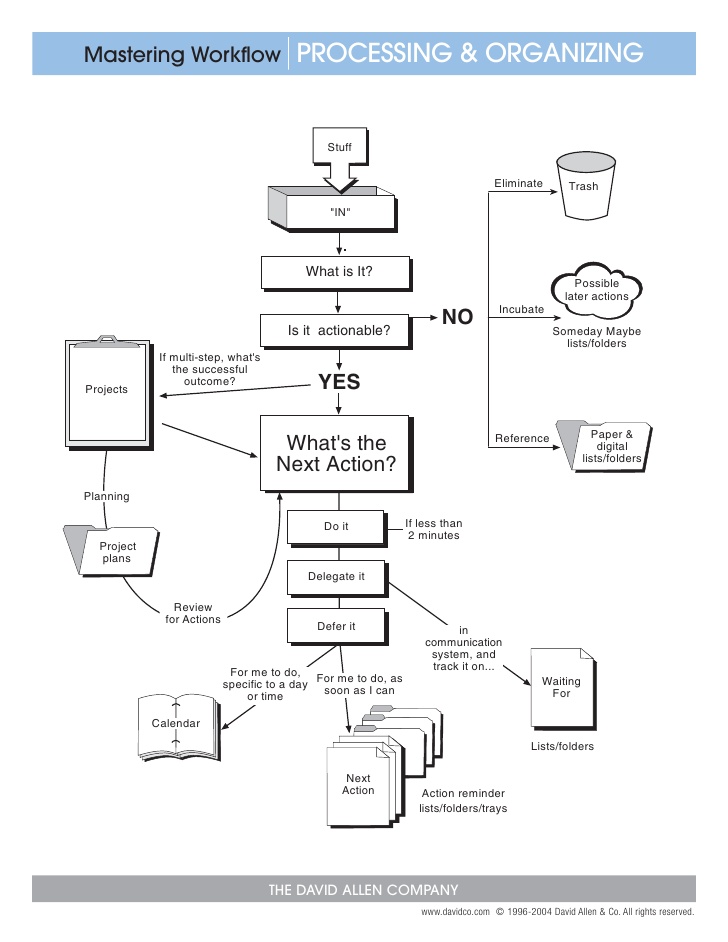
Following the template of Getting Things Done, Macadamian project manager Andrea Carbert details how she makes sure no commitment slips through the cracks.
Source: [WayBack] Getting Things Done with Google – Macadamian
Via: [WayBack] Andrea wrote a great piece on ##gtd Getting Things Done with Google Products – Marjan Venema – Google+
–jeroen

Posted in GTD - Getting Things Done, LifeHacker, Power User | Leave a Comment »
Posted by jpluimers on 2019/08/29
ANWB can superimpose the lane availability indicators on their internap maps software.
Some links so I won’t forget:
–jeroen

Posted in Development, Google, GoogleMaps, Power User, Software Development, Web Development | Leave a Comment »
Posted by jpluimers on 2019/08/26
This looks smart
gem update `gem list | cut -d ' ' -f 1`From: [WayBack] How to Update All Your Ruby Gems At Once | Life, the Universe, and Everything
Though on the bash prompt, it works fine on Mac OS X / OS X / macOS / …, it does not work nice as an alias.
You can get it to work with difficult escaping (or nesting).
But it is easier to escape this:
gem update $(gem list | cut -d ' ' -f 1)
Escaped, it comes down to:
alias "gem-update-all=gem update \$(gem list | cut -d ' ' -f 1)"
Based on:
–jeroen
Posted in Apple, bash, bash, Development, Mac OS X / OS X / MacOS, Power User, Scripting, Software Development | Leave a Comment »
Posted by jpluimers on 2019/08/26
There are still sites limiting password lengt to low values like 20 or 15. Don’t!
The why at [WayBack] Implement Proper Password Strength Controls: Password Length has been in place since October 2012, since when cracking passwords has become way faster, so risk at length 20 back then is now a risk at something like length 40.
Password Length
Longer passwords provide a greater combination of characters and consequently make it more difficult for an attacker to guess.
- Minimum length of the passwords should be enforced by the application.
- Passwords shorter than 10 characters are considered to be weak (NIST SP800-132).
While minimum length enforcement may cause problems with memorizing passwords among some users, applications should encourage them to set passphrases (sentences or combination of words) that can be much longer than typical passwords and yet much easier to remember.
- Maximum password length should not be set too low, as it will prevent users from creating passphrases. Typical maximum length is 128 characters.
- Passphrases shorter than 20 characters are usually considered weak if they only consist of lower case Latin characters.
–jeroen
via:

Posted in LifeHacker, Power User, Security | Leave a Comment »
Posted by jpluimers on 2019/08/26
I think I got the link to this song via Jan Wildeboer. It’s awesome: https://www.youtube.com/watch?v=iR64lF2agbM – Herbie Mann – Push Push 1971
–jeroen
Posted in Music, Power User | Leave a Comment »
Posted by jpluimers on 2019/08/23
Since I needed to know how to formulate external hyperlinks on a Wiki page: [WayBack] Help:Links – MediaWiki.
Too many options, not even counting other sections on that page I did not quote, so I went for the first.
To create an external link, usually to a page at a different website, enclose the URL followed by space and the link text in single square brackets (see examples below). When you save or preview the page, you will see a link rendered slightly differently than an internal wikilink. It may be a different color and/or be followed by an arrow icon to show that it may lead to another site.
Description You type You get External link with specified link text MediaWiki Numbered external link This is what happens if you omit the link text. Multiple links of this type on the same page are numbered sequentially.
[1] Bare external link URLs beginning with “
http://” and “https://” are automatically linked, even when no brackets are used.https://mediawiki.org Avoiding auto-linked URLs https://mediawiki.org Protocol-relativeexternal link The link will be HTTP or HTTPS depending on the protocol of the page currently being viewed (which could be different for different users). This is only supported inside of square brackets
[ ]. Using “//en.wikipedia.org” by itself does not result in a link.Wikipedia External link to the current server https://{{SERVERNAME}}/pagenamehttps://www.mediawiki.org/pagename External link to other host passing the pagename https://google.com/search?q={{PAGENAMEE}}See also: URL encoded page names, PAGENAMEE encoding
https://google.com/search?q=Links Mailto link email me Mailto named with subject line and body info Custom URI Any URI you wish to add needs to be first declared through $wgUrlProtocols. (This example is not enabled on Mediawiki.org)
[skype:echo123 call me] External links with file-type icons See External link icons for currently supported icons and extensions. Note that this wiki is not set up to use such icons.
video
–jeroen.
Posted in Development, Lightweight markup language, MediaWiki, Power User | Leave a Comment »
 The Wiert Corner - irregular stream of stuff