The Wiert Corner – irregular stream of stuff

Jeroen W. Pluimers on .NET, C#, Delphi, databases, and personal interests

  • My badges

  • Twitter Updates

  • My Flickr Stream

  • Pages

  • All categories

  • Enter your email address to subscribe to this blog and receive notifications of new posts by email.

    Join 1,839 other subscribers

Archive for the ‘Power User’ Category

munki/createOSXinstallPkg: Tools for packaging OS X installers – upgrade Mac OS X from InstallESD.dmg

Posted by jpluimers on 2017/06/12

You can use this package to install OS X on an empty partition, but perhaps more interestingly, you can also use it to upgrade existing OS X installations to a newer version of the OS X. There are many tools and workflows that support the installation of Apple packages; you can use these together with an OS X installation package to upgrade machines to the latest version of OS X.This is especially interesting when used with tools like Munki — you can automate the upgrade of a group of machines while still preserving user data, or offer an upgrade as a “Self-Service”-type option where a user can initiate an OS X upgrade themselves without needing to have administrative rights.

I will probably need this one day.

Source: munki/createOSXinstallPkg: Tools for packaging OS X installers

–jeroen

Posted in Apple, iMac, Mac, Mac OS X / OS X / MacOS, MacBook, MacBook Retina, MacBook-Air, MacBook-Pro, MacMini, OS X 10.10 Yosemite, OS X 10.11 El Capitan, OS X 10.9 Mavericks, Power User | Leave a Comment »

QC does this logon call to http://qc.embarcadero.com/coBugCGI.exe/soap/ICDSReportPublicInterface

Posted by jpluimers on 2017/06/09

I drafted this in 2014 and given the recent QC news:

I was quite shocked to see that the Embarcadero QC client logs in over HTTP, not over HTTPS, especially since it passes the password in plain text.

QC does this logon call to http://qc.embarcadero.com/coBugCGI.exe/soap/ICDSReportPublicInterface:


POST http://qc.embarcadero.com/coBugCGI.exe/soap/ICDSReportPublicInterface HTTP/1.1
SOAPAction: "urn:CDSReportPublicInterfaceIntf-ICDSReportPublicInterface#Login"
Content-Type: text/xml; charset="utf-8"
User-Agent: Borland SOAP 1.1
Host: qc.embarcadero.com
Content-Length: 665
Proxy-Connection: Keep-Alive
Pragma: no-cache
<?xml version="1.0"?>
<SOAP-ENV:Envelope xmlns:SOAP-ENV="http://schemas.xmlsoap.org/soap/envelope/&quot; xmlns:xsd="http://www.w3.org/2001/XMLSchema&quot; xmlns:xsi="http://www.w3.org/2001/XMLSchema-instance&quot; xmlns:SOAP-ENC="http://schemas.xmlsoap.org/soap/encoding/"><SOAP-ENV:Body SOAP-ENV:encodingStyle="http://schemas.xmlsoap.org/soap/encoding/"><NS1:Login xmlns:NS1="urn:CDSReportPublicInterfaceIntf-ICDSReportPublicInterface"><EMail xsi:type="xsd:string">nobody@example.org</EMail><Passcode xsi:type="xsd:string">password</Passcode><ClientID xsi:type="xsd:string">QCWINCLNT</ClientID><BDN xsi:type="xsd:string">1</BDN></NS1:Login></SOAP-ENV:Body></SOAP-ENV:Envelope>

Time to cut down on my usage of QC.

–jeroen

via: QC does this logon call to http://qc.embarcadero.com/coBugCGI.exe/soap/ICDSReportPublicInterface.

Posted in Delphi, Development, QC, Security, Software Development | 3 Comments »

Mikrotik – splitting your local LAN so you can assign different gateways and DNS servers by the DHCP server

Posted by jpluimers on 2017/06/09

When you want your Mikrotik DHCP Server handout different gateways (or DNS/WINS/NTP/.. servers and other settings), many of the answers tell you to fiddle with the DHCP networks like DHCP Server different gateways – MikroTik RouterOS [WayBack] but lack concrete examples, so here we go elaborating a lot on DHCP server with static leases – MikroTik RouterOS [WayBack]:

Read the rest of this entry »

Posted in Internet, MikroTik, Power User, routers | Leave a Comment »

Repair a Broken Ethernet Plug – All

Posted by jpluimers on 2017/06/09

The locking tab of RJ45 plugs breaks very easily. Replace it by two nylon cable ties (aka zip ties), in minutes. IMPORTANT NOTES: – This must be regarded as a temporary “Mac Gyver” solution, for home usage. – Definitely not for IT staff! (no crimper? asking for one in the budget won’t get you fired!) – Before the tab breaks, consider protecting the plug.

Source: Repair a Broken Ethernet Plug – All

via:  Now that’s very cool!! – Joe C. Hecht – Google+

Read the rest of this entry »

Posted in LifeHacker, Network-and-equipment, Power User | Leave a Comment »

curl Statistics Made Simple: httpstat

Posted by jpluimers on 2017/06/08

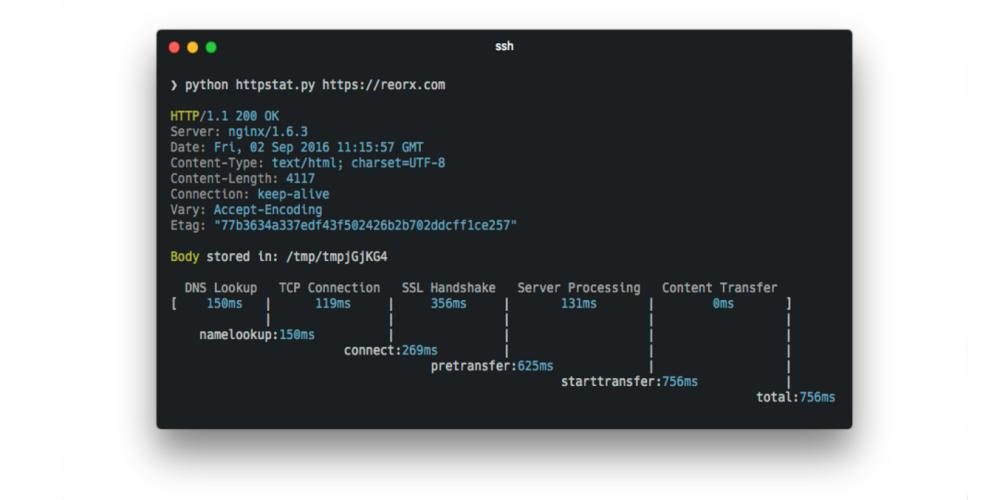
curl Statistics Made Simple: httpstat is a single file Python script that has no dependency and is compatible with Python 3.

Source: curl Statistics Made Simple: httpstat [WayBack]

via: Using curl to get the HTTP header, and httpstat script to add connection stats (timings) to it. – Jean-Luc Aufranc – Google+ [WayBack]

Source: Using curl to get the HTTP header, and httpstat script to add connection stats…

Posted in *nix, cURL, Development, Power User, Python, Scripting, Software Development | Leave a Comment »

Mikrotik scripting language: a list of questions I had linking to the forum messages having answers

Posted by jpluimers on 2017/06/08

The RouterOS scripting language you can use on Mikrotik device immediately shows it’s origin: the console.

  • It is a statement oriented language where statement separators can be both semicolons and new-lines.
  • You can use the \ at the end-of the line as line-continuation character effectively spreading statements over multiple lines.

As promised some links to questions I asked:

Read the rest of this entry »

Posted in Development, Hardware, Internet, MikroTik, Network-and-equipment, Power User, RouterOS, routers, Scripting, Software Development, WinBox | 1 Comment »

APC 7xxx models, DHCP Option 43 and Mikrotik DHCP servers

Posted by jpluimers on 2017/06/07

When switching my DHCP to a Mikrotik CCR1009, both the AP7920 and AP7921 failed to get IP addresses. The APC7921 would look bounce between waiting and offered states like this:

The cause is the need of DHCP Option 43 (Vendor Class Identifier) specified in RFC2132 – based on [WayBack] RFC 2131 – Dynamic Host Configuration Protocol and [WayBackRFC 1533 – DHCP Options and BOOTP Vendor Extensions – which I found first via these links:

Read the rest of this entry »

Posted in Development, Internet, MikroTik, Power User, RouterOS, routers, Scripting, Software Development | 3 Comments »

Reminder to self: when your PPTP server is behind a NAT, forward both GRE protocol and TCP port 1723

Posted by jpluimers on 2017/06/06

The WAN sides of my Mikrotik CCR1009 are partly behind Fritz!Box routers that do NAT and contain a truckload of port-forwards.

A while ago, I wanted the CCR1009 to do PPTP as Fritz!Box 7360 and 7490: static routes over VPN don’t work (so I could only VPN to the WAN side of the CCR1009). However, it would not pass through the Fritz!Box from the outside.

It appears you need to forward both:

Maybe one day I will ditch the Fritz!Box 7490 and directly hookup the Mikrotik to the NTU: xs4all ftth en Mikrotik router – Google Groups.

But preferably I should follow Don’t use PPTP, and don’t use IPSEC-PSK either (via: CloudCracker blog)

–jeroen

via: VPNs einrichten mit PPTP – administrator.de: Achtung mit PPTP VPN Servern hinter NAT Firewalls !

Forward both PPTP TCP port 1723 and the GRE protocol

Forward both PPTP TCP port 1723 and the GRE protocol

Posted in Fritz!, Fritz!Box, Fritz!WLAN, Internet, IPSec, MikroTik, Network-and-equipment, Power User, PPTP, routers, VPN | Leave a Comment »

FRITZ!Box tuning part 1: Enable remote access over ssh

Posted by jpluimers on 2017/06/05

Interesting:

As I always try to maximize the usage of new hardware I started to explore what is possible with this combination. In this post I will explain how you get access to your FRITZ!Box using ssh.

Source: FRITZ!Box tuning part 1: Enable remote access over ssh [WayBack]

–jeroen

Posted in Fritz!, Fritz!Box, Internet, Power User | Leave a Comment »

VHD Attach 4.11 – Medo’s Home Page

Posted by jpluimers on 2017/06/05

Brilliant:

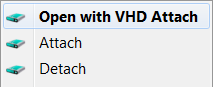
This is small tool that adds Attach and Detach option to contextual (aka right-click) menu of Virtual disk (vhd) files. That enables those operations to be done without trip to Disk Management console. Detach option is available on hard drive contextual menu also (if selected in options).

Source:

–jeroen

Posted in Power User, Windows, Windows 10, Windows 7, Windows 8, Windows 8.1, Windows Server 2012, Windows Server 2012 R2 | Leave a Comment »