Archive for the ‘WinBox’ Category
Posted by jpluimers on 2025/07/09
I wasn’t aware that [Wayback/Archive] [OpenWrt Wiki] MikroTik was available. Many devices are incomplete in support, but it is good to know there is an alternative to the buggy scripting interface of RouterOS.
For the hEX series, support seems good enough to give it a try this summer, but I need to figure out of the hEX PoE RB960PGS is supported. I have good hopes as other models of the RB9* series are.
A few warnings from the below links:
- First Things First: Don’t Lose Your RouterOS License
- OpenWrt is not compatible with the bootloader of RouterOS v7. Do NOT upgrade the firmware on your device to RouterOS v7 or, if you did, downgrade to RouterOS Firmware v6 before installing OpenWrt. RouterOS doesn’t allow to downgrade below factory firmware version, but OpenWrt boots and works fine with versions up to 6.49.10 or beyond. Confirmed working: 6.47.10 (tested on SXTsq 5 ac), 6.49.10 (tested on SXTsq 2nD).
- If the installation fails, you might need to upgrade/downgrade to RouterOS 6.49.2
- Warning: Don’t upgrade RouterOS packages & bootloader to 7.2.1 otherwise ‘sysupgrade image’ install will fail!
- If latested release of RouterOS does not work, try an older version. 6.45 is reportet to work as a first debrick, you can upgrade later with the Winbox Software to latest release
These hEX related models are supported on the web-site (which also explains major differences with Fast Ethernet (100 Mbit/s) and Gigabit Ethernet (1 Gbit/s) models:
Read the rest of this entry »
Posted in Development, Hardware, MikroTik, Network-and-equipment, Power User, routers, Scripting, Software Development, WinBox | Leave a Comment »
Posted by jpluimers on 2021/12/31
A few notes:
- WinBox configuration files are under
%APPDATA%\Mikrotik\Winbox
- The subdirectory
sessions contains binary *.viw files that seem to represent “view” configurations (the positions, dimensions and other properties of the open Windows in a Winbox session) where the * of the name seems to be an IPv4 address of a machine.
- Directories named like
6.40.3-2932358209 and 6.43.13-695307561 contain configuration files that seem to determine what WinBox features a certain RouterOS version should reveal; files in those directories seem to always be these:
advtool.crc / advtool.jgdhcp.crc / dhcp.jghotspot.crc / hotspot.jgicons.crc / icons.pngmpls.crc / mpls.jgppp.crc / ppp.jgroteros.crc / roteros.jgroting4.crc / roting4.jgsecure.crc / secure.jgwlan6.crc / wlan6.jg
- There are binary files
Addresses.cdb and settings.cfg.viw
- A text file named
sessionpath contains the expanded path %APPDATA%\Mikrotik\Winbox\sessions
The *.crc files contain a CRC code, presumably on the contents of the correspoding *.jg file. The *.jg files seem to contain some kind of JSON.
Some links I found:
Read the rest of this entry »
Posted in Development, Hardware, Internet, MikroTik, Network-and-equipment, Power User, RouterOS, routers, Scripting, Software Development, WinBox | Leave a Comment »
Posted by jpluimers on 2021/09/20
Still need to research this further:
Somewhere around 6.44, when upgrading an existing RouterOS device, this snippet became part of the configuration:
/ip ssh
set allow-none-crypto=yes forwarding-enabled=remote
A few remarks:
Read the rest of this entry »
Posted in Hardware, Internet, MikroTik, Network-and-equipment, Power User, routers, WinBox | Leave a Comment »
Posted by jpluimers on 2021/08/17
Not sure why, but Winbox 3.17 could not connect to out of the box blank MikroTik equipment at all.
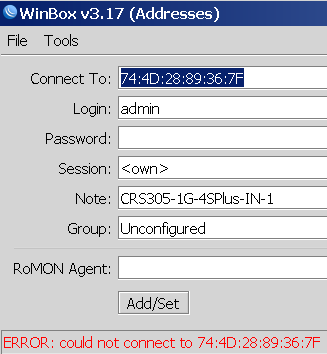
Winbox 3.19 complains every now and than, but usually connects fine.
This was while configuring a bunch of [WayBack] MikroTik Routers and Wireless – Products: CRS305-1G-4S+IN.
Read the rest of this entry »
Posted in Development, Hardware, Internet, MikroTik, Network-and-equipment, Power User, RouterOS, routers, Scripting, Software Development, WinBox | Leave a Comment »
Posted by jpluimers on 2021/08/02
Edit 20260504: added link to the gist of the switch configuration and a link to a forum post I recently found.
[WayBack] Manual:Reset – MikroTik Wiki:
unplug the device from power
2) press and hold the button right after applying power
Note: hold the button for 5 seconds (USER LED will start flashing)
3) release the button to clear configuration.
 Note:
Note: If you wait until LED stops flashing, and only then release the button – this will instead launch Netinstall mode, to reinstall RouterOS.
Initial configuration
(see also [WayBack] Manual:First time startup – MikroTik Wiki)
Read the rest of this entry »
Posted in Hardware, Internet, MikroTik, Network-and-equipment, Power User, routers, WinBox | Leave a Comment »
Posted by jpluimers on 2021/07/02
Having it accidentally made it to the CBL (Composite Blocking List – Wikipedia) a long time ago, I discovered the page started with (WayBack link mine):
IMPORTANT: Many CBL/XBL listings are caused by a vulnerability in Mikrotik routers. If you have a Mikrotik router, please check out the [WayBack] Mikrotik blog on this subject and follow the instructions before attempting to remove your CBL listing.
It wasn’t one of my Mikrotik devices, as first of all they had all being patched out of the box from a really empty internal network before being externally exposed to the internet or more busy internal networks, and second because the CBL entry was a one off on one specific day where someone used our guest network.
Some CBL entries in the range where it was displayed, quite a while after CVE-2018-14847 became public:
Read the rest of this entry »
Posted in Firewall, Hardware, Infrastructure, Internet, MikroTik, Network-and-equipment, Power User, routers, SPAM, WinBox | Leave a Comment »
Posted by jpluimers on 2020/08/04
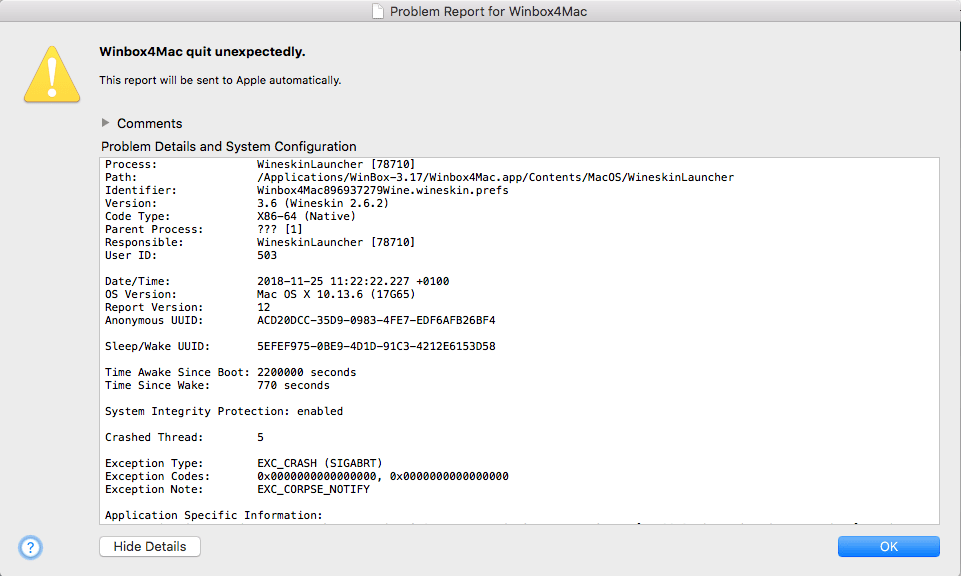
On my investigation list as WinBox 3.17 only crashes some of the times.
It might have to do with changes in High Sierra:
The real problem: if this happens, WinBox will not start until I have rebooted.
--jeroen
Read the rest of this entry »
Posted in Development, Ethernet, Hardware, MikroTik, Network-and-equipment, Power User, routers, Software Development, WinBox | Leave a Comment »
Posted by jpluimers on 2019/03/06
With the removal of the C# based Windows vSphere Client in ESXi 6.5, the vSphere HTML5 Web Client is the way to go.
It doesn’t cover all functionality yet, and some functionality is in different places in the UI, so below the steps to change the hostname.
Since I prefer a central location of name and address management, I’ve also documented on how to do this with DHCP option 12.
Oh: I’m not alone in finding the changed place
Read the rest of this entry »
Posted in Development, ESXi6.5, Hardware, MikroTik, Network-and-equipment, Power User, RouterOS, routers, Scripting, Software Development, Virtualization, VMware, VMware ESXi, WinBox | Leave a Comment »
Posted by jpluimers on 2018/03/31
I both understand the [WayBack] Urgent security advisory – MikroTik and the users reluctant to upgrade: Mikrotik has a history of updates breaking existing behaviour and underdocumenting features and release notes.
The attack is over the www or www-ssl services which by default run on port 80 and 443. You can see on which networks they are bound using this example from the terminal:
Read the rest of this entry »
Posted in Hardware, Internet, MikroTik, Network-and-equipment, Power User, routers, Security, WinBox | Leave a Comment »
Posted by jpluimers on 2017/11/17
The first trick works for WinBox 3.7 on Mac [download], the second doesn’t.
First trick:
Read the rest of this entry »
Posted in Apple, Hardware, iMac, Mac, Mac OS X / OS X / MacOS, MacBook, MacBook Retina, MacBook-Air, MacBook-Pro, MacMini, MikroTik, Network-and-equipment, OS X 10.11 El Capitan, Power User, routers, WinBox | Leave a Comment »


 The Wiert Corner - irregular stream of stuff