The Wiert Corner – irregular stream of stuff

Jeroen W. Pluimers on .NET, C#, Delphi, databases, and personal interests

  • My badges

  • Twitter Updates

  • My Flickr Stream

  • Pages

  • All categories

  • Enter your email address to subscribe to this blog and receive notifications of new posts by email.

    Join 1,860 other subscribers

Archive for the ‘Encryption’ Category

Very nice “Appendix A. Introduction to TCP/IP security” on digests, hashing, encryption, asymetric/symmetric, VPN and much more

Posted by jpluimers on 2020/03/03

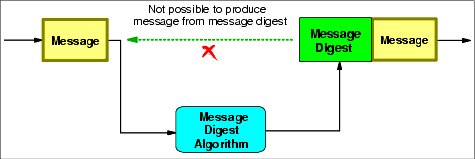
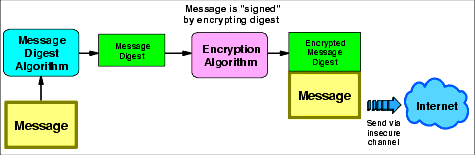
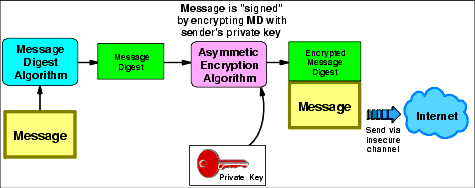
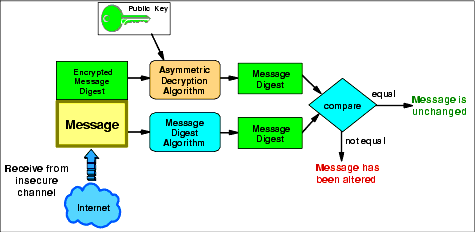
For me this is still a primary starting point in case I need to know something about security which has clear pictures: [WayBack] Appendix A. Introduction to TCP/IP security (sg245383.pdf/ftp://ftp.www.ibm.com/…/sg245383.pdf, thanks to Jac Las) all on one web page.

The links are to the “Digital signatures” portion, as that’s what I needed at the time, but they are just anchors in the page.

These were the diagrams I was after:

If you want much more in-depth slide then, then go for [WayBackCryptography, from Theory to Practice which you can find back searching for IBM “Cryptography, from Theory to Practice” or “sign then hash” or “hash then sign”.

It is very different from the equally interesting presentation

–jeroen

Posted in Development, Encryption, Power User, Security, Software Development | 2 Comments »

Does anyone knows a existing implementation of bcrypt or scrypt for delphi?

Posted by jpluimers on 2020/02/19

For my link archive: [WayBack] Does anyone knows a existing implementation of bcrypt or scrypt for delphi? – Fabian S. Biehn – Google+:

–jeroen

Posted in Delphi, Development, Encryption, Power User, Security, Software Development | Leave a Comment »

Viewing certbot installed certificates and their expiry dates

Posted by jpluimers on 2020/01/24

A simple tip on the certbot command-line from [WayBackUser Guide — Certbot 0.19.0.dev0 documentation – Managing certificates (Automatically enable HTTPS on your website with EFF’s Certbot, deploying Let’s Encrypt certificates.):

To view a list of the certificates Certbot knows about, run the certificates subcommand:

certbot certificates

This returns information in the following format:

Found the following certs:
  Certificate Name: example.com
    Domains: example.com, www.example.com
    Expiry Date: 2017-02-19 19:53:00+00:00 (VALID: 30 days)
    Certificate Path: /etc/letsencrypt/live/example.com/fullchain.pem
    Private Key Path: /etc/letsencrypt/live/example.com/privkey.pem

Via: [WayBack] It there a command to show how many days certificate you have? – Server – Let’s Encrypt Community Support

–jeroen

Posted in Encryption, Let's Encrypt (letsencrypt/certbot), Power User, Security | Leave a Comment »

Diffie-Hellman Key Exchange graphically explained – Wikipedia/Computerphile

Posted by jpluimers on 2019/12/31

Sometimes a picture or video is better than a thousand words.

I wish that back when I learned about the mathematics of the Diffie–Hellman key exchange – Wikipedia

I had seen the picture on the right from File:Diffie-Hellman Key Exchange-modified.png – Wikipedia (via DHKE General overview) which inspired the Computerphile and Art-Of-The-Problem videos below doing the same dynamically with colorised liquids and paint.

Art-Of-The-Problem has a similar video on RSA as well which is also below.

Usually Diffie-Hellman is combined with RSA to prevent man-in-the-middle and allow for perfect forward secrecy. That’s what the final computerphile video is about.

Excellent!

Finally, Computerphile also posted a video with the mathematics. If you’re into that: nice work too!

Via:

–jeroen

Read the rest of this entry »

Posted in Development, Encryption, Power User, Security, Software Development | Leave a Comment »

if you allow users to register email addresses on your domain, make sure they can’t get: admin@ administrator@ hostmaster@…

Posted by jpluimers on 2019/12/16

Great tip from: [Archive.isMichal Špaček on Twitter: “Friendly reminder: if you allow users to register email addresses on your domain, make sure they can’t get: admin@ administrator@ hostmaste… https://t.co/wUHXrQC2J0”:

 Friendly reminder: if you allow users to register email addresses on your domain, make sure they can’t get:
  • admin@
  • administrator@
  • hostmaster@
  • postmaster@
  • webmaster@ (and others from RFC 2142)

otherwise users might be able to get an HTTPS certificate for your domain.

–jeroen

Read the rest of this entry »

Posted in Encryption, https, Let's Encrypt (letsencrypt/certbot), Power User, Security | Leave a Comment »

Running a feature branch from the letsencrypt certbot

Posted by jpluimers on 2019/09/27

So I won’t forget; the steps below based on and assumes ~/Versioned is the directory where you keep repositories in:

# cd ~/Versioned
# git clone https://github.com/certbot/certbot.git
...
# cd certbot
# git fetch --all
Fetching origin
# git checkout alt_override
Branch 'alt_override' set up to track remote branch 'alt_override' from 'origin'.
Switched to a new branch 'alt_override'
# ./certbot-auto --os-packages-only
OS packages installed.
# ./tools/venv.sh
... very long log ...
Please run the following command to activate developer environment:
source venv/bin/activate
# source ./venv/bin/activate
[venv] # venv/bin/certbot renew --force-renewal

–jeroen

Posted in Encryption, Let's Encrypt (letsencrypt/certbot), Power User, Security | Leave a Comment »

CAA Mandated by CA/Browser Forum | Qualys Blog

Posted by jpluimers on 2019/07/22

[WayBack] CAA Mandated by CA/Browser Forum | Qualys Blog

Certification Authority Authorization (CAA), specified in RFC 6844 in 2013, is a proposal to improve the strength of the PKI ecosystem with a new control to restrict which CAs can issue certificates…

Related:

–jeroen

Posted in Conference Topics, Conferences, DNS, Encryption, Event, HTTPS/TLS security, Internet, Power User, Security | Leave a Comment »

Keep a Changelog

Posted by jpluimers on 2019/03/20

Lot’s of tips (and translations!) on how to Keep a Changelog [WayBack].

There are lots of useful tips, ranging from content (how to write, what to include) to technicalities (order of entries, unreleased, version numbering, date format) that might seem unimportant but in practice makes using the changelog.

The really cool thing: the site has a changelog of itself showing the best practices.

via:

–jeroen

Posted in Development, Documentation Development, Encryption, Let's Encrypt (letsencrypt/certbot), Security, Software Development | Leave a Comment »

{Updated} Linux server security checklist. #sysadmin 

Posted by jpluimers on 2019/03/11

Most tips are OK, but:

  1. for password related policies, please read these:
  2. If you do DNS, implement DNSSEC
  3. I think ipv6 is OK, but like ipv4 needs to be firewalled
  4. Be really careful with fail2ban and similar tools: they are easy ways to lock yourself out as well, for instance by someone doing a nice (D)DoS on you.

Tips: [WayBack40 Linux Server Hardening Security Tips [2017 edition] – nixCraft

Via:

–jeroen

Posted in *nix, *nix-tools, Encryption, Let's Encrypt (letsencrypt/certbot), Power User, Security | Leave a Comment »

Installing Let’s Encrypt Free SSL/TLS Certificate in 2 Minutes with Certbot, Spending Hours Making it Work with Cloudflare

Posted by jpluimers on 2019/03/06

If I ever need to get LetsEncrypt to work with CloudFlare, then I need to read [WayBackInstalling Let’s Encrypt Free SSL/TLS Certificate in 2 Minutes with Certbot, Spending Hours Making it Work with Cloudflare

The steps there should save me hours.

Via [WayBcack] Free Let’s Encrypt SSL/TLS certificates are even easier to install than self-signed certificates. I could do so in 2 minutes in my +Linode … – Jean-Luc Aufranc – Google+.

–jeroen

Posted in Encryption, Let's Encrypt (letsencrypt/certbot), Power User, Security | Leave a Comment »