The Wiert Corner – irregular stream of stuff

Jeroen W. Pluimers on .NET, C#, Delphi, databases, and personal interests

  • My badges

  • Twitter Updates

  • My Flickr Stream

  • Pages

  • All categories

  • Enter your email address to subscribe to this blog and receive notifications of new posts by email.

    Join 1,861 other subscribers

Archive for the ‘Virtualization’ Category

“fixing” ESXi “rsync error: error allocating core memory buffers (code 22) at util2.c(106) [sender=3.1.2]”

Posted by jpluimers on 2021/08/30

Reminder to self: create a static ESXi binary for a recent rsync release.

Quite a few people have bumped into rsync erroring out with “large” sets of files (where large can be as low as ~1000), like for instance Tj commenting on my post “ESXi 5.1 and rsync – damiendebin.net.”:

ERROR: out of memory in receive_sums [sender] │······
rsync error: error allocating core memory buffers (code 22) at util2.c(102) [sender=3.1.1] │······
rsync: [generator] write error: Broken pipe (32) │······

I bumped into this myself as well, even when updating from rsync 3.1.0 to 3.1.2.

There are various static rsync for ESXi around. Just a few of them for completeness:

There is also 3.0.9 (via [Wayback] VMware ESXi 5.1 rsync 3.0.9 statically linked binary erstellen – bachmann-lan.de), but it has a VMFS bug ([Wayback] 8177 – Problems with big sparsed files) as per [Wayback] ESXi 5.1 and rsync – damiendebin.net.)

The good news is that it is fixed in 3.2.2 as a user-configurable setting, but since there is no ESXi build yet (see reminder above)…

Anyway: [Wayback] 12769 – error allocating core memory buffers (code 22) depending on source file system

Wayne Davison 2020-06-26 03:56:35 UTC
I fixed the allocation args to be size_t values (and improved a bunch of allocation error checking while I was at it).

I then added an option that lets you override this allocation sanity-check value. The default is still 1G per allocation, but you can now specify a much larger value (up to "--max-alloc=8192P-1").

If you want to make a larger value the default for your copies, export RSYNC_MAX_ALLOC in the environment with the size value of your choice.

Committed for release in 3.2.2.

This is what happens with 3.1.2 and 3.1.3:

time rsync -aiv --info=progress2 --progress --partial --existing --inplace /vmfs/volumes/Samsung850-2TB-S3D4NX0HA01043L/ Samsung850-2TB-S3D4NX0HA01043L/
sending incremental file list
              0   0%    0.00kB/s    0:00:00 (xfr#0, ir-chk=1000/1259)
ERROR: out of memory in flist_expand [sender]
rsync error: error allocating core memory buffers (code 22) at util2.c(106) [sender=3.1.2]
Command exited with non-zero status 22
real    0m 0.87s
user    0m 0.10s
sys 0m 0.00s
time rsync -aiv --info=progress2 --progress --partial --ignore-existing --sparse /vmfs/volumes/Samsung850-2TB-S3D4NX0HA01043L/ Samsung850-2TB-S3D4NX0HA01043L/
sending incremental file list
              0   0%    0.00kB/s    0:00:00 (xfr#0, ir-chk=1000/1259)
ERROR: out of memory in flist_expand [sender]
rsync error: error allocating core memory buffers (code 22) at util2.c(106) [sender=3.1.2]
Command exited with non-zero status 22
real    0m 0.28s
user    0m 0.12s
sys 0m 0.00s
Finished

I was lucky that [Wayback] “rsync error: error allocating core memory buffers” protocol version “3.1.2” – Google Search got me a result so quickly: add a --protocol-29 and you are set.

The first result (Wayback has the results reversed from what got) didn’t fix it. The second did.

  1. [Wayback] 225761 – net/rsync long path causes buffer overflow (update to 3.1.3)
  2. [Wayback/Archive.is] AIX Open Source – IBM Power Systems Community: rsync out of memory

    As a work around, I added “--protocol=29” to one of our servers that was consistently failing with “ERROR: out of memory in flist_expand [receiver]” “rsync error: error allocating core memory buffers (code 22) at util2.c(105) [receiver=3.1.3]” in rsync-3.1.3-2.ppc

    I read the man page and started experimenting with the protocol version until I lowered it enough to get it to work consistently.

The problem might be that running on the ESXi gives you limited memory, but then some 10k files should not use more than like half a megabyte of memory.

Sometime I will dig deeper into the protocol version differences, for now a list of files I think will be relevant for that (mainly look for protocol_version):

Some web pages mentioning the --protocol option and might give me more insight in the protocol differences:

With --protocol=29, time estimation is way off, but there are no errors:

time rsync -aiv --info=progress2 --progress --partial --existing --inplace --protocol=29 /vmfs/volumes/Samsung850-2TB-S3D4NX0HA01043L/ Samsung850-2TB-S3D4NX0HA01043L/
building file list ... 
9059 files to consider
.d..t...... isos/
         27,593   0%    0.00kB/s    0:00:06 (xfr#1, to-chk=0/9059)   

sent 212,594 bytes  received 268 bytes  20,272.57 bytes/sec
total size is 3,055,677,645,398  speedup is 14,355,204.99
real    0m 13.31s
user    0m 1.35s
sys 0m 0.00s

time /vmfs/volumes/5791a3e1-0b9368de-4965-0cc47aaa9742/local-bin/rsync -aiv --info=progress2 --progress --partial --ignore-existing --sparse --protocol=29 /vmfs/volumes/Samsung850-2TB-S3D4NX0HA01043L/ Samsung850-2TB-S3D4NX0HA01043L/
building file list ... 
9059 files to consider
>f+++++++++ isos/EN-Windows-XP-SP3-VL.iso
...
cd+++++++++ ESXi65.filesystem-root/usr/share/
216,868,164,639   7%   40.64MB/s    1:24:48 (xfr#2571, to-chk=0/9059)   

sent 216,894,938,870 bytes  received 57,858 bytes  42,582,702.80 bytes/sec
total size is 3,055,677,645,398  speedup is 14.09
real    1h 24m 58s
user    34m 5.59s
sys 0m 0.00s
Finished

Even not on ESXi, there were just a few people bumping into this, so I wonder why there are so few matches on [Wayback] “ERROR: out of memory in flist_expand [sender]” “sender=3.1” – Google Search:

–jeroen

Posted in *nix, *nix-tools, ash/dash development, Development, ESXi5, ESXi5.1, ESXi5.5, ESXi6, ESXi6.5, ESXi6.7, ESXi7, Power User, rsync, Scripting, Software Development, Virtualization, VMware, VMware ESXi | Leave a Comment »

Windows on VMware ESXi: fixing “Unknown USB Device” or “The USB device returned an invalid USB device descriptor”

Posted by jpluimers on 2021/08/27

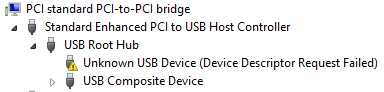
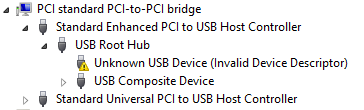
Sometimes, the Windows device manager shows any of the below errots for an USB 3.x device that is physically connected to the ESXi host and passes through a VM (via a virtual USB controller and virtual USB device).

This solution usually works: use a USB 2.0 cable instead of a USB 3.x cable.

If it doesn’t work, then the solutions are the same as when this happens in a pure physical solution:

In my case, I needed a USB connection, because it is the only way to reset a Fujitsu ScanSnap scanner to correct WiFi settings after it gets confused (which happens a few times per year).

Sreenshots

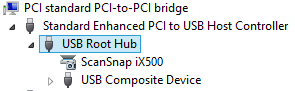
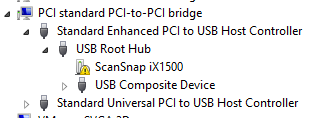
The difference for devices with a known driver:

  • USB 3 cable 
  • USB 2 cable 

The difference for devices with an unknown driver:

  •  USB 3 cable 
  • USB 2 cable 

Related information

This happened with me on both a ScanSnap iX500 and iX1500, and this did not help (as I was on a more recent Windows version): [WayBack] When setting up your scanner 502: My computer does not recognize ScanSnap iX500 with a USB 3.0 port. – Fujitsu Global.

More on USB passthrough:

More on USB virtualisation:

–jeroen

Posted in ESXi5.5, ESXi6, ESXi6.5, Fujitsu ScanSnap, Hardware, ix500, Power User, Scanners, Virtualization, VMware, VMware ESXi | Leave a Comment »

ESXi: finding unmounted VMFS volumes

Posted by jpluimers on 2021/08/26

Sometimes, especially when ESXi thinks a volume is bad, but the ESXi S.M.A.R.T. logging does not indicate so, it boots without mounting some of the VMFS volumes as datastores.

It took me a while to find the right command to list those, but I’m glad I found it:

Read the rest of this entry »

Posted in ESXi6, ESXi6.5, ESXi6.7, Power User, PowerCLI, Virtualization, VMware, VMware ESXi | Leave a Comment »

NVMe and SATA health data on ESXi: some links to investigate

Posted by jpluimers on 2021/08/25

(Edit 20221202: added one more link on “REALLOCATED SECTOR CT below threshold”)

Somehow, health data of my NVMe and SATA drives do not show up as health information on the web-ui of my ESXi playground rig.

So far, I noticed that ESXi runs a smartd, but does not ship with a smartctl, nor health data ends up in the web user interface. So you cannot see the state of NVMe and SATA devices easily.

Still these devices deteriorate over time and afterwards die, so below are some links to investigate later.

Goal is to use my own thresholds to set warning and error levels.

Some log entries:

Read the rest of this entry »

Posted in *nix, *nix-tools, ESXi6, ESXi6.5, Power User, PowerCLI, smartmontools/smartctl/smartd, Virtualization, VMware, VMware ESXi | Leave a Comment »

The curious Kabri | How to force VMware to generate a new MAC address for a virtual machine

Posted by jpluimers on 2021/08/06

[WayBack] The curious Kabri | How to force VMware to generate a new MAC address for a virtual machine

  1. Shut down the Guest OS.
  2. Open up the .vmx file.
  3. Delete the following lines (that begin with…):
    ethernet0.addressType
    uuid.location =
    uuid.bios =
    ethernet0.generatedAddress =
    ethernet0.generatedAddressOffset =
  4. Boot up the Guest OS again, and it should generate new details in the vmx file (I’d check afterwards to be doubly sure).

In my experience, start with the bold values.

If the address is the same, fiddle with ethernet0.generatedAddressOffset

Be careful with the other values, as it might force your OS to think so much hardware has changed, that license keys have become invalid.

Via: [WayBack] Re-generate MAC addresses for VMs |VMware Communities

Related:

–jeroen

Posted in ESXi6, ESXi6.5, ESXi6.7, Power User, Virtualization, VMware, VMware ESXi | Leave a Comment »

How to auto start virtual machines in Windows 10 Hyper V – YouTube

Posted by jpluimers on 2021/07/30

One day I will need this: How to auto start virtual machines in Windows 10 Hyper V – YouTube.

Via [WayBack] windows 10 automatically start a vm – Google Search.

Requires Hyper-V to be installed, so these should be useful:

–jeroen

Read the rest of this entry »

Posted in Hyper-V, Power User, Virtualization, Windows, Windows 10 | Leave a Comment »

ESXi 6.7 and up: embedded busybox wget understands https (finally!)

Posted by jpluimers on 2021/07/16

At last, somewhere around ESXi 6.7, the built-in BusyBox tool wget started to support the https protocol.

Yay!

Which means that workarounds in these answers are not needed any more:

It was a big BusyBox version bump (from 1.22.x to 1.29.x)  between ESXI 6.5 and 6.7, especially since 1.26.x versions (that introduced wget) have been available way before ESXi 6.5 came out: [WayBack] BusyBox.

From an ESXi 6.5U2 host

[root@ESXi-X10SRH-CF:/tmp] wget https://www.example.org
wget: not an http or ftp url: https://www.example.org
[root@ESXi-X10SRH-CF:/tmp] wget --help
BusyBox v1.22.1 (2018-07-23 19:34:04 PDT) multi-call binary.

Usage: wget [-csq] [-O FILE] [-Y on/off] [-P DIR] [-U AGENT] URL...

Retrieve files via HTTP or FTP

    -s  Spider mode - only check file existence
    -c  Continue retrieval of aborted transfer
    -q  Quiet
    -P DIR  Save to DIR (default .)
    -O FILE Save to FILE ('-' for stdout)
    -U STR  Use STR for User-Agent header
    -Y  Use proxy ('on' or 'off')

[root@ESXi-X10SRH-CF:/tmp] vmware -l
VMware ESXi 6.5.0 Update 2

From an ESXi 6.7U2 host

[root@ESXi-X9SRI-3F:/tmp] wget https://www.example.org
Connecting to www.example.org (93.184.216.34:443)
index.html           100% |******************************************************************************************|  1270  0:00:00 ETA
[root@ESXi-X9SRI-3F:/tmp] wget --help
BusyBox v1.29.3 (2018-11-02 15:37:50 PDT) multi-call binary.

Usage: wget [-c|--continue] [--spider] [-q|--quiet] [-O|--output-document FILE]
    [--header 'header: value'] [-Y|--proxy on/off] [-P DIR]
    [-S|--server-response] [-U|--user-agent AGENT] URL...

Retrieve files via HTTP or FTP

    --spider    Only check URL existence: $? is 0 if exists
    -c      Continue retrieval of aborted transfer
    -q      Quiet
    -P DIR      Save to DIR (default .)
    -S          Show server response
    -O FILE     Save to FILE ('-' for stdout)
    -U STR      Use STR for User-Agent header
    -Y on/off   Use proxy
[root@ESXi-X9SRI-3F:/tmp] vmware -l
VMware ESXi 6.7.0 Update 2

–jeroen

Posted in ESXi6.5, ESXi6.7, Power User, Virtualization, VMware, VMware ESXi | Leave a Comment »

Some notes for future research: ovftool on ESXi

Posted by jpluimers on 2021/07/12

One of the things you cannot do easily is deploy ofv from an ESXi data store to an ESXi data store using ESXi 6.7 or higher using the web client.

Some notes that might help me further on this (for now I have worked around doing this by deploying from a Windows machine)

The ESXi 6.5 non-web client could do this easily [WayBack] ESXi 6.5 Deploy ova from Datastore |VMware Communities

–jeroen

Posted in ESXi6.7, Power User, Virtualization, VMware, VMware ESXi | Leave a Comment »

Automatically shutting down an ESXi 6.7+ server from a CyberPower UPS using the PowerPanel Business Edition 4.x

Posted by jpluimers on 2021/07/09

Unlike the name PowerPanel Business Edition, this is a free tool. It allows you to manage your CyberPower UPS and to shutdown various systems, including an ESXi host.

It took CyberPower from version 3.3 to version 4.0 of the PowerPanel software to support ESXi 6.7. Reason was that VMware ESXi 6.5 was the latest version supporting vMA:

Below the steps to get PowerPanel 4.x up and running on ESXi 6.7+.

First of all, you have to ensure your CyberPower is connected to ESXi via USB.

Then you need to download and install the CyberPower virtual appliance “PowerPanel Business”

When the appliance runs, you have to virtually plugin the USB.

Finally configure the virtual appliance.

Read the rest of this entry »

Posted in CP1500EPFCLCD, CyberPower, ESXi6.5, ESXi6.7, Power User, UPS, Virtualization, VMware, VMware ESXi | Leave a Comment »

In my research list: reproduce failing ESXi updates.

Posted by jpluimers on 2021/07/02

Whenever I get time to dig into the actual cause (a reboot fixed it; I do not like problems disappearing by themselves).

I got these errors:

  1. cannot be live installed
  2. No space left on device

A reboot resolved the first, which might be caused by the /bootbank pointing to /tmp:

[root@ESXi-X9SRI-F:~] ls -la /bootbank
lrwxrwxrwx    1 root     root             4 May 20 08:44 /bootbank -> /tmp
[root@ESXi-X9SRI-F:~] ls -la /tmp
total 36
drwxrwxrwt    1 root     root           512 Jun 23 06:13 .
drwxr-xr-x    1 root     root           512 Jun 17 13:13 ..
-rw-------    1 root     root            40 Jun 23 06:15 probe.session
-rw-r--r--    1 root     root         14188 Jun 23 06:01 state.tgz
drwx------    1 root     root           512 Jun 23 04:44 vmware-root
[root@ESXi-X9SRI-F:~] ls -la /tmp/vmware-root/
total 8
drwx------    1 root     root           512 Jun 23 04:44 .
drwxrwxrwt    1 root     root           512 Jun 23 06:13 ..
[root@ESXi-X9SRI-F:~] cd ..

Normally, this points to a valid filesystem:

[root@ESXi-X9SRI-F:~] ls -la /bootbank
lrwxrwxrwx    1 root     root            49 Jun 23 06:29 /bootbank -> /vmfs/volumes/69ab34ee-f2e2bd4a-e013-a62e6975b9e7
[root@ESXi-X9SRI-F:~] du -h `readlink /bootbank`
146.7M  /vmfs/volumes/69ab34ee-f2e2bd4a-e013-a62e6975b9e7

Research links

This was while applying patches using the [WayBack] VMware ESXi 6.7.0 Patch History pop-ups:

  • ESXi-6.7.0-20190604001-standard
    # Cut and paste these commands into an ESXi shell to update your host with this Imageprofile
    # See the Help page for more instructions
    #
    esxcli network firewall ruleset set -e true -r httpClient
    esxcli software profile update -p ESXi-6.7.0-20190604001-standard \
    -d https://hostupdate.vmware.com/software/VUM/PRODUCTION/main/vmw-depot-index.xml
    esxcli network firewall ruleset set -e false -r httpClient
    #
    # Reboot to complete the upgrade
  • ESXi-6.7.0-20190504001-standard
    # Cut and paste these commands into an ESXi shell to update your host with this Imageprofile
    # See the Help page for more instructions
    #
    esxcli network firewall ruleset set -e true -r httpClient
    esxcli software profile update -p ESXi-6.7.0-20190504001-standard \
    -d https://hostupdate.vmware.com/software/VUM/PRODUCTION/main/vmw-depot-index.xml
    esxcli network firewall ruleset set -e false -r httpClient
    #
    # Reboot to complete the upgrade

The swap settings were exactly the same:

  • Working

  • Failing

The USB devices were the same too:

  • Working

  • Failing

The failing system had even more partition space than the working system:

Working Failing

So was quite baffled that pointing the swap space pointing to a datastore solved the problem:

  • Working

  • Working too

You can also request this from the shell (via [WayBack] VMware vSphere 5.1):

[root@ESXi-X9SRI-F:~] esxcli sched swap system get
Datastore Active: true
Datastore Enabled: true
Datastore Name: QVO860_960GB
Datastore Order: 1
Hostcache Active: false
Hostcache Enabled: true
Hostcache Order: 0
Hostlocalswap Active: false
Hostlocalswap Enabled: true
Hostlocalswap Order: 2

Empty bootbank

Quoted in full as it cannot be archived in the WayBack machine nor Archive.is: Bootbanks mounts to /tmp folder and configuration changes are lost after rebooting of ESXi 6.0 Server (2148321)

Last Updated: 1/31/2019Categories: Troubleshooting

 Symptoms

  • Configuration changes on the ESXi is lost after rebooting the server.
  • Bootbank and altbootbank points to /tmp folder instead of pointing to the ESXi installed partition (this can be confirmed by running ls -l on root (“/”) folder)

 Cause

This issue happens if there is a delay in Fabric Login during the ESXi Boot process. By default, there is 3 Second timeout for Fabric login.
If Fabric Login takes more than 3 seconds, claiming the devices and discovering the LUNs happens parallelly and some LUNs will not be claimed on time during the boot process. If the boot LUN is not claimed before mounting the bootbank, ESXi boot process will mount bootbank and altbootbank to /tmp.

 Resolution

VMware introduced a new boot configuration parameter on ESXi 6.0 Patch 4 to handle the delay in Fabric logins.

To resolve this issue, follow the steps:

  1. To mount the bootbank to proper LUN, run this command on ESXi:
    localcli –plugin-dir=/usr/lib/vmware/esxcli/int/ boot system restore –bootbanks
  2. Upgrade ESXi to Patch 4 (Build number 4600944) available VMware Downloads.
  3. Connect to the Server KVM Console.
  4. During the ESXi boot process, press Shift+O and append the boot parameter devListStabilityCount=10 (its 10 Seconds, can be different value depending on flogi delay in the environment).
  5. After the boot process, append the devListStabilityCount=10 entry in the /bootbank/boot.cfg file.Note: This step is to ensure that change is persistent.

 Related Information

Following log from ESXi boot, HBA Link is UP and it took more than 3 seconds for the Fabric login completion (flogi succeeded) and Claim rules are enabled after 3rd Second :
2016-05-13T11:07:45.610Z cpu24:33363)<7>fnic : 1 :: link up
2016-05-13T11:07:45.610Z cpu24:33363)<6>host1: libfc: Link up on port ( 0)
2016-05-13T11:07:45.752Z cpu15:33365)<7>fnic : 2 :: link up
2016-05-13T11:07:45.752Z cpu15:33365)<6>host2: libfc: Link up on port ( 0)
2016-05-13T11:07:46.754Z cpu0:33369)<6>usb 1-1: suspended
2016-05-13T11:07:48.019Z cpu0:33315)ScsiClaimrule: 2463: Enabling claimrules for MPplugins.
2016-05-13T11:07:49.465Z cpu0:33351)<6>usb usb1: suspended
2016-05-13T11:07:49.620Z cpu26:33353)<6>host1: Assigned Port ID 16369
2016-05-13T11:07:49.620Z cpu26:33353)<7>fnic : 1 :: set port_id 16369 fp 0x439e41ccebc8
2016-05-13T11:07:49.620Z cpu26:33353)<6>host1: fip: received FLOGI LS_ACC using non-FIP mode
2016-05-13T11:07:49.620Z cpu26:33353)<7>fnic : 1 :: update_mac 0x439e41ccec41M
2016-05-13T11:07:49.620Z cpu26:33353)<7>fnic : 1 :: FLOGI reg issued fcid 16369 map 0 dest 0x43915249bcfaM
2016-05-13T11:07:49.622Z cpu11:33158)<7>fnic : 1 :: flog reg succeeded
Note: The preceding log excerpts are only examples. Date, time, and environmental variables may vary depending on your environment.

Build numbers and versions of VMware ESXi/ESX

jeroen

Read the rest of this entry »

Posted in ESXi6.7, Power User, Virtualization, VMware, VMware ESXi | Leave a Comment »