The Wiert Corner – irregular stream of stuff

Jeroen W. Pluimers on .NET, C#, Delphi, databases, and personal interests

  • My badges

  • Twitter Updates

  • My Flickr Stream

  • Pages

  • All categories

  • Enter your email address to subscribe to this blog and receive notifications of new posts by email.

    Join 1,860 other subscribers

Archive for the ‘ESXi6.5’ Category

VFrontDe/ESXi-Customizer-PS: PowerCLI script that greatly simplifies and automates the process of creating fully patched and customized VMware ESXi installation images

Posted by jpluimers on 2021/11/30

On my list of things to try, as it allows me to have an ISO at hand in case I ever need to quickly re-install a machine to the current patch level (for instance when the USB boot stick breaks down: these things happen in reality): [Wayback] VFrontDe/ESXi-Customizer-PS: PowerCLI script that greatly simplifies and automates the process of creating fully patched and customized VMware ESXi installation images

ESXi-Customizer-PS is a Powershell script that greatly simplifies and automates the process of creating fully patched and customized ESXi 5.x and 6.x installation ISOs using the VMware PowerCLI ImageBuilder module/snapin.

Requirements

  • A Windows computer (XP or newer) with Powershell 2.0 or newer
  • VMware PowerCLI version 5.1 or newer

You can get the code from [Wayback] ESXi-Customizer-PS/ESXi-Customizer-PS.ps1 at master · VFrontDe/ESXi-Customizer-PS.

The old site (which still has most of the documentation) can be reached at two places:

A video showing how to use it is below the signature.

The above links via [Wayback] Custom ESXi ISO with ne1000 driver for install on Intel NUC Frost Canyon – seanwalsh.dev.


Oh: you can check if you have a PXE, USB or HDD installation of ESXi via the steps here: Determining the ESXi installation type (2014558) | VMware KB.

More on a failing USB stick later…


–jeroen


Read the rest of this entry »

Posted in CommandLine, Development, ESXi6, ESXi6.5, ESXi6.7, ESXi7, Power User, PowerCLI, PowerShell, PowerShell, Software Development, Virtualization, VMware, VMware ESXi | Leave a Comment »

Some bash parameter propagation links that hopefully will work with ash/dash too

Posted by jpluimers on 2021/10/27

For my link archive; I started with [Wayback] dash get all parameters quoted – Google Search:

–jeroen

Posted in *nix, *nix-tools, ash/dash, ash/dash development, bash, bash, Development, ESXi6, ESXi6.5, ESXi6.7, ESXi7, Power User, Scripting, Software Development, Virtualization, VMware, VMware ESXi | Leave a Comment »

ESXi: listing virtual machines with their IP addresses

Posted by jpluimers on 2021/10/26

This is sort of a follow-up on VMware ESXi console: viewing all VMs, suspending and waking them up: part 4 which already gave part of the configuration details of all the configured VMs.

Back then, we ended with this:

List the vmid values, power status and name of all VMs

Back to the listing script vim-cmd-list-all-VMs.sh:

#!/bin/sh
# https://wiert.me/2021/04/29/vmware-esxi-console-viewing-all-vms-suspending-and-waking-them-up-part-4/
vmids=`vim-cmd vmsvc/getallvms | sed -n -E -e "s/^([[:digit:]]+)\s+((\S.+\S)?)\s+(\[\S+\])\s+(.+\.vmx)\s+(\S+)\s+(vmx-[[:digit:]]+)\s*?((\S.+)?)$/\1/p"`
for vmid in ${vmids} ; do
    powerState=`vim-cmd vmsvc/power.getstate ${vmid} | sed '1d'`
    name=`vim-cmd vmsvc/get.config ${vmid} | sed -n -E -e '/\(vim.vm.ConfigInfo\) \{/,/files = \(vim.vm.FileInfo\) \{/ s/^ +name = "(.*)",.*?/\1/p'`
    vmPathName=`vim-cmd vmsvc/get.config ${vmid} | sed -n -E -e '/files = \(vim.vm.FileInfo\) \{/,/tools = \(vim.vm.ToolsConfigInfo\) \{/ s/^ +vmPathName = "(.*)",.*?/\1/p'`
    echo "VM with id ${vmid} has power state ${powerState} (name = ${name}; vmPathName = ${vmPathName})."
done

It uses vim-cmd vmsvc/getallvms, vim-cmd vmsvc/power.getstate and vim-cmd vmsvc/get.config with some sed and a for loop from dash to generate a nice list of information.

A long time ago, I already figured out that vim-cmd vmsvc/get.guest # gives all guest information including network information for a running VM that has either VMware Tools or open-vm-tools running (see VMware ESXi console: viewing all VMs, suspending and waking them up: part 3 for the difference between these two tools).

A full output of a sample VM is below the signature.

There are a few places that have the LAN ipAddress. For now, I choose to use only the IPv4 main address from ipAddress, which is in between (vim.vm.GuestInfo) { and net = (vim.vm.GuestInfo.NicInfo) [.

I modified the above script to become this:

Read the rest of this entry »

Posted in *nix, *nix-tools, ash/dash, ash/dash development, Development, ESXi6, ESXi6.5, ESXi6.7, ESXi7, find, Power User, Scripting, sed, sed script, Software Development, Virtualization, VMware, VMware ESXi | Leave a Comment »

ESXi shell: appending the parent directory of a script to the path and starting a new shell, even if the script is symlinked

Posted by jpluimers on 2021/10/26

I needed a way to append the directory of a script to the path as all my tool scripts are in there, and I did not want to modify any profile scripts as these might be modified during ESXi upgrade.

First you need the full script filename through readlink then toe parent directory name through dirname:

Note there might be dragons with more symlinks or different shells:

I created the script below. It is not perfect, but for my situation it gets the job done.

If you do not start a new shell, then the export is lost as a new dash shell process is started for each script that runs from the terminal or console.

# cat /opt/bin/append-script-directory-to-path-and-start-new-shell.sh
#!/bin/sh
# Absolute path to this script, e.g. /home/user/bin/foo.sh
# echo "'$0'"
SCRIPT=$(readlink -f "$0")
# Absolute path this script is in, thus /home/user/bin
SCRIPTPATH=$(dirname "$SCRIPT")
# echo Appending to $PATH: $SCRIPTPATH
export PATH=$PATH:$SCRIPTPATH
sh

–jeroen

Posted in *nix, *nix-tools, ash/dash, ash/dash development, Development, ESXi6, ESXi6.5, ESXi6.7, ESXi7, Power User, Scripting, Software Development, Virtualization, VMware, VMware ESXi | Leave a Comment »

VMware ESXi has 2 bootbanks; with some luck the second contains your old ESXi version

Posted by jpluimers on 2021/10/19

Just in case I ever need this again:

  • [Wayback] VMware Knowledge Base: Reverting to a previous version of ESXi (1033604)
    1. In the console screen of the ESXi host, press Ctrl+Alt+F2 to see the Direct Console User Interface (DCUI) screen.
    2. Press F12 to view the shutdown options for the ESXi host.
    3. Press F11 to reboot.
    4. When the Hypervisor progress bar starts loading, press Shift+R. You will see the warning:
      Current hypervisor will permanently be replaced
      with build: X.X.X-XXXXXX. Are you sure? [y/n]
    5. Press Y to roll back the build.
    6. Press Enter to boot.
  • [Wayback] Downgrade ESXi 6.5 from update 3 to update 2 – VMware Technology Network VMTN; when out of luck:
    • This is not my case.As I mentioned, I don’t have altbootbank with update 2. This is because after update 3, I also installed the latest patch.So both bootbanks now have update 3.Is there any other option for me. Can I just install update 2 again so it will overwrite everything? Or it is impossible?
    • Backup ESXi configurations and reinstall it without overwriting VMFS.

Via: [Wayback/Archive.is] downgrade esxi 6.5 u3 to u2 – Google Search

–jeroen

Posted in ESXi6, ESXi6.5, ESXi6.7, ESXi7, Power User, Virtualization, VMware, VMware ESXi | Leave a Comment »

Some links to post about ESXi 6 and ESXi 7 storage and storage speed issues

Posted by jpluimers on 2021/09/09

For my link archive (most via [Wayback] sata very slow after ESXi 6.7 update – Google Search):

Two takeaways already:

–jeroen

Posted in ESXi6, ESXi6.5, ESXi6.7, ESXi7, Power User, Virtualization, VMware, VMware ESXi | Leave a Comment »

“fixing” ESXi “rsync error: error allocating core memory buffers (code 22) at util2.c(106) [sender=3.1.2]”

Posted by jpluimers on 2021/08/30

Reminder to self: create a static ESXi binary for a recent rsync release.

Quite a few people have bumped into rsync erroring out with “large” sets of files (where large can be as low as ~1000), like for instance Tj commenting on my post “ESXi 5.1 and rsync – damiendebin.net.”:

ERROR: out of memory in receive_sums [sender] │······
rsync error: error allocating core memory buffers (code 22) at util2.c(102) [sender=3.1.1] │······
rsync: [generator] write error: Broken pipe (32) │······

I bumped into this myself as well, even when updating from rsync 3.1.0 to 3.1.2.

There are various static rsync for ESXi around. Just a few of them for completeness:

There is also 3.0.9 (via [Wayback] VMware ESXi 5.1 rsync 3.0.9 statically linked binary erstellen – bachmann-lan.de), but it has a VMFS bug ([Wayback] 8177 – Problems with big sparsed files) as per [Wayback] ESXi 5.1 and rsync – damiendebin.net.)

The good news is that it is fixed in 3.2.2 as a user-configurable setting, but since there is no ESXi build yet (see reminder above)…

Anyway: [Wayback] 12769 – error allocating core memory buffers (code 22) depending on source file system

Wayne Davison 2020-06-26 03:56:35 UTC
I fixed the allocation args to be size_t values (and improved a bunch of allocation error checking while I was at it).

I then added an option that lets you override this allocation sanity-check value. The default is still 1G per allocation, but you can now specify a much larger value (up to "--max-alloc=8192P-1").

If you want to make a larger value the default for your copies, export RSYNC_MAX_ALLOC in the environment with the size value of your choice.

Committed for release in 3.2.2.

This is what happens with 3.1.2 and 3.1.3:

time rsync -aiv --info=progress2 --progress --partial --existing --inplace /vmfs/volumes/Samsung850-2TB-S3D4NX0HA01043L/ Samsung850-2TB-S3D4NX0HA01043L/
sending incremental file list
              0   0%    0.00kB/s    0:00:00 (xfr#0, ir-chk=1000/1259)
ERROR: out of memory in flist_expand [sender]
rsync error: error allocating core memory buffers (code 22) at util2.c(106) [sender=3.1.2]
Command exited with non-zero status 22
real    0m 0.87s
user    0m 0.10s
sys 0m 0.00s
time rsync -aiv --info=progress2 --progress --partial --ignore-existing --sparse /vmfs/volumes/Samsung850-2TB-S3D4NX0HA01043L/ Samsung850-2TB-S3D4NX0HA01043L/
sending incremental file list
              0   0%    0.00kB/s    0:00:00 (xfr#0, ir-chk=1000/1259)
ERROR: out of memory in flist_expand [sender]
rsync error: error allocating core memory buffers (code 22) at util2.c(106) [sender=3.1.2]
Command exited with non-zero status 22
real    0m 0.28s
user    0m 0.12s
sys 0m 0.00s
Finished

I was lucky that [Wayback] “rsync error: error allocating core memory buffers” protocol version “3.1.2” – Google Search got me a result so quickly: add a --protocol-29 and you are set.

The first result (Wayback has the results reversed from what got) didn’t fix it. The second did.

  1. [Wayback] 225761 – net/rsync long path causes buffer overflow (update to 3.1.3)
  2. [Wayback/Archive.is] AIX Open Source – IBM Power Systems Community: rsync out of memory

    As a work around, I added “--protocol=29” to one of our servers that was consistently failing with “ERROR: out of memory in flist_expand [receiver]” “rsync error: error allocating core memory buffers (code 22) at util2.c(105) [receiver=3.1.3]” in rsync-3.1.3-2.ppc

    I read the man page and started experimenting with the protocol version until I lowered it enough to get it to work consistently.

The problem might be that running on the ESXi gives you limited memory, but then some 10k files should not use more than like half a megabyte of memory.

Sometime I will dig deeper into the protocol version differences, for now a list of files I think will be relevant for that (mainly look for protocol_version):

Some web pages mentioning the --protocol option and might give me more insight in the protocol differences:

With --protocol=29, time estimation is way off, but there are no errors:

time rsync -aiv --info=progress2 --progress --partial --existing --inplace --protocol=29 /vmfs/volumes/Samsung850-2TB-S3D4NX0HA01043L/ Samsung850-2TB-S3D4NX0HA01043L/
building file list ... 
9059 files to consider
.d..t...... isos/
         27,593   0%    0.00kB/s    0:00:06 (xfr#1, to-chk=0/9059)   

sent 212,594 bytes  received 268 bytes  20,272.57 bytes/sec
total size is 3,055,677,645,398  speedup is 14,355,204.99
real    0m 13.31s
user    0m 1.35s
sys 0m 0.00s

time /vmfs/volumes/5791a3e1-0b9368de-4965-0cc47aaa9742/local-bin/rsync -aiv --info=progress2 --progress --partial --ignore-existing --sparse --protocol=29 /vmfs/volumes/Samsung850-2TB-S3D4NX0HA01043L/ Samsung850-2TB-S3D4NX0HA01043L/
building file list ... 
9059 files to consider
>f+++++++++ isos/EN-Windows-XP-SP3-VL.iso
...
cd+++++++++ ESXi65.filesystem-root/usr/share/
216,868,164,639   7%   40.64MB/s    1:24:48 (xfr#2571, to-chk=0/9059)   

sent 216,894,938,870 bytes  received 57,858 bytes  42,582,702.80 bytes/sec
total size is 3,055,677,645,398  speedup is 14.09
real    1h 24m 58s
user    34m 5.59s
sys 0m 0.00s
Finished

Even not on ESXi, there were just a few people bumping into this, so I wonder why there are so few matches on [Wayback] “ERROR: out of memory in flist_expand [sender]” “sender=3.1” – Google Search:

–jeroen

Posted in *nix, *nix-tools, ash/dash development, Development, ESXi5, ESXi5.1, ESXi5.5, ESXi6, ESXi6.5, ESXi6.7, ESXi7, Power User, rsync, Scripting, Software Development, Virtualization, VMware, VMware ESXi | Leave a Comment »

Windows on VMware ESXi: fixing “Unknown USB Device” or “The USB device returned an invalid USB device descriptor”

Posted by jpluimers on 2021/08/27

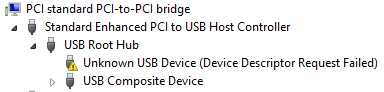
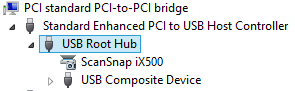
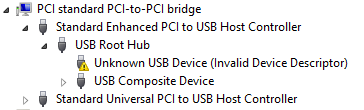
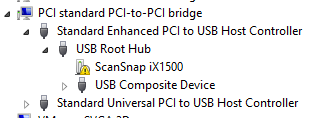
Sometimes, the Windows device manager shows any of the below errots for an USB 3.x device that is physically connected to the ESXi host and passes through a VM (via a virtual USB controller and virtual USB device).

This solution usually works: use a USB 2.0 cable instead of a USB 3.x cable.

If it doesn’t work, then the solutions are the same as when this happens in a pure physical solution:

In my case, I needed a USB connection, because it is the only way to reset a Fujitsu ScanSnap scanner to correct WiFi settings after it gets confused (which happens a few times per year).

Sreenshots

The difference for devices with a known driver:

  • USB 3 cable 
  • USB 2 cable 

The difference for devices with an unknown driver:

  •  USB 3 cable 
  • USB 2 cable 

Related information

This happened with me on both a ScanSnap iX500 and iX1500, and this did not help (as I was on a more recent Windows version): [WayBack] When setting up your scanner 502: My computer does not recognize ScanSnap iX500 with a USB 3.0 port. – Fujitsu Global.

More on USB passthrough:

More on USB virtualisation:

–jeroen

Posted in ESXi5.5, ESXi6, ESXi6.5, Fujitsu ScanSnap, Hardware, ix500, Power User, Scanners, Virtualization, VMware, VMware ESXi | Leave a Comment »

ESXi: finding unmounted VMFS volumes

Posted by jpluimers on 2021/08/26

Sometimes, especially when ESXi thinks a volume is bad, but the ESXi S.M.A.R.T. logging does not indicate so, it boots without mounting some of the VMFS volumes as datastores.

It took me a while to find the right command to list those, but I’m glad I found it:

Read the rest of this entry »

Posted in ESXi6, ESXi6.5, ESXi6.7, Power User, PowerCLI, Virtualization, VMware, VMware ESXi | Leave a Comment »

NVMe and SATA health data on ESXi: some links to investigate

Posted by jpluimers on 2021/08/25

(Edit 20221202: added one more link on “REALLOCATED SECTOR CT below threshold”)

Somehow, health data of my NVMe and SATA drives do not show up as health information on the web-ui of my ESXi playground rig.

So far, I noticed that ESXi runs a smartd, but does not ship with a smartctl, nor health data ends up in the web user interface. So you cannot see the state of NVMe and SATA devices easily.

Still these devices deteriorate over time and afterwards die, so below are some links to investigate later.

Goal is to use my own thresholds to set warning and error levels.

Some log entries:

Read the rest of this entry »

Posted in *nix, *nix-tools, ESXi6, ESXi6.5, Power User, PowerCLI, smartmontools/smartctl/smartd, Virtualization, VMware, VMware ESXi | Leave a Comment »