The Wiert Corner – irregular stream of stuff

Jeroen W. Pluimers on .NET, C#, Delphi, databases, and personal interests

  • My badges

  • Twitter Updates

  • My Flickr Stream

  • Pages

  • All categories

  • Enter your email address to subscribe to this blog and receive notifications of new posts by email.

    Join 1,862 other subscribers

Archive for the ‘ESXi6’ Category

Keeping your ESXi infrastructure up-to-date: Subscribe to VMware ESXi Patch Tracker RSS Feed

Posted by jpluimers on 2021/06/29

[WayBack] Subscribe to VMware ESXi Patch Tracker RSS Feed has all the post-feedburner (see below) RSS links in a nice table:

Subscribe to VMware ESXi Patch Tracker RSS Feed

For popular web based readers:
Feedly [All] [6.7] [6.5] [6.0] [5.5] [5.1] [5.0]
My Yahoo! [All] [6.7] [6.5] [6.0] [5.5] [5.1] [5.0]
netvibes [All] [6.7] [6.5] [6.0] [5.5] [5.1] [5.0]
For manual subriptions with other web based or offline readers copy-and-paste these links:
manual [All] [6.7] [6.5] [6.0] [5.5] [5.1] [5.0]

Post-feedburner

Parts of feedburner have been deprecated since 2012: FeedBurner – Wikipedia.

There are all sorts of reports of feedburner being unstable, for instance:

–jeroen

Posted in ESXi5, ESXi5.1, ESXi5.5, ESXi6, ESXi6.5, ESXi6.7, Power User, Virtualization, VMware, VMware ESXi | Leave a Comment »

How to rename a VM through SSH on ESXi ? |VMware Communities

Posted by jpluimers on 2021/06/28

From [WayBack] How to rename a VM through SSH on ESXi ? |VMware Communities (numbering and code highlighting mine):

Kindly find the below:

  1. Backup the virtual machine
  2. Power down the virtual machine
  3. Remove the virtual machine from the vSphere host inventory
  4. Open an SSH console session to the vSphere host
  5. Navigate to the storage directory containing the virtual machine: For example: cd /vmfs/volumes/<datastore_name>/<original_vmname>
  6. Rename the primary .vmdk configuration files: vmkfstools -E "<original_vmname>.vmdk" "<new_vmname>.vmdk"
  7. Rename the .vmx configuration file: mv "original_vmname.vmx" "new_vmname.vmx"
  8. Edit the virtual machine .vmx configuration file (Be sure to properly update the directory and file name of the .vswp swap file reference): vi "new_vmname.vmx"
  9. Rename any remaining files in the virtual machine’s folder as needed:
    1. Rename the .vmxf configuration file: mv "original_vmname.vmxf" "new_vmname.vmxf"
    2. Rename the .nvram configuration file: mv "original_vmname.nvram" "new_vmname.nvram"
    3. Rename the .vsd configuration file: mv "original_vmname.vsd" "new_vmname.vmsd"
  10. Rename the virtual machine folder: Move up one directory level to the parent folder ( cd .. ) then rename the virtual machine directory: mv "original_directory" "new_directory"
  11. Add the newly-named virtual machine to the host’s inventory (the newly renamed .vmx configuration file)
  12. Power on the newly renamed virtual machine
  13. Answer “I moved it” to the virtual machine question prompt (not “I copied it”)
  14. Review the virtual machine and all files/folders to make sure it is named as desired and functioning properly

Note: There are other methods to allow for renaming, but this method is fairly quick and easy. It should work on all editions of vSphere from free to Enterprise Plus.

The “Answer question” prompt where you should selected “I moved it”:

->

Prompt with symlink names in the path

On a site note, I need to figure uit how to set the ESXi shell prompt to show the current path like pwd does (with symlink names in it instead of the followed symlink targets):

[root@ESXi-X9SRI-3F:~] cd /vmfs/volumes/EVO860_250GB/
[root@ESXi-X9SRI-3F:/vmfs/volumes/5c9bd516-ef1f6d4c-f1b1-0025907d9d5c] pwd
/vmfs/volumes/EVO860_250GB

The ESXi shell is based on busybox, in fact it uses the ash variety:

[root@ESXi-X9SRI-3F:/vmfs/volumes/5c9bd516-ef1f6d4c-f1b1-0025907d9d5c] `readlink -f \`which readlink\`` | grep ^BusyBox
BusyBox v1.29.3 (2018-11-02 15:37:50 PDT) multi-call binary.
BusyBox is copyrighted by many authors between 1998-2015.
[root@ESXi-X9SRI-3F:/vmfs/volumes/5c9bd516-ef1f6d4c-f1b1-0025907d9d5c] type chdir
chdir is a shell builtin

This seemed to work fine:

[root@ESXi-X9SRI-3F:/vmfs/volumes/5c9bd516-ef1f6d4c-f1b1-0025907d9d5c] PS1="[\u@\h:`pwd`] "
[root@ESXi-X9SRI-3F:/vmfs/volumes/EVO860_250GB] 

But in faxt fails, as it only takes a pwd value once, and not every time the prompt is evaluated:

[root@ESXi-X9SRI-3F:/vmfs/volumes/EVO860_250GB] cd ..
[root@ESXi-X9SRI-3F:/vmfs/volumes/EVO860_250GB] pwd
/vmfs/volumes
[root@ESXi-X9SRI-3F:/vmfs/volumes/EVO860_250GB] 

So I need to re-visit these links:

–jeroen

Posted in *nix, *nix-tools, BusyBox, ESXi6, ESXi6.5, ESXi6.7, Power User, Virtualization, VMware, VMware ESXi | Leave a Comment »

esxi what is my ip – Google Search

Posted by jpluimers on 2021/06/25

[Archive.is] esxi what is my ip – Google Search:

esxcli network Commands
Command Description
network ip dns server remove Remove a DNS server from the list of DNS servers to use for this ESXi host.
network ip get Get global IP settings
network ip interface add Add a new VMkernel network interface.
network ip interface ipv4 get Get IPv4 settings for VMkernel network interfaces.

60 more rows

More columns and rows of that table in

[WayBack] vSphere Documentation Center: vSphere 5 Command Line Documentation > vSphere Command-Line Interface Documentation > vSphere Command-Line Interface Reference: esxcli network Commands

Not much has changed since, so this still works:

[root@ESXi-X9SRI-3F:/] esxcli network ip interface ipv4 get
Name  IPv4 Address   IPv4 Netmask   IPv4 Broadcast  Address Type  Gateway       DHCP DNS
----  -------------  -------------  --------------  ------------  ------------  --------
vmk0  192.168.71.94  255.255.255.0  192.168.71.255  DHCP          192.168.71.1      true
[root@ESXi-X9SRI-3F:/] network ip interface ipv6 get
Name  IPv6 Enabled  DHCPv6 Enabled  Router Adv Enabled  DHCP DNS  Gateway
----  ------------  --------------  ------------------  --------  -------
vmk0          true           false                true     false  ::

If the box has IPv6 configured, the last command would have shown the IPv6 vmdk information as well.

–jeroen

Posted in ESXi5, ESXi5.1, ESXi5.5, ESXi6, ESXi6.5, ESXi6.7, Power User, Virtualization, VMware, VMware ESXi | Leave a Comment »

VMware VMRC: connect to a remote console without the vSphere Client

Posted by jpluimers on 2021/06/21

Interesting tool: https://www.vmware.com/go/download-vmrc.

Back when scheduling this post in 2019, this was the most recent version: [WayBack] Download VMware vSphere: Download VMware Remote Console 10.0.4

From [WayBack] ovf – How to connect ESXi vm console from ESXi host console – Stack Overflow:

Example of vmrc.exe command :

"C:\Program Files (x86)\VMware\VMware Remote Console\vmrc.exe" vmrc://<ESXi host username>@<ESXi host IP>/?moid=<VM ID>

Basically it uses the vmrc scheme to start a connection to the remote screen for a specific MoRef ID. On ESXi, this is actually the VM ID that you get from vim-cmd vmsvc/getallvms. In that sense this is very similar to getting a single screenshot for the VM from the ESXi host by using the https://%5BHOST%5D:%5BPORT%5D/?id=%5BVM-MOREF%5D like described in ESXi and VMware Workstation: quick way of getting Console screenshots in PNG format; some URLs on your ESXi machine.


In MacOS, starting VMware Remote Console is slightly different as you have to start it through a URI using using the vmrc scheme from either a browser or with the open command on the console.

The reason is that there is no vmrc binary on MacOS.

  • [WayBack] Using VMware’s Standalone Remote Console for OS X with free ESXi | Der Flounder:

    vmrc://@[HOST]:[PORT]/?moid=[VM-MOREF]

    • HOST = the hostname or IP address of the ESXi server
    • PORT = the HTTPS port of the ESXi server, which is usually 443

    open 'vmrc://@server_name_here:port_number_here/?moid=vmid_number_here'

  • [WayBack] Standalone VMRC now available for Mac OS X:

    just provide the following URI which will prompt for your ESXi credentials

    vmrc://@[HOST]:[PORT]/?moid=[VM-MOREF]

    Once you have generated the VMRC URI, you MUST launch it through a web browser as that is how it is passed directly to the Standalone VMRC application. In my opinion, this is not ideal especially for customers who wish to automatically generate this as part of a VM provisioning workflow to their end users and not having to require a browser to launch the Standalone VMRC application. If you have some feedback on this, please do leave a comment.

    In the mean time, a quick workaround is to use the “open” command on Mac OS X along with the VMRC URI which will automatically load it into your default browser and launch the Standalone VMRC application for you.

    open 'vmrc://@192.168.1.60:443/?moid=vm-18'

On one of my test systems, for VMID 3 (see below), this comes down to this:

open 'vmrc://@192.168.71.94:443/?moid=3'

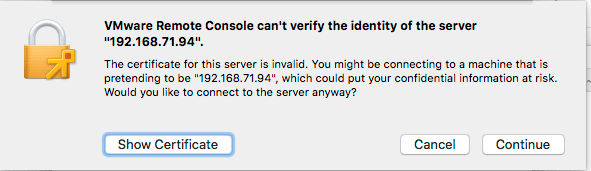
Note you have to accept the ESXi self generated TLS certificate once on MacOS:

After this, these processes were started (note there is no vmrc like on Windows):

± ps -ax | grep -i "\(vmware\|vmrc\)"
65239 ?? 0:04.15 /Applications/VMware Remote Console.app/Contents/MacOS/VMware Remote Console
65343 ?? 0:00.01 /Applications/VMware Remote Console.app/Contents/Library/services/VMRC Services 3 4
65360 ?? 0:00.16 /Applications/VMware Remote Console.app/Contents/Library/vmware-usbarbitrator
65363 ?? 0:00.01 /Applications/VMware Remote Console.app/Contents/Library/services/VMware USB Arbitrator Service 3 4
65393 ?? 0:01.29 /Applications/VMware Remote Console.app/Contents/Library/vmware-remotemks -@ vmdbPipeHandle=42; vm=_7FD2A461E8E0_3; gui=true -H 44 -R -P 2 -# product=256;name=VMware Remote Console;version=10.0.1;buildnumber=5898794;licensename=VMware Remote Console;licenseversion=10.0; -s libdir=/dev/null/Non-existing DEFAULT_LIBDIRECTORY
65872 ttys001 0:00.00 grep -i \(vmware\|vmrc\)

VM IDs (or VM-MOREFs)

You get the VM IDs using the vim-cmd vmsvc/getallvms command; they appear in the left column:

[root@ESXi-X9SRI-3F:/] vim-cmd vmsvc/getallvms
Vmid         Name                                 File                               Guest OS       Version   Annotation
1      Lampje             [EVO860_250GB] Lampje/Lampje.vmx                       opensuse64Guest    vmx-14              
3      X9SRI-3F-W10P-NL   [EVO860_250GB] X9SRI-3F-W10P-NL/X9SRI-3F-W10P-NL.vmx   windows9_64Guest   vmx-14    

Note that in practice, this is much harder so I wrote a script for that which you can find in VMware ESXi console: viewing all VMs, suspending and waking them up: part 1.

bundle files

I did not know about bundle files, but they seem to be sh scripts that precede a binary: [WayBack] What is a .bundle file and how do I run it? – Super User.

Inspecting such a files, shows it starts with this code:

#!/usr/bin/env bash
#
# VMware Installer Launcher
#
# This is the executable stub to check if the VMware Installer Service
# is installed and if so, launch it.  If it is not installed, the
# attached payload is extracted, the VMIS is installed, and the VMIS
# is launched to install the bundle as normal.

# Architecture this bundle was built for (x86 or x64)
ARCH=x64

if [ -z "$BASH" ]; then
   # $- expands to the current options so things like -x get passed through
   if [ ! -z "$-" ]; then
      opts="-$-"
   fi

   # dash flips out of $opts is quoted, so don't.
   exec /usr/bin/env bash $opts "$0" "$@"
   echo "Unable to restart with bash shell"
   exit 1
fi

–jeroen

Posted in Apple, ESXi6, ESXi6.5, ESXi6.7, Mac OS X / OS X / MacOS, macOS 10.12 Sierra, macOS 10.13 High Sierra, Power User, Virtualization, VMware, VMware ESXi, Windows, Windows 10, Windows 7, Windows 8, Windows 8.1 | Leave a Comment »

CloudKey ESXi Appliance – Google Search

Posted by jpluimers on 2021/06/07

Via [Archive.is] CloudKey ESXi Appliance – Google Search:

–jeroen

Posted in *nix, Cloud Key, ESXi6, ESXi6.5, ESXi6.7, Internet, Network-and-equipment, Power User, Unifi-Ubiquiti, Virtualization, VMware, VMware ESXi | Leave a Comment »

Downloading files with wget on ESXi · random writes

Posted by jpluimers on 2021/05/31

Reminder to self to check if wget on ESXi now finally supports https downloading: [WayBack] Downloading files with wget on ESXi · random writes.

In the mean time, ESXi 6.7 Update 2 and up seems to support this; so the below workaround might only be needed for ESXi 6.7 update 1 and below.

[WayBack] VMware ESXi: help downloading large ISO – Server Fault

I will likely not do this, as by now all my ESXi boxes should have been recent enough.

I will keep the article because of the BusyBox commands section below.

If so, I might finally try and write a Python wrapper for this, as I know that Python 3 on ESXi supports https, but the ESXi BusyBox does not have a built-in cURL.

Some links and notes I might need by then:

BusyBox commands

Another cool thing in the above blog post is that it shows how to dump the BusyBox built in commands.

I ran it for ESXi 6.7 with a slight trick to get the full path (using back-ticks and escaped back-ticks) and content.

Since ESXi is BusyBox based, the commands that are in /bin are not actually binaries, but each command is a symlink to the BusyBox binary. BusyBox then knows the original name of the command, so it can deduct what part to execute. This makes for a very space efficient storage scheme.

The various bits of the tricks to get the location of the BusyBox binary, so the --list parameter can be passed to it:

  • The which wget gives the full path of wget.
  • The ls -l `which wget` shows the full path of wget and the symlink target (but there is no way for ls to only show the symlink target).
  • The readlink -f `which wget` shows the full path of where /bin/wget points to: the BusyBox binary.

The main trick consists of backtick evalution, and knowing that ls cannot get you just the symlink target, but readlink can:

Now the back-tick escapes, because you cannot nest back-ticks:

  • The `readlink -f \`which wget\`` executes the BusyBox binary without arguments.
  • The `readlink -f \`which wget\`` --list executes the BusyBox binary with the --list parameter.

Note I do not like the cat --help (see [WayBack] How do I check busybox version (from busybox)? – Unix & Linux Stack Exchange) way of getting the BusyBox version, as that gets echoed to stderr.

This is the output:

Read the rest of this entry »

Posted in *nix, *nix-tools, cURL, ESXi6, ESXi6.5, ESXi6.7, Power User, Virtualization, VMware ESXi, wget | Leave a Comment »

How to Copy files between ESXi hosts using SCP Command

Posted by jpluimers on 2021/05/21

Derived the bits below from [WayBack] How to Copy files between ESXi hosts using SCP Command.

Recursive copy from a remote machine to an existing local directory:

scp -rp root@192.168.71.97://vmfs/volumes/EVO860_500GB/VM1/ /vmfs/volumes/EVO860_250GB/VM2/

After this you need to edit the .vmxf files in the VM2 directory to ensure these are not duplicates.

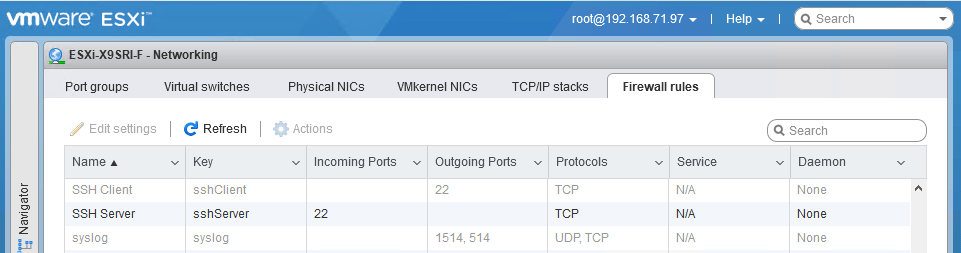
One thing to remember is that you need the current host to allow the SSH client in the firewall, which is disabled by default:

After enabling:

Be really careful with the -3 option to scp; it allows you to transfer from one remote machine to another remote machine, but when using keyboard-interactive, you have a high change to lock-out your accounts: SSH will try to keyboard-interactive to both hosts at the same time.

If you lock-out root, then you have to go through the local DCUI console (use ALT-F2 to go there), then reset the root account failure count using pam_tally2 --user root --reset.

So this can be bad:

scp -3 -rp root@192.168.71.97://vmfs/volumes/EVO860_500GB/VM1/ root@192.168.71.91://vmfs/volumes/EVO860_250GB/VM2/

This works, but assumes the SSH client is enabled from the first host:

scp -rp root@192.168.71.97://vmfs/volumes/EVO860_500GB/VM1/ root@192.168.71.91://vmfs/volumes/EVO860_250GB/VM2/

See these links:


[root@ESXi-X9SRI-F:~] esxcli network firewall get
   Default Action: DROP
   Enabled: true
   Loaded: true
[root@ESXi-X9SRI-F:~] esxcli network firewall ruleset list --ruleset-id sshClient
Name       Enabled
---------  -------
sshClient    false
[root@ESXi-X9SRI-F:~] esxcli network firewall ruleset set --ruleset-id sshClient --enabled true
[root@ESXi-X9SRI-F:~] esxcli network firewall ruleset list --ruleset-id sshClient
Name       Enabled
---------  -------
sshClient     true
[root@ESXi-X9SRI-F:~] esxcli network firewall ruleset set --ruleset-id sshClient --enabled false
[root@ESXi-X9SRI-F:~] esxcli network firewall ruleset list --ruleset-id sshClient
Name       Enabled
---------  -------
sshClient    false

–jeroen

Posted in *nix, *nix-tools, ESXi6, ESXi6.5, ESXi6.7, Power User, ssh/sshd, Virtualization, VMware, VMware ESXi | Leave a Comment »

ESXi 6.x download URL

Posted by jpluimers on 2021/05/17

Many of the ESXi download URLs get you to my-vmware in places that indicate you do not have a license.

This seems to be the only link that consistently gets you the license and downloads: my.vmware.com/en/group/vmware/evalcenter?p=free-esxi6.

For instance, the ones below with

–jeroen

Posted in ESXi6, ESXi6.5, ESXi6.7, Power User, Virtualization, VMware, VMware ESXi | Leave a Comment »

Alternatives to VMware ESXi: working around “[Errno 28] No space left on device” when updating (especially when booting from USB-stick)

Posted by jpluimers on 2021/05/07

Yesterday I talked about VMware ESXi: working around “[Errno 28] No space left on device” when updating (especially when booting from USB-stick).

There are some alternative workarounds mentioned on the interwebz. Below are a the ones I found. I discuss which ones won’t work, and why I dislike others.

Alternative workarounds that failed

Configuring host-swap

This was suggested by:

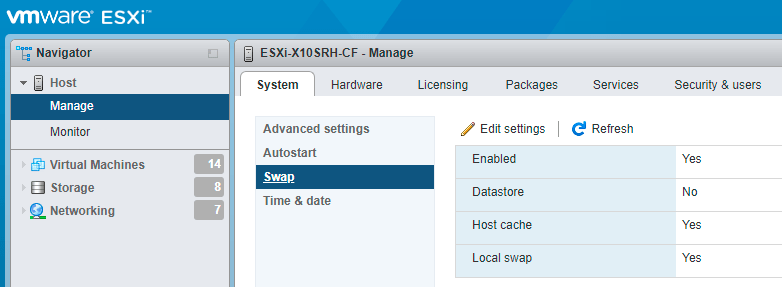
Host swap was already configured, and it still failed.

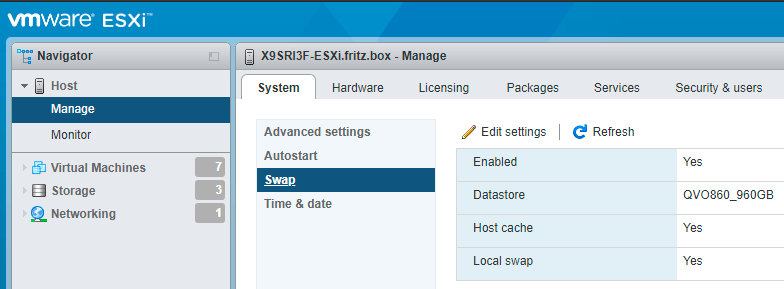
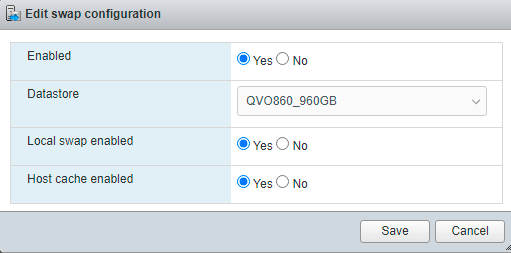
Just in case you ever want to configure host swap, it is under an URL like https://esxi67.example.org/ui/#/host/manage/system/swap and looks like this:

ESXi 6.7: configuring host swap

ESXi 6.7: configuring host swap

You get there by:

  1. logging on to the web UI
  2. clicking Host
  3. clicking Manage under Host
  4. clicking Swap under the System tab
  5. clicking Edit settings when you want to change them
    ESXi 6.7: edit host swap settings

    ESXi 6.7: edit host swap settings

More information about host swap:

Alternative workarounds I like less

Below are a few alternative workarounds. I will include them as they gained me more knowledge, but I will also describe why I like them less.

  • [Wayback] ESXI 6.7 update: No space left on device | eknori.de after explaining that directing the swap space to a datastore fails, also mentions alternative this:

    Unfortunately, in this situation, host swap already was enabled.

    There is though, a workaround. You can use an image that doesn’t have the tools vib included with this command:

    esxcli software profile update -p ESXi-6.7.0-20190802001-no-tools -d https://hostupdate.vmware.com/software/VUM/PRODUCTION/main/vmw-depot-index.xml

    You can then manually install the troublesome vib (if you have a need for tools) with this command:

    esxcli software vib install -v https://hostupdate.vmware.com/software/VUM/PRODUCTION/main/esx/vmw/vib20/tools-light/VMware_locker_tools-light_10.3.10.12406962-14141615.vib

    I had to edit it as the post itself shows the filename as

    vmw-depot
     -index.xml

    Yup: bitching again, as markup issues make code unreliable. It also allows me to explain why I do not like the solution, which is because of two reasons:

    1. It doesn’t explain why this solution works and if it is future proof. Does a future upgrade that includes changed VMware_locker_tools-light also fail? If it does not fail, does it update the VMware_locker_tools-light?
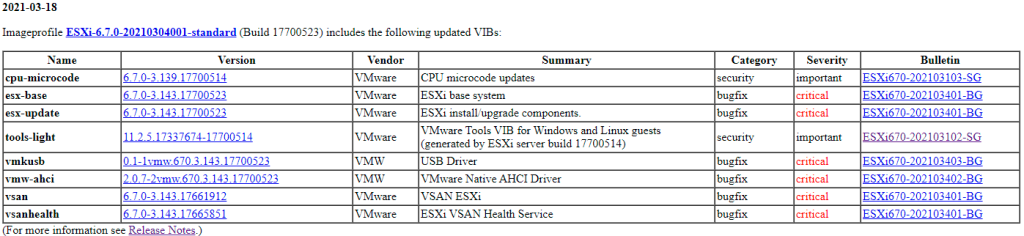
    2. It does not explain how to get the path of https://hostupdate.vmware.com/software/VUM/PRODUCTION/main/esx/vmw/vib20/tools-light/VMware_locker_tools-light_10.3.10.12406962-14141615.vib.  I did some mor research on this, and it is actually pretty straightforward: the [Wayback] VMware ESXi 6.7 Patch History has it in the table
      ESXi-6.7.0-20210304001-standard patch table

      ESXi-6.7.0-20210304001-standard patch table

      The “Version” link for “tools-light” [Wayback] 11.2.5.17337674-17700514 actually links to the VMware_locker_tools-light_11.1.1.16303738-16701467.vib file.

  • [Wayback] ESXi 6.7.0 – [Errno 28] No space left on devicevibs = VMware_locker_tools-light_11.1.1.16303738-16701467 does not explain where to get the VMware_locker_tools-light_11.1.1.16303738-16701467.vib link from, does not have the code formatted as such (so I did that below), but does actually answers part of the above questions, but not if a future upgrade will also fail. In short: re-running the upgrade after manually installing the VMware_locker_tools-light_11.1.1.16303738-16701467.vib will succeed:

    Unfortunately swap was already enabled to I had to manually install the tools-light with this command:

    esxcli software vib install -v https://hostupdate.vmware.com/software/VUM/PRODUCTION/main/esx/vmw/vib20/tools-light/VMware_locker_tools-light_11.1.1.16303738-16701467.vib

    Then re-ran the upgrade and it was successful.

  • [Wayback] ESXi 6 Update error – No Space left on device /locker which suggests to delete “find all big files in /locker and remove it”. I think that is a bad idea, as the /locker directory is maintained by your ESXi system and you should not remove any big file without knowing if it is relied upon by ESXi.
  • While updating VMware ESXi servers, VMware vSphere users may encounter the “No space left on device” error that pops up while executing “esxcli software vib update” command. Interestingly, the problem occurs even though disks are doing well and have enough free space and df -h command proves that.[Wayback] No Space Left on Device? Updating VMware ESXi | StarWind Blog has bad code markup, but explains
    • how to get disk usage with df -h where the vfat volumes usually indicate the ones on USB or SD-card media.
    • that hardly the number of inodes is a problem, and that stat -f / can help you figure out if that is the case on the volume where the upgrade files are stored
    • how to find large files not in data stores; I have changed added -h to the ls command so it becomes human readable:
      find / -path "/vmfs" -prune -o -type f -size +50000k -exec ls -lh '{}' \;
    • suggests how to put the swap space on a data store (which doesn’t work on ESXi 6.7 systems any more)
  •  

    [Wayback] Intel NUC Kit NUC5i3RYH met ESXi 6.0 updaten naar 6.7 – Gahan Zwart’s Blog

    • I like the upgrade copying the ISO to an USB stick with Rufus
    • I do not like the VMware_locker_tools-light... intermediate step, as the last step (download the full depot to a datastore, then update from there)
    • ESXi 7.0 has the same ErrNo 28 update problem as ESXi 6.7 and 6.5, so I will default to the depot download.

–jeroen

Posted in ESXi6, ESXi6.5, ESXi6.7, ESXi7, Power User, Virtualization, VMware, VMware ESXi | Leave a Comment »

VMware ESXi: working around “[Errno 28] No space left on device” when updating (especially when booting from USB-stick)

Posted by jpluimers on 2021/05/06

A while ago, I had this error while upgrading an ESXi 6.7 system:

# esxcli system maintenanceMode get
Enabled
# esxcli software profile update -p ESXi-6.7.0-20210304001-standard -d https://hostupdate.vmware.com/software/VUM/PRODUCTION/main/vmw-depot-
index.xml
 [InstallationError]
 [Errno 28] No space left on device
       vibs = VMware_locker_tools-light_11.2.5.17337674-17700514
 Please refer to the log file for more details.

This seems to be kind of a known issue, especially on systems that boot from USB sticks (see [Archive.is] “ESXi” “[Errno 28] No space left on device” – Google Search). Despites these sticks having gotten larger over time, VMware uses very little storage on them, so runs out of storage spice while processing installs from the depot.

This is kind of disappointing, and with the ever growing updates, the only workaround is to download an offline bundle, then install it.

Below I will explain how to get the offline bundle, as it involves a few more steps all aimed at this simple installation of the offline bundle file:

# esxcli system maintenanceMode get
Enabled
# esxcli software profile update -p ESXi-6.7.0-20210304001-standard -d /vmfs/volumes/EVO860_500GB/OfflineBundles/ESXi670-202103001.zip 
Update Result
   Message: The update completed successfully, but the system needs to be rebooted for the changes to be effective.
   Reboot Required: true
   VIBs Installed: VMW_bootbank_ixgben_1.7.1.16-2vmw.670.3.104.16075168, VMW_bootbank_lpfc_11.4.33.26-14vmw.670.3.104.16075168, VMW_bootbank_net-e1000_8.0.3.1-5vmw.670.3.112.16701467, VMW_bootbank_net-vmxnet3_1.1.3.0-3vmw.670.3.104.16075168, VMW_bootbank_nfnic_4.0.0.44-0vmw.670.3.104.16075168, VMW_bootbank_ntg3_4.1.5.0-0vmw.670.3.116.16713306, VMW_bootbank_nvme_1.2.2.28-4vmw.670.3.132.17167734, VMW_bootbank_qfle3f_1.0.25.0.2-15vmw.670.3.104.16075168, VMW_bootbank_sfvmk_1.0.0.1003-7vmw.670.3.104.16075168, VMW_bootbank_vmkusb_0.1-1vmw.670.3.143.17700523, VMW_bootbank_vmw-ahci_2.0.7-2vmw.670.3.143.17700523, VMware_bootbank_cpu-microcode_6.7.0-3.139.17700514, VMware_bootbank_elx-esx-libelxima.so_11.4.1184.2-3.89.15160138, VMware_bootbank_esx-base_6.7.0-3.143.17700523, VMware_bootbank_esx-ui_1.33.7-15803439, VMware_bootbank_esx-update_6.7.0-3.143.17700523, VMware_bootbank_native-misc-drivers_6.7.0-3.89.15160138, VMware_bootbank_vmware-esx-esxcli-nvme-plugin_1.2.0.36-2vmw.670.3.116.16713306, VMware_bootbank_vsan_6.7.0-3.143.17661912, VMware_bootbank_vsanhealth_6.7.0-3.143.17665851, VMware_locker_tools-light_11.2.5.17337674-17700514
   VIBs Removed: VMW_bootbank_ixgben_1.7.1.16-1vmw.670.3.73.14320388, VMW_bootbank_lpfc_11.4.33.25-14vmw.670.3.73.14320388, VMW_bootbank_net-e1000_8.0.3.1-5vmw.670.0.0.8169922, VMW_bootbank_net-vmxnet3_1.1.3.0-3vmw.670.2.48.13006603, VMW_bootbank_nfnic_4.0.0.29-0vmw.670.3.73.14320388, VMW_bootbank_ntg3_4.1.3.2-1vmw.670.1.28.10302608, VMW_bootbank_nvme_1.2.2.28-1vmw.670.3.73.14320388, VMW_bootbank_qfle3f_1.0.25.0.2-14vmw.670.0.0.8169922, VMW_bootbank_sfvmk_1.0.0.1003-6vmw.670.3.73.14320388, VMW_bootbank_vmkusb_0.1-1vmw.670.2.48.13006603, VMW_bootbank_vmw-ahci_1.2.8-1vmw.670.3.73.14320388, VMware_bootbank_cpu-microcode_6.7.0-2.69.14141615, VMware_bootbank_elx-esx-libelxima.so_11.4.1184.1-2.48.13006603, VMware_bootbank_esx-base_6.7.0-3.73.14320388, VMware_bootbank_esx-ui_1.33.4-14093553, VMware_bootbank_esx-update_6.7.0-3.73.14320388, VMware_bootbank_native-misc-drivers_6.7.0-2.48.13006603, VMware_bootbank_vmware-esx-esxcli-nvme-plugin_1.2.0.36-2.48.13006603, VMware_bootbank_vsan_6.7.0-3.73.14263135, VMware_bootbank_vsanhealth_6.7.0-3.73.14263064, VMware_locker_tools-light_10.3.10.12406962-14141615
   VIBs Skipped: VMW_bootbank_ata-libata-92_3.00.9.2-16vmw.670.0.0.8169922, VMW_bootbank_ata-pata-amd_0.3.10-3vmw.670.0.0.8169922, VMW_bootbank_ata-pata-atiixp_0.4.6-4vmw.670.0.0.8169922, VMW_bootbank_ata-pata-cmd64x_0.2.5-3vmw.670.0.0.8169922, VMW_bootbank_ata-pata-hpt3x2n_0.3.4-3vmw.670.0.0.8169922, VMW_bootbank_ata-pata-pdc2027x_1.0-3vmw.670.0.0.8169922, VMW_bootbank_ata-pata-serverworks_0.4.3-3vmw.670.0.0.8169922, VMW_bootbank_ata-pata-sil680_0.4.8-3vmw.670.0.0.8169922, VMW_bootbank_ata-pata-via_0.3.3-2vmw.670.0.0.8169922, VMW_bootbank_block-cciss_3.6.14-10vmw.670.0.0.8169922, VMW_bootbank_bnxtnet_20.6.101.7-24vmw.670.3.73.14320388, VMW_bootbank_bnxtroce_20.6.101.0-20vmw.670.1.28.10302608, VMW_bootbank_brcmfcoe_11.4.1078.25-14vmw.670.3.73.14320388, VMW_bootbank_char-random_1.0-3vmw.670.0.0.8169922, VMW_bootbank_ehci-ehci-hcd_1.0-4vmw.670.0.0.8169922, VMW_bootbank_elxiscsi_11.4.1174.0-2vmw.670.0.0.8169922, VMW_bootbank_elxnet_11.4.1097.0-5vmw.670.3.73.14320388, VMW_bootbank_hid-hid_1.0-3vmw.670.0.0.8169922, VMW_bootbank_i40en_1.8.1.9-2vmw.670.3.73.14320388, VMW_bootbank_iavmd_1.2.0.1011-2vmw.670.0.0.8169922, VMW_bootbank_igbn_0.1.1.0-5vmw.670.3.73.14320388, VMW_bootbank_ima-qla4xxx_2.02.18-1vmw.670.0.0.8169922, VMW_bootbank_ipmi-ipmi-devintf_39.1-5vmw.670.1.28.10302608, VMW_bootbank_ipmi-ipmi-msghandler_39.1-5vmw.670.1.28.10302608, VMW_bootbank_ipmi-ipmi-si-drv_39.1-5vmw.670.1.28.10302608, VMW_bootbank_iser_1.0.0.0-1vmw.670.1.28.10302608, VMW_bootbank_lpnic_11.4.59.0-1vmw.670.0.0.8169922, VMW_bootbank_lsi-mr3_7.708.07.00-3vmw.670.3.73.14320388, VMW_bootbank_lsi-msgpt2_20.00.06.00-2vmw.670.3.73.14320388, VMW_bootbank_lsi-msgpt35_09.00.00.00-5vmw.670.3.73.14320388, VMW_bootbank_lsi-msgpt3_17.00.02.00-1vmw.670.3.73.14320388, VMW_bootbank_misc-cnic-register_1.78.75.v60.7-1vmw.670.0.0.8169922, VMW_bootbank_misc-drivers_6.7.0-2.48.13006603, VMW_bootbank_mtip32xx-native_3.9.8-1vmw.670.1.28.10302608, VMW_bootbank_ne1000_0.8.4-2vmw.670.2.48.13006603, VMW_bootbank_nenic_1.0.29.0-1vmw.670.3.73.14320388, VMW_bootbank_net-bnx2_2.2.4f.v60.10-2vmw.670.0.0.8169922, VMW_bootbank_net-bnx2x_1.78.80.v60.12-2vmw.670.0.0.8169922, VMW_bootbank_net-cdc-ether_1.0-3vmw.670.0.0.8169922, VMW_bootbank_net-cnic_1.78.76.v60.13-2vmw.670.0.0.8169922, VMW_bootbank_net-e1000e_3.2.2.1-2vmw.670.0.0.8169922, VMW_bootbank_net-enic_2.1.2.38-2vmw.670.0.0.8169922, VMW_bootbank_net-fcoe_1.0.29.9.3-7vmw.670.0.0.8169922, VMW_bootbank_net-forcedeth_0.61-2vmw.670.0.0.8169922, VMW_bootbank_net-igb_5.0.5.1.1-5vmw.670.0.0.8169922, VMW_bootbank_net-ixgbe_3.7.13.7.14iov-20vmw.670.0.0.8169922, VMW_bootbank_net-libfcoe-92_1.0.24.9.4-8vmw.670.0.0.8169922, VMW_bootbank_net-mlx4-core_1.9.7.0-1vmw.670.0.0.8169922, VMW_bootbank_net-mlx4-en_1.9.7.0-1vmw.670.0.0.8169922, VMW_bootbank_net-nx-nic_5.0.621-5vmw.670.0.0.8169922, VMW_bootbank_net-tg3_3.131d.v60.4-2vmw.670.0.0.8169922, VMW_bootbank_net-usbnet_1.0-3vmw.670.0.0.8169922, VMW_bootbank_nhpsa_2.0.22-3vmw.670.1.28.10302608, VMW_bootbank_nmlx4-core_3.17.13.1-1vmw.670.2.48.13006603, VMW_bootbank_nmlx4-en_3.17.13.1-1vmw.670.2.48.13006603, VMW_bootbank_nmlx4-rdma_3.17.13.1-1vmw.670.2.48.13006603, VMW_bootbank_nmlx5-core_4.17.13.1-1vmw.670.3.73.14320388, VMW_bootbank_nmlx5-rdma_4.17.13.1-1vmw.670.2.48.13006603, VMW_bootbank_nvmxnet3-ens_2.0.0.21-1vmw.670.0.0.8169922, VMW_bootbank_nvmxnet3_2.0.0.29-1vmw.670.1.28.10302608, VMW_bootbank_ohci-usb-ohci_1.0-3vmw.670.0.0.8169922, VMW_bootbank_pvscsi_0.1-2vmw.670.0.0.8169922, VMW_bootbank_qcnic_1.0.2.0.4-1vmw.670.0.0.8169922, VMW_bootbank_qedentv_2.0.6.4-10vmw.670.1.28.10302608, VMW_bootbank_qfle3_1.0.50.11-9vmw.670.0.0.8169922, VMW_bootbank_qfle3i_1.0.2.3.9-3vmw.670.0.0.8169922, VMW_bootbank_qflge_1.1.0.11-1vmw.670.0.0.8169922, VMW_bootbank_sata-ahci_3.0-26vmw.670.0.0.8169922, VMW_bootbank_sata-ata-piix_2.12-10vmw.670.0.0.8169922, VMW_bootbank_sata-sata-nv_3.5-4vmw.670.0.0.8169922, VMW_bootbank_sata-sata-promise_2.12-3vmw.670.0.0.8169922, VMW_bootbank_sata-sata-sil24_1.1-1vmw.670.0.0.8169922, VMW_bootbank_sata-sata-sil_2.3-4vmw.670.0.0.8169922, VMW_bootbank_sata-sata-svw_2.3-3vmw.670.0.0.8169922, VMW_bootbank_scsi-aacraid_1.1.5.1-9vmw.670.0.0.8169922, VMW_bootbank_scsi-adp94xx_1.0.8.12-6vmw.670.0.0.8169922, VMW_bootbank_scsi-aic79xx_3.1-6vmw.670.0.0.8169922, VMW_bootbank_scsi-bnx2fc_1.78.78.v60.8-1vmw.670.0.0.8169922, VMW_bootbank_scsi-bnx2i_2.78.76.v60.8-1vmw.670.0.0.8169922, VMW_bootbank_scsi-fnic_1.5.0.45-3vmw.670.0.0.8169922, VMW_bootbank_scsi-hpsa_6.0.0.84-3vmw.670.0.0.8169922, VMW_bootbank_scsi-ips_7.12.05-4vmw.670.0.0.8169922, VMW_bootbank_scsi-iscsi-linux-92_1.0.0.2-3vmw.670.0.0.8169922, VMW_bootbank_scsi-libfc-92_1.0.40.9.3-5vmw.670.0.0.8169922, VMW_bootbank_scsi-megaraid-mbox_2.20.5.1-6vmw.670.0.0.8169922, VMW_bootbank_scsi-megaraid-sas_6.603.55.00-2vmw.670.0.0.8169922, VMW_bootbank_scsi-megaraid2_2.00.4-9vmw.670.0.0.8169922, VMW_bootbank_scsi-mpt2sas_19.00.00.00-2vmw.670.0.0.8169922, VMW_bootbank_scsi-mptsas_4.23.01.00-10vmw.670.0.0.8169922, VMW_bootbank_scsi-mptspi_4.23.01.00-10vmw.670.0.0.8169922, VMW_bootbank_scsi-qla4xxx_5.01.03.2-7vmw.670.0.0.8169922, VMW_bootbank_shim-iscsi-linux-9-2-1-0_6.7.0-0.0.8169922, VMW_bootbank_shim-iscsi-linux-9-2-2-0_6.7.0-0.0.8169922, VMW_bootbank_shim-libata-9-2-1-0_6.7.0-0.0.8169922, VMW_bootbank_shim-libata-9-2-2-0_6.7.0-0.0.8169922, VMW_bootbank_shim-libfc-9-2-1-0_6.7.0-0.0.8169922, VMW_bootbank_shim-libfc-9-2-2-0_6.7.0-0.0.8169922, VMW_bootbank_shim-libfcoe-9-2-1-0_6.7.0-0.0.8169922, VMW_bootbank_shim-libfcoe-9-2-2-0_6.7.0-0.0.8169922, VMW_bootbank_shim-vmklinux-9-2-1-0_6.7.0-0.0.8169922, VMW_bootbank_shim-vmklinux-9-2-2-0_6.7.0-0.0.8169922, VMW_bootbank_shim-vmklinux-9-2-3-0_6.7.0-0.0.8169922, VMW_bootbank_smartpqi_1.0.1.553-28vmw.670.3.73.14320388, VMW_bootbank_uhci-usb-uhci_1.0-3vmw.670.0.0.8169922, VMW_bootbank_usb-storage-usb-storage_1.0-3vmw.670.0.0.8169922, VMW_bootbank_usbcore-usb_1.0-3vmw.670.0.0.8169922, VMW_bootbank_vmkata_0.1-1vmw.670.0.0.8169922, VMW_bootbank_vmkfcoe_1.0.0.1-1vmw.670.1.28.10302608, VMW_bootbank_vmkplexer-vmkplexer_6.7.0-0.0.8169922, VMW_bootbank_xhci-xhci_1.0-3vmw.670.0.0.8169922, VMware_bootbank_esx-dvfilter-generic-fastpath_6.7.0-0.0.8169922, VMware_bootbank_esx-xserver_6.7.0-3.73.14320388, VMware_bootbank_lsu-hp-hpsa-plugin_2.0.0-16vmw.670.1.28.10302608, VMware_bootbank_lsu-intel-vmd-plugin_1.0.0-2vmw.670.1.28.10302608, VMware_bootbank_lsu-lsi-drivers-plugin_1.0.0-1vmw.670.2.48.13006603, VMware_bootbank_lsu-lsi-lsi-mr3-plugin_1.0.0-13vmw.670.1.28.10302608, VMware_bootbank_lsu-lsi-lsi-msgpt3-plugin_1.0.0-9vmw.670.2.48.13006603, VMware_bootbank_lsu-lsi-megaraid-sas-plugin_1.0.0-9vmw.670.0.0.8169922, VMware_bootbank_lsu-lsi-mpt2sas-plugin_2.0.0-7vmw.670.0.0.8169922, VMware_bootbank_lsu-smartpqi-plugin_1.0.0-3vmw.670.1.28.10302608, VMware_bootbank_qlnativefc_3.1.8.0-5vmw.670.3.73.14320388, VMware_bootbank_rste_2.0.2.0088-7vmw.670.0.0.8169922
# reboot

Note that I always perform a  esxcli system maintenanceMode get in order to verify the system is indeed in maintenance mode.

Steps to get the offline bundle

0. determining the profile

Actually there is a pre-step: checking which update profile is needed. I use the VMware Patch Tracker from VFrontDe, as you can subscribe through RSS (by ESXi version) Twitter (all versions) for that.

For ESXi 7, I use moved from the [Wayback] regular ESXi 6.7 patch RSS feed to the Feedly ESXi 6.7 patch RSS feed (which integrates in my daily news reading) of [Wayback] VMware ESXi 6.7 Patch History:

Keep track of VMware ESXi patches, subscribe by [Archive.is] RSS and [Archive.is] Twitter! – Brought to you by @VFrontDe

For the current (as of writing) update, it shows two out of four profiles:

  1. Imageprofile ESXi-6.7.0-20210304001-standard (Build 17700523) … (For more information see [Wayback] Release Notes.)
  2. Imageprofile ESXi-6.7.0-20210301001s-standard (Build 17700514) … (For more information see [Wayback] Release Notes.)

There can be two more “...-no-tools” profiles as described by [Wayback] VMware ESXi Image Profiles | virten.net

Example – ESXi 5.5 Patch 2 contains 4 Image Profiles:
  1. ESXi-5.5.0-20140704001-standard – Contains all patches
  2. ESXi-5.5.0-20140704001-no-tools – Contains all patches but no VMware Tools
  3. ESXi-5.5.0-20140701001s-standard – Contains security patches only
  4. ESXi-5.5.0-20140701001s-no-tools – Contains security patches only and no VMware Tools

vSphere ESXi 6.7 Image Profiles
Image Profile ESX Build Release Date
ESXi-6.7.0-20210304001-standard 17700523 2021-03-18
ESXi-6.7.0-20210304001-no-tools 17700523 2021-03-18
ESXi-6.7.0-20210301001s-standard 17700514 2021-03-18
ESXi-6.7.0-20210301001s-no-tools 17700514 2021-03-18

Given that I my environment as complete as possible (the original ESXi install contains everything, so I do want to include the “VMware Tools“, and update the full software, nut just security issues), I opt for “###...-standard” and not for “###s...-standard“.

1. determine the download

The page [Wayback] VMware ESXi 6.7 Patch History (and similar pages for other ESXi versions) contains a tiny link in the upper left hand side named “[MyVMware Patch Download]” (I saved it in the Wayback machine) which brings you a patch search page on the VMware patch site.

The big drawback is that you need to be signed on into yout VMware account to actually see this page. The VMware account validation is implemented in a “corporate” way, so often does not work (especially when you need it, which for me often is on weekends, a period in the week that corporates seem to ar less monitor their systems than during USA work-day hours). I might sound cynical, but this set me back quite some time even trying to get an ESXi 7 license.

Here are some screenshots:
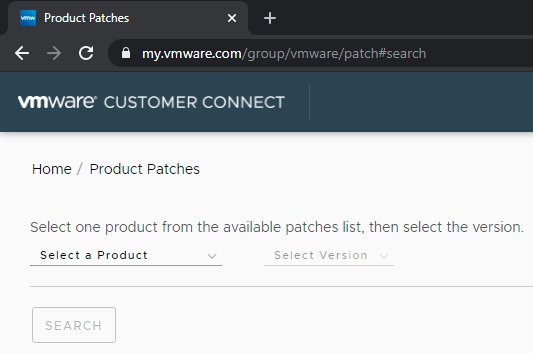
VMware HomeP/roduct Patches

VMware Home/Product Patches

The site is so corporate, that when your screen is not wide enough, the selection box is drawn outside your screen area:
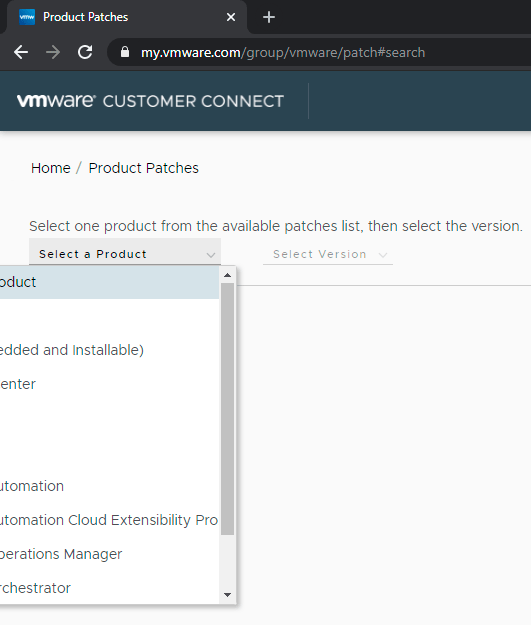
VMware being very corporate: drawing selection box outside the screen area.

VMware being very corporate: drawing selection box outside the screen area.

Anyway the one ending in “and Installable” is the one we want, cutting off the other part (you are a corporate or you aren’t, right?):
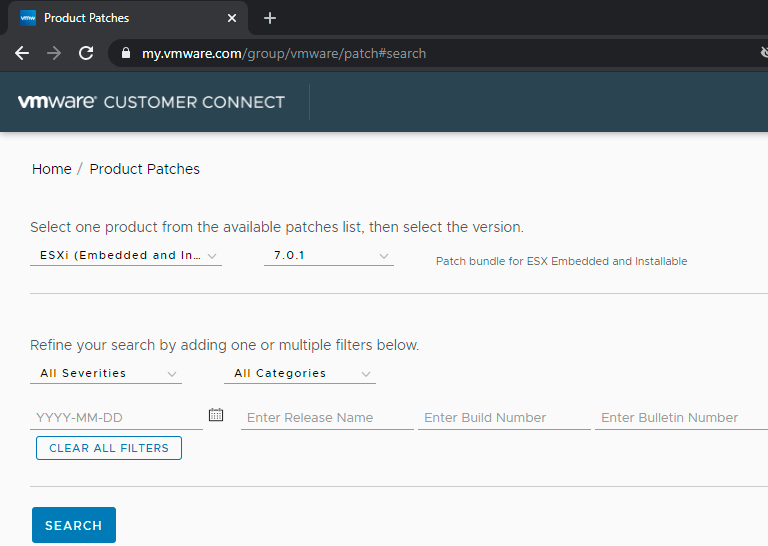
"ESXi (Embedded and ..." is cut off as the layout has been designed to cut off either way.

“ESXi (Embedded and …” is cut off as the layout has been designed to cut off either way.

So for ESXi 6.7.0, when writing this, the offline bundles were these:
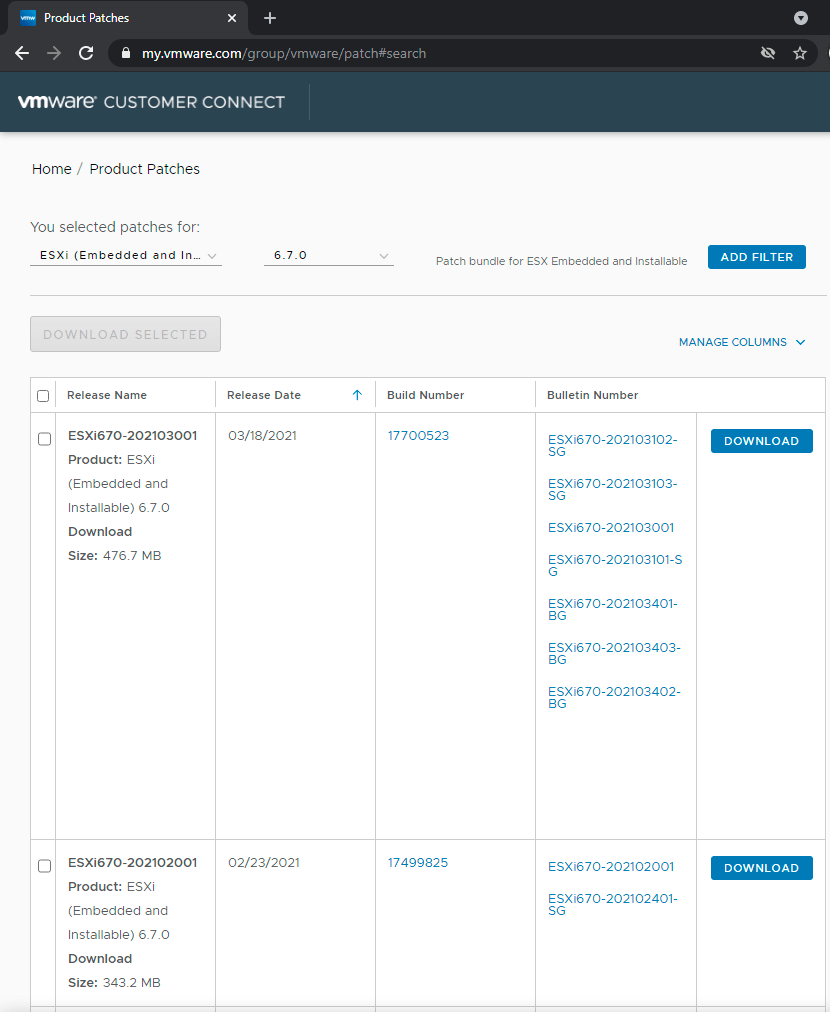
ESXi 6.7.0 offline bundles

ESXi 6.7.0 offline bundles (unlike the YYYYMM### release name and YYYYMM### bulletin numbers, the dates are in MM/DD/YYYY format)

Release Name Release Date Build Number Bulletin Number

ESXi670-202103001

Product:ESXi (Embedded and Installable) 6.7.0

Download Size:476.7 MB

03/18/2021

ESXi670-202103102-SG

ESXi670-202103103-SG

ESXi670-202103001

ESXi670-202103101-SG

ESXi670-202103401-BG

ESXi670-202103403-BG

ESXi670-202103402-BG

Download

So, for imageprofile ESXi-6.7.0-20210304001-standard (Build 17700523), the release name is ESXi670-202103001 (as it matches Build Number [Wayback] 17700523).

From the above, we now have these links and numbers:

The two common parts above are:

  1. ESXi670-202103001 (both as identifier and as filename ESXi670-202103001.zip)
  2. https://docs.vmware.com/en/VMware-vSphere/6.7/rn/esxi670-202103001.html which contains a table like this that has both a (deprecated!) md5sum and sha1sum value:
    Download Filename: ESXi670-202103001.zip
    Build: 17700523
    Download Size: 476.7 MB
    md5sum: 26f177706bce4a0432d9e8af016a5bad
    sha1checksum: 0263a25351d003d34321a062b391d9fe5c312bd2
    Host Reboot Required: Yes
    Virtual Machine Migration or Shutdown Required: Yes


Back to the download button, where you can validate the filename of the off-line bundle:

The Download button points to a complex URL with these parts:

  • scheme:[//authority]pathhttps://download2.vmware.com/patch/software/VUM/OFFLINE/release-767-20210316-739878/ESXi670-202103001.zip
  • [?query] is of the form ?HashKey=<32-hexadecimal-digits>&params=<URI-escaped-JSON-string>&AuthKey=<10-decimal-digits>_<32-hexadecimal-digits>
  • Sample values included in params:
    • "custnumber":"ABCDEFGHIJKLMNOP==" 16-digit == padded base64 encoded customer identification
    • "sourcefilesize":"476.7+MB"
    • "dlgcode":"ESXi670-202103001"
    • "languagecode":"en"
    • "source":"PATCH"
    • "downloadtype":"manual"
    • "downloaduuid":"12345678-490a-abcd-efgh12345678" (version 4 variant 1 uuid)
    • "productname":"ESXi+(Embedded+and+Installable)"
    • "productversion":"6.7.0"

2. downloading the offline bundle file and verifying it

The steps taken until now:

  1. Find the most recent imageprofile name at [Wayback] VMware ESXi 6.7 Patch History (in my case ESXi-6.7.0-20210304001-standard)
  2. Find the “Release notes” link right under the table below it (in my case https://docs.vmware.com/en/VMware-vSphere/6.7/rn/esxi670-202103001.html#esxi-6-7-0-20210301001s-standard-resolved)
  3. Browse to the top of that page for the table with the offline bundle identifier and filename

Now

  1. search for the filename (like [Wayback/Archive.is] “ESXi670-202103001.zip” – Google Search) to download, or get the download URL from the VMware patch site (note this URL expires usually within 20 minutes).
  2. download the file using that URL:
    # wget "download-URL" -O /vmfs/volumes/EVO860_500GB/OfflineBundles/ESXi670-202103001.zip
    Connecting to download.example.org (192.0.2.0:443)
    ESXi670-202103001.zi 100% |****************************************************************************************************************|  454M  0:00:00 ETA

    Yes, that strange IP address is for documentation purposes as you can see in [Wayback] RFC 5737 – IPv4 Address Blocks Reserved for Documentation and Reserved IP addresses – Wikipedia.

  3. verify the download with the above sha1sum (which is included in the ESXi BusyBox shell)
    # sha1sum /vmfs/volumes/EVO860_500GB/OfflineBundles/ESXi670-202103001.zip 
    0263a25351d003d34321a062b391d9fe5c312bd2  /vmfs/volumes/EVO860_500GB/OfflineBundles/ESXi670-202103001.zip
  4. shutdown all the VM’s, put the machine in maintenance mode, upgrade, verify result, reboot, put the machine out of maintenance mode, start any VM’s that should be up

[Archive.is] [OSError] [Errno 28] No space left on device even … – VMware Technology Network VMTN very importantly mentions to do a dry-run before actually upgrading:

esxcli software profile update --dry-run -p ESXi-6.7.0-20201103001-standard -d /vmfs/volumes/datastore1/update/ESXi670-202011001.zip

If the dry run is successful, do the update with

esxcli software profile update -p ESXi-6.7.0-20201103001-standard -d /vmfs/volumes/datastore1/update/ESXi670-202011001.zip

jeroen

Posted in ESXi6, ESXi6.5, ESXi6.7, ESXi7, Power User, Virtualization, VMware, VMware ESXi | Leave a Comment »