The Wiert Corner – irregular stream of stuff

Jeroen W. Pluimers on .NET, C#, Delphi, databases, and personal interests

  • My badges

  • Twitter Updates

  • My Flickr Stream

  • Pages

  • All categories

  • Enter your email address to subscribe to this blog and receive notifications of new posts by email.

    Join 1,839 other subscribers

Archive for the ‘Windows’ Category

Why I love choco-cleaner for chocolatey

Posted by jpluimers on 2021/04/05

A while ago, I wrote about Installing Windows software with Chocolatey: a few notes and A choco install list, mentioned choco-cleaner in both (see first quote below) but forgot to show where this excels.

This is what I wrote:

since there is no choco cleanup yet [WayBack] you need to either:

If you want to clean cruft:

choco install --yes choco-cleaner

It helps a lot for situations where chocolatey updates a package, but you still have the old software running. In that case, the old version will be in %ProgramData%\chocolatey\lib-bkp, potentially taking up a lot of disk space.

This happed to me for instance when still having Process Explorer open while upgrading.

This is what happened:

 ShimGen has successfully created a shim for ZoomIt.exe
This is try 1/3. Retrying after 300 milliseconds.
 Error converted to warning:
 Toegang tot het pad procexp.exe is geweigerd.
This is try 2/3. Retrying after 400 milliseconds.
 Error converted to warning:
 Toegang tot het pad procexp.exe is geweigerd.
Maximum tries of 3 reached. Throwing error.
Attempted to remove 'C:\ProgramData\chocolatey\lib-bkp\sysinternals' but had an error::
 Toegang tot het pad procexp.exe is geweigerd.
 The upgrade of sysinternals was successful.
  Software installed to 'C:\ProgramData\chocolatey\lib\sysinternals\tools'

Chocolatey upgraded 1/21 packages.
 See the log for details (C:\ProgramData\chocolatey\logs\chocolatey.log).

Upgraded:
 - sysinternals v2019.3.18

C:\>C:\ProgramData\chocolatey\lib\choco-cleaner\tools\choco-cleaner-manual.bat
Choco-Cleaner.ps1 v0.0.5.2 (01/09/2019) - deletes unnecessary residual Chocolatey files to free up disk space
Copyleft 2017-2019 Bill Curran (bcurran3@yahoo.com) - free for personal and commercial use
Choco-Cleaner Summary:
  **  Deleting unnecessary Chocolatey _processed.txt (WTF?) file...
  **  Deleting unnecessary Chocolatey .ignore files...
  **  Deleting unnecessary Chocolatey .old files...
  **  Deleting unnecessary Chocolatey cache files...
  **  Deleting unnecessary Chocolatey config backup files...
  **  Deleting unnecessary Chocolatey lib-bad package files...
  **  Deleting unnecessary Chocolatey lib-bkp package files...
  **  Deleting unnecessary Chocolatey extracted file logs...
  **  Deleting unnecessary Chocolatey log files...
  **  Deleting unnecessary Chocolatey package embedded archive files in toolsDir...
  **  Deleting unnecessary Chocolatey package embedded archives and executables in .nupkg files...
  **  Deleting unnecessary Chocolatey package embedded license files...
  **  Deleting unnecessary Chocolatey package embedded Microsoft installers...
  **  Deleting unnecessary Chocolatey package embedded various read me files...
  **  Deleting unnecessary Nuget cache files...
Choco-Cleaner finished deleting unnecessary Chocolatey files and saved you 85.008 KB!
Found Choco-Cleaner.ps1 useful?
Buy me a beer at https://www.paypal.me/bcurran3donations
Become a patron at https://www.patreon.com/bcurran3

–jeroen

Posted in Chocolatey, Power User, Windows | Leave a Comment »

Chocolatey: installing Forticlient

Posted by jpluimers on 2021/03/26

I needed Forticlient on a machine one day, so this is how to install the most recent Forticlient 6 using chocolatey:

choco install --yes forticlient --source https://www.myget.org/F/public-choco/api/v2

This ensures you can automatically update from Chocolatey instead of manually from the Forticlient GUI.

The update command is slightly different as a choco update will complain it cannot find the source for forticlient; you need this in stead:

choco update forticlient --source https://www.myget.org/F/public-choco/api/v2

Based on [WayBack] public-choco – forticlient 6.0.4.0182 | MyGet.

–jeroen

Posted in Chocolatey, Power User, Windows | Leave a Comment »

em-dosbox – Windows 3.11 on the Web

Posted by jpluimers on 2021/03/22

Cool: [Archive.is/WayBack] em-dosbox – Windows 3.11 on the Web.

Via [WayBack] JRWR – Forrest F. on Twitter: “I love this thing, http://vrcade.io/win311 Boots into Windows 3.11 with a internet connection (over a fake modem!)”

–jeroen

Read the rest of this entry »

Posted in History, Windows, Windows 3.11 | 2 Comments »

Windows 10 Home: allow a certain user to have a non-expiring password

Posted by jpluimers on 2021/03/15

Sometimes it makes sense to have a user never expire the password.

On a non-home editions of Windows, this is easy: just run lusrmgr.msc, then in the UI change the property for the user.

On home editions of Windows, you cannot do this in a GUI: those bits are either disabled or completely unavailable.

I did this on a demo VM system on an elevated command-prompt:

C:\>wmic UserAccount where Name='developer' set PasswordExpires=False
Updating property(s) of '\\DEMO-VM\ROOT\CIMV2:Win32_UserAccount.Domain="DEMO-VM",Name="developer"'
Property(s) update successful.

To show the current state (before I changed it):

C:\>wmic UserAccount where Name='developer'
AccountType  Caption           Description  Disabled  Domain      FullName  InstallDate  LocalAccount  Lockout  Name       PasswordChangeable  PasswordExpires  PasswordRequired  SID                                            SIDType  Status 
512          DEMO-VM\developer              FALSE     DEMO-VM                            TRUE          FALSE    developer  TRUE                TRUE             TRUE              S-1-5-21-2478057260-1439466941-978077079-1002  1        OK     

Via: [WayBack] Cocosenor: 4 ways to disable or enable Windows 10 password expiration notification

–jeroen

Posted in Power User, Windows, Windows 10 | Leave a Comment »

Windows Users like “Window Manager\DWM-3” are virtual users

Posted by jpluimers on 2021/03/15

Having seen logon failures from user Window Manager\DWM-3 while on a public WiFi network, I did a quick search on [WayBack] “Window Manager\DWM-3” – Google Search.

It appeared somebody trying a dictionary attack on the RDP port of my Windows VM which was on the host Bridged Network (see [Archive.is] Help – VMware Fusion 6 Documentation Center).

This is a virtual user that is part of a series of users that the Desktop Window Manager started using from Windows 8 and up.

The first user always exist, DWM-2 and up are created for new dwm.exe processes (by winlogon.exe) when users start logging on through RDP connections to a Windows machine:

  1. Window Manager\DWM-1
  2. Window Manager\DWM-2
  3. Window Manager\DWM-3
  4. Window Manager\DWM-4

In addition to logging on as a new user, as of Windows 8, these also are created when shutting down and starting up (which Windows fools you by actually doing a kind of hibernate): [Wayback] windows 8 – What is winlogon.exe -SpecialSession? – Super User

Related:

–jeroen

Posted in Power User, Windows, Windows 10, Windows 8, Windows 8.1 | Leave a Comment »

Enable Block at First Sight to detect malware in seconds | Microsoft Docs

Posted by jpluimers on 2021/03/12

On my reading list, because I saw it suddenly enabled on a domain based Windows network:

[WayBackEnable Block at First Sight to detect malware in seconds | Microsoft Docs

Enable the Block at First sight feature to detect and block malware within seconds, and validate that it is configured correctly.

It seems to have been introduced early 2018: Windows Defender – Wikipedia: Advanced Features

Windows 10’s Anniversary Update introduced Limited Periodic Scanning, which optionally allows Windows Defender to scan a system periodically if another antivirus app is installed.[5] It also introduced Block at First Sight, which uses machine learning to predict whether a file is malicious.[21]

There is a BAFS – Windows Defender Testground for which you need a Microsoft account.

–jeroen

Posted in Power User, Security, Windows, Windows 10 | Leave a Comment »

Reminder of Windows 10 update “What’s New” location

Posted by jpluimers on 2021/03/02

If you forgot what Microsoft has added, look for a file named like this:

C:\Program Files\WindowsApps\Microsoft.Getstarted_7.3.20251.0_x64__8wekyb3d8bbwe\WhatsNew.Store.exe

Disregard any warnings you find through the above link: it is a legit file installed during Windows 10 update.

–jeroen

Posted in Power User, Windows, Windows 10 | Leave a Comment »

Research list: getting rid of the Windows 10 Delivery Content data and service

Posted by jpluimers on 2021/02/15

Not sure yet if this is still possible, but on my research list as it pollutes low-resource Windows 10 VMs and computers the Delivery Content:

–jeroen

Read the rest of this entry »

Posted in Power User, Windows, Windows 10 | Leave a Comment »

Deleting the WebCache database – The IE browser cache | Apttech’s Blog

Posted by jpluimers on 2021/02/15

[WayBack] Deleting the WebCache database – The IE browser cache | Apttech’s Blog quotes from WayBack: C drive space is using up on terminal server after upgrading to IE10 or IE11 – AsiaTech: Microsoft Azure & Development:

With the new cache implementation, the cache files are saved in %LocalAppData%\Microsoft\Windows\WebCache\ folder. And, the cache files will be created when a new user logs on.

Actually, the database is a file named WebCacheV01.dat in the cache folder, and its initial size could be around 20-32MB. The size of this file will keep increasing along with you browse more and more websites.

save the below contents into ClearIECache.cmd file and try to fun this file.

echo OFF
net stop COMSysApp
taskkill /F /IM dllhost.exe
taskkill /F /IM taskhost.exe
taskkill /F /IM taskhostex.exe
del /Q %LocalAppData%\Microsoft\Windows\WebCache\*.*
net start COMSysApp
echo ON

Furthermore, you’d better deploy the batch file to a logoff script of your local GPO, here are the steps.

Related:

–jeroen

Posted in Internet Explorer, Power User, Web Browsers, Windows, Windows 10 | Leave a Comment »

Everything force rescan all volumes – via voidtools forum

Posted by jpluimers on 2021/02/08

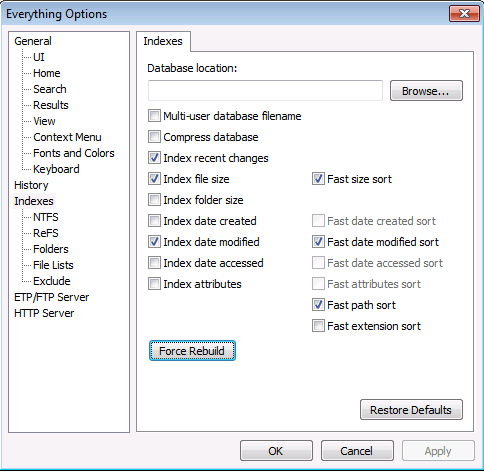
Sometimes the Everything search tool gets out of sync with the actual contents on disk, so this tip from [WayBack] Everything 1.3.1.636b does not “refresh” – voidtools forum will rescan all volumes and update the database:

To rebuild the Everything database:

  • In Everything, from the Tools menu, click Options.
  • Click the Indexes tab.
  • Click Force Rebuild.

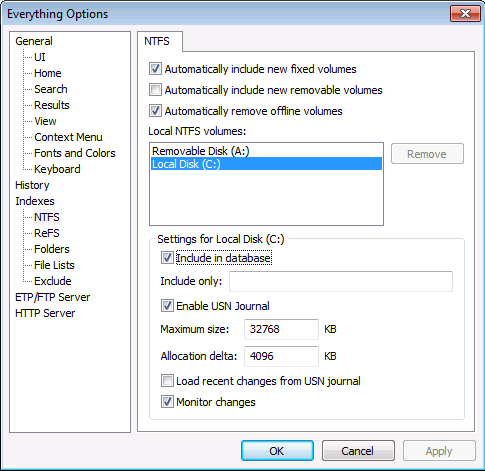
If that fails, you can always remove/add the volumes:

–jeroen

Posted in Everything by VoidTools, Power User, Windows | Leave a Comment »