Archive for the ‘Windows’ Category
Posted by jpluimers on 2019/02/15
Up until Widows 8.1, you could use wuapp to start the Windows Update panel.
For a while, Windows 10 needed a cumbersome language specific workaround described at Windows 10 – language neutral batch file to start Windows.
That stopped working after a few builds, but I forgot to make a note in which build exactly. Already in Windows 10 build 10122, the icon in wucltux.dll, so this might have been shortly after the initial “RTM” (retroactively named 1507).
So for a while, I had this batch file:
Since then I had to maintain too many locales running Windows 10. So here is the batch file:
for /f "delims=" %%A in ('PowerShell -Command "(Get-Culture).Name"') do explorer "%LocalAppData%\Packages\windows.immersivecontrolpanel_cw5n1h2txyewy\LocalState\Indexed\Settings\%%A\AAA_SystemSettings_MusUpdate_UpdateActionButton.settingcontent-ms"
It uses these tricks:
- Set output of a command as a variable (in this case a for loop variable)
- Execute PowerShell script in a .bat file
- PowerShell Get-Culture (which gets a .NET CultureInfo instance)
- CultureInfo.Name property (which has the nl-NL, en-US, etc codes in it)
But now I have extended it to support old and new Windows versions:
if exist %windir%\System32\wuapp.exe (
  %windir%\System32\rundll32.exe url.dll,FileProtocolHandler wuapp.exe
) else (
  %windir%\explorer ms-settings:windowsupdate
)
–jeroen
via: Windows Update Shortcut – Create in Windows 10 – Windows 10 Forums
Posted in Batch-Files, Development, Power User, Scripting, Software Development, Windows | Leave a Comment »
Posted by jpluimers on 2019/02/15
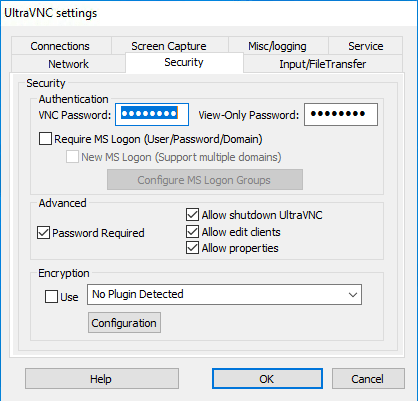 Since I needed to maintain a Windows PC behind a VPN connection via the console (so not via RDP sessions) including installation of software, I needed a (preferably free or open source) solution supporting elevation through UAC (User Account Control).
For a good description of differences between RDP and VNC, see [WayBack] remote desktop – TightVNC while an RDP session is running – Super User by [WayBack] User Canadian Luke.
Of the many non functional search results, the one suggesting running UltraVNC as a service is the one that really worked: [WayBack] If you install UltraVNC as a service, you can see the UAC notifications and press the buttons… VNC on windows 7 with administrator rights – Super User.
- I only needed the “Ultra VNC Server Silent” installation (see screenshot below).
- Run the UltraVNC settings (default location for the settings application is
C:\Program Files\uvnc bvba\UltraVNC\uvnc_settings.exe)
- In the
Security tab, be sure to set good passwords for read/write access (VNC Password) and read-settings (View-Only password)
- In the
Service tab, ensure the service is installed and if it is stop+start the service
- Optionally ensure a TLS or SSH tunnel (as by default ports 5900 and 5800 are unencrypted)
- I need to research this further, as there seems to be a plugin possibility.
Now I can use Screen Sharing on my Mac to access the machine via a VPN over the VNC protocol. Combined with a Wake On LAN feature in the remote network, this works splendid.
Read the rest of this entry »
Posted in Power User, Remote Desktop Protocol/MSTSC/Terminal Services, Windows | Leave a Comment »
Posted by jpluimers on 2019/02/04
Downloads: [WayBack] Softlink 1807114 – c’t magazine
Commands (only execute them from within a Windows PE session!):
- Sometimes the network does not start, so you can use the
wpeutil command to start it: wpeutil initializenetwork; with wpeutil disablefirewall and wpeutil enablefirewall you can manage the firewall.Background information:
- Like regular Windows,
net use can map shares to drive letters over a wired network connection. There is a small thing with anonymous logon, see the below links for more, and you might need a network driver that is not automatically loaded, see the next section.
- [WayBack] samba – Windows 10 PE Unable to map network drive anonymously – Server Fault
- [WayBack] WinPE Network Drivers: Initializing and adding drivers | Microsoft Docs
- Windows PE can load most drivers through the drvload command; ensure you have unpacked your drivers and the driver directory contains the appropriate
.inf file, then run drvload E:\driver\drivername.inf where E:\driver is where your driver files are.Background information:
- The
manage-bde -unlock command can unlock a Bitlocker volume. There are various parameters, but the most used combination is manage-bde -unlock C: -password where C: is the drive you want to unlock and -password (or -pw) causes it to prompt for a password.Background information:
- To get information which kind of boot was performed (BIOS or UEFI):
wpeutil updatebootinfo

regedit
Then browse toHKEY_LOCAL_MACHINE\System\CurrentControlSet\Control and check the value for PEFirmwareType: when 1, it is BIOS, when 2, it is UEFI.
or check out
[WayBack] Boot to UEFI Mode or Legacy BIOS mode | Microsoft Docs and run this small script:
wpeutil UpdateBootInfo for /f "tokens=2* delims= " %%A in ('reg query HKLM\System\CurrentControlSet\Control /v PEFirmwareType') DO SET Firmware=%%B

:: Note: delims is a TAB followed by a space.

if %Firmware%==0x1 echo The PC is booted in BIOS mode.

if %Firmware%==0x2 echo The PC is booted in UEFI mode.
You can execute compact.exe with the /compactos parameter from both a regular Windows installation as well as from Windows PE. From Windows PE, you need to provide an extra parameter: the drive to check.
Regular Windows:
compact.exe /compactos queries if it is enabledcompact.exe /compactos:always enables compactOS
Windows PE:
Compact.exe /CompactOS:Query /WinDir:E:\Windows
Background information:
–jeroen
Posted in Power User, Windows | Leave a Comment »
Posted by jpluimers on 2019/02/01
For my memory:
What’s new in this update:
It’s time for the first update of the year! We appreciate all your comments sent to us through the App Store, in-app feedback and email; and continue focusing on making this app better with each release.
In this version we addressed the following issues:
- Added support for the AVC (420 and 444) codec, available when connecting to current versions of Windows 10.
- In “fit to window mode”, a window refresh now occurs immediately after a resize to ensure that content is rendered at the correct interpolation level.
- Fixed a layout bug that caused feed headers to overlap for some users.
- Cleaned up the Application Preferences UI.
- Polished the Add/Edit Desktop UI.
- Made lots of fit and finish adjustments to the Connection Center tile and list views for desktops and feeds.
Please continue to send us feedback. We read it all and factor it into our planning. If you encounter any errors, you can always contact us via Help > Report an Issue.
NOTE: There is a bug in macOS 10.14.0 and 10.14.1 that can cause the “.com.microsoft.rdc.application-data_SUPPORT/_EXTERNAL_DATA” folder (nested deep inside the ~/Library folder) to consume a large amount of disk space. To resolve this issue, delete the folder contents and upgrade to macOS 10.14.2. Note that a side-effect of deleting the folder contents is that snapshot images assigned to bookmarks will be deleted. These images will be regenerated when reconnecting to the remote PC.
Read the rest of this entry »
Posted in Apple, Mac OS X / OS X / MacOS, Power User, Remote Desktop Protocol/MSTSC/Terminal Services, Windows | Leave a Comment »
Posted by jpluimers on 2019/01/16
With the advent of WebSockets, it looks like TCP tunnels over HTTP/HTTPS are gaining more ground and I need to put some research time in them.
Some old to new links:
CONNECT requests are not supported by many HTTP proxies, especially in larger organisations, so chisel and crowbar have a much bigger chance there.
And of course there is SoftEtherVPN/SoftEtherVPN: A Free Cross-platform Multi-protocol VPN Software. * For support, troubleshooting and feature requests we have http://www.vpnusers.com/. For critical vulnerability please email us. (mail address is on the header.).
However, that is a VPN solution which is much broader than just a single TCP tunnel. You can so similar things with OpenVPN, but over HTTP/HTTPS, also requires CONNECT:
SoftEtherVPN seems to be more versatile though. I blogged about that before, but back then didn’t have needs for it yet. VPN over HTTPS: Ultimate Powerful VPN Connectivity – SoftEther VPN Project.
–jeroen
via: [WayBack] VPN through only http – Server Fault answer by [WayBack] neutrinus
Posted in Communications Development, Development, HTTP, https, Internet protocol suite, Network-and-equipment, OpenVPN, Power User, TCP, VPN, WebSockets, Windows-Http-Proxy | Leave a Comment »
Posted by jpluimers on 2019/01/09
In my search for starting the Windows Credential Manager from the console, I found [WayBack] Credential Manager Shortcut – Create – Windows 7 Help Forums explaining:
%windir%\explorer.exe shell:::{1206F5F1-0569-412C-8FEC-3204630DFB70}
This reminded me of From batch file or shortcut: start Windows Update (via: Windows 7 Help Forums) and batch-file trick: Starting Windows Explorer and selecting a file (“explorer” commandline parameters “/n” “/e” “/select” “/root” “/start” site:microsoft.com).
The odd thing is that some of the GUID shortcuts works fine using the shell::: syntax, but fail with the /e:: syntax, for instance Windows Update until Windows 8.1:
%windir%\explorer.exe shell:::{36eef7db-88ad-4e81-ad49-0e313f0c35f8}

%windir%\explorer.exe /e,::{36eef7db-88ad-4e81-ad49-0e313f0c35f8}
One day I’ll create a table of permutations for various Windows versions and execute options.
For now these links need to suffice:
–jeroen
Posted in Batch-Files, Development, Power User, Scripting, Software Development, Windows, Windows 10, Windows 7, Windows 8, Windows 8.1, Windows 9 | 1 Comment »
Posted by jpluimers on 2019/01/07
After an outrage about AdWare mid last year on the Windows side of things, a new outrage on the Mac side of things at the end of last year caused FileZilla to be removed from the homebrew cask repository.
They do not care that there is a non-bundle version that (right now) does not have adware, as FileZilla could put AdWare in that version at any moment in time.
After trying to update, it will disappear, and you might get an error like this (a full log is below the fold):
"Error: Cask 'filezilla' is unavailable: No Cask with this name exists."
Too bad, as FileZilla was fun while it lasted.
For the dare devils, you might want to try the non-bundled version at fosshub, but please run it through at least VirusTotal before installing, and remember: you have to trust yet another man-in-the-middle!
Uninstalling now that the cask has been removed is described in:
Related:
–jeroen
Read the rest of this entry »
Posted in Apple, Power User, Windows | Leave a Comment »
Posted by jpluimers on 2018/12/31
I’m monitoring quite a bunch of Windows machines with Zabbix.
One of the services I turn off for monitoring is ShellHWDetection as otherwise you get this notification often:
Service "ShellHWDetection" (Shell Hardware Detection) is not running (startup type automatic)
When it happens, it’s always when there is nobody logged on to the machine. But sometimes you do not get this message. I’ve not fully figured out the pattern well, but since the service is associated with auto-play of inserted CD/DVD/USB and other media, I don’t bother too much.
References:
–jeroen
Posted in *nix, Monitoring, Power User, Windows, Zabbix | Leave a Comment »


 The Wiert Corner - irregular stream of stuff