Archive for the ‘Windows’ Category
Posted by jpluimers on 2012/06/20
Somehow many software vendors seem to make it a sport to make it hard to get download URLs.
So here is a bunch of direct download URLs for the (almost new <g>) Visual Studio 2012 RC (formerly and internally known as Visual Studio 11).
There are both ISO files (big, but convenient for offline installation).
Web installers (depending on the choose install options, the total download can be a lot less than the complete ISO, but your system needs to be online during the full installation process).
You can find similar Windows 8 Release Preview download links here (they were distilled from the official download page, which now gives a 404 because of the atdmt link redirect is broken).
I use the x64 and x86 shortcuts for the x64 and x86 ISO links.
The Windows 8 Release Preview Upgrade Assistant also comes in handy.
The above links give a sustained transfer rate here of at least 3 megabit/second.
–jeroen
Posted in .NET, .NET 4.5, C#, C# 5.0, Development, Power User, Software Development, Visual Studio 11, Visual Studio and tools, Windows, Windows 8 | Leave a Comment »
Posted by jpluimers on 2012/06/07
On Windows, the keyboard shortcut [WayBack] Windows-L will lock your workstation and when [WayBack] Fast User Switching is enabled – and when your (corporate) policies allow it – shows your Switch User screen.
First of all, there is [WayBack] TSDISCON (which I found thanks to [WayBack] this thread). It is meant to disconnect a terminal services session, but when you are logged in on the console, it just locks your workstation.
It is small (about 20 kilobyte) and [WayBack] has been there since Windows 2000.
Then there is the [WayBack] LockWorkStation function that does the same.
Lot’s of people think you can call LockWorkStation using rundll32.exe. As per Raymond Chen: [WayBack] (404) Don’t do that: it has a different parameter count and different calling convention than [Archive.is] rundll32.exe expects (note that in Raymond’s article, the last link is broken).
So now you all go upvote [WayBack] the TSDISCON answer and downvote the ruldll32.exe LockWorkStation answers on this [WayBack] SuperUser.com question.
–jeroen
PS: [WayBack] Rob van der Woude published a list of Terminal Server commands including TSDISCON.
Posted in Development, Power User, Scripting, Software Development, Windows, Windows 7, Windows 8, Windows Vista, Windows XP | Leave a Comment »
Posted by jpluimers on 2012/05/14
(Thanks to a “Missed Post” problem on WordPress.com, this one didn’t get posted on the scheduled date. Sorry for any inconvenience)
You need to be administrator to see the output of the “net config server” command.
The inbound/outbound limit is 20:
Running ‘net config server’ at the command-line suggests that Windows 7 can support up to 20 inbound / 20 outbound incomplete connections.
–jeroen
via: Inbound TCP connection limit in Windows 7 – Super User.
Posted in Missed Schedule, Power User, SocialMedia, Windows, Windows 7, WordPress | Leave a Comment »
Posted by jpluimers on 2012/05/14
A few tools to prevent your screensaver to run:
Windows (most seem to work with Windows 7 too)
Note: on Windows 7 this will not prevent the inactivity timer on an RDP connection!
Mac OS X
–jeroen
via: windows xp – How to prevent screensaver – Super User.
Note: no need to write it yourself :)

Posted in Apple, Mac, Mac OS X / OS X / MacOS, Mac OS X 10.5 Leopard, Mac OS X 10.6 Snow Leopard, Mac OS X 10.7 Lion, Power User, Windows, Windows 7, Windows 8, Windows Vista, Windows XP | Leave a Comment »
Posted by jpluimers on 2012/05/11
(Thanks to a “Missed Post” problem on WordPress.com, this one didn’t get posted on the scheduled date. Sorry for any inconvenience)
You can fix the “temporary profile” in Windows 7 if you have access to the registry.
So it totally depends on how tight security at your clients is, and how fast their alternative processes are…
–jeroen
via: How to Fix Temporary Profile in Windows 7.
Posted in Missed Schedule, Power User, SocialMedia, Windows, Windows 7, WordPress | Leave a Comment »
Posted by jpluimers on 2012/05/11
The “route print” command in Windows will show you some “On-link” entries in the gateway column. This is from Windows Vista and up. Before that, you would see “127.0.0.1”.
While creating Windows Vista and Windows Server 2008, Microsoft built a “Next Generation TCP/IP Stack” (Wikipedia link) that – apart from adding IPv6 – added many new features and performance improvements.
Since traffic routable through the local machine can have multiple IPv4 and IPv6 addresses, it is not called ” 127.0.0.1″ any more, but “On-link” as the answers to the windows 7 – What does “On-link” mean on the result of “rout print” command? on SuperUser nicely point out:
They are addresses that can be resolved locally. They don’t need a gateway because they dont need to be routed.
and this:
Yep, the other three answers are correct: it’s just a route thats directly reachable the NIC is in direct contact with it; on the same subnet. To explain a little further though: by contrast, the routes that have a gateway IP listed must be contacted through that gateway.
Note that sometimes the new TCP/IP stack needs some arm wrestling in order to have it do what you want (for instance to have it honour TCP metrics).
Note that the “default gateway” line is also missing, as it is in the 0.0.0.0 network destination.
A few examples of what route print shows: Read the rest of this entry »
Posted in Power User, Windows, Windows 7, Windows 8, Windows Vista, Windows XP | Leave a Comment »
Posted by jpluimers on 2012/05/09
A few notes on TLIST.EXE:
- Lots and lots of articles mention it.
- Not all versions of TLIST.EXE will work on all Windows versions (I found a 40k version 3.51 at a client that clearly hangs on their XP systems, where the version 3.50 works fine but is more limited).
- It is hard to find an actual download.
This is what I downloaded as I prefer ISO files prefer web-installers:
http://download.microsoft.com/download/4/A/2/4A25C7D5-EFBE-4182-B6A9-AE6850409A78/GRMWDK_EN_7600_1.ISO
I got there through these pages (in reverse chronological order)
–jeroen
Posted in Debugging, Development, Power User, Software Development, Windows, Windows 7, Windows Vista, Windows XP | 1 Comment »
Posted by jpluimers on 2012/05/08
Some clients generate their VPN connection settings using the CMAK (Connection Manager Administration Kit). Apart from the cumbersome way to support both x86 and x64 at the same time, they usually add in some kind of time-out feature, and often route the whole 10.0.0.0/8 network over the VPN to just host a couple of dozen machines. Having done most of my VPN connections by hand, and automating them using rasdial to dial these from the commandline, I also found out the hard way that you cannot use rasdial for CMAK generated VPN connections: it will give you the error “This function is not supported on this system.”. The funny thing is: you can disconnect using rasdial. Luckily, the far less well documented rasphonedoes work for dialing. The batch file below uses a few tricks, and you can set the parameters in the top of the batch file.
Have fun with it!
Posted in Development, Power User, Scripting, Software Development, Windows, Windows 7 | 1 Comment »
Posted by jpluimers on 2012/04/23
Someone forgot to kick the VDI instances in the farm to perform an automatic reboot.
Patch Tuesdays only work when you make sure that mandatory reboots are actually being done.
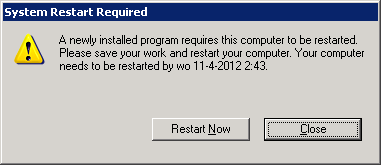
 That also prevents users of getting confused by these System Modal dialogs:
[System Restart Required]

A newly installed program requires this computer to be restarted.

Please save your work and restart your computer. Your computer needs to be restarted by wo 11-4-2012 2:43.

[Restart Now] [Close]
 and
and
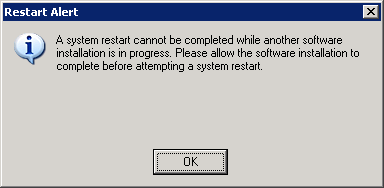
[Restart Alert]

A system restart cannot be completed while another software installation is in progress. Please allow the software installation to complete before attempting a system restart.

[OK]
–jeroen
Posted in Power User, Windows, Windows XP | Leave a Comment »
Posted by jpluimers on 2012/04/20
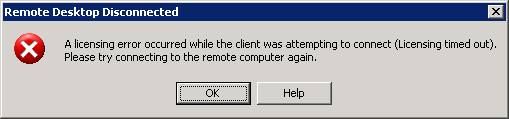
The VDI recently it is driving me nuts with sudden disconnects and messages like these after you have been connected for a couple of hours.
It all looks like there is some sort of Connectra thing in the middle that does deep packet inspection and randomly kicks out RDP or PCoIP sessions it doesn’t like, then doesn’t allow any new sessions to come in.
If I get a connection at all, now I always get a fresh VM, which – because they all are single core – take between 2 and 3 hours of getting below 100% CPU usage.
CcmExec.exe, SMSCliUI.exe, and the svchost.exe instances for RpcSs and BITS hog the CPU scanning for updates and software installs for about about 25% of a working day.
Boy I wish there was something I could do about it.

---------------------------

Remote Desktop Disconnected

---------------------------

A licensing error occurred while the client was attempting to connect (Licensing timed out).

Please try connecting to the remote computer again.

---------------------------

OK Help

---------------------------
Read the rest of this entry »
Posted in Power User, Windows, Windows XP | Leave a Comment »




 The Wiert Corner - irregular stream of stuff