


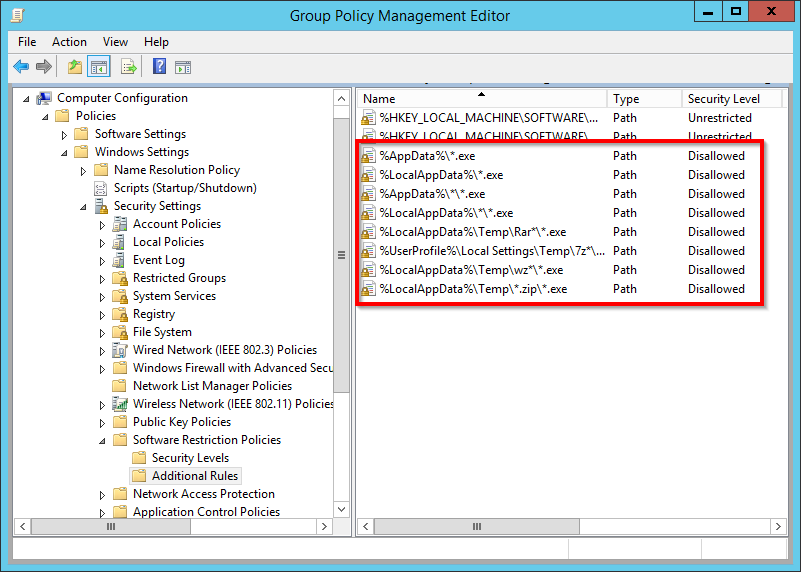
Interesting: [Ardhive.is] Use Software Restriction Policies to block viruses and malware | Branko Vucinec
via: [WayBack] Ransomware treft Tweede Kamer – Malware versleutelt overheidsbestanden – IT Pro – Nieuws – Tweakers
–jeroen
Posted by jpluimers on 2018/06/25
Interesting: [Ardhive.is] Use Software Restriction Policies to block viruses and malware | Branko Vucinec
via: [WayBack] Ransomware treft Tweede Kamer – Malware versleutelt overheidsbestanden – IT Pro – Nieuws – Tweakers
–jeroen

Posted in Microsoft Surface on Windows 7, Power User, Windows, Windows 10, Windows 7, Windows Server 2003, Windows Server 2003 R2, Windows Server 2008, Windows Server 2008 R2, Windows Server 2012, Windows Server 2012 R2, Windows Server 2016, Windows Vista, Windows XP | Leave a Comment »
Posted by jpluimers on 2018/05/28
As of Windows 10 fall creators update, the WDAGUtilityAccount was added, so the default accounts on such a machine are these:
Then there is one account for the user that installed the system (which is named by that user).
Windows Defender Application Guard is the reason for WDAGUtilityAccount as explained here:
–jeroen

Posted in Power User, Windows, Windows 10 | Leave a Comment »
Posted by jpluimers on 2018/05/21
[WayBack] Microsoft is gestopt met gratis Windows 10-upgrade via toegankelijkheidspagina – Computer – Nieuws – Tweakers
Licenses: Retail, OEM, ODM, VLK.
[WayBack] Activation in Windows 10 – Windows Help
Notes
- Microsoft doesn’t keep a record of purchased product software keys.
- For help finding your product key, see Find your Windows product key.
- If you don’t have a product key, you can purchase a Windows 10 license after installation finishes. Select the Start button > Settings > Update & Security > Activation . Then select Go to Store to go to the Windows Store, where you can purchase a Windows 10 license.
–jeroen
Posted in Power User, Windows, Windows 10 | Leave a Comment »
Posted by jpluimers on 2018/04/21
Does anyone know how to disable Edge popping up with a failed link www.msftconnecttest.com/redirect on machines blocked by a router?
This happens on the PC running Windows 10 Pro N (winver shows 1709 build 16299.371) that is not allowed to do any internet access.
Related: [WayBack] How to Find Out Which Build and Version of Windows 10 You Have | ilicomm
Later:
This seems to be intended as per these links:
This can happen on Windows 8 and up when Windows thinks there is a partial network connection and a logon to a proxy or captive portal might solve the solution.
Allowing these in the proxy for port 80 solves the issue:
*.msftncsi.com*.msftconnecttest.com--jeroen
Posted in Captive Portal, Internet, Power User, Windows, Windows 10 | Leave a Comment »
Posted by jpluimers on 2018/04/20
A while ago I had an Intel Matrix RAID-1 pair of drives that got broken. One of them turned “red” and – since both drives were only a few serial numbers apart – the other was giving issues the moment I tried fiddling with it.
These actions failed:
What had succeeded was a regular Windows backup (a non-image one).
This is what I finally did to get it working again:
–jeroen
References:
Posted in NTFS, Power User, Windows, Windows 10 | Leave a Comment »
Posted by jpluimers on 2018/03/21
About a year ago, [WayBack] Rumors of Cmd’s death have been greatly exaggerated – Windows Command Line Tools For Developers got published as a response to confusing posts like these:
But I still think it’s a wise idea to switch away from the Cmd and to PowerShell as with PowerShell you get way more consistent language features, far better documentation, truckloads of new features (of which I like the object pipeline and .NET interoperability most) and far fewer quirks.
It’s time as well, as by now, Windows 7 has been EOL for a while, and Windows 8.x is in extended support: [WayBack] Windows lifecycle fact sheet – Windows Help:
Client operating systems Latest update or service pack End of mainstream support End of extended support Windows XP Service Pack 3 April 14, 2009 April 8, 2014 Windows Vista Service Pack 2 April 10, 2012 April 11, 2017 Windows 7* Service Pack 1 January 13, 2015 January 14, 2020 Windows 8 Windows 8.1 January 9, 2018 January 10, 2023 Windows 10, released in July 2015** N/A October 13, 2020 October 14, 2025
Which means the PowerShell version baseline on supported Windows versions is at least 4.0: [Archive.is] windows 10 powershell version – Google Search and [WayBack] PowerShell versions and their Windows version – 4sysops
PowerShell and Windows versions ^
PowerShell Version Release Date Default Windows Versions PowerShell 2.0 October 2009 Windows 7 Windows Server 2008 R2 (**) PowerShell 3.0 September 2012 Windows 8 Windows Server 2012 PowerShell 4.0 October 2013 Windows 8.1 Windows Server 2012 R2 PowerShell 5.0 April 2014 (***) Windows 10
So try PowerShell now. You won’t regret it.
–jeroen
via: [WayBack] Very interesting clear-up post and comments on CMD, command.com, PowerShell in past and future DOS/Windows versions and Unix shells altogether. – Ilya S – Google+
Posted in Batch-Files, CommandLine, Development, Power User, PowerShell, Scripting, Software Development, Windows, Windows 10, Windows 7, Windows 8, Windows 8.1, Windows Server 2012, Windows Server 2012 R2, Windows Server 2016 | Leave a Comment »
Posted by jpluimers on 2018/03/13
Had this happen on a Dutch Windows 10 system today, a retry did not work, but a manual reboot solved it [WayBack] Windows 10: Update error 0x8024a112 | Born’s Tech and Windows World.

–jeroen


Posted in Power User, Windows, Windows 10 | Leave a Comment »
Posted by jpluimers on 2018/03/09
Windows 10 (and 8) include a new virtual memory file named swapfile.sys. It’s stored in your system drive, along with the pagefile.sys and hiberfil.sys. But why does Windows need both a swap file and a page file?
…
In summary, the swapfile — swapfile.sys — is currently used for swapping out Microsoft’s new style of app. Microsoft has called these universal apps, Windows Store apps, Metro apps, Modern apps, Windows 8 apps, Windows 8-style UI apps, and other things at various points.
via:
Posted in Power User, Windows, Windows 10, Windows 8, Windows 8.1, Windows 9 | Leave a Comment »
Posted by jpluimers on 2018/02/26
This seems to work on other Windows versions as well: [WayBack] Windows 10 auto-logout on <5 minutes of inactivity – Super User
Posted in Power User, Windows, Windows 10, Windows 7, Windows 8, Windows 8.1, Windows Server 2008, Windows Server 2008 R2, Windows Server 2012, Windows Server 2012 R2, Windows Server 2016 | Leave a Comment »
Posted by jpluimers on 2018/02/05
I often wonder why do they make changing the network location more difficult in each Windows version.
Anyway: for Windows 10, the secpol.msc way still works even though by default you now need to use a command prompt or the Windows-R key-combo to start it as typing it in the “Ask me Anything” search often gets you to bing (the search is too slow to figure out it is available locally even if you’re running a machine with SSD).
So from [WayBack] Top 10: Windows Firewall Netsh Commands (via: Windows Server content from Windows IT Pro), this still works in Windows 10:
a secpol.msc way that is easy:
- Press Win+R, then type
secpol.msc- Click on “Network List Manager Policies”
- Double-click on your network
- Optionally give your network another name
- Click on “Tab Network Location”
- Set “Location Type” to “Private”
Go back to Network and Sharing Center to check the result.
In Windows 10 there are half a dozen other ways: [WayBack] Network Location – Set to Private or Public in Windows 10 – Windows 10 Tutorials
- Option One: To Change a Network Location in Settings app
- Option Two: To Change a Network Location in Registry Editor
- Option Three: To Change a Network Location Local Security Policy
- Option Four: To Change a Network Location in PowerShell
- Option Five: To Change Network Location of Current Network Connection in PowerShell
- Option Six: To Change Network Location of Current Network Connection using a VBS file
I like this PowerShell script too via [WayBack] networking – How do I force Windows 10 to see a network as private? – Super User:
## Change NetWorkConnection Category to Private
#Requires -RunasAdministrator

Get-NetConnectionProfile |
  Where{ $_.NetWorkCategory -ne 'Private'} |
  ForEach {
    $_
    $_|Set-NetConnectionProfile -NetWorkCategory Private -Confirm
  }
–jeroen
Posted in Power User, Windows, Windows 10, Windows 7, Windows 8, Windows 8.1 | Leave a Comment »
 The Wiert Corner - irregular stream of stuff