The Wiert Corner – irregular stream of stuff

Jeroen W. Pluimers on .NET, C#, Delphi, databases, and personal interests

  • My badges

  • Twitter Updates

  • My Flickr Stream

  • Pages

  • All categories

  • Enter your email address to subscribe to this blog and receive notifications of new posts by email.

    Join 1,860 other subscribers

Archive for the ‘Windows Terminal’ Category

I was today years old when I found there is a shortcut to switch to the Terminal tab in Visual Studio Code

Posted by jpluimers on 2025/03/12

Boy, I always to the Ctrl+Shift+Space on Microsoft Windows (or on MacOS Command+Shift+Space) detour to switch to the Terminal tab in Visual Studio Code

So I was amazed to find the shortcut inside the first bullet in the Google Search quote of the first result at [Wayback/Archive] vscode terminal open new terminal – Recherche Google:

Read the rest of this entry »

Posted in .NET, Apple, Development, Keyboards and Keyboard Shortcuts, KVM keyboard/video/mouse, Mac OS X / OS X / MacOS, Power User, Software Development, Terminal, vscode Visual Studio Code, Windows, Windows Terminal | Tagged: | Leave a Comment »

Installing the Microsoft Store version of Windows Terminal via the winget command-line

Posted by jpluimers on 2023/05/26

In the continuing series of Chocolatey/Scoop/winget related posts, this one is about Windows Terminal.

There are basically two ultimate sources you can install it from:

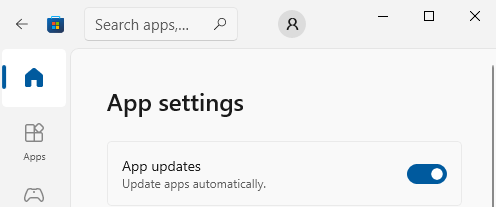
You can configure the Microsoft Store to automatically install updates as per [Wayback/Archive] Turn on automatic app updates (on my system this was the default):

Microsoft Store - Auto-Updates is turned on by default

Microsoft Store – Auto-Updates is turned on by default

  1. Select the Start ⊞ screen, then select Microsoft Store.
  2. In Microsoft Store at the upper right, select the account menu (the three dots) and then select Settings.
  3. Under App updates, set Update apps automatically to On.

As a backgrounder, here some articles on Windows Terminal, ConPTY and the Windows Console from the [Wayback/Archive] DevBlogs – Microsoft Developer Blogs:

  1. [Wayback/Archive] Windows Command-Line: Backgrounder | Windows Command Line Tools For Developers
  2. [Wayback/Archive] Windows Command-Line: The Evolution of the Windows Command-Line | Windows Command Line
  3. [Wayback/Archive] Windows Command-Line: Inside the Windows Console | Windows Command Line
  4. [Wayback/Archive] Windows Command-Line: Introducing the Windows Pseudo Console (ConPTY) | Windows Command Line
  5. [Wayback/Archive] Windows Command-Line: Unicode and UTF-8 Output Text Buffer | Windows Command Line

More on (pseudo)terminals in general containing [Wayback/Archive] “ConPTY” – Search results – Wikipedia:

More on using the Windows Terminal:

My related blog posts:

–jeroen

Posted in Chocolatey, ConPTY, Microsoft Store, Power User, Scoop, Windows, Windows Terminal, winget | Leave a Comment »

Some links on the Visual Studio Code terminal and known issues

Posted by jpluimers on 2022/12/08

For my link archive: some links related to the Visual Studio Code built-in terminal and its’ known issues.

All of the above links started when I looked for [Wayback/Archive] vscode terminal wikipedia – Google Search.

–jeroen

Posted in Console (command prompt window), Development, Power User, Software Development, vscode Visual Studio Code, Windows, Windows Terminal | Leave a Comment »

Installing vscode extensions from within the Visual Studio Code terminal was way easier than I anticipated

Posted by jpluimers on 2022/11/09

Having missed quite a lot of Visual Studio Code releases during my metastasised rectum cancer treatment and recovery, it had become both very mature, but also very reliant of having the right extensions installed.

In that period, the extension marketplace grew remarkably, so I really wanted an easy way to install them from within the inside vscode integrated Windows Terminal.

A while ago I wrote How can you export the Visual Studio Code extension list? (via: Stack Overflow), which generated a small script with code --install-extension <extension-name> lines so I could executed those from the command-line for Visual Studio installations on new machines.

Boy was I surprised that you can just as well execute them from the [Wayback/Archive] Integrated Terminal in Visual Studio Code as well (:

When doing so, the Visual Studio Code instance around that Integrated Terminal will automatically pick up the new extension.

I found that with a [Wayback/Archive] vscode install extension from within visual studio code console – Google Search and bumping in the video also embedded below the signature: [Archive] VS Code tips — Installing extensions from the command line using –install-extension – YouTube.

The video also showed that the installation syntax can also include the version number like this:

Read the rest of this entry »

Posted in Console (command prompt window), Development, Power User, Software Development, vscode Visual Studio Code, Windows, Windows 10, Windows Terminal | Leave a Comment »

On my reading list: Windows Console and PTY

Posted by jpluimers on 2022/10/25

With the rise of *nix tools and infrastructure on Windows (including, but certainly not limited to Visual Studio Code and Windows Subsystem for Linux), I need to get acquainted to the new ways these interface to the Windows Console.

Since Windows Console is from the (now obsolete) UCS-2 days, so it is not even fully Unicode aware, and has trouble with UTF-8, UTF-16.

So here are some links for my reading list:

–jeroen

Read the rest of this entry »

Posted in *nix, *nix-tools, CommandLine, ConPTY, Console (command prompt window), Development, Linux, Power User, Software Development, Windows, Windows 10, Windows 11, Windows Development, Windows Terminal, WSL Windows Subsystem for Linux | Leave a Comment »