The Wiert Corner – irregular stream of stuff

Jeroen W. Pluimers on .NET, C#, Delphi, databases, and personal interests

  • My badges

  • Twitter Updates

  • My Flickr Stream

  • Pages

  • All categories

  • Enter your email address to subscribe to this blog and receive notifications of new posts by email.

    Join 1,854 other subscribers

Factory reset a MikroTik hEX PoE RB960PGS using the reset button

Posted by jpluimers on 2021/08/02

[WayBack] Manual:Reset – MikroTik Wiki:

 unplug the device from power

2) press and hold the button right after applying power

Note: hold the button for 5 seconds (USER LED will start flashing)

3) release the button to clear configuration.

Icon-note.png Note: If you wait until LED stops flashing, and only then release the button – this will instead launch Netinstall mode, to reinstall RouterOS.

Initial configuration

(see also [WayBack] Manual:First time startup – MikroTik Wiki)

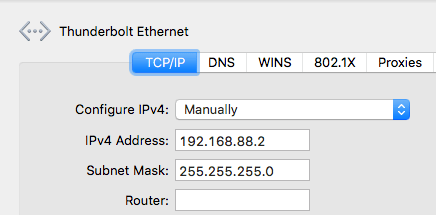
  1. Connect your machine to port 1 on the Mikrotik hEX PoE RB960PGS (after the reset, this port will have IPv4 address 192.168.88.2 with netmask 255.255.255.0)
  2. Ensure your local machine to IPv4 address 192.168.88.2 with netmask 255.255.255.0 (otherwise WinBox might not see the router, not even in discovery mode):
  3. Have WinBox auto discover it:

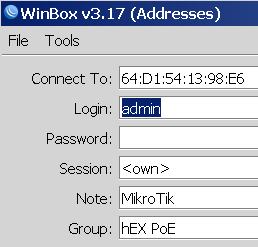
  4. Connect with user admin and no password:


  5. Configure your Mikrotik hEX PoE RB960PGS as router or switch

For switch, I prefer a setting like this (the bold portions are different from the default configuration):

/interface bridge
add admin-mac=64:D1:54:13:98:E6 auto-mac=no comment=defconf name=bridgeLocal
/interface wireless security-profiles
set [ find default=yes ] supplicant-identity=MikroTik
/ip hotspot profile
set [ find default=yes ] html-directory=flash/hotspot
/interface bridge port
add bridge=bridgeLocal comment=defconf interface=ether1
add bridge=bridgeLocal comment=defconf interface=ether2
add bridge=bridgeLocal comment=defconf interface=ether3
add bridge=bridgeLocal comment=defconf interface=ether4
add bridge=bridgeLocal comment=defconf interface=ether5
add bridge=bridgeLocal comment=defconf interface=sfp1
/ip dhcp-client
add comment=defconf dhcp-options=hostname,clientid disabled=no interface=bridgeLocal
/ip dns static
add address=192.168.88.1 name=router.lan
/system clock
set time-zone-name=Europe/Amsterdam
/system identity
set name="RB960PGS <<location-name>>"
/system ntp client
set enabled=yes server-dns-names=0.pool.ntp.org,1.pool.ntp.org,2.pool.ntp.org,3.pool.ntp.org

–jeroen

Posted in Internet, MikroTik, Power User, routers | Leave a Comment »

Geurthee nr. 5 theebuiltjes – De Pelikaan Zutphen – Koffie/theespecialist sinds 1816

Posted by jpluimers on 2021/08/02

[WayBack] Geurthee nr. 5 theebuiltjes – De Pelikaan Zutphen – Koffie/theespecialist sinds 1816

Een huisgemelangeerde zwarte thee met een gerookt tintje. Perfecte keuze als u van Earl Grey houdt en opzoek bent naar een extra smaaksensatie

Onze Geurthee nr. 5 is een gemelangeerde zwarte thee. Naast dat wij onze Geurthee nr. 2 hiervoor gebruiken, zitten er nog meer theesoorten in verwerkt zoals Lapsang Souchong. Lapsang Souchong is een zwarte theesoort uit China en is erg sterk van smaak. Deze thee wordt in bamboemanden gedroogd boven brandend naald- of cypressenhout. Dit zorgt ervoor dat er zich een sterke rooksmaak ontwikkeld. Ook is de Geurthee nr. 5 sterk gearomatiseerd met Bergamot-olie. Bergamot is een citrusvrucht die wordt gebruikt als smaakmaker in Earl Grey. Door al deze ingrediënten met elkaar te melangeren, ontstaat er een heerlijke Earl Grey met een gerookt tintje

____

Theekopje Pelikaan   ZETADVIES (1 kop): 1 zakje, water opschenken (95°C -100°C), 2-3 minuten laten trekken. Één zakje kan zelfs voor een hele pot gebruikt worden!

____

15 piramide theebuiltjes

Via [WayBack] Frederike op Twitter: “Dan vind jij Geurthee 5 van @pelikaankoffie vast ook lekker.… “

–jeroen

Read the rest of this entry »

Posted in LifeHacker, Power User | Leave a Comment »

Create & use pivot tables – Computer – Docs Editors Help

Posted by jpluimers on 2021/08/02

This was way easier than I thought it would be; it’s just that the meny items are different from Excel: [WayBack] Create & use pivot tables – Computer – Docs Editors Help.

The page has much more, but these are the initial steps:

Add or edit pivot tables

  1. On your computer, open a spreadsheet in Google Sheets.
  2. Select the cells with source data you want to use. Important: Each column needs a header.
  3. In the menu at the top, click Data and then Pivot table. Click the pivot table sheet, if it’s not already open.
  4. In the side panel, next to “Rows” or “Columns,” click Add, then choose a value.
    • Note: Sometimes, you’ll see recommended pivot tables based on the data you choose. To add a pivot table, under “Suggested,” choose a pivot table.
  5. In the side panel, next to “Values,” click Add, then choose the value you want to see over your rows or columns.
  6. You can change how your data is listed, sorted, summarized, or filtered. Next to what you want to change, click the Down Arrow Down Arrow.

–jeroen

Read the rest of this entry »

Posted in Google, GoogleDocs, GoogleSheets, Power User | Leave a Comment »

Abel Wang, a true legend, is gone.

Posted by jpluimers on 2021/07/30

Hopefully my response to his spouse was appropriate enough:

Thanks for this tribute. It’s amazing, lovely, wonderful, all at the same time.

Abel is one of the persons that I would have loved to meet in real life.

I’m forever grateful that Scott Hanselman got me into touch with Abel Wang. Abel informed and motivated me. After that we stayed in touch every now and then about being ill and how to deal with that.

I had to contemplate for a while as this hit me harder than I thought, especially given the “always positive Abel” he is in my – and many others’ – minds.

So to all his close ones: remember the positivity and try to be like that. Abel expects that from us.

Glad I could send him some good thoughts last week, and miss him already.

Related twitter links (Image by Donavan Brown) as my memory still is not what it used to be:

Read the rest of this entry »

Posted in About, Facebook, Personal, SocialMedia, Twitter | Leave a Comment »

How to auto start virtual machines in Windows 10 Hyper V – YouTube

Posted by jpluimers on 2021/07/30

One day I will need this: How to auto start virtual machines in Windows 10 Hyper V – YouTube.

Via [WayBack] windows 10 automatically start a vm – Google Search.

Requires Hyper-V to be installed, so these should be useful:

–jeroen

Read the rest of this entry »

Posted in Hyper-V, Power User, Virtualization, Windows, Windows 10 | Leave a Comment »

Some links on getting MacOS network interfaces and DHCP information

Posted by jpluimers on 2021/07/30

One day I’ll put this in a script that shows all DHCP information for all network interfaces.

For now some links I will need when writing that script.

Many of the below commands are also in [WayBack/Archive] Command-Line Tools: The Missing Manpages (Mac OS X for Unix Geeks).

Read the rest of this entry »

Posted in Apple, Mac OS X / OS X / MacOS, macOS 10.13 High Sierra, Power User | Leave a Comment »

Is warshipping still a thing?

Posted by jpluimers on 2021/07/30

Reminder to self to see if warshipping is still a thing, and in which regions.

Related:

Via:

–jeroen

Read the rest of this entry »

Posted in Power User, Security | Leave a Comment »

Methods on enums by using extension methods: Unity sample MonoBehaviour explaining how to associate simple strings with enums.

Posted by jpluimers on 2021/07/29

Reminder to self (as I keep forgetting how versatile extension methods can be):

[WayBack] Mark Pintar sur Twitter : “The nice thing about extension methods is one can add it to most types. Even works of int, float and other primitive types… “

An interesting way of allowing methods on enumerated types is by using extension methods: [WayBack] Unity sample MonoBehaviour explaining how to associate simple strings with enums. · GitHub.

A more elaborate example from [WayBack] NoraGrace-Chess/Position.cs at master · ericoldre/NoraGrace-Chess · GitHub is below the fold.

Via:


using System;
using System.ComponentModel;
using UnityEngine;

public class EnumDescription : MonoBehaviour
{
    public enum PlayerState
    {
        Unknown,
        [Description("Alive and kicking")]
        Alive,
        [Description("Dead as a duck")]
        Dead
    }

    // Start is called before the first frame update
    void Start()
    {
        var state = PlayerState.Dead;
        Debug.Log("Player is " + state.GetDescription());
    }
}

public static class EnumExtensions
{
    public static string GetDescription(this Enum value)
    {
        var type = value.GetType();
        var name = Enum.GetName(type, value);
        if (name != null)
        {
            var field = type.GetField(name);
            if (field != null)
            {
                if (Attribute.GetCustomAttribute(field,
                  typeof(DescriptionAttribute)) is DescriptionAttribute attr)
                    return attr.Description;
            }
        }
        return name;
    }
}

Read the rest of this entry »

Posted in .NET, C#, Development, Software Development | Leave a Comment »

Listing information on all active interfaces on MacOS part 1: getting the active interface names

Posted by jpluimers on 2021/07/29

Listing Listing information on all active interfaces on MacOS is a process involving multiple pieces, which then can be combined together.

Listing all active interfaces try 1

This involves both the -l (list with optional criteria) and -u parameter (the up criterion) as per excerpts from the [Archive.is] ifconfig(8) [osx man page] / [WayBack] ifconfig Man Page – macOS – SS64.com:

NAME
     ifconfig -- configure network interface parameters

SYNOPSIS
     ...
     ifconfig -l [-d] [-u] [address_family]
     ...

DESCRIPTION
     The ifconfig utility is used to assign an address to a network interface and/or configure network interface parameters.

     The following options are available:

     ...

     address_family
             Specify the address family which affects interpretation of the remaining parameters.  Since an interface can receive transmissions
             in differing protocols with different naming schemes, specifying the address family is recommended.  The address or protocol fami-
             lies currently supported are ``inet'', ``inet6'', and ``link''.  The default is ``inet''.  ``ether'' and ``lladdr'' are synonyms
             for ``link''.

     ...

     The -l flag may be used to list all available interfaces on the system, with no other additional information.  Use of this flag is mutually
     exclusive with all other flags and commands, except for -d (only list interfaces that are down) and -u (only list interfaces that are up).

Example:

ifconfig -l -u

Each interface on one line:

ifconfig -l -u | xargs -n1 echo

The problem is that on my system, it also lists bridges as active, whereas they are not:

# ifconfig -l -u | xargs -n1 echo
lo0
en1
en2
en0
p2p0
awdl0
bridge0
utun0
en10

# ifconfig bridge0
bridge0: flags=8863<UP,BROADCAST,SMART,RUNNING,SIMPLEX,MULTICAST> mtu 1500
    options=63<RXCSUM,TXCSUM,TSO4,TSO6>
    ether 6a:00:02:9a:23:f0 
    Configuration:
        id 0:0:0:0:0:0 priority 0 hellotime 0 fwddelay 0
        maxage 0 holdcnt 0 proto stp maxaddr 100 timeout 1200
        root id 0:0:0:0:0:0 priority 0 ifcost 0 port 0
        ipfilter disabled flags 0x2
    member: en1 flags=3<LEARNING,DISCOVER>
            ifmaxaddr 0 port 5 priority 0 path cost 0
    member: en2 flags=3<LEARNING,DISCOVER>
            ifmaxaddr 0 port 6 priority 0 path cost 0
    Address cache:
    nd6 options=201<PERFORMNUD,DAD>
    media: 
    status: inactive

So this is where the MacOS and BSD documentation is inaccurate.

Interface types

The above interfaces are many more than just ethernet or WiFi interfaces; there is a list at [WayBack] macos – What are en0, en1, p2p, and so on, that are displayed after executing ifconfig? – Stack Overflow by [WayBackmcint:

In arbitrary order of my familarity / widespread relevance:

lo0 is loopback.

en0 at one point “ethernet”, now is WiFi (and I have no idea what extra en1 or en2 are used for).

fw0 is the FireWire network interface.

stf0 is an IPv6 to IPv4 tunnel interface to support the transition from IPv4 to the IPv6 standard.

gif0 is a more generic tunneling interface [46]-to-[46].

awdl0 is Apple Wireless Direct Link

p2p0 is related to AWDL features. Either as an old version, or virtual interface with different semantics than awdl.

many VPNs will add additional devices, often “utun#” or “utap#” following TUN/TAP (L3/L2)virtual networking devices.

More on AWDL at [WayBack] ios – What is AWDL (Apple Wireless Direct Link) and how does it work? – Stack Overflow.

Listing all active interfaces try 2

Read the rest of this entry »

Posted in *nix, *nix-tools, Apple, bash, Development, ifconfig, Mac OS X / OS X / MacOS, Power User, Scripting, Software Development | Leave a Comment »

Delphi run-time errors

Posted by jpluimers on 2021/07/29

Since I always forget where to get the full list: there is none in the documentation. Only parts.

Usually the mapping is from run-time errors to exceptions:

In addition, exceptions are converted to run-time errors when the exception handling mechanism in the SysUtils unit is not up.

This can happen early in start-up, or late un shut-down of an application.

The one I encountered most is the runtime error 216 during shutdown: it is an Access Violation (EAccessViolation).

Run-time errors (not changed since Delphi 2007)

Read the rest of this entry »

Posted in Delphi, Development, Software Development | Leave a Comment »