Posted by jpluimers on 2021/01/27
On one of the sites, when having some Delphi package registration issues, the standard measure was to delete the complete Package Cache subtree (like HKEY_CURRENT_USER\Software\Embarcadero\BDS\17.0\Package Cache).
Since there is so little information about it, it is on my list of things to eventually research.
Some links I already found, but had no time for to fully read:
Unrelated: You should not delete the folder C:\ProgramData\Package Cache\? – Super User, but matched my initial delphi registry “Package Cache” – Google Search.
Yup, I did it: I added an “Undocumented Delphi” category.
–jeroen
Posted in Delphi, Development, Software Development, Undocumented Delphi | Leave a Comment »
Posted by jpluimers on 2021/01/26
TL;DR
The examples in this post are specific for NUnit but, you can apply this pattern for safely running unit tests in parallel to any unit test framework that supports parallel execution.
To safely run tests in parallel, do the following:
- Mark your test fixtures with the
Parallelizable attribute and set the parallel scope to ParallelScope.All.
- Create a private class called
TestScope and implement IDisposable.
- Put all startup and clean-up logic inside the
TestScope constructor and .Dispose() method respectively.
- Wrap your test code in a
using (var scope = new TestScope) { ... } block
From [WayBack] Run your unit tests in parallel with NUnit, which also covers:
- Background (on why you might want this)
- How to safely run tests in parallel
- Maximizing parallel execution with Visual Studio
- Maximizing parallel execution with Azure DevOps
Via: [WayBack] Sander Aernouts on Twitter: “Run unit tests in parallel with NUnit without having one test interfere with another test. https://t.co/FC0fNocGov”
–jeroen
Posted in .NET, Development, Software Development | Leave a Comment »
Posted by jpluimers on 2021/01/26
[WayBack] datetime – Determine Whether Two Date Ranges Overlap – Stack Overflow answer by Charles Bretana with input from and .
TL;DR (proof is in the post)
(StartA <= EndB) and (EndA >= StartB)
Alternative (also from the post):
DateRangesOverlap = max(StartA,StartB) < min(EndA,EndB)
It gets complicated when the date boundaries for A and B can be out of order.
The post also covers that.
Related:
–jeroen
Posted in Development, Software Development | Leave a Comment »
Posted by jpluimers on 2021/01/26
Every once in a while you want to have a Delphi Watch of a field inside an object (say an object of type TContext), except that the field has no value yet, but eventually will point to another object (say an object of type TUser).
However, the original object will go out of scope, so you need to employ a few tricks.
First of all, you get the address of that field:
@(Context().FCurrentUser) = $7EF6F624
Then you watch the content of that field:
TUser(PPointer($7EF6F624)^),r = nil
To get to this trick, you have to remember:
- The contents of address
$7EF6F624 is pointer (at first nil) to a TUser.
- You get to the contents of the address
$7EF6F624 by using PPointer($7EF6F624)^.
- Then you cast it to the object you want with the
TUser(...) cast.
–jeroen
Posted in Delphi, Development, Software Development | Leave a Comment »
Posted by jpluimers on 2021/01/25
[Archive.is] PassProtect – Chrome Web Store:
Stop using bad passwords. PassProtect alerts you about breached credentials. Powered by “Have I Been Pwned?”.
Interesting plugin. Will try this soon.
Via:
–jeroen
Posted in Authentication, Chrome, Firefox, LifeHacker, Power User, Security, Web Browsers | Leave a Comment »
Posted by jpluimers on 2021/01/25
Some notes and links, as eventually I want to react on Windows events raised for successful Remote Desktop connections.
Log-files:
- Name
Microsoft-Windows-TerminalServices-LocalSessionManager/Admin
- Path
%SystemRoot%\System32\Winevt\Logs\Microsoft-Windows-TerminalServices-LocalSessionManager%4Admin.evtx
- Name
Microsoft-Windows-TerminalServices-LocalSessionManager/Operational
- Path
%SystemRoot%\System32\Winevt\Logs\Microsoft-Windows-TerminalServices-LocalSessionManager%4Operational.evtx
EventID 25:
<Event xmlns="http://schemas.microsoft.com/win/2004/08/events/event">
<System>
<Provider Name="Microsoft-Windows-TerminalServices-LocalSessionManager" Guid="{5D896912-022D-40AA-A3A8-4FA5515C76D7}" />
<EventID>25</EventID>
<Version>0</Version>
<Level>4</Level>
<Task>0</Task>
<Opcode>0</Opcode>
<Keywords>0x1000000000000000</Keywords>
<TimeCreated SystemTime="2019-02-06T13:48:02.978377900Z" />
<EventRecordID>5358</EventRecordID>
<Correlation ActivityID="{F4203346-1BFB-421E-8668-C7503D590000}" />
<Execution ProcessID="308" ThreadID="12552" />
<Channel>Microsoft-Windows-TerminalServices-LocalSessionManager/Operational</Channel>
<Computer>MACHINE-NAME.subdomain.domain</Computer>
<Security UserID="S-1-5-18" />
</System>
<UserData>
<EventXML xmlns="Event_NS">
<User>DOMAIN\jeroen</User>
<SessionID>2</SessionID>
<Address>192.168.1.42</Address>
</EventXML>
</UserData>
</Event>
Links on the events:
- [WayBack] Is there a log file for RDP connections?
- [WayBack] Windows RDP-Related Event Logs: Identification, Tracking, and Investigation | Ponder The Bits
A cohesive and comprehensive walk-through of the most common and empirically useful RDP-related Windows Event Log Sources and ID’s, grouped by stage of occurrence (Connection, Authentication, Logon, Disconnect/Reconnect, Logoff).
…
Event ID: 25
Provider Name: Microsoft-Windows-TerminalServices-LocalSessionManager
Description: “Remote Desktop Services: Session reconnection succeeded:”
Notes: The user has reconnected to an RDP session, when the “Source Network Address” contains a remote IP address. A “Source Network Address” of “LOCAL” simply indicates a local session reconnection and does NOTindicate a remote RDP session reconnection. Note the “Source Network Address” for the source of the RDP connection. This is typically paired with an Event ID 40. Take note of the SessionID as a means of tracking/associating additional Event Log activity with this user’s RDP session.
TL;DR: The user has reconnected to an existing RDP session, so long as the “Source Network Address” is NOT “LOCAL”.
- [WayBack] Jeroen Pluimers on Twitter: “How can I run a script (batch or powershell) when a remote desktop connection starts? (either re-connects to an existing Windows logon session, or starts a new Windows logon session)? I know how to cover the last, but not the first.”
- [WayBack] CHUA Chee Wee on Twitter: “Watch Windows event log for RDP events. You’ll figure which one out, then execute a designated script.”
- [WayBack] Jeroen Pluimers on Twitter: “Thanks, found it: Log Name Microsoft-Windows-TerminalServices-LocalSessionManager/Operational Log Path %SystemRoot%\System32\Winevt\Logs\Microsoft-Windows-TerminalServices-LocalSessionManager%4Operational.evtx EventID 25 Now I need to find how to initiate a script on this.”
- [WayBack] CHUA Chee Wee on Twitter: “Manually, it’s within eventvwr, click on the event and right click, select attach task to this event. Programmatically, you’ll need to figure out the equivalent.”
- [WayBack] Jeroen Pluimers on Twitter: “Thanks. In the mean time I was collecting some links for a blog post about this which includes blogs.technet.microsoft.com/wincat/… That’s a more elaborate version of what you describe, so both of these will get me going.”
Links on triggers and scripts running because of events:
–jeroen
Read the rest of this entry »
Posted in Power User, Windows, Windows 10 | Leave a Comment »
Posted by jpluimers on 2021/01/25
Back in 2019, there were 56 commands and scripts covered. I wonder how many there are now.
An ongoing list of Linux Networking Commands and Scripts. These commands and scripts can be used to configure or troubleshoot your Linux network.
Source: [WayBack] 55 Linux Networking commands and scripts
List back then (which goes beyond just built-in commands: many commands from optional packages are here as well):
- arpwatch – Ethernet Activity Monitor.
- bmon – bandwidth monitor and rate estimator.
- bwm-ng – live network bandwidth monitor.
- curl – transferring data with URLs. (or try httpie)
- darkstat – captures network traffic, usage statistics.
- dhclient – Dynamic Host Configuration Protocol Client
- dig – query DNS servers for information.
- dstat – replacement for vmstat, iostat, mpstat, netstat and ifstat.
- ethtool – utility for controlling network drivers and hardware.
- gated – gateway routing daemon.
- host – DNS lookup utility.
- hping – TCP/IP packet assembler/analyzer.
- ibmonitor – shows bandwidth and total data transferred.
- ifstat – report network interfaces bandwidth.
- iftop – display bandwidth usage.
- ip (PDF file) – a command with more features that ifconfig (net-tools).
- iperf3 – network bandwidth measurement tool. (above screenshot Stacklinux VPS)
- iproute2 – collection of utilities for controlling TCP/IP.
- iptables – take control of network traffic.
- IPTraf – An IP Network Monitor.
- iputils – set of small useful utilities for Linux networking.
- jwhois (whois) – client for the whois service.
- “lsof -i” – reveal information about your network sockets.
- mtr – network diagnostic tool.
- net-tools – utilities include: arp, hostname, ifconfig, netstat, rarp, route, plipconfig, slattach, mii-tool, iptunnel and ipmaddr.
- ncat – improved re-implementation of the venerable netcat.
- netcat – networking utility for reading/writing network connections.
- nethogs – a small ‘net top’ tool.
- Netperf – Network bandwidth Testing.
- netsniff-ng – Swiss army knife for daily Linux network plumbing.
- netstat – Print network connections, routing tables, statistics, etc.
- netwatch – monitoring Network Connections.
- ngrep – grep applied to the network layer.
- nload – display network usage.
- nmap – network discovery and security auditing.
- nslookup – query Internet name servers interactively.
- ping – send icmp echo_request to network hosts.
- route – show / manipulate the IP routing table.
- slurm – network load monitor.
- snort – Network Intrusion Detection and Prevention System.
- smokeping – keeps track of your network latency.
- socat – establishes two bidirectional byte streams and transfers data between them.
- speedometer – Measure and display the rate of data across a network.
- speedtest-cli – test internet bandwidth using speedtest.net
- ss – utility to investigate sockets.
- ssh – secure system administration and file transfers over insecure networks.
- tcpdump – command-line packet analyzer.
- tcptrack – Displays information about tcp connections on a network interface.
- telnet – user interface to the TELNET protocol.
- tracepath – very similar function to traceroute.
- traceroute – print the route packets trace to network host.
- vnStat – network traffic monitor.
- wget – retrieving files using HTTP, HTTPS, FTP and FTPS.
- Wireless Tools for Linux – includes iwconfig, iwlist, iwspy, iwpriv and ifrename.
- Wireshark – network protocol analyzer.
Via:
–jeroen
Posted in *nix, *nix-tools, cURL, dig, Internet, nmap, Power User, SpeedTest, ssh/sshd, tcpdump, Wireshark | Leave a Comment »
Posted by jpluimers on 2021/01/24
Valid reasons:
English (Dutch)
- I need to work and I have an employer’s declaration with me. (Ik moet werken en heb de Werkgeversverklaring Avondklok
bij me).
- I need urgent medical assistance or my pet needs urgent veterinary assistance. (Ik heb dringend medische hulp nodig of
een dier heeft dringend medische hulp nodig).
- Explanation (Toelichting):
- Someone needs my urgent assistance. (Iemand anders heeft dringend mijn hulp nodig).
- Explanation (Toelichting):
- I am travelling to a destination outside the Netherlands and I have travel documents and other documents
proving this is the reason I need to be outdoors between 21:00 and 04:30. (Ik reis naar het buitenland en kan met (reis)
documenten aantonen dat ik daarom tussen 21.00 – 04.30 uur buiten ben.)
- I am going to or returning from a funeral and I can prove this. (Ik ben onderweg van of naar een uitvaart en kan dit aantonen).
- I am travelling in connection with a summons issued by a court or public prosecutor, or in connection with a court
hearing in objection, judicial review or appeal proceedings, and I can prove this. (Ik ben onderweg in verband met een
oproep van een rechter, officier van justitie of bezwaar- of beroepschriftencommissie en kan dit aantonen).
- I am travelling to or from a live programme and have an invitation from the broadcaster to prove this. (Ik ben
onderweg van of naar een live-programma en kan dit aantonen met een uitnodiging van de omroep die dit programma uitzendt.)
- I am going to or returning from an exam that I must sit and I can prove this (applies to students in secondary
vocational education (MBO) and higher education (HBO and university)). (Ik ben onderweg van of naar een examen of
tentamen dat ik moet afleggen voor mijn opleiding op het mbo, hbo of wo en kan dit aantonen.)
Dutch
- Ik moet werken en heb de Werkgeversverklaring Avondklok bij me.
- Ik heb dringend medische hulp nodig of een dier heeft dringend medische hulp nodig. Toelichting:
- Iemand anders heeft dringend mijn hulp nodig. Toelichting:
- Ik reis naar het buitenland en kan met (reis)documenten aantonen dat ik daarom tussen 21.00 en 04.30 uur buiten ben.
- Ik ben onderweg van of naar een uitvaart en kan dit aantonen.
- Ik ben onderweg in verband met een oproep van een rechter, officier van justitie of bezwaar- of beroepschriftencommissie en kan dit aantonen.
- Ik ben onderweg van of naar een live-programma en kan dit aantonen met een uitnodiging van de omroep die dit programma uitzendt.
- Ik ben onderweg van of naar een examen of tentamen dat ik moet afleggen voor mijn opleiding op het mbo, hbo of wo en kan dit aantonen.
For my link archive:
–jeroen
Posted in About, LifeHacker, Personal, Power User | Leave a Comment »
Posted by jpluimers on 2021/01/24
U kunt uw afval de avond voor de ophaaldag vanaf 18.00 uur buiten zetten. Op de ophaaldag kunt u uw afval voor 7.00 uur buiten zetten.
Source: [Wayback] Ruimere tijden grofvuil wegens avondklok – Gemeente Amsterdam
–jeroen
Posted in About, LifeHacker, Power User | Leave a Comment »
Posted by jpluimers on 2021/01/22
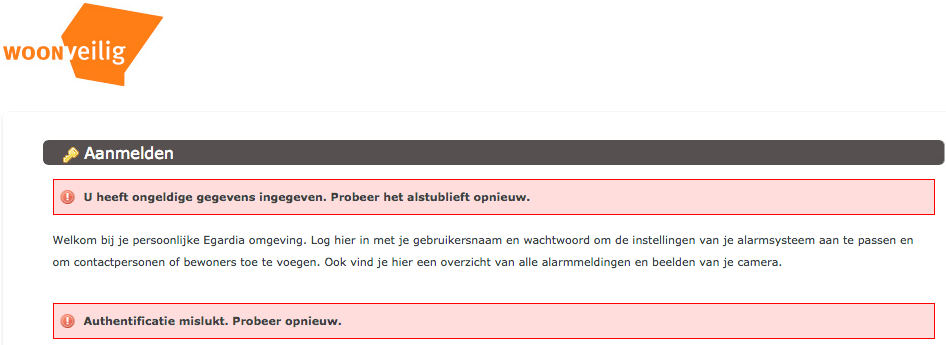
Ik had al eerder over woonveilig geschreven (Ik ben wat verward over de @WoonVeilig site. https://t.co/ui8agTkgM9 heeft het bijvoorbeeld over GATE-03 en GATE-02, maar…), nu iets meer over de installatie handleidingen van GATE-03:
De aanmeldprocedure brengt je naar [Archive.is] alarmsysteem.woonveilig.nl/nl_NL_woonveilig/registratie, die voor registratie nog verwijst naar:
Een paar tips tijdens de registratie en gebruik:
–jeroen
Posted in LifeHacker, Power User, Security | Leave a Comment »




 The Wiert Corner - irregular stream of stuff