The Wiert Corner – irregular stream of stuff

Jeroen W. Pluimers on .NET, C#, Delphi, databases, and personal interests

  • My badges

  • Twitter Updates

  • My Flickr Stream

  • Pages

  • All categories

  • Enter your email address to subscribe to this blog and receive notifications of new posts by email.

    Join 1,854 other subscribers

How to debug Delphi JSON export stack-overflows: watch the fields and their circular references

Posted by jpluimers on 2020/12/23

Unlike Delphi RTL XML support which is property based, the JSON support is field based.

By default, JSON uses all fields (no matter their protection level, so anything from strict private to published  is taken into account).

When there are cycles, they are not detected: it will just stack-overflow with a high set of entries like this:

REST.JsonReflect.{REST.JsonReflect}TTypeMarshaller.MarshalSimpleField($788BFB40,$78AB0150)
REST.JsonReflect.{REST.JsonReflect}TTypeMarshaller.MarshalData($78AB0150)
REST.JsonReflect.{REST.JsonReflect}TTypeMarshaller.MarshalValue((($A9B7E8, Pointer($AFE168) as IValueData, 80, 336, 2024472912, $78AB0150, TClass($78AB0150), 80, 336, 2024472912, 2,77471682335019e+34, 1,00022251675539e-314, 0,00000000737961e-4933, 2024472912, 202447,2912, 2024472912, 2024472912, ($78AB0150, nil), $78AB0150)),???)
REST.JsonReflect.{REST.JsonReflect}TTypeMarshaller.MarshalSimpleField($78A921D0,$78AA69C0)
REST.JsonReflect.{REST.JsonReflect}TTypeMarshaller.MarshalData($78AA69C0)
REST.JsonReflect.{REST.JsonReflect}TTypeMarshaller.Marshal(???)

The easiest way to debug this is to:

  1. Set breakpoints in procedure TTypeMarshaller<TSerial>.MarshalData(Data: TObject);
    1. First breakpoint on the for rttiField loop
      • Watch or log these values (the first two usually are the same, the last two too):
        1. ComposeTypeName(Data) which gives you the fully qualified name (including unit and class) of the type exposing the fields
        2. Data.ClassName as a sanity check
        3. rttiType.Name which should be the same as Data.ClassName
    2. Second breakpoint inside the for rttiField loop on the if not ShouldMarshalstatement
      • Watch or log these values:
        1. rttiType.Name inside the loop, it changes value to match rttiField.Name, because of a debugger bug not showing it as E2171 Variable 'rttiType' inaccessible here due to optimization.
        2. rttiField.Name the actual field name

Tricks to circumvent circular references:

  • remember that fields with a reference to function value are not marshaled, so they are an excellent way of shoehorning in a dependency in (the reference value will be a capture which includes the instance data of the function to be called)
  • applying a [JsonMarshalled(False)] attribute (be sure to use unit REST.Json.Types!) only works when used inside non-generic types:
    • a class like TMySoapHeaderValue<T: IInterface> = class will not expose these attributes
    • a class like TMySoapHeaderValue = class will expose these attributes

You can check the JsonMarshalled problem by setting a breakpoint inside function LazyLoadAttributes(var P: PByte): TFunc<TArray<TCustomAttribute>>; on the line Exit(nil); and watch the value for Handle^.

Posted in Conference Topics, Conferences, Delphi, Development, Event, Software Development | Leave a Comment »

Some odd Windows Messages for my research list (Windows 10 with a very basic Delphi application)

Posted by jpluimers on 2020/12/22

The bold messages below inside the main message loop are on my research list because:

  • they seem to be undocumented in WinUser.h and other header files
  • they are sent to Window handles that have no corresponding VCL TWinControl bound to them
  • they are WM_TIMER messages sending to a null hwnd, without the Delphi code registering a window-less timer (note the lParam indicates they have different call back procedures attached to them)

Being inside the message loop, they are either posted or created by Windows.

The hexadecimal value for WM_TIMER is documented: [Archive.is] 0x0113 site:https://docs.microsoft.com/en-us/windows/desktop/winmsg – Google Search.

Neither of the below messages are documented in either of the Undocumented Windows books (yes, there are two; the first – though rare to get – was a slightly earlier published one-person effort; the second was a tiny bit later three-person effort, but much thicker and included a diskette with tools; both books complement each other well; I am listed in both):

Messages I am looking for:

Yes, I know that Windows Messages are usually noted as 4 hexadecimal digits, but since they are UINT, the logging framework logs them as 32-bit hexadecimal values as this was a 32-bit application, see these WM_* constants and message ranges:

  • 0x0400: [WayBack] WM_USER – Windows applications | Microsoft Docs
  • 0x8000: [WayBack] WM_APP – Windows applications | Microsoft Docs

    The WM_APP constant is used to distinguish between message values that are reserved for use by the system and values that can be used by an application to send messages within a private window class. The following are the ranges of message numbers available.

    Start End Meaning Note
    0 WM_USER–1 Messages reserved for use by the system.
    WM_USER 0x7FFF Integer messages for use by private window classes. Depends on the one that called RegisterClass, see below.
    WM_APP 0xBFFF Messages available for use by applications. Depends on the one that called CreateWindow, see below.
    0xC000 0xFFFF String messages for use by applications.
    0x10000 0xFFFFFFFF Reserved by the system.

Note that [WayBack] Which message numbers belong to whom? – The Old New Thing explains more about CreateWindow and RegisterClass, which are important for the above subranges.

Similarly, the sharing of the ID space for Windows Messages, Atom Names and Clipboard Formats:

It might be that two of the messages are related to an undocumented UserAdapterWindowClass: [WayBack] Windows Creators Update Crashes old C++ Apps – Stack Overflow.

On message handling in general:

Related (as my WM_TIMER knowledge was rusty when scheduling this blog post):

Read the rest of this entry »

Posted in Development, Software Development, The Old New Thing, Windows Development | Leave a Comment »

winapi – What format is the time member of a MSG structure? – Stack Overflow

Posted by jpluimers on 2020/12/22

Found it. GetMessageTime defines it as the number of milliseconds since the system was started.

Source: [WayBack] winapi – What format is the time member of a MSG structure? – Stack Overflow.

It is not documented in the MSG/tagMSG documentation: [WayBack] tagMSG | Microsoft Docs Contains message information from a thread’s message queue.

Luckily, The Old New Thing does: [WayBack] What clock do MSG.time and GetMessageTime use? – The Old New Thing

The unit is documented in [WayBack] GetMessageTime function | Microsoft Docs: Retrieves the message time for the last message retrieved by the GetMessage function.

–jeroen

Posted in Development, Software Development, The Old New Thing, Windows Development | Leave a Comment »

If you control both caller and callee: do not “override” functions by introducing a function with the same name

Posted by jpluimers on 2020/12/22

Every now and then I see people “overriding” a function by introducing a function with the same name.

Often this raises a lot of confusion, because the override will only work if you have the unit of the override closer in your user scope.

Example:

Unit AdoOverrideUnit;

interface

function VarTypeToDataType(VarType: Integer): TFieldType;

implementation

uses
  Data.DB;

function VarTypeToDataType(VarType: Integer): TFieldType;
begin
  Result := Data.DB.VarTypeToDataType(VarType);
  // override Result for some ADO specific data management layer case.
  // ...
end;

end.

In this case it is much better to call the override AdoVarTypeToDataType instead of VarTypeToDataType.

Otherwise, when AdoOverrideUnit is not closer in scope than Data.DB, the wrong method will be called which is hard to track down.

–jeroen

Posted in Delphi, Development, Software Development | Leave a Comment »

Windows Sandbox – Microsoft Tech Community – 301849

Posted by jpluimers on 2020/12/21

For my link archive, as I totally missed it when it was released: [WayBack] Windows Sandbox – Microsoft Tech Community – 301849:

  1. Install Windows 10 Pro or Enterprise, Insider build 18305 or newer
  2. Enable virtualization:
    • If you are using a physical machine, ensure virtualization capabilities are enabled in the BIOS.
    • If you are using a virtual machine, enable nested virtualization with this PowerShell cmdlet:
    • Set-VMProcessor -VMName <VMName> -ExposeVirtualizationExtensions $true
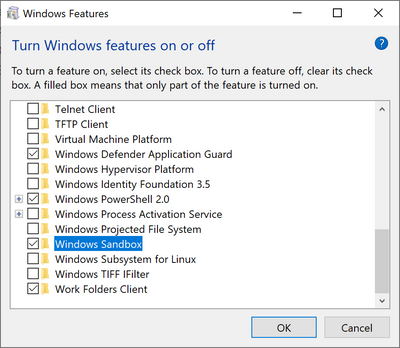
  3. Open Windows Features, and then select Windows Sandbox. Select OK to install Windows Sandbox. You might be asked to restart the computer.
  4. Optional Windows Features dlg.png
  5. Using the Start menu, find Windows Sandbox, run it and allow the elevation
  6. Copy an executable file from the host
  7. Paste the executable file in the window of Windows Sandbox (on the Windows desktop)
  8. Run the executable in the Windows Sandbox; if it is an installer go ahead and install it
  9. Run the application and use it as you normally do
  10. When you’re done experimenting, you can simply close the Windows Sandbox application. All sandbox content will be discarded and permanently deleted
  11. Confirm that the host does not have any of the modifications that you made in Windows Sandbox.

–jeroen

Posted in Power User, Windows, Windows 10 | Leave a Comment »

mkcert: valid HTTPS certificates for localhost (Windows/Mac/Linux) — a short blog post about it, by FiloSottile

Posted by jpluimers on 2020/12/21

Cool: [WayBack] Filippo Valsorda on Twitter: “mkcert: valid HTTPS certificates for localhost — a short blog post mkcert now that it’s almost done 🔒 “

Blog post: [WayBackmkcert: valid HTTPS certificates for localhost:

The web is moving to HTTPS, preventing network attackers from observing or injecting page contents. But HTTPS needs TLS certificates, and while deployment is increasingly a solved issue thanks to the ACME protocol and Let’s Encrypt, development still mostly ends up happening over HTTP because no one can get an…

Code: [WayBack] GitHub – FiloSottile/mkcert: A simple zero-config tool to make locally trusted development certificates with any names you’d like.

It is cross platform and works way better than good old Windows makecert (which is from the 2000’s era: [Archive.is] Public Key Infrastructure: Second European PKI Workshop: Research and … – David Chadwick, Greece) European PKI Workshop: Research and Applications (1st : 2004 : Samos Island – Google Books).

Related:

–jeroen

Read the rest of this entry »

Posted in *nix, Apple, Encryption, HTTPS/TLS security, Linux, Mac OS X / OS X / MacOS, Power User, Security, Windows | Leave a Comment »

In Amsterdam zonder Ja-Ja sticker hoef je de @AxenderBV bezorger geen fooi te geven

Posted by jpluimers on 2020/12/21

In 2019 instrueerde [WayBack] Axender B.V. (@AxenderBV) | Twitter haar bezorgers om langs alle deuren te gaan, ook die in Amsterdam geen JA-JA sticker hebben.

Die bezorger hoef je dan dus geen fooi te geven, want je krijgt geen folders.

Axender bezorgt ook incidenteel de City krant: bij ons in Amsterdam 1 keer in 2018.

–jeroen


Gerelateerd:

Posted in About, History, Personal | Leave a Comment »

high sierra – Remote Desktop 10.2.3 Database Creation Error; 10.2.1 runs fine; 10.2.2 crashes: how to find actual cause(s)? – Ask Different

Posted by jpluimers on 2020/12/21

From a while back:

What would be good steps to find the cause of the below errors?

I get this error when running Microsoft Remote Desktop 10.2.3 or higher on MacOS High Sierra:

Database Creation Error

"An error occurred during persistent store migration.

[Domain: NSCocoaErrorDomain, Code: 134110]"

[WayBack] high sierra – Remote Desktop 10.2.3 Database Creation Error; 10.2.1 runs fine; 10.2.2 crashes: how to find actual cause(s)? – Ask Different

Related Twitter thread: [WayBackJeroen Pluimers on Twitter: “Help! Stuck at @msremotedesktop 10.2.1 (that cannot add new users) on High Sierra because 10.2.2 keeps crashing, and both 10.2.3 and 10.2.4 cannot migrate: “An error occurred during persistent store migration. [Domain: NSCocoaErrorDomain, Code: 134110]””

Tried beta: 10.2.6 (1529) at [WayBackMicrosoft_Remote_Desktop_Beta.app.zip from [WayBack] Microsoft Remote Desktop for Mac – HockeyApp

--jeroen

Read the rest of this entry »

Posted in Apple, Mac OS X / OS X / MacOS, macOS 10.13 High Sierra, Power User, Remote Desktop Protocol/MSTSC/Terminal Services, Windows | Leave a Comment »

Foldimate: Cooles Gerät. 1000 US$ ist jetzt auch nicht soo teuer…

Posted by jpluimers on 2020/12/18

Hopefully they are around nowand available in Europe: [WayBack] Cooles Gerät. 1000 US$ ist jetzt auch nicht soo teuer (eine gute Waschmaschine kostet auch 500 Euro, und der Preis wird sicherlich noch fallen). – Thomas Mueller (dummzeuch) – Google+.

Estimate early 2019 was availability end of 2019, Europe usually takes longer so this is a reminder to myself (:

More info in German:

–jeroen

Read the rest of this entry »

Posted in LifeHacker, Power User | Leave a Comment »

The double positive becomes a negative anecdote

Posted by jpluimers on 2020/12/18

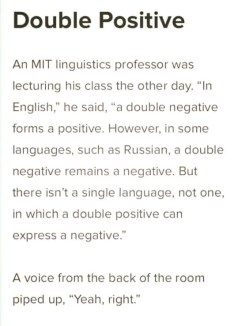
There has been an anecdote going around on the internet (I bumped into it via [WayBack] Giggles #giggles #linguistics – Terry McNeil – Google+) about an MIT linguistics professor on double positives not becoming a negative, but somehow do.

In reality, this was a real life event where Oxford philosopher J. L. Austin posed statement and Columbia University professor Sidney Morgenbesser saying “Yeah, yeah.” quoted in for instance [WayBackSidewalk Socrates – The New York Times

So: No MIT linguistics professor involved at all (:

Related:

–jeroen

Via: [WayBack] Giggles #giggles #linguistics – Jeroen Wiert Pluimers – Google+

Read the rest of this entry »

Posted in Fun | Leave a Comment »