


Cool! It’s about Floting Point Math. Which means that in most programming languages 0.1 + 0.2 does not equal 0.3: [WayBack] 0.30000000000000004.com
–jeroen

Posted by jpluimers on 2020/03/12
Cool! It’s about Floting Point Math. Which means that in most programming languages 0.1 + 0.2 does not equal 0.3: [WayBack] 0.30000000000000004.com
–jeroen

Posted in Development, Software Development | Leave a Comment »
Posted by jpluimers on 2020/03/11
Since the “account.json” SourceTree search did not help me much, below are the steps for installing SourceTree for Windows 3.x on an air-gapped machine.
Prerequisites:
Steps:
"%LocalAppData%\Google\Chrome\Application\chrome.exe" -- "https://bitbucket.org/site/oauth2/authorize?response_type=code&client_id=123456789012345678&state=authenticated&redirect_uri=http://localhost:34106/"https://bitbucket.org/site/oauth2/authorize?response_type=code&client_id=123456789012345678&state=authenticated&redirect_uri=http://localhost:34106/ over and paste it on a machine that has internet accesshttp://localhost:34106/?state=authenticated&code=876543210987654321Now a new file should be in %LocalAppData%\Atlassian\SourceTree\accounts.json suitable for SourceTree 3.x. In the future you might be lucky enough to copy that to a target system before installing.
I was not so lucky, because my accounts.json was SourceTree 2.x based, which the SourceTree 3.x setup modifies, but is still not happy with.
Note these number differ on each request:
123456789012345678 is a base64 encoded request ID876543210987654321 is a base64 encoded response ID34106 is a random TCP port where the installer is listening on to get the authentication informationInitially, I had Fiddler steps in the above, but found out I did not need those. One thing that complicated this is that Fiddler had been removed from Chocolatey for a while, so I was not sure it would stay as a product:
Now has an MSI installer:
Has old steps for 2.x versions to get around the above hoopla:
–jeroen

Posted in Development, DVCS - Distributed Version Control, Software Development, Source Code Management, SourceTree | Leave a Comment »
Posted by jpluimers on 2020/03/11
Bad surprise of the day: SysUtils.TEncoding in XE2+ defaults to ANSI, while in XE it defaulted to UTF-8 .Among other things this means that TStringList… – Eric Grange – Google+
Source: Bad surprise of the day: SysUtils.TEncoding in XE2+ defaults to ANSI, while i…
Delphi


–jeroen

Posted in Ansi, Delphi, Development, Encoding, Software Development, UTF-8, UTF8 | Leave a Comment »
Posted by jpluimers on 2020/03/11
I’ve read this twice and need to re-read this a few times, so from my reading list then need to follow the course one day: Practical Deep Learning for Coders 2018 · fast.ai [WayBack].
… deep learning course based on Pytorch (and a new library we have built, called fastai), with the goal of allowing more students to be able to achieve world-class results with deep learning. … this course, Practical Deep Learning for Coders 2018 [WayBack], … The only prerequisites are a year of coding experience, and high school math (math required for understanding the material is introduced as required during the course).
Related: [WayBack] The Matrix Calculus You Need For Deep Learning – Terence Parr and Jeremy Howard
Via:
who posted another link as well:
–jeroen
Posted in Development, Python, Scripting, Software Development | Leave a Comment »
Posted by jpluimers on 2020/03/10
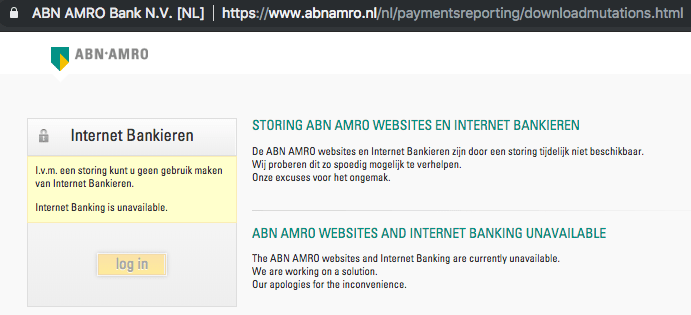
Nice example on how not to copy with link rot: as a bank is to indicate “internet banking is unavailable” scares your customers away.
[WayBack] Jeroen Pluimers on Twitter: “dit heet overigens link rot, en gebruiksvriendelijke sites proberen dat te voorkomen; is zeker niet gecompliceerd en eigenlijk ook niet complex: het is een kleine moeite om dat in je ontwerp en onderhoud-proces mee te nemen. 1/2 …
[WayBack] Jeroen Pluimers on Twitter: “de huidige down-melding zet sowieso je klanten volledig op het verkeerde been, dus daar moet zeker iets aan gebeuren. 2/2 “I.v.m. een storing kunt u geen gebruik maken van Internet Bankieren. Internet Banking is unavailable”…”
–jeroen
ABNAMRO

Posted in Conference Topics, Conferences, Development, Event, LifeHacker, Power User, Software Development, Usability, User Experience (ux), Web Development | Leave a Comment »
Posted by jpluimers on 2020/03/10
In a lot of ssh-keygen related posts, you still see DSA being mentioned, though that has been deprecated and later removed from OpenSSH.
I wondered why, so I did some digging.
TL;DR: it’s complicated:
Some of the related topics cannot be archived in the WayBack machine or refuse being archived at Archive.is, so here is a list of partially archived relevant links:
–jeroen
Posted in Communications Development, Development, Internet protocol suite, Power User, Security, SSH, TCP | Leave a Comment »
Posted by jpluimers on 2020/03/10
I need to read more Hacker Noon stuff:
It may seem counterintuitive, but… Start Together. Finish Together – Hacker Noon [WayBack]
Via a mention of the “non developers” point of view, who are the key persons to do this whole “start/finish together” mantra wit: [WayBack] “Their mental model is that developers/designers are this tiny little pipe, and you have to play this intricate game of Tetris to get the most amount of… – Marjan Venema – Google+ (who does great coaching, so be sure to check out her postings)
–jeroen
Posted in Agile, Development, Software Development | Leave a Comment »
Posted by jpluimers on 2020/03/09
Converting a man page to markdown is a three step process:
The source format of man pages is troff, which is usually converted by man using groff, or a set of macros.
My initial thought for the first problem was to use pandoc, but as I found earlier in pandoc oneliner from reStructuredText to html, on MacOS, the pandoc can write groff format, but not read it.
Luckily doing a pandoc from groff to markdown – Google Search, I bumped into [WayBack] Convert groff to markdown · Issue #8 · neomutt/neomutt-docs · GitHub which lead to mandoc – Wikipedia.
Since I already had homebrew installed, getting mandoc was simple: brew install mandoc.
Earlier in the process when searching for pandoc based conversions, I found the solution for the second problem too: [WayBack] Man page with preserved text decorations, proportional text and fixed-width code – Unix & Linux Stack Exchange taught me about the -w option, but there is actually a -W option that works better if you have multiple pages for a keyword:
-wor--path
Don’t actually display the man pages, but do print the location(s) of the files that would be formatted or displayed. If no argument is given: display (onstdout) the list of directories that is searched bymanfor man pages. If manpath is a link toman, then “manpath” is equivalent to “man --path“.
-WLike-w, but print file names one per line, without additional information. This is useful in shell commands likeman -aW man | xargs ls -l
fsck_hfsIt all came down to a one-liner:
mandoc -T markdown `man -w fsck_hfs` > /tmp/fsck_hfs.8.md
Note the order here is important this will fail with an error:
mandoc `man -w fsck_hfs` -T markdown > /tmp/fsck_hfs.8.mdmandoc: -T: ERROR: No such file or directory mandoc: markdown: ERROR: No such file or directory
–jeroen
Posted in Apple, Mac, Mac OS X / OS X / MacOS, Power User | 1 Comment »
Posted by jpluimers on 2020/03/09
Since I always forget one-letter command-line options: [WayBack]command line – Recursive tar compression? – Ask Ubuntu (thanks andrew.46 for this very nice answer!):
Try:
tar -czvf directorios.tar.gz folderA few notes:
- Recursion is the default, from the
tarman pages:-c, --create Create a new archive. Arguments supply the names of the files to be archived. Directories are archived recursively, unless the --no-recursion option is given.Although this can be turned off by using the
--no-recursionoption…- You need the archive name immediately after the
-foption, the correct sequence being:tar -c [-f ARCHIVE] [OPTIONS] [FILE...] ^^^^^^^^^^- For a more flexible command line (particularly if you wanted to use other compression utilities apart from gzip with tar) you could omit the
-zoption and use-aoption to allow tar to automatically decide which compressor to use based on the archive suffix:-a, --auto-compress Use archive suffix to determine the compression program.Recognised suffixes are:
- .gz : gzip
- .tgz : gzip
- .taz : gzip
- .Z : compress
- .taZ : compress
- .bz2 : bzip2
- .tz2 : bzip2
- .tbz2 : bzip2
- .tbz : bzip2
- .lz : lzip
- .lzma : lzma
- .tlz : lzma
- .lzo : lzop
- .xz : xz
tar is pretty cool :)
–jeroen
Posted in *nix, *nix-tools, Power User | Leave a Comment »
Posted by jpluimers on 2020/03/09
Boy, I wish I had found this years ago: [WayBack] GitHub – facebook/osquery: SQL powered operating system instrumentation, monitoring, and analytics.
No more remembering all those nifty configuration and log file details by heart, just install and query using SQL.
Now you need to learn a “database” schema, however that’s the same for all supported operating systems.
Example installation steps:
brew install osqueryRun interactively through osqueryi, then perform .help or .schema to get an impression of what is possible.
There is lots of documentation at [WayBack] osquery.
–jeroen
Posted in *nix, *nix-tools, Apple, Mac, Mac OS X / OS X / MacOS, Power User | Leave a Comment »
 The Wiert Corner - irregular stream of stuff