The Wiert Corner – irregular stream of stuff

Jeroen W. Pluimers on .NET, C#, Delphi, databases, and personal interests

  • My badges

  • Twitter Updates

  • My Flickr Stream

  • Pages

  • All categories

  • Enter your email address to subscribe to this blog and receive notifications of new posts by email.

    Join 1,861 other subscribers

Archive for 2018

Topic: “Request Feedback” button vanished | WordPress.com Forums

Posted by jpluimers on 2018/11/02

Too bad, as it was fun while it lasted:

Even worse: the change was not announced, so people find out after the fact. A similar thing happened back in the “Press This” removal process (which got restored).

Some notes on “The WordPress bookmarklet was deprecated. Please delete it from your web browser.” because the `/wp-admin/press-this.php` based URLs look very similar.

The cool things about the “Request Feedback” were these:

Read the rest of this entry »

Posted in Bookmarklet, Power User, SocialMedia, Web Browsers, WordPress | Leave a Comment »

Creating a full off-line installation directory for Visual Studio 2017 Community

Posted by jpluimers on 2018/11/01

Steps:

  1. mkdir C:\Installs\VS2017Community\VS2017CommunityLayout
  2. pushd C:\Installs\VS2017Community
  3. bitsadmin.exe /transfer "VS2017CommunityBootstrap" https://aka.ms/vs/15/release/vs_community.exe C:\Installs\VS2017Community\vs_community.exe
  4. vs_community.exe --lang en-US --layout C:\Installs\VS2017Community\VS2017CommunityLayout
  5. VS2017CommunityLayout\vs_community.exe

Step 3 needs a full path to the destination file.

Step 4 can take a relative path.

Step 4 takes considerable time (for 15.2 about 90 minutes on a 100 Mibit/s fiber connection with an ~8 millisecond ping time to download.visualstudio.microsoft.com; for 15.8 with 80 Mibit/s and a ~4 millisecond ping about 120 minutes) resulting in ~40 gigabyte download.

After download, run the vs_setup.exe in theVS2017CommunityLayout directory.

Note that upgrading to a newer version of Visual Studio 2017 will require downloads! See [WayBack] Offline Install Modify always goes to the WEB – Developer Community.

Note that after installation, Visual Studio 2017 needs considerable disk space as found via visual studio 2017 disk size – Google Search:

[WayBack] Visual Studio 2017 System Requirements | Microsoft Docs:

Find the minimum system requirements, supported hardware, and languages for the Visual Studio 2017 product family.

Hardware
  • 1.8 GHz or faster processor. Dual-core or better recommended
  • 2 GB of RAM; 4 GB of RAM recommended (2.5 GB minimum if running on a virtual machine)
  • Hard disk space: up to 130 GB of available space, depending on features installed; typical installations require 20-50 GB of free space.
  • Hard disk speed: to improve performance, install Windows and Visual Studio on a solid state drive (SSD).
  • Video card that supports a minimum display resolution of 720p (1280 by 720); Visual Studio will work best at a resolution of WXGA (1366 by 768) or higher.

For instance, the choices below require about 22 gigabyte of space, while adding mobile .NET development adds another 13 gigabyte.
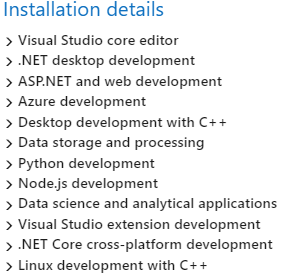
Via:

–jeroen

Posted in .NET, Development, Software Development, Visual Studio 2017, Visual Studio and tools | Leave a Comment »

PlasticSCM Workaround for “Can’t perform a checkout in an edited xlink.”

Posted by jpluimers on 2018/11/01

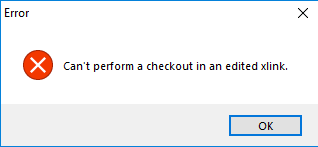
Error message during a commit (checkin) or shelve of some changes:

---------------------------
Error
---------------------------
Can't perform a checkout in an edited xlink.
---------------------------
OK
---------------------------

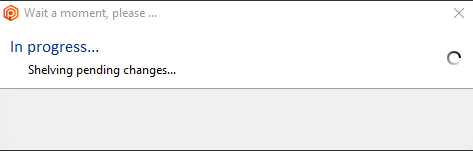
In this case it is during a shelve:

---------------------------
Wait a moment, please...
---------------------------
In progress...
Shelving pending changes
---------------------------
OK
---------------------------

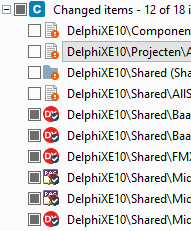
I cannot show all changes, but the third one is an xlink:

The error did not return any meaningful results when I searched for it, but the developers on the team indicated “Errors like these happen every now and then; there is no information in Google. Sit down, cry a little, then restart with a fresh repository”.

Workaround

The workaround for this undocumented behaviour is tedious, but works:

Read the rest of this entry »

Posted in Development, PlasticSCM, Software Development, Source Code Management | Leave a Comment »

PSBL: Passive Spam Block List powered by Spamikaze

Posted by jpluimers on 2018/11/01

On my research list: [WayBackPassive Spam Block List:

PSBL is an easy-on, easy-off blacklist that does not rely on testing and should reduce false positives because any user can remove their ISP’s mail server from the list.

The idea is that 99% of the hosts that send me spam never send me legitimate email, but that people whose mail server was used by spammers should still be able to send me email.

This results in a simple listing policy: an IP address gets added to the PSBL when it sends email to a spamtrap, that email is not identified as non-spam and the IP address is not a known mail server.

Via: Hans Wolters commenting at [WayBack] For my research list: Source: Bruteforce login prevention… – Jeroen Wiert Pluimers – Google+

References:

–jeroen

Posted in *nix, *nix-tools, Development, Perl, Power User, Scripting, Software Development | Leave a Comment »

A command-line REPL for RESTful HTTP Services – Scott Hanselman

Posted by jpluimers on 2018/10/31

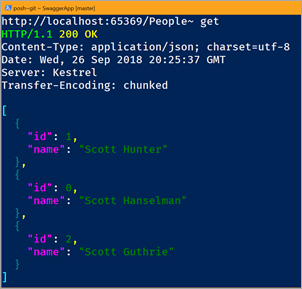
Somewhere in Q4 2018 (actual year, not fiscal year) when .NET Core 2.2 gets released, but you can tinker with it right now: [WayBack] A command-line REPL for RESTful HTTP Services – Scott Hanselman.

Release estimates at [WayBack] core/roadmap.md at master · dotnet/core · GitHub.

–jeroen

Posted in .NET, .NET Core, Development, Software Development | Leave a Comment »

Down on the Upside – Kevlin Henney – Medium

Posted by jpluimers on 2018/10/31

Interesting read: [WayBack] Down on the Upside – Kevlin Henney – Medium

Abstraction is a question of less over more. But is it also a question of high over low?

What developers call abstraction, is not the abstraction end-users mean. Being aware of that makes software development life a whole lot easier.

Via: [WayBack] Kevlin Henney – Google+

–jeroen

Posted in Design Patterns, Development, Software Development | Leave a Comment »

Batch files and parentheses

Posted by jpluimers on 2018/10/31

Answering [WayBack] delphi – post-build event with multiple if/copy combinations only execute if first file does not exist – Stack Overflow made me do a quick search for parentheses handling in batch files. TL;DR: it is a mess.

But it reveals some interesting links:

–jeroen

Posted in Batch-Files, Conference Topics, Conferences, Development, Event, Scripting, Software Development, Windows Development | Leave a Comment »

PowerShell: measuring size of the Windows TEMP directory

Posted by jpluimers on 2018/10/31

Due some issues in Windows, every now and then the Windows TEMP directory gets huge.

This script helps measuring the recursive size of that folder:

$WindowPath = [System.Environment]::GetFolderPath([System.Environment+SpecialFolder]::Windows)
$WindowTempPath = Join-Path -Path $WindowPath -ChildPath "TEMP"
$Result = Get-ChildItem $WindowTempPath -Recurse | Measure-Object -Property Length -Sum
$RecursiveSumInBytes = $Result.Sum
Write-Host "$RecursiveSumInBytes"

It uses these tricks:

  • Accessing native .NET types; in this case [WayBackEnvironment.SpecialFolder Enumeration (System) to get the “The Windows directory or SYSROOT. This corresponds to the %windir% or %SYSTEMROOT% environment variables. Added in the .NET Framework 4.”
  • Assuming the Windows TEMP directory is always named that way.
  • Using [WayBackJoin-Path to combine a base path with a child path without worrying about the path delimiter.
  • Recursively enumerating all items in that folder using [WayBackGet-ChildItem.
  • Aggregating with [WayBackMeasure-Object over the Length property of each Child-Item to determine their Sum.

After this, cleaning up uses two more tricks:

$WindowPath = [System.Environment]::GetFolderPath([System.Environment+SpecialFolder]::Windows)
$WindowTempPath = Join-Path -Path $WindowPath -ChildPath "TEMP"
Get-ChildItem $WindowTempPath -Recurse | foreach { Remove-Item $_.FullName -Recurse }

Inspired by:

–jeroen

Posted in CommandLine, Development, PowerShell, Software Development | Leave a Comment »

airbus-seclab/crashos

Posted by jpluimers on 2018/10/30

Cool repository, but contact your cloud provider before trying…: [WayBackairbus-seclab/crashos.

via:

–jeroen

Posted in Fusion, Hyper-V, KVM Kernel-based Virtual Machine, Power User, Proxmox, View, VirtualBox, Virtualization, VMware, VMware ESXi, VMware Workstation | Leave a Comment »

Delphi: create implementations in the same order as the interface section and sync method signatures

Posted by jpluimers on 2018/10/30

An interesting question at [WayBack] Previously i have not been big on IDE plugins.So i’m blatantly asking for pointers on the following, i.e. is there already such beasts? Or maybe i’m i… – Dany Marmur – Google+:

… asking for pointers on the following…

Crtl+C – create implementations in the same order as the interface section?
Ctrl+C – adjust the signature of the method the cursor is on interface if implementation and vice versa.

I realise they can both be very tricky to implement. Second function might not be able to handle overloads.

From that thread, a few things you might want to try:

  • [WayBack] ModelMaker Code Explorer can do both.
  • [Archive.is] DDevExtensions version 2.82 (2014-08-25): introduced “Added: Disable Alpha-Sort Class Completion (Default off)”
  • More recent versions of the IDE (I think 10.0) incorporated the “sync prototypes” action (Shift+Ctrl+Alt+P) from Castalia.

–jeroen


Posted in Castalia, Delphi, Development, Software Development | Leave a Comment »