The Wiert Corner – irregular stream of stuff

Jeroen W. Pluimers on .NET, C#, Delphi, databases, and personal interests

  • My badges

  • Twitter Updates

  • My Flickr Stream

  • Pages

  • All categories

  • Enter your email address to subscribe to this blog and receive notifications of new posts by email.

    Join 1,862 other subscribers

Archive for 2019

How to break a Monolith into Microservices

Posted by jpluimers on 2019/10/02

Long read, worth it too: [WayBack] How to break a Monolith into Microservices

A guide to the common steps we’ve observed in breaking a monolithic application up into microservices

–jeroen

Via [WayBack] How to break a Monolith into Microservices https://martinfowler.com/… – Jeroen Wiert Pluimers – Google+


Posted in Development, Software Development, Systems Architecture | Leave a Comment »

Terminate threads during application or not?

Posted by jpluimers on 2019/10/02

I got an interesting question a while ago: should an application terminate (anonymous) threads or not?

A problem is that a thread might not execute unless you call WaitFor before Terminate is called. The reason is that the internal function ThreadProc does not start Execute if the thread is already terminated.

The ThreadProc in the System.Classes unit is an ideal place to set breakpoints in order to see which threads might start.

Other useful places to set breakpoints:

  • TAnonymousThread.Execute
  • TExternalThread.Execute

Execute not being called by ThreadProc is a bug, but it is not documented because QC is gone (taking the below entry with it), it is not in QP and the docwiki never got updated.

Given QC has so much information, I am still baffled that Embarcadero took it down.

Sergey Kasandrov (a.k.a. serg or sergworks) wrote in [WayBack] Sleep sort and TThread corner case | The Programming Works about this bug and refers to WayBack: QualityCentral 35451 – TThread implementation doesn’t guarantee that thread’s Execute method will be called at all .

The really bad thing are the WayBack: QualityCentral Resolution Entries for Report #35451 Resolution “As Designed” implying the design is wrong.

In his post, sergworks implemented the Sleep sorting in Delphi. Related:

Note that application shutdown is a much debated topic. Best is to do as little cleanup as possible: your process is going to terminate soon anyway. No need to close handles or free memory: Windows will do that for you anyway. See for instance:


Related to waiting:

Related to executing:

–jeroen

Posted in Conference Topics, Conferences, Delphi, Development, Event, Multi-Threading / Concurrency, Software Development, The Old New Thing, Windows Development | Leave a Comment »

The Myth of Advanced TDD

Posted by jpluimers on 2019/10/02

[WayBack] The Myth of Advanced TDD

People frequently ask me for “advanced TDD”. I have good news and bad news.

TL;DR:

if you think you need to to “advanced TDD”, then you don’t do TDD.

If TDD hurts, then you need to improve your design or code. It’s like going to the gym: it’s not the exercise that causes the hurt, but the lack of physical condition.

via: [WayBack] “If you want advanced testing techniques, then you’re probably looking for techniques that will make your code worse, not better.” – J.B. Rainsberger @j… – Marjan Venema – Google+

–jeroen

Posted in Development, Software Development, TDD, Testing | Leave a Comment »

Microservices – Please, don’t | Basho Technologies

Posted by jpluimers on 2019/10/01

Long read worth it: [WayBackMicroservices – Please, don’t | Basho Technologies

This blog post is adapted from a lightning talk I gave at the Boston Golang meetup in December of 2015.

TL;DR

When should you use microservices?

“When you’re ready as an engineering organization”

–jeroen

Posted in Development, Software Development, Systems Architecture | Leave a Comment »

Enabling IIS log files on Windows 7

Posted by jpluimers on 2019/10/01

Since each Windows version, Microsoft hides the way to first enable, then configure IIS Logging in a different place: [WayBack] Enabling IIS log files on Windows 7.

That should provide me some guidance on how to find it back when it is not displayed at all.

Related:

–jeroen

Posted in Development, IIS, Power User, Software Development, Windows | Leave a Comment »

ApexSQL, a free tool (SSMS add-in) for analyzing the execution plan of a SQL server query…

Posted by jpluimers on 2019/10/01

On my research list: ApexSQL PLAN analysis tool released in 2017. It requires SSMS which you can get at [WayBack] Download SQL Server Management Studio (SSMS) | Microsoft Docs.

More info:

Via:

–jeroen

Posted in Database Development, Development, Software Development, SQL, SQL Server | Leave a Comment »

Chronological Facebook

Posted by jpluimers on 2019/09/30

For people still using Facebook: visit it using www.facebook.com/?sk=h_chr.

This will open the chronological view of your Facebook feed.

Via:

–jeroen


Posted in Facebook, Power User, SocialMedia | Leave a Comment »

Readable weekdays in Excel

Posted by jpluimers on 2019/09/30

Since I always forget this: [WayBackExceljet: Get day name from date

If you need to get the day name (i.e. Monday, Tuesday, etc.) from a date, there are several options depending on your needs.

Basically there are four ways go get the day of the week; the first three are readable, but when ordered, they are ordered alphabetically. The last one is numeric.

Combining the numeric with the text is easier in for instance Pivot Legend Fields (Series).

So here they go (based on the above link), assuming that B4 contains a timestamp:

  1. =WEEKDAY(B4) gives you the numeric weekday (starting with Sunday=1 to Saturday=7) which allows sorting in a meaningful order
  2. =TEXT(B4,"dddd") gives you the full day name of B4 in your locale
  3. =TEXT(B4,"ddd") gives you the shortened day name of B4 in your locale
  4. =CHOOSE(WEEKDAY(B4),"Sun","Mon","Tue","Wed","Thu","Fri","Sat") gives you a name of your liking from a series of 7 texts

Note that depending on your locale, these formulas might actually need a semicolon:

  1. =WEEKDAY(B4)
  2. =TEXT(B4;"dddd")
  3. =TEXT(B4;"ddd")
  4. =CHOOSE(WEEKDAY(B4);"Sun";"Mon";"Tue";"Wed";"Thu";"Fri";"Sat")

–jeroen

Read the rest of this entry »

Posted in Excel, Office, Power User | Leave a Comment »

Meeting Agreements for High Performing Teams – Noteworthy — The Journal Blog

Posted by jpluimers on 2019/09/30

Worthy short read: [WayBackMeeting Agreements for High Performing Teams – Noteworthy — The Journal Blog

A quote from it:

[WayBackPatrick Lencioni‏ @patricklencioni: If someone offered me a single piece of evidence to assess the health of an org, I would want to observe the executive team during a meeting

–jeroen

via: [WayBack] Meeting Agreements for High Performing Teams – Noteworthy — The Journal Blog – Marjan Venema – Google+

Read the rest of this entry »

Posted in Agile, Development, LifeHacker, Power User, Software Development | Leave a Comment »

Sony STR-DE205 Receiver – storing FM stations into memory

Posted by jpluimers on 2019/09/27

Somehow I misplaced the manuals of my Sony STR-DE205 receiver, including the Operating Instructions.

Sony still makes receivers

I did find [WayBack] Sony STR-DE205 – Manual – AM/FM Stereo Receiver – HiFi Engine which has a Service Manual. It has no operating instructions though.

Luckily, the STR-DE205 is very similar to the Sony STR-DE305, which I found using sony str de205 filetype:pdf operating instructions and having an Operating Instructions copy at [WayBackpdf.crse.com/manuals/3810995221.pdf.

In fact, all the pictures in that manual look remarkably similar to the STR-DE205, except for one: the remote control:
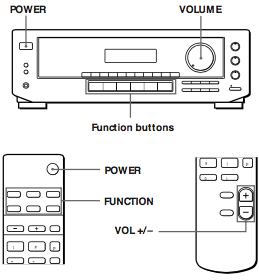
It has one extra button POWER, which the STR-DE205 lacks, which likely means the STR-DE305 can be powered on remotely (like my trusty Sony MHC-3000 mini set that is slightly older).

Anyway, programming is easy as long as you know you need to press one of the NUMERIC BUTTONS in step 5:
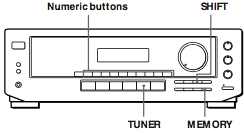
  1. Press TUNER.
    The last received station is tuned in.
  2. Tune in the station you want.
    If you are not familiar with how to tune in a station, see “Receiving Broadcasts” on the previous page.
  3. Press MEMORY.
    “MEMORY” appears for a few seconds.
    Do steps 4 and 5 before “MEMORY” goes out.
  4. Press SHIFT to select a character (A, B or C).
    Each time you press SHIFT, the letter “A”, “B” or “C” appears in the display.
    If “MEMORY” disappears, start again from step 3.
  5. While MEMORY is displayed, press the number you want to use (0 to 9).
  6. Repeat Steps 2 to 5 to preset other stations.

Getting the text out of the PDF was a bit of a pain, as even though it renders, DRM tried to prohibit copying.

Luckily there is a pdftohtml with a -nodrm feature in Poppler (software) – Wikipedia (unlike the Xpdf – Wikipedia it forked from that does not have this switch) which I got based on these links:

Some more images are below after some Sony STR-DE205 videos.

–jeroen

Read the rest of this entry »

Posted in Hardware, History, Power User | Leave a Comment »