The Wiert Corner – irregular stream of stuff

Jeroen W. Pluimers on .NET, C#, Delphi, databases, and personal interests

  • My badges

  • Twitter Updates

  • My Flickr Stream

  • Pages

  • All categories

  • Enter your email address to subscribe to this blog and receive notifications of new posts by email.

    Join 1,854 other subscribers

Archive for 2019

including enumerations and JPEG compression examples for wPDF 4 Manual: Compression related properties

Posted by jpluimers on 2019/04/11

Since I was tracking down an issue having to to with generating DIB in a compressed PDF: [Archive.is] wPDF 4 Manual: Compression related properties

Property CompressStreamMethod

By modifying this property you can let the PDF engine compress (deflate) text. By using compression the file will be reasonable smaller. On the other had compression will create binary data rather than ASCII data. While “deflate” produces the smallest files, “run-length” compression is compatible even to very old PDF reader programs.

Property JPEGQuality

wPDF can compress bitmaps using JPEG. This will work only for true color bitmaps (24 bits/pixel) and if you have set the desired quality in this property.

Property EncodeStreamMethod

If data in the PDF file is binary it can be encoded to be ASCII again. Binary data can be either compressed text or graphics. You can select HEX encoding or ASCII95 which is more effective then HEX.

Property ConvertJPEGData

Note: Only applies to TWPDFExport.

If this property is true JPEG data found in the TWPRichText editor will not be embedded as JPEG data. Instead the bitmap will be compressed using deflate or run length compression. It is necessary to set this property to TRUE if the PDF files must be compatible to older PDF reader programs which are incapable to read JPEG data.

Note that EncodeStreamMethod does not do compression, but it does belong here because the encodings result in different PDF sizes.

The settings are not documented in more detail, so here are the enumerations explaining them in a bit more depth:

–jeroen

Posted in ASCII95, Delphi, Development, Encoding, HEX encoding, Software Development | Leave a Comment »

Delphi Code Monkey: Cool Advanced Troubleshooting Technique – WinDbg

Posted by jpluimers on 2019/04/11

This so much reminds me of a struggle in the Toshiba Tecra 750CDT era: [WayBackDelphi Code Monkey: Cool Advanced Troubleshooting Technique – WinDbg.

First about Warren’s issue:

His laptop froze only in Windows 10, but not Windows 7, after doing some debugging work. Display is on, but non-responsive. He ruled out a lot of things, thought it was a video issue, looked for pointers how to research it ending to force memory dumps by keyboard then running WinDbg to further pinpoint the cause.

He solved the issue by removing the Lenovo supplied Intel graphics driver and forcing the Intel HD Graphics 520 OEM drivers onto the system and posted a few interesting links:

Then some history:

Back in the 750CDT days, the problem was the combination of Toshiba using OEM S3 Virge/MX video drivers, Windows GDI and TImageList with a lot of images in them (basically: the component palette).

Result: interrupt freeze of the laptop, so not even mouse or keyword would work.

Solutions:

  • use Windows NT, not Windows 95
  • disable all S3 hardware acceleration
  • use the Toshiba 780 series video drivers

From then on, I’ve never developed on Windows 9x based systems any more, but Windows NT based systems (even though it was much harder to get drivers for all hardware components), this despite the fact that with Windows NT 4, Microsoft video drivers from ring 3 to ring 0 (they were at ring 3 until and including Windows NT 3.51 [Archive.is]). On the one hand the move to ring 0 caused more blue screens, on the other hand made it a lot harder to directly access hardware from user software running at ring 3.


–jeroen

Posted in Development, Power User, Software Development, Windows, Windows 10 | Leave a Comment »

Some links and notes as I want to learn about JavaScript in bookmarklets

Posted by jpluimers on 2019/04/11

I wrote about bookmarklets before, but more from a usage perspective, not from a programmers one.

From what I understand now is that:

  • bookmarklets are basically a special form of URI
    • you can use JavaScript in them, but must make sure you do not interfere with existing JavaScript on the page
    • javascript:(function(){ window.open('https://wiert.me/'); })();
  • the URI has limits so,
    • browsers can have length restrictions (some around 500 characters) forcing you to put the actual script on-line as externalised bookmarklet (which won’t work on body-less pages)
    • you will have to encode special characters (and URI decode them before beautifying existing JavaScript bookmarklets)

My first tries will likely be:

Read the rest of this entry »

Posted in Bookmarklet, Development, JavaScript/ECMAScript, jQuery, Power User, Scripting, Software Development, Web Browsers | Leave a Comment »

Some notes on Testinsight Issues

Posted by jpluimers on 2019/04/10

So I won’t forget:

Note to self:

Read the rest of this entry »

Posted in Delphi, Development, Software Development, TestInsight | Leave a Comment »

ILockable/TLockable/Lockable. Similar to IManaged in Spring4D, but provides a Locked interface.

Posted by jpluimers on 2019/04/10

Had to use this to start solving threading issues in a project I inherited a while ago in a temporary way before doing a huge refactoring. Will likely need it in the future as well: ILockable/TLockable/Lockable. Similar to IManaged in Spring4D, but provides a Locked interface..

ILockable/TLockable/Lockable. Similar to IManaged(now IShared) in Spring4D, but provides a Locked interface.

Note this is very inefficient, but can be practical as a shotgun approach to start solving the mess when you inherit a project that has the “I know, I’ll use threads!” approach in it.

Replace the resource typed TNeedsLock that needs protection with a ILockable<TNeedsLock>, then route all references via a call to the Locked()() call to it.

If you need a simpler approach, then use [WayBack] Interfaced monitor lock — Bitbucket by Stefan Glienke.

–jeroen

Read the rest of this entry »

Posted in Conference Topics, Conferences, Delphi, Development, Event, Multi-Threading / Concurrency, Software Development | Leave a Comment »

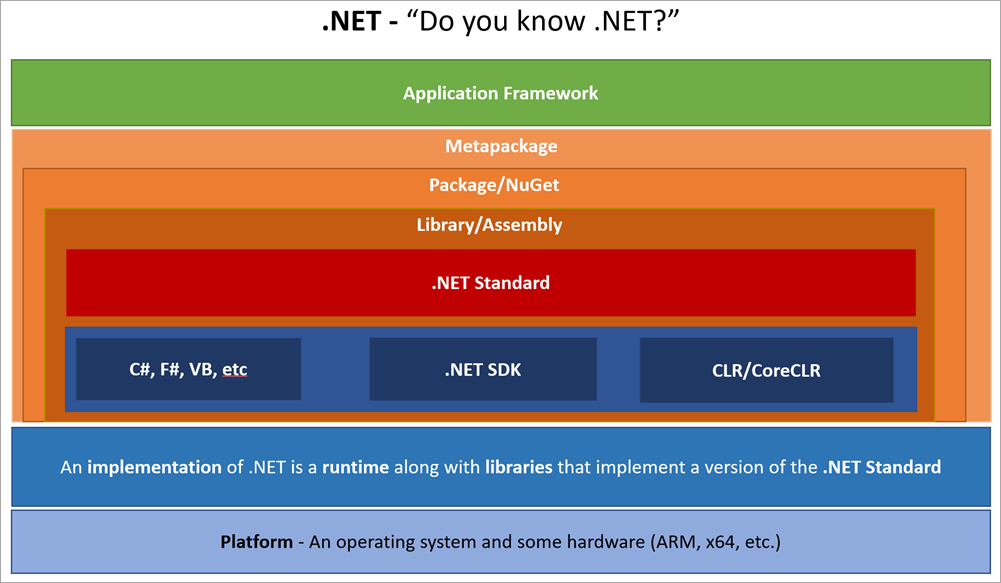
Draft – .NET Glossary Diagram – Scott Hanselman

Posted by jpluimers on 2019/04/10

By now this should be out of [WayBackDraft – .NET Glossary Diagram – Scott Hanselman: a list of common terms to describe various parts of the .NET ecosystem.

He has a nice list of sentences where each term is used.

I’ll try to use them myself as well, so I gave it a start at paulcbetts/refit: The automatic type-safe REST library for Xamarin and .NET.

–jeroen

Posted in .NET, C#, Development, F#, Software Development, VB.NET, Visual Studio and tools | Leave a Comment »

Detecting the Delphi edition that is installed

Posted by jpluimers on 2019/04/09

Via [WayBack] In what ways can you detect which edition of Delphi in installed from the installed files? I’m trying to distinguish between Standard, Professional, E… – Jeroen Wiert Pluimers – Google+

Different Delphi editions have different msbuild support files. For instance IDL is only available in Enterprise/Architect/Ultimate (which use the exact same binaries anyway).

IDL is old, see

So I updated my [WayBack] jeroenp / wiert.me / Run-Dependend-rsvars-From-Path.bat — Bitbucket (which besides running rsvars.bat, can start the various Delphi IDE personalities, or run msbuild with various configurations) with [WayBack] jeroenp / wiert.me / commit / 2c55fa1bf786 — Bitbucket:

Support 10.1 Berlin and 10.2 Berlin in Run-Dependend-rsvars-From-Path.bat, as well as Professional/Starter editions.

Thanks to Andrea Magni – Google+, Querying was simple: look for the value of the Edition entry under inside the *\X\BDS\Y.0 where Y is the BDS version, X is Borland, CodeGear or Embarcadero (depending on the BDS version) and * is the base key HKEY_CURRENT_USER\Software, HKEY_LOCAL_MACHINE\SOFTWARE , HKEY_LOCAL_MACHINE\SOFTWARE\Wow6432Node.

–jeroen

Posted in Delphi, Development, Software Development | Leave a Comment »

Continuous Integration Server performance

Posted by jpluimers on 2019/04/09

From a while back, but still relevant for any continuous integration system: [WayBack] Continuous Integration Server performance.

–jeroen

via: [WayBackBlogged – Continous Integration Server Performance – Vincent Parrett – Google+

Posted in Continua CI, Continuous Integration, Development, Software Development | Leave a Comment »

When generics and VCL controls bite you: memory overwrites when you show the control usually ending up in access violations

Posted by jpluimers on 2019/04/09

Recently I got bitten by the 2013 reported http://qc.embarcadero.com/wc/qcmain.aspx?d=112101 (too bad the site is gone and the WayBack machine doesn’t have it archived) as a result of [WayBackdelphi – Why do I get access violations when a control’s class name is very, very long? – Stack Overflow.

It got reentered as [RSP-18399] Buffer overflow in TWinControl.CreateParams() – Embarcadero Technologies but since that requires logon, it’s not search machine indexed so it’s very hard to find unless you know where to look.

So I spent a quite some time to find out what was wrong:

Since Delphi 1, the [WayBackControls.TCreateParams Record has a 64-byte WinClassName field that’s blindingly copied by the TWinControl.CreateParams without range checking.

The structure is used by the [WayBackTWinControl.CreateWnd Method to call the Windows API [WayBackRegisterClass function that takes a [WayBackWNDCLASS structure with a lpszClassName field that supports up to 256 characters and it fails when it’s longer.

That overwrite cause spurious other errors depending on the memory that gets overwritten. It took almost a day to figure out the cause of the error was this field, then an hour or to track that down to the long class names created by generic code.

To my surprise, I found back [WayBack] This issue caused coworkers and me quite a few hours wasted:Long story short – refactor some forms/frames to class names longer than 64 chars and boom… – Stefan Glienke – Google+.

As of Delphi 8 (yes, that version that a lot of people want to forget, but did bring a few good things), the structure was defined as below, and the code intialising also got improved:

Params.WinClassName := ClassName;
...
Params.WinClassName := Format('%s.%d', [Params.WinClassName, AppDomain.CurrentDomain.GetHashCode]);

So there it’s a string that – if it is too long – will get rejected by the Windows API anyway just like the native Delphi VCL implementation should have done 20+ years ago.

The sad part for FMX users: that structure and code got blindingly copied to the FMX.Controls.Win unit.

Read the rest of this entry »

Posted in Delphi, Development, Software Development | Leave a Comment »

Adobe Acrobat Reader – Content Preparation Progress window

Posted by jpluimers on 2019/04/08

I hope this gets rid of the content preparation progress window:

Disable the screen reader options in Adobe Acrobat:

  1. Within Adobe Acrobat, go to “Edit > Preferences > Reading”
  2. Locate the “Screen Reader Options” section.
  3. In the ‘Page vs Document’ dropdown box choose “Only read the currently visible pages”, and uncheck “Confirm before tagging documents”.

–jeroen

Read the rest of this entry »

Posted in Adobe, Adobe Acrobat, Adobe Reader, Power User | 2 Comments »