The Wiert Corner – irregular stream of stuff

Jeroen W. Pluimers on .NET, C#, Delphi, databases, and personal interests

  • My badges

  • Twitter Updates

  • My Flickr Stream

  • Pages

  • All categories

  • Enter your email address to subscribe to this blog and receive notifications of new posts by email.

    Join 1,854 other subscribers

Archive for 2019

The Way of the Gopher – Digg Data – Medium

Posted by jpluimers on 2019/02/19

Interesting read, especially about the node event-loop which tries to mask it is single threaded by doing cooperative multi-tasking: [WayBackThe Way of the Gopher – Digg Data – Medium – Making the Switch from Node.js to Golang.

It mentions [WayBack] GitHub – gengo/goship: A simple tool for deploying code to servers.

Via: [WayBackJonas Bandi on Twitter: “There’s that alarm that goes off in my brain when I read about something being fast and easy and production-level.”

https://twitter.com/jbandi/status/1026868884266278912

–jeroen

Posted in Development, Go (golang), JavaScript/ECMAScript, Node.js, Scripting, Software Development | Leave a Comment »

Delphi component to show some text file at design time

Posted by jpluimers on 2019/02/19

Interesting idea: [WayBackDelphi component to show some text file at design time

Via: [WayBack] On some projects I put an invisible TMemo on the main form to keep notes about things todo…is there any extension that could attach a kind …could save to … – Paul TOTH – Google+

–jeroen

Read the rest of this entry »

Posted in Delphi, Development, Software Development | Leave a Comment »

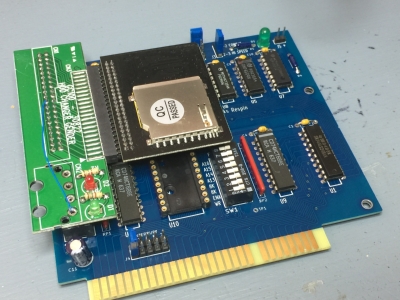
Insentricity :: Adding Solid-State Storage to an Original IBM PC ::

Posted by jpluimers on 2019/02/19

Can you imagine MS-DOS 6.2 recognising an 8 gigabyte SD card and allowing it to format it with multiple 2 gigabyte partitions?

Keeping old stuff working: [WayBackInsentricity :: Adding Solid-State Storage to an Original IBM PC :: with these nice links:

–jeroen

via: [WayBack] There was a lot of interest in how I added solid-state storage when I was tweeting about it a few weeks ago, now you can see… – Chris Osborn – Google+


Posted in Development, Hardware Development, History | Leave a Comment »

Calls from +18553308653 might be because someone is trying to use your phone number to setup a Microsoft account two factor authentication

Posted by jpluimers on 2019/02/18

Got some calls to my phone numbers in The Netherlands from +18553308653 that I did not ask for. The below searches revealed it is likely someone trying to use those to setup Two Factor Authentication.

It was not my live account, as that was already covered by the Microsoft Authenticator app (you can set up your phone number through account.live.com/names/Manage and authentication through account.microsoft.com/security, see steps at [WayBack] Microsoft – Authy).

Read the rest of this entry »

Posted in Authentication, Power User, Security | Leave a Comment »

That duh moment when you cannot read an SD card: it’s SDHC/SDXC in an SD card reader; Secure Digital – Wikipedia

Posted by jpluimers on 2019/02/18

That moment you facepalm yourself because you forgot that particular machine won’t read SD cards because they are too big for the SD card reader in it: SD goes up to 4 gigabyte, anything bigger (nowadays basically everything) requires SDXC or SDHC compatible readers.

Quotes from Wikipedia:

However, older host devices do not recognize SDHC or SDXC memory cards, although some devices can do so through a firmware upgrade.[11] Older Windows operating systems released before Windows 7 require patches or service packs to support access to SDHC cards.[12][13][14]

Older host devices generally do not support newer card formats, and even when they might support the bus interface used by the card,[6]there are several factors that arise:

  • A newer card may offer greater capacity than the host device can handle (over 4 GB for SDHC, over 32 GB for SDXC).
  • A newer card may use a file system the host device cannot navigate (FAT32 for SDHC, exFAT for SDXC)
  • Use of an SDIO card requires the host device be designed for the input/output functions the card provides.
  • The hardware interface of the card was changed starting with the version 2.0 (new high-speed bus clocks, redefinition of storage capacity bits) and SDHC family (Ultra-high speed (UHS) bus)
  • UHS-II has physically more pins but is backwards compatible to UHS-I and non-UHS for both slot and card.[27]
  • Some vendors produced SDSC cards above 1GB before the SDA had standardized a method of doing so.
SD compatibility table
SDSC card SDHC card SDHC UHS card SDXC card SDXC UHS card SDIO card
SDSC slot Yes No No No No No
SDHC slot Yes Yes Yes[a] No No No
SDHC UHS slot Yes[a] Yes[a] Yes[b] No No No
SDXC slot Yes Yes Yes[a] Yes Yes[a] No
SDXC UHS slot Yes[a] Yes[a] Yes[b] Yes[a] Yes[b] No
SDIO slot Varies Varies Varies Varies Varies Yes

–jeroen

Posted in Development, Flash-memory, Hardware Interfacing, Power User, SD/miniSD/microSD/MMC, Storage, USB | Leave a Comment »

Windows 7..10: disable shutdown/hibernate/sleep/restart from UI

Posted by jpluimers on 2019/02/18

I needed this for the Windows 10 machine of my mentally retarded brother: WoL (wake-on LAN) for his machine always works when it is in sleep or deep sleep mode, not every now and then fails when fully powered off.

After it is disabled in the UI, you can still perform it with [WayBackshutdown.exe, so I added these shortcuts first:

Disabling the Shutdown related actions in the UI consists of two steps:

  1. Removing it from the logon screen using the registry
  2. Removing it from the user using gpedit.msc (which is wrapped in mmc.exe)

I will try to get the registry changes for the second using [WayBackRegFromApp – Generate RegEdit .reg file from Registry changes made by application (thanks [WayBack] magicandre1981 for suggesting that at [WayBackwindows – How can I use Process Monitor to detect register changes made by GPEdit modifications? – Super User).
The wrapping mmc.exeis easiest to obtain using Process Explorer, and RegFromApp likely needs to run in elevated mode.

If that fails, I can try Process Monitor as suggested by [WayBack] Tom Wijsman in [WayBackcommand line – Change group policy using windows CMD – Super User.

The reason for the above is that I want to avoid UI based modifications that are hard to script.

Remove Shutdown options from the logon screen

This is just the registry setting below.

It also removes the reboot/hibernate/sleep options from the logon screen, so you need shortcuts for that.

Remove Shutdown for the regular users UI

This can be done using either gpedit.msc (Group Policy Editor) drilling down to the local policies or secpol.msc (the Local Policy Editor):

  1. Drill down to
    1. Local Policies
    2. User Rights Management
  2. Double click Shut down the system
  3. Remove the groups you don’t want the system to shutdown
  4. Press OK to confirm

See the video below how.

I’ve removed the group Users and kept the group Administrators to allow ShutDown.

Administrators now do need to execute the above commands (for instance shutdown.exe /h /f) in with an UAC administrative token enabled!

If you do not want that, add the users that can perform Shutdown commands to a new group, then aadd that group to Shutdown the system.

If you want to perform this system wide for all users, then it’s faster to change the [WayBackWindows Explorer NoClose policy (see also [WayBackGroup Policy Registry Reference).

Read the rest of this entry »

Posted in Ethernet, Network-and-equipment, Power User, Wake-on-LAN (WoL), Windows | Leave a Comment »

Windows <= 10: batch file to open Windows Update panel

Posted by jpluimers on 2019/02/15

Up until Widows 8.1, you could use wuapp to start the Windows Update panel.

For a while, Windows 10 needed a cumbersome language specific workaround described at Windows 10 – language neutral batch file to start Windows.

That stopped working after a few builds, but I forgot to make a note in which build exactly. Already in Windows 10 build 10122, the icon in wucltux.dll, so this might have been shortly after the initial “RTM” (retroactively named 1507).

So for a while, I had this batch file:

Since then I had to maintain too many locales running Windows 10. So here is the batch file:

for /f "delims=" %%A in ('PowerShell -Command "(Get-Culture).Name"') do explorer "%LocalAppData%\Packages\windows.immersivecontrolpanel_cw5n1h2txyewy\LocalState\Indexed\Settings\%%A\AAA_SystemSettings_MusUpdate_UpdateActionButton.settingcontent-ms"

It uses these tricks:

  1. Set output of a command as a variable (in this case a for loop variable)
  2. Execute PowerShell script in a .bat file
  3. PowerShell Get-Culture (which gets a .NET CultureInfo instance)
  4. CultureInfo.Name property (which has the nl-NL, en-US, etc codes in it)

But now I have extended it to support old and new Windows versions:

if exist %windir%\System32\wuapp.exe (
  %windir%\System32\rundll32.exe url.dll,FileProtocolHandler wuapp.exe
) else (
  %windir%\explorer ms-settings:windowsupdate
)

–jeroen

via: Windows Update Shortcut – Create in Windows 10 – Windows 10 Forums

Posted in Batch-Files, Development, Power User, Scripting, Software Development, Windows | Leave a Comment »

To celebrate his 85th birthday, some links to interviews with Niklaus Wirth interviews

Posted by jpluimers on 2019/02/15

Today, Niklaus Wirth, “father” of The Pascal Programming Language turned 85.

Happy birthday!

Almost 50 years ago, Niklaus Wirth submitted his famous paper “The Programming Language Pascal” which was published early 1971

Luckily it is archived on both the WayBack machine and Archive.is as the only PDF copy I could find on-line isn’t always on-line: http://oberoncore.ru/_media/library/wirth_the_programming_language_pascal.pdf

Originally it was published by Niklaus Wirth  in Acta Informatica, Vol. 1, Fasc. 1, 1971 pp. 35-63

He has been very active, just browse through the [WayBack] List of computer science publications by Niklaus Wirth

To celebrate his birthday, here are some interviews with him:

If you like the ones above as much as I do, then search for more: there are plenty!

–jeroen

via: Happy 80th birthday Niklaus Wirth! « The Wiert Corner – irregular stream of stuff

Read the rest of this entry »

Posted in Delphi, Development, History, Pascal, Software Development | Leave a Comment »

VNC, Windows and UAC prompts

Posted by jpluimers on 2019/02/15

Since I needed to maintain a Windows PC behind a VPN connection via the console (so not via RDP sessions) including installation of software, I needed a (preferably free or open source) solution supporting elevation through UAC (User Account Control).

For a good description of differences between RDP and VNC, see [WayBack] remote desktop – TightVNC while an RDP session is running – Super User by [WayBackUser Canadian Luke.

Of the many non functional search results, the one suggesting running UltraVNC as a service is the one that really worked: [WayBack] If you install UltraVNC as a service, you can see the UAC notifications and press the buttons… VNC on windows 7 with administrator rights – Super User.

  1. I only needed the “Ultra VNC Server Silent” installation (see screenshot below).
  2. Run the UltraVNC settings (default location for the settings application is C:\Program Files\uvnc bvba\UltraVNC\uvnc_settings.exe)
    1. In the Security tab, be sure to set good passwords for read/write access (VNC Password) and read-settings (View-Only password)
    2. In the  Service tab, ensure the service is installed and if it is stop+start the service
  3. Optionally ensure a TLS or SSH tunnel (as by default ports 5900 and 5800 are unencrypted)
    • I need to research this further, as there seems to be a plugin possibility.

Now I can use Screen Sharing on my Mac to access the machine via a VPN over the VNC protocol. Combined with a Wake On LAN feature in the remote network, this works splendid.

Read the rest of this entry »

Posted in Power User, Remote Desktop Protocol/MSTSC/Terminal Services, Windows | Leave a Comment »

Anonymous method do location capturing, so when you expect value capturing you get the “Mysterious Case Of Wrong Value”

Posted by jpluimers on 2019/02/14

Interesting read [WayBack] Mysterious Case Of Wrong Value.

In order to capture by value (which in C++ you can specify), you need an intermediate function like Dalija describes:

function CreateFunction(Value: Integer): TFunc<Integer>;
begin
  Result :=
    function: Integer
    begin
      Result := Value;
    end;
end;

Via: [WayBack] Dalija Prasnikar – Google+

–jeroen

Posted in Delphi, Development, Software Development | Leave a Comment »