The Wiert Corner – irregular stream of stuff

Jeroen W. Pluimers on .NET, C#, Delphi, databases, and personal interests

  • My badges

  • Twitter Updates

  • My Flickr Stream

  • Pages

  • All categories

  • Enter your email address to subscribe to this blog and receive notifications of new posts by email.

    Join 1,854 other subscribers

Archive for 2020

On my research list: Unum – The End of (Numeric) Error

Posted by jpluimers on 2020/06/24

From about 4 years ago, so time to see how many development stacks support Unum by now: [WayBackThe End of (Numeric) Error

Crunching numbers was the prime task of early computers. The common element of these early computers is they all used integer arithmetic. John Gustafson, one of the foremost experts in scientific computing, has proposed a new number format that provides more accurate answers than standard floats, yet saves space and energy. The new format might well revolutionize the way we do numerical calculations.

Back then, I found these links through my G+ circles:

Read the rest of this entry »

Posted in Algorithms, Development, Floating point handling, Software Development, Unum | Leave a Comment »

Git – Credential Storage: caching for some time (and removing it)

Posted by jpluimers on 2020/06/24

From [WayBackGit – Credential Storage:

Git has a few options provided in the box:

  • The default is not to cache at all. Every connection will prompt you for your username and password.
  • The “cache” mode keeps credentials in memory for a certain period of time. None of the passwords are ever stored on disk, and they are purged from the cache after 15 minutes.

$ git config --global credential.helper cache

The cache helper accepts the --timeout <seconds> option, which changes the amount of time its daemon is kept running (the default is 900, or 15 minutes).

This is a one time config setting.

To remove it, use this command:

$ git config --global unset credential.helper cache

–jeroen

Posted in Development, DVCS - Distributed Version Control, git, Software Development, Source Code Management | Leave a Comment »

“Here’a nickel, kid. Get yourself a better computer.” 25th anniversary

Posted by jpluimers on 2020/06/24

Today 25 years ago: [WayBack] Dilbert Comic Strip on 1995-06-24 | Dilbert by Scott Adams

Wally approaches another employee and says, “Hold it right there, buddy.”

Wally continues, “That scruffy beard . . . those suspenders . . . that smug expression . . .”

Wally concludes, “You’re one of those condescending Unix computer users!”

The man responds, “Here’a nickel, kid. Get yourself a better computer.”

It was a play on the tiny Here’s a nickel kid. Go buy yourself a real computer fragment from [WayBack] single.h:

#if _FP_W_TYPE_SIZE < 32
#error "Here's a nickel kid. Go buy yourself a real computer."
#endif

Not much has changed for Dilbert, apart that by now, the transcripts have been put on-line, something I wanted to do some 15 years ago with OCR.

Seems somebody did it, and made it official too. Woot!

On the computing side, we still seem to be well in the 64-bit era, just like when I posted 20 years ago today: Here’s a nickel kid. Go buy yourself a real computer.

I wonder that really has changed in the past 5 years, and how long the “here’s a nickel” will stay relevant.

Via these tweets that helped me remind to post:

There is more gold in that thread. See below (:

–jeroen

Read the rest of this entry »

Posted in Fun, History | Leave a Comment »

Ten Commandments For Naming Your Code

Posted by jpluimers on 2020/06/23

Be clear, be consistent, don’t be clever, and follow these rules for naming your code.

[WayBack] Ten Commandments For Naming Your Code investigates these:

  1. Thou shalt be specific.
  2. Thou shalt not use unnecessary words.
  3. Thou shalt not use abbreviations.
  4. Thou shalt use the code’s primary human language.
  5. Thou shalt not make up words.
  6. Thou shalt not include type.
  7. Thou shalt only use non-obvious words if the meaning is obvious.
  8. Thou shalt prefer active voice.
  9. Thou shalt use consistent syntax.
  10. Thou shalt break these rules if necessary.

–jeroen

Posted in Conference Topics, Conferences, Development, Event, Software Development | Leave a Comment »

.NET Rocks: How do you do concurrency?

Posted by jpluimers on 2020/06/23

Since it was quite a while ago I wrote heavily concurrent code in .NET, I wanted to know about the starte of the art.

This pod cast and the book discussed in it helped a lot: [WayBackHow do you do concurrency? Carl and Richard talk to Riccardo Terrell about his book on Concurrency in .NET. https://www.manning.com/books/concurrency-i… – .NET Rocks! – Google+

Links referenced:

–jeroen

Posted in .NET, Development, Multi-Threading / Concurrency, Software Development | Leave a Comment »

Git submodule inside of a submodule (nested submodules) – Stack Overflow

Posted by jpluimers on 2020/06/23

Not sure why yet, but with a nested pacapt git submodule inside another git submodule bash.aliases, when pulling bash.aliases it did pull the actual content of pacapt, only the reference.

I wanted this because this allowed me to abstract installation of common packages no matter if the system was using the apt-get, zypper, homebrew or other package managers. [WayBack] GitHub – icy/pacapt: An Arch’s pacman-like package manager for some Unices supports many in a coherent way (I’m way past the not-invented-here syndrome:[WayBack] linux – A universal bash script for installing with apt-get and yum – Stack Overflow).

A git pull --recurse-submodules failed.

Even executing git submodule update --init --recursive at the top-level did not get it.

Forcing a submodule to update after a shallow clone

I had to to inside the bash.aliases submodule and perform git submodule update --init <submoduleName>:

$ git submodule update --init pacapt
Submodule 'pacapt' (https://github.com/icy/pacapt.git) registered for path 'pacapt'
Cloning into '/home/jeroen_pluimers_com/bash.aliases/pacapt'...
Submodule path 'pacapt': checked out '31f43d901055e3c361dfbcefdf50231442da13de'

I got this workaround at [WayBack] Git submodule inside of a submodule (nested submodules) – Stack Overflow.

It might mean I need to read more deeply into these asgit submodule update --init --recursive might by now need to be git submodule update --init --recurse-submodules, but the docs are not clear on that:

Forcing a recursive clone including submodules

This worked out of the box on a Git > 2.13:

D:\Versioned\github.com\project-jedi>call git clone --recurse-submodules -j8 https://github.com/project-jedi/jcl.git
Cloning into 'jcl'...
remote: Enumerating objects: 79, done.
remote: Counting objects: 100% (79/79), done.
remote: Compressing objects: 100% (46/46), done.
Receiving objects: 100% (82053/82053), 78.7delta 33), pack-reused 81974 eceiving objects: 100% (82053/82053), 72.05 MiB | 7.14 MiB/s
9 MiB | 3.77 MiB/s, done.
Resolving deltas: 100% (65056/65056), done.
Checking out files: 100% (3461/3461), done.
Submodule 'jcl/source/include/jedi' (https://github.com/project-jedi/jedi.git) registered for path 'jcl/source/include/jedi'
Cloning into 'D:/Versioned/github.com/project-jedi/jcl/jcl/source/include/jedi'...
remote: Enumerating objects: 4, done.
remote: Counting objects: 100% (4/4), done.
remote: Compressing objects: 100% (4/4), done.
remote: Total 379 (delta 0), reused 3 (delta 0), pack-reused 375
Receiving objects: 100% (379/379), 123.87 KiB | 568.00 KiB/s, done.
Resolving deltas: 100% (120/120), done.
Submodule path 'jcl/source/include/jedi': checked out 'd04f4d341051c1245c06c822468ea927073e26eb'

–jeroen

Posted in Development, DVCS - Distributed Version Control, git, Source Code Management | Leave a Comment »

browser – How to connect a website has only IPv6 address without domain name? – Super User

Posted by jpluimers on 2020/06/22

For my link archive: [WayBack] browser – How to connect a website has only IPv6 address without domain name? – Super User (thanks haimg):

According to RFC2732, literal IPv6 addresses should be put inside square brackets in URLs, e.g. like this:

http://[1080:0:0:0:8:800:200C:417A]/index.html

If you also need to specify a port other then 80 to access the server it has to be placed after the closing bracket:

http://[1080:0:0:0:8:800:200C:417A]:8888/index.html

Of course, you have to have end-to-end IPv6 connectivity to that host. E.g. if the server is not inside your own local network, you need to have IPv6 connectivity, either via your ISP (rare), or via some kind of IPv6 in IPv4 encapsulation (tunnel).

Related: [WayBack] RFC 2732 – Format for Literal IPv6 Addresses in URL’s

–jeroen

Posted in Chrome, Firefox, Internet Explorer, Opera, Power User, Web Browsers | Leave a Comment »

How to Merge Folders on Mac OS X Without Losing All Your Files (Seriously)

Posted by jpluimers on 2020/06/22

And still the UI has not improved:

The default folder-merge behavior in Mac OS X is to erase the existing folder, deleting all its files rather than offering to merge them intelligently. Windows and Linux file managers have offered folder-merging for decades, but Macs still don’t.

[WayBack]How to Merge Folders on Mac OS X Without Losing All Your Files (Seriously)

Via: [WayBack] Yes, you’re reading that right — try to merge a folder like you would on Windows or Linux and you’ll lose all the old folder’s files if you click Replace… – Roderick Gadellaa – Google+

–jeroen

Posted in Apple, Mac, Mac OS X / OS X / MacOS, Power User | Leave a Comment »

Linux Containers – LXD – Try it online

Posted by jpluimers on 2020/06/22

Cool: live container for some 20 minutes usage at [WayBack/Archive.is] Linux Containers – LXD – Try it online.

Via: [WayBack] New European Data Protection Law coming soon! Beginning with May, 25 you’re no longer allowed to host private data outside the EC, e.g. in the U.S. or … – Joe C. Hecht – Google+

–jeroen

Posted in Cloud, Containers, Infrastructure | Leave a Comment »

“This app can’t run on your PC – To find a version for your PC, check with the software publisher.”

Posted by jpluimers on 2020/06/19

I had a problem running wmic. It was no a Dutch Windows 10, but the same will happen with any locale, so in English the error looks like this:

This app can't run on your PC

To find a version for your PC, check with the software publisher.

After which you get this on the command-line:

Access is denied.

In the Dutch version, the error is called this:

Deze app kan niet worden uitgevoerd op uw pc

Vraag bij de software-uitgever na of er een versie bestaat voor uw pc.

After which you get this on the command-line:

Toegang geweigerd.

Apparently, an executable is now an app, and PC is uppercase in English, but not in Dutch. I digress.

The un-cool thing is that [WayBack] Process Monitor – Windows Sysinternals | Microsoft Docs showed no Access Denied message at all.

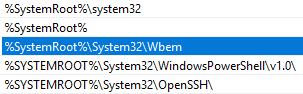
What happened however, was that there was an empty %SystemRoot%\System32\wmic.exe, which gets executed because %SystemRoot%\System32 is earlier on the path than C:\Windows\System32\wbem\WMIC.exe.

Note that %SystemRoot% seems to be the new %windir%.

You can reproduce this by doing this on a command prompt window:

cd %temp%

rem > wmic.exe

wmic

The rem will create an empty wmic.exe. Because on Windows, the current directory is always on the path, it tries to execute the empty wmic.exe, which causes the error.

Do not run an administrative in the default %SystemRoot%\System32 directory

The actual cause was a combination of this:

  1. When running cmd as Administrator, it starts in %SystemRoot%\System32
  2. %SystemRoot%\System32 is early on the path
  3. Copy/Paste through a remote desktop connection is unreliable
  4. I copied a big bunch of output from the RDP session to my host to write some documentation
  5. I copied a new command from the host to run in the Administrative cmd
  6. What got pasted instead was the output, which created these empty files (which has some typos, I know) because output is of the form C:\path>filename:

    C
    conrol
    control
    defrag
    del
    Disable-ComputerRestore
    exit
    Get-ComputerRestorePoint
    net
    powercfg
    powershell
    powrcfg
    SystemProperties.exe
    vssadmin
    wmic
    wmic.exe

  7. I did not notice these files were created in  %SystemRoot%\System32

–jeroen

Posted in Power User, Windows, Windows 10 | Leave a Comment »