The Wiert Corner – irregular stream of stuff

Jeroen W. Pluimers on .NET, C#, Delphi, databases, and personal interests

  • My badges

  • Twitter Updates

  • My Flickr Stream

  • Pages

  • All categories

  • Enter your email address to subscribe to this blog and receive notifications of new posts by email.

    Join 1,854 other subscribers

Archive for 2020

Corona virus crisis humour research

Posted by jpluimers on 2020/03/12

https://twitter.com/GMMKuipers/status/1237745540265390084

Posted in Uncategorized | Leave a Comment »

0.30000000000000004.com

Posted by jpluimers on 2020/03/12

Cool! It’s about Floting Point Math. Which means that in most programming languages 0.1 + 0.2 does not equal 0.3: [WayBack0.30000000000000004.com

–jeroen

Posted in Development, Software Development | Leave a Comment »

Installing SourceTree 3.x for Windows on an air-gapped machine

Posted by jpluimers on 2020/03/11

Since the “account.json” SourceTree search did not help me much, below are the steps for installing SourceTree for Windows 3.x on an air-gapped machine.

Prerequisites:

Steps:

  1. Run Process Explorer on the target system
  2. Run the SourceTreeSetup installer on the target system
  3. When registering, click on the “BitBucket” button on the target system
  4. In Process Explorer, find out the web browser process that the setup kicks off and grab the command-line, which looks like this when running Chrome as default browser:
    "%LocalAppData%\Google\Chrome\Application\chrome.exe" -- "https://bitbucket.org/site/oauth2/authorize?response_type=code&client_id=123456789012345678&state=authenticated&redirect_uri=http://localhost:34106/"
  5. Copy the URL bit https://bitbucket.org/site/oauth2/authorize?response_type=code&client_id=123456789012345678&state=authenticated&redirect_uri=http://localhost:34106/ over and paste it on a machine that has internet access
  6. Logon, and follow the steps until the URL look like this: http://localhost:34106/?state=authenticated&code=876543210987654321
  7. Copy that URL over to a web-browser on the target system and execute it
  8. Finish the installation steps on the target system

Now a new file should be in %LocalAppData%\Atlassian\SourceTree\accounts.json suitable for SourceTree 3.x. In the future you might be lucky enough to copy that to a target system before installing.

I was not so lucky, because my accounts.json was SourceTree 2.x based, which the SourceTree 3.x setup modifies, but is still not happy with.

Note these number differ on each request:

  • 123456789012345678 is a base64 encoded request ID
  • 876543210987654321 is a base64 encoded response ID
  • 34106 is a random TCP port where the installer is listening on to get the authentication information

Fiddler

Initially, I had Fiddler steps in the above, but found out I did not need those. One thing that complicated this is that Fiddler had been removed from Chocolatey for a while, so I was not sure it would stay as a product:

SourceTree

Now has an MSI installer:

Has old steps for 2.x versions to get around the above hoopla:

–jeroen

Posted in Development, DVCS - Distributed Version Control, Software Development, Source Code Management, SourceTree | Leave a Comment »

Bad surprise of the day: SysUtils.TEncoding in XE2+ defaults to ANSI, while in XE it defaulted to UTF-8.

Posted by jpluimers on 2020/03/11

Bad surprise of the day: SysUtils.TEncoding in XE2+ defaults to ANSI, while in XE it defaulted to UTF-8 .Among other things this means that TStringList… – Eric Grange – Google+

Source: Bad surprise of the day: SysUtils.TEncoding in XE2+ defaults to ANSI, while i…

Delphi

Eric Grange's profile photo

+Stefan Glienke Indeed, you’re right. The issue must be deeper somewhere. Don’t have time to investigate too much, I’m bypassing the RTL now (also have to work around the limitation that for utf-8 the TEncoding.GetString method returns an empty string if one character in the buffer isn’t utf-8)

Asbjørn Heid's profile photo

I wouldn’t trust the RTL at all with loading non-ascii text, we’ve had it hang on invalid UTF-8 codes more than once.

–jeroen

Posted in Ansi, Delphi, Development, Encoding, Software Development, UTF-8, UTF8 | Leave a Comment »

Practical Deep Learning for Coders 2018 · fast.ai

Posted by jpluimers on 2020/03/11

I’ve read this twice and need to re-read this a few times, so from my reading list then need to follow the course one day: Practical Deep Learning for Coders 2018 · fast.ai [WayBack].

… deep learning course based on Pytorch (and a new library we have built, called fastai), with the goal of allowing more students to be able to achieve world-class results with deep learning. … this course, Practical Deep Learning for Coders 2018 [WayBack], … The only prerequisites are a year of coding experience, and high school math (math required for understanding the material is introduced as required during the course).

Related: [WayBackThe Matrix Calculus You Need For Deep Learning – Terence Parr and Jeremy Howard

Via:

–jeroen

Posted in Development, Python, Scripting, Software Development | Leave a Comment »

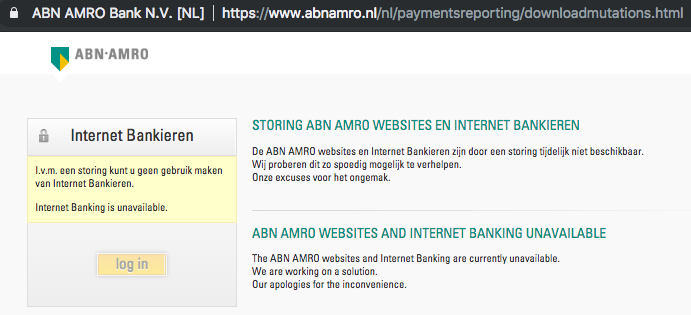
The last thing you need to do when you cause link rot is to list the page as “online banking is down”

Posted by jpluimers on 2020/03/10

Nice example on how not to copy with link rot: as a bank is to indicate “internet banking is unavailable” scares your customers away.

[WayBack] Jeroen Pluimers on Twitter: “dit heet overigens link rot, en gebruiksvriendelijke sites proberen dat te voorkomen; is zeker niet gecompliceerd en eigenlijk ook niet complex: het is een kleine moeite om dat in je ontwerp en onderhoud-proces mee te nemen. 1/2 …

[WayBackJeroen Pluimers on Twitter: “de huidige down-melding zet sowieso je klanten volledig op het verkeerde been, dus daar moet zeker iets aan gebeuren. 2/2 “I.v.m. een storing kunt u geen gebruik maken van Internet Bankieren. Internet Banking is unavailable”…”

–jeroen

ABNAMRO

Posted in Conference Topics, Conferences, Development, Event, LifeHacker, Power User, Software Development, Usability, User Experience (ux), Web Development | Leave a Comment »

ssh – Why OpenSSH deprecated DSA keys – Information Security Stack Exchange

Posted by jpluimers on 2020/03/10

In a lot of ssh-keygen related posts, you still see DSA being mentioned, though that has been deprecated and later removed from OpenSSH.

I wondered why, so I did some digging.

TL;DR: it’s complicated:

  • different standards mandating eventually conflicting parameters,
  • extending the parameters would require protocol extension,
  • a logjam vulnerability for certain combinations of parameters and finally
  • better algorithms having become available.

Some of the related topics cannot be archived in the WayBack machine or refuse being archived at Archive.is, so here is a list of partially archived relevant links:

–jeroen

Posted in Communications Development, Development, Internet protocol suite, Power User, Security, SSH, TCP | Leave a Comment »

Start Together. Finish Together – Hacker Noon

Posted by jpluimers on 2020/03/10

I need to read more Hacker Noon stuff:

It may seem counterintuitive, but… Start Together. Finish Together – Hacker Noon [WayBack]

Via a mention of the “non developers” point of view, who are the key persons to do this whole “start/finish together” mantra wit: [WayBack] “Their mental model is that developers/designers are this tiny little pipe, and you have to play this intricate game of Tetris to get the most amount of… – Marjan Venema – Google+ (who does great coaching, so be sure to check out her postings)

–jeroen


Posted in Agile, Development, Software Development | Leave a Comment »

MacOS: converting a man page to markdown

Posted by jpluimers on 2020/03/09

Converting a man page to markdown is a three step process:

  1. installing a tool that can convert the source of a man page to markdown
  2. finding the location of the man page source
  3. doing the actual conversion

Tool to convert man to markdown

The source format of man pages is troff, which is usually converted by man using groff, or a set of macros.

My initial thought for the first problem was to use pandoc, but as I found earlier in pandoc oneliner from reStructuredText to html, on MacOS, the pandoc can write groff format, but not read it.

Luckily doing a pandoc from groff to markdown – Google Search, I bumped into [WayBack] Convert groff to markdown · Issue #8 · neomutt/neomutt-docs · GitHub which lead to mandoc – Wikipedia.

Since I already had homebrew installed, getting mandoc was simple: brew install mandoc.

Finding the man page source

Earlier in the process when searching for pandoc based conversions, I found the solution for the second problem too: [WayBack] Man page with preserved text decorations, proportional text and fixed-width code – Unix & Linux Stack Exchange taught me about the -w option, but there is actually a -W option that works better if you have multiple pages for a keyword:

-w or --path
Don’t actually display the man pages, but do print the location(s) of the files that would be formatted or displayed. If no argument is given: display (on stdout) the list of directories that is searched by man for man pages. If manpath is a link to man, then “manpath” is equivalent to “man --path“.

-W Like -w, but print file names one per line, without additional information. This is useful in shell commands like man -aW man | xargs ls -l

Actual conversion for fsck_hfs

It all came down to a one-liner:

mandoc -T markdown `man -w fsck_hfs` > /tmp/fsck_hfs.8.md

Note the order here is important this will fail with an error:

mandoc `man -w fsck_hfs` -T markdown > /tmp/fsck_hfs.8.md

mandoc: -T: ERROR: No such file or directory
mandoc: markdown: ERROR: No such file or directory

–jeroen

Read the rest of this entry »

Posted in Apple, Mac, Mac OS X / OS X / MacOS, Power User | 1 Comment »

command line – Recursive tar compression? – Ask Ubuntu

Posted by jpluimers on 2020/03/09

Since I always forget one-letter command-line options: [WayBack]command line – Recursive tar compression? – Ask Ubuntu (thanks andrew.46 for this very nice answer!):

Try:

tar -czvf directorios.tar.gz folder

A few notes:

  1. Recursion is the default, from the tar man pages:
    -c, --create
        Create a new archive.  Arguments supply the names of the files to be archived.
        Directories  are  archived  recursively,  unless  the --no-recursion option is
        given.
    

    Although this can be turned off by using the --no-recursion option…

  2. You need the archive name immediately after the -f option, the correct sequence being:
    tar -c [-f ARCHIVE] [OPTIONS] [FILE...]
             ^^^^^^^^^^
    
  3. For a more flexible command line (particularly if you wanted to use other compression utilities apart from gzip with tar) you could omit the -z option and use -a option to allow tar to automatically decide which compressor to use based on the archive suffix:
    -a, --auto-compress
        Use archive suffix to determine the compression program.
    

    Recognised suffixes are:

    • .gz : gzip
    • .tgz : gzip
    • .taz : gzip
    • .Z : compress
    • .taZ : compress
    • .bz2 : bzip2
    • .tz2 : bzip2
    • .tbz2 : bzip2
    • .tbz : bzip2
    • .lz : lzip
    • .lzma : lzma
    • .tlz : lzma
    • .lzo : lzop
    • .xz : xz

tar is pretty cool :)

–jeroen

Posted in *nix, *nix-tools, Power User | Leave a Comment »