The Wiert Corner – irregular stream of stuff

Jeroen W. Pluimers on .NET, C#, Delphi, databases, and personal interests

  • My badges

  • Twitter Updates

  • My Flickr Stream

  • Pages

  • All categories

  • Enter your email address to subscribe to this blog and receive notifications of new posts by email.

    Join 1,860 other subscribers

Archive for 2021

Covid-19 booster prik vanuit het buitenland reserveren: bel +31851124970

Posted by jpluimers on 2021/12/28

Via https://twitter.com/locuta/status/1475849029376516098

LET OP: We hebben een telefoonnummer gevonden dat je vanuit het buitenland kunt bellen om een boosterafspraak te maken: +31851124970. Deze lijkt nog wél te werken!
prikdoor

Draadje met extra informatie:

Posted in Uncategorized | Leave a Comment »

Run the latest RDP session in full-screen

Posted by jpluimers on 2021/12/28

MSTSC.exe helptext

MSTSC.exe helptext

I created this small batch file:

:: start last RDP session (or new one with command-line parameters) full-screen
:: see https://interworks.com/blog/ijahanshahi/2012/01/02/mstsc-commands-and-creating-custom-remote-desktop-shortcut/
mstsc /f %*

It is based on [Wayback] MSTSC Commands and Creating a Custom Remote Desktop Shortcut | InterWorks, which has the helptext for MSTSC.exe (which stands for MicroSoft Terminal Services).

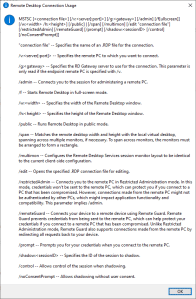
Later I found out a way easier method to get that helptext is to run MSTSC.exe /?, which shows a nice dialog:

[Window Title]
Remote Desktop Connection Usage

[Content]
MSTSC [] [/v:<server[:port]>] [/g:] [/admin] [/f[ullscreen]] [/w: /h:] [/public] | [/span] [/multimon] [/edit "connection file"] [/restrictedAdmin] [/remoteGuard] [/prompt] [/shadow: [/control] [/noConsentPrompt]]

"connection file" -- Specifies the name of an .RDP file for the connection.

/v:<server[:port]> -- Specifies the remote PC to which you want to connect.

/g: -- Specifies the RD Gateway server to use for the connection. This parameter is only read if the endpoint remote PC is specified with /v.

/admin -- Connects you to the session for administering a remote PC.

/f -- Starts Remote Desktop in full-screen mode.

/w: -- Specifies the width of the Remote Desktop window.

/h: -- Specifies the height of the Remote Desktop window.

/public -- Runs Remote Desktop in public mode.

/span -- Matches the remote desktop width and height with the local virtual desktop, spanning across multiple monitors, if necessary. To span across monitors, the monitors must be arranged to form a rectangle.

/multimon -- Configures the Remote Desktop Services session monitor layout to be identical to the current client-side configuration.

/edit -- Opens the specified .RDP connection file for editing.

/restrictedAdmin -- Connects you to the remote PC in Restricted Administration mode. In this mode, credentials won't be sent to the remote PC, which can protect you if you connect to a PC that has been compromised. However, connections made from the remote PC might not be authenticated by other PCs, which might impact application functionality and compatibility. This parameter implies /admin.

/remoteGuard -- Connects your device to a remote device using Remote Guard. Remote Guard prevents credentials from being sent to the remote PC, which can help protect your credentials if you connect to a remote PC that has been compromised. Unlike Restricted Administration mode, Remote Guard also supports connections made from the remote PC by redirecting all requests back to your device.

/prompt -- Prompts you for your credentials when you connect to the remote PC.

/shadow: -- Specifies the ID of the session to shadow.

/control -- Allows control of the session when shadowing.

/noConsentPrompt -- Allows shadowing without user consent.

[OK]

–jeroen

Posted in Batch-Files, Development, Power User, Remote Desktop Protocol/MSTSC/Terminal Services, Scripting, Software Development, Windows | Leave a Comment »

Windows: get CPU information on the console

Posted by jpluimers on 2021/12/28

It still seems that WMIC is the quickest way to get CPU information on the console:

T510-PSO C:\bin\rdp> wmic cpu get name,CurrentClockSpeed,MaxClockSpeed
CurrentClockSpeed  MaxClockSpeed  Name
2667               2667           Intel(R) Core(TM) i5 CPU       M 560  @ 2.67GHz

T510-PSO C:\bin\rdp> wmic path win32_Processor get Name,NumberOfCores,NumberOfLogicalProcessors
Name                                             NumberOfCores  NumberOfLogicalProcessors
Intel(R) Core(TM) i5 CPU       M 560  @ 2.67GHz  2              4

Actually, wmic cpu is shorthand for wmic path win32_Processor, so this works fine:

T510-PSO C:\bin\rdp> wmic cpu get name,CurrentClockSpeed,MaxClockSpeed,NumberOfCores,NumberOfLogicalProcessors
CurrentClockSpeed  MaxClockSpeed  Name                                             NumberOfCores  NumberOfLogicalProcessors
2667               2667           Intel(R) Core(TM) i5 CPU       M 560  @ 2.67GHz  2              4

The reason is that cpu is an alias:

T510-PSO C:\bin\rdp> wmic alias cpu list brief
FriendlyName  PWhere              Target
CPU           Where DeviceID='#'  Select * from WIN32_PROCESSOR

Via:

–jeroen

Posted in Batch-Files, Console (command prompt window), Development, Power User, Scripting, Software Development, T510, ThinkPad, Windows | Leave a Comment »

Sometimes you wish that companies – especially banks – would pay you for testing their sites instead of you paying them for using their sites

Posted by jpluimers on 2021/12/28

People around me often wonder why things that seem so obvious does not work, and ask me if I bump into similar things.

I do, and often wonder why banks do not pay users to do testing for them instead of the other way around.

Below the fold a few Twitter threads. They might be mainly involving ING, but that’s just because I use their business and consumer portals more than those of other banks.

Here are the summaries:

Read the rest of this entry »

Posted in Development, Software Development, Web Development | Leave a Comment »

Chocolatey Software | NirLauncher

Posted by jpluimers on 2021/12/27

The cool thing about the Chocolatey NirLauncher install, is that it not just installs the launcher in the path, but all the NirSoft tools.

I wanted it in the path initially because I needed InsideClipboard to do some investigation (I wrote a similar tool ages ago, but could not readily find the source or executable, but InsideClipboard is better anyway).

This is cool, as I now can start any of the NirSoft tools from the cmd prompt, including [WayBack] NirLauncher itself, [WayBack] InsideClipboard and [WayBack] NirCmd (so I can now set the sound volume to 25% by running nircmd setsysvolume 16000)

To install:

choco install --yes NirLauncher

An older WayBack link notes a few important issues about anti-virus tools:

Read the rest of this entry »

Posted in Chocolatey, NirSoft, Power User, Windows, Windows 10 | Leave a Comment »

Cleaning up your Twitter timeline: run odd tweets through BotOMeter

Posted by jpluimers on 2021/12/27

To help my Twitter timeline clean I run odd messages through: [WayBack] Botometer® by OSoMe:

Botometer® (formerly BotOrNot) checks the activity of Twitter accounts and gives them a score based on how likely they are to be bots. Higher scores are more bot-like. Brought to you by the Observatory on Social Media (OSoMe) at Indiana University.

Next to just analysing one account, it can also analyse the followers of friends of an account.

Note that you need to give Twitter Permissions to BotOMeter, which you can easily revoke from their site as well, see [WayBack] FAQ: Botometer® by OSoMe.

Next to be more versatile, I also found BotOMeter to be more precise than [WayBack] Bot Sentinel Dashboard ‹ Bot Sentinel:

Bot Sentinel is a free platform developed to automatically detect political trollbots and untrustworthy accounts. Bot Sentinel utilizes machine learning and artificial intelligence to identify and track disruptive Twitter users.

Quite a few are now on the mule or block list.

Note that both work better with English than with non-English language, but even with non-English, both are quite good.

A review is on [WayBack] A Review of Popular Bot Checkers – Unhack The Vote.

–jeroen

Posted in Power User, SocialMedia, Twitter | Leave a Comment »

SoloPartners – ZZP-er in de zorg? Uitnodiging boostervaccinatie aanvragen!

Posted by jpluimers on 2021/12/27

Als je ZZP-er in de zorg bent kun je ongeacht je leeftijd je boostervaccinatie tegen Covid-19 aanvragen. Dat kan via [Wayback/Archive] SoloPartners: Uitnodiging boostervaccinatie aanvragen.

Daarna kun je je via [Wayback/Archive] Online een afspraak maken: Online aanmelden voor een boostervaccinatie in de wachtrij plaatsen. Soms ben je dan sneller dan wachten op geboortejaar.

Via [Wayback/Archive] Boostervaccinatie voor zzp’ers in de zorg via SoloPartners.

Gerelateerd: [Wayback/Archive] “vaccinatie.solopartners.nl” – Google Search

–jeroen

Posted in Covid-19 / Coronavirus, LifeHacker, Power User | Leave a Comment »

Amazon Prime in Nederland – Shopping Forum – GoT

Posted by jpluimers on 2021/12/27

Experiences if Dutch people using Amazon prime on various European sites over time (thread starts in 2017) [WayBack] Amazon Prime in Nederland – Shopping Forum – GoT.

It is quite a historic overview on what Amazon has done and changed with Amazon prime.

–jeroen

Posted in LifeHacker, Power User | Leave a Comment »

Chirpty circles from @jpluimers

Posted by jpluimers on 2021/12/24

[Wayback/Archive] Chirpty

Circle 1

Read the rest of this entry »

Posted in About, Personal | Leave a Comment »

Some links on resetting Windows 10 to a different installation language, but keeping the license

Posted by jpluimers on 2021/12/24

I had a few non English Windows 10 systems that I wanted to keep the license for, but otherwise have a clean Windows 10 English install on.

Some links; hopefully I can later make more notes.

Read the rest of this entry »

Posted in Power User, Windows, Windows 10 | Leave a Comment »