


ESXi: some notes on .vswp files; there are actually two types of them!
Posted by jpluimers on 2022/02/23
Earlier this month, I ended ESXi: editing /etc/vmware/hostd/vmInventory.xml to fix the datastore UUID for unavailable VMs part 2 with this:
A final note: I need to check out if
.vswpfiles need to be there at all, as my ESXi servers have plenty of physical memory in order not to swap out to disk. More on that in a future blog post.
Browsing back through my blog posts, I mentioned .vswp files before, but never really dug into them:
- How to copy files from one machine to another using ssh – Unix & Linux Stack Exchange mentions remote copying a while virtual machine directory via
scpincluding.vswpfiles - How to rename a VM through SSH on ESXi ? |VMware Communities quoting [WayBack] How to rename a VM through SSH on ESXi ? |VMware Communities “Edit the virtual machine .vmx configuration file (Be sure to properly update the directory and file name of the
.vswpswap file reference)” (which is invalidated by my own experience in the below blog post) - ESXi: on the console/ssh, when a moved VM pauses during power-on: show which VMs have messages waiting, then answer them found out that when moving or copying a virtual machine to another datastore or folder, the
.vmxfile will be changed to adopt thesched.swap.derivedNamevalue with a new value for the.vswpfile. The location of that.vswpfile is in the same directory as the.vmxfile. The file is named similar to the.vmxfilename, so if that one is likemyVirtualMachine.vmx, the.vswpfile will be likemyVirtualMachine-0ed91464.vswpwith a dash and 6 hexadecimal digits.
Doing more digging, especially about reducing .vswp file size, I first did a bit of browsing on my own systems. There I found that even a simple virtual machine like the archiveteam warrior appliance takes two .vswp files, of which only one is mentioned in the .vmx file. I actually used this virtual machine as example in ESXi: on the console/ssh, when a moved VM pauses during power-on: show which VMs have messages waiting, then answer them mentioning this .vmx file after confirming a copy.
These are the .vswp files:
[root@ESXi-X10SRH-CF:~] find /vmfs/volumes/Samsung980ProNVMe_782DB311B138/base/archiveteam/ | grep -w vswp | xargs -n 1 -I [] ls -Alh "[]"
-rw-------    1 root     root      110.0M May 15 21:29 /vmfs/volumes/Samsung980ProNVMe_782DB311B138/base/archiveteam/archiveteam-warrior-v3-20171013/vmx-archiveteam-warrior-v3-20171013-249107556-1.vswp
-rw-------    1 root     root        3.0G May 15 21:29 /vmfs/volumes/Samsung980ProNVMe_782DB311B138/base/archiveteam/archiveteam-warrior-v3-20171013/archiveteam-warrior-v3-20171013-0ed91464.vswp
The .vmx file mentions this entry with the archiveteam-warrior-v3-20171013-0ed91464.vswp file, not the vmx-archiveteam-warrior-v3-20171013-249107556-1.vswp file:
sched.swap.derivedName = "/vmfs/volumes/6097a4eb-6c6e4c76-46d3-0cc47aaa9742/base/archiveteam/archiveteam-warrior-v3-20171013/archiveteam-warrior-v3-20171013-0ed91464.vswp"
Well, there indeed are two types, and neither of them is encrypted, which can impose a security risk as per [Wayback] security – How to disable swap files in ESXi? – Server Fault (thanks [Wayback] User Marius Burz and [Wayback] User ewwhite):
- Per VM a
.vswpfile that has novmx-prefix, which is used for guest memory swapping. - Per VM a
.vswpfile that does have avmx-prefix, which is used for swapping out memory for thevmxwrapper process and associated resources used to be able the running of a VM.
That post also explains a few more things:
-
- you can zero size the
.vswpfile that has novmx-prefix (effectively disabling the guest memory swapping) by editing the VM settings, then enabling “Reserve all guest memory”:
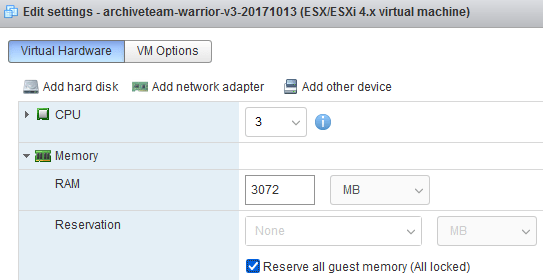
Edit settings – archiveteam-warrior-v3-20171013 (ESX/ESXi 4.x virtual machine) – Reserve all guest memory
It is recommended to only do this in the web GUI, as what happens behind the scenes in the
.vmxfile (see [Wayback] memory – Immediately Allocate All RAM to Virtual Machine at Power-On – Super User, thanks [Wayback] Ronaldo) is tricky and consists of two things:- A line with
sched.mem.pin = "TRUE"is added or updated (this corresponds to the value of the above checkbox and is the simple step).
- A line with
sched.mem.min = "####"is added or updated which is tricky: this is the maximum “Reservation value” and must exactly correspond to the amount of RAM MB for the VM (which is the same value as the
memSizevalue in the.vmxfile, so in this case, the####is3072).
When you change the
memSizevalue in the.vmxfile, you have to remember also change thesched.mem.minvalue. If you change the RAM value in the GUI, this is automatic (see [Wayback/Archive.is] Vmware memory question : vmware). - A line with
- you can zero size the
- you can get rid of the
.vswpfile that does have avmx-prefix as well by editing the.vmxfile:
In addition, the
vmx-*.vswpfiles can be disabled by settingsched.swap.vmxSwapEnabledtoFALSE.
Some links on why configuring 1. via the .vmx file is trickly:
- [Wayback/Archive.is] mem.reservation cannot be set to any value other than the memory declared · Issue #1871 · vmware/govmomi
- [Wayback/Archive.is] [VMC on AWS] NSX Autonomous Edge deployment fails on vSphere 7 (81875)
Forcing zero sized .vswp files also solves another potential problem: overcommitting RAM resources. Overcommitting can seriously hamper performance as you can see in [Wayback] Overcommitted resources within ESXi may result in high memory usage or high CPU usage status within ATP UI.
All of the above started with a the [Wayback] esxi vswp – Google Search and these two links:
- [Wayback] Solved: what is xxx.vswp file what is for? – VMware Technology Network VMTN (explaining it makes overcommitment of memory possible)
- [Wayback] VM .vswp files – VMware Technology Network VMTN explaining more details, of which this is an abstract:
The smaller
vmx-xxx.vswpthat are typically somewhere between ~64-256 MiB in size (depends on number of vCPUs, VM memory size, 32/64 bit Guest OS etc.) are overhead swap files for the VMX-process that is executing the VM on the host. This is unrelated to the actual VM memory swap files.…
The
XXXX.vswpfiles are VM memory swap files. The disk space space consumed by these files is calculated as (configured VM memory size–VM reserved memory).The files are created on power-on and removed when a VM enters the powered-off state.
The secondary vmx-xxx.vswp file is very well explained in [Wayback] vSphere 5.0 New .vswp file & Storage Tax on VDI – myvirtualcloud.net.
Link resurrected from the above Server Fault: entry: [Wayback] Virtual Machine Files Essential to Forensic Investigations | Crucial Security Forensics Blog
–jeroen

 The Wiert Corner - irregular stream of stuff
Leave a comment