The Wiert Corner – irregular stream of stuff

Jeroen W. Pluimers on .NET, C#, Delphi, databases, and personal interests

  • My badges

  • Twitter Updates

  • My Flickr Stream

  • Pages

  • All categories

  • Enter your email address to subscribe to this blog and receive notifications of new posts by email.

    Join 1,861 other subscribers

Archive for 2023

GitLab pages on a custom domain are nice, but be aware of intermittent 502 and certificate errors

Posted by jpluimers on 2023/06/05

Reminder to self GitLab pages on the gitlab.com are free, so Setting up a GitLab project so it is served over https as a gitlab.io and a custom subdomain comes with two caveats:

  1. Intermittent HTTP error 502 Bad Gateway
  2. Intermittent NET::ERR_CERT_COMMON_NAME_INVALID (Chrome) or SSL_ERROR_BAD_CERT_DOMAIN (Firefox):

–jeroen

Read the rest of this entry »

Posted in Cloud, Development, GitLab, Infrastructure, Power User, Source Code Management | Leave a Comment »

Different ways for installing Windows features on the command line – Peter Hahndorf

Posted by jpluimers on 2023/06/02

If course you can configure Windows Optional Features using the GUI as for instance explained at [Wayback/Archive] How to manage Windows 10’s many ‘optional features | Windows Central.

However, I prefer command-line management.

About the only post doing the comparison of command-line mangement options I could find about is [Wayback/Archive] Different ways for installing Windows features on the command line – Peter Hahndorf and hopefully will be further updated in the future. It is dated 2015, but has been updated until at least Windows Server Nano.

I added one, and then rewrote the tool-set availability table in the post into this:

Read the rest of this entry »

Posted in Communications Development, Development, Internet protocol suite, Microsoft Store, OpenSSH, Power User, SSH, TCP, Windows, Windows 10, Windows 11, Windows 7, Windows 8, Windows 8.1, Windows Server 2008, Windows Server 2008 R2, Windows Server 2012, Windows Server 2012 R2, Windows Server 2016, Windows Vista | Leave a Comment »

For my link archive: Microsoft account activity policy – Microsoft Support

Posted by jpluimers on 2023/06/01

Bumped into [Wayback/Archive] Microsoft account activity policy – Microsoft Support because an account that I hardly use was about to expire.

A few quotes (but be sure to read the most up to date policy):

  • Except as provided below, you must sign in to your Microsoft account at least once in a two-year period to keep your account active. If you don’t sign in during this time, Microsoft will consider your account to be inactive.
  • Exceptions: The activities below are exceptions that will result in Microsoft extending your account’s active status, even if you have not otherwise signed in to your Microsoft account within a two-year period.
    • Purchases
    • Subscriptions
    • Publishing to the Microsoft Store
    • Certifications
    • Account Balance
    • Accounts Payable
    • Family Accounts
    • Legal Requirements or as otherwise provided by Microsoft

Probably the easiest way at the time of writing is to make sure there is an account balance.

–jeroen

Posted in LifeHacker, Power User | Leave a Comment »

Why I try to keep an online copy of my bookmarklets in html instead of Markdown

Posted by jpluimers on 2023/06/01

As Chrome mangles Bookmarklets to a partially escaped form (I think using Percent encoding), I first tried to document my Bookmarklets in Markdown so I could easier edit them and copy these JavaScript links  to various browsers. That failed, because the html rendered from the Markdown didn’t contain the links any more. So I now use plain html for documenting them which is a pain to edit but works.

[Wayback/Archive] Some bookmarklets hosted as [Wayback/Archive] Some bookmarklets – cached 1 minute – throttled and [Wayback/Archive] Some bookmarklets – cached 1 year – CDN.

This is why:

  1. Technically you can include JavaScript for Bookmarklets in Markdown documents both as Markdown links (either with escapes or by splitting reference and link in two pieces) and html links (as embedding html in Markdown is allowed): [Wayback/Archive] Bookmarklet link in Markdown document – Stack Overflow (thanks [Wayback/Archive] Adam Haile, [Wayback/Archive] Zombo and [Wayback/Archive] stevemegson)
  2. Because of security reasons, many hosters will filter out JavaScript when transforming Markdown in html [Wayback/Archive] Embed JavaScript in GitHub README.md – Stack Overflow (thanks [Wayback/Archive] Matt Smith and [Wayback/Archive] coyotte508)

Searches: [Wayback/Archive] markdown javascript in link – Google Search and [Wayback/Archive] “embed javascript” in markdown – Google Search.

–jeroen

Posted in Bookmarklet, Development, JavaScript/ECMAScript, Power User, Scripting, Software Development, Web Browsers | Leave a Comment »

JavaScript bookmarklet to replace part of the archive.li fixing: not possible 

Posted by jpluimers on 2023/05/31

Quite often while saving a URL in the WayBack Machine, the response often is headed “Sorry” with non-descriptive “Job failed”. In the background however, at least half of th…

Related: JavaScript bookmarklet to replace part of the WayBack machine URL

For instance, a while ago for instance http://archive.fo/search/?q=nu.nl, https://archive.fo/search/?q=nu.nl and similar URLs redirected to https://archive.li/search/?q=nu.nl, which in turn redirected to itself:

This page isn’t working

archive.li redirected you too many times.

ERR_TOO_MANY_REDIRECTS

This isn’t a cookie thing as it happens in an anonymous window on several browsers as well. Most redirect checkers return a 429, as Archive Today has quite strict rate limiting:

I tried these bookmarklets to go to a good archive.is link from the above replacing http://archive.fo/search/?q=nu.nlhttps://archive.fo/search/?q=nu.nl, http://archive.li/search/?q=nu.nl and https://archive.li/search/?q=nu.nl with https://archive.is/search/?q=nu.nl (with the same above bolded parts):

javascript:(function() {window.location=window.location.toString().replace(/^http.?:\/\/archive\.[is|li]\//,'https://archive.is/');})()

It can even be simpler (but maybe not fully conformant to specs):

javascript:location=location.href.replace(/^http.?:\/\/archive\.[is|li]\//,'https://archive.is/')

These both fail!

Even a simple bookmarklet like this fails too:

javascript:alert('hello world!');

It took me a bit of thinking to figure out why, but then figured out that any JavaScript requires a page context to run, and when no page is displayed, there is no context to run on.

And indeed:

–jeroen

Posted in Bookmarklet, Development, JavaScript/ECMAScript, Power User, Scripting, Software Development, Web Browsers | Leave a Comment »

Tijs Hofmans on Twitter: “LPT die echt werkt: in februari heb ik “Retour afzender: bewoner is gokverslaafd” op een ongevraagde loterijreclame gezet en sindsdien heb ik er nooit meer een gekregen. Loterijen HATEN hem!” / Twitter

Posted by jpluimers on 2023/05/30

[Archive] Tijs Hofmans on Twitter: “LPT die echt werkt: in februari heb ik “Retour afzender: bewoner is gokverslaafd” op een ongevraagde loterijreclame gezet en sindsdien heb ik er nooit meer een gekregen. Loterijen HATEN hem! …” / Twitter

Via

–jeroen

Posted in LifeHacker, Power User | Leave a Comment »

Install apps with the WinAppDeployCmd.exe tool – UWP applications | Microsoft Docs

Posted by jpluimers on 2023/05/29

Since winget is only available as of Windows 10 version 2004, [Wayback/Archive] Install apps with the WinAppDeployCmd.exe tool – UWP applications | Microsoft Docs as an alternative.

Related:

–jeroen

Posted in Power User, Windows, Windows 10, Windows 11, Windows 8.1, winget | Leave a Comment »

ASRock Rack ALTRAD8U-1L2T is a mATX Motherboard for up to 128 Cores which supports IPMI!

Posted by jpluimers on 2023/05/28

I would really like to try out a system based on the interesting [Wayback/Archive] ASRock Rack ALTRAD8U-1L2T is a mATX Motherboard for up to 128 Cores specs from the PDF and ServeTheHome images below:

ASRock AMPERE ALTRADBU-1L2T
Product ASRock Rack Ampere Altra Family deep microATX motherboard
Power source Supports ATX PSU or 12V DC-in
Form Factor Deep Micro-ATX (9.6″ x 10.5″)
Processor System CPU
Chipset
1 Socket (LGA-4926) Ampere® Altra®/Altra® Max processor
System on chip
Memory Capacity 8 DDR4 288-pin DIMM Slots (1DPC); Supports:
RDIMM up to 256GB each, max. 3200MHz.
LRDIMM up to 256GB each, max. 3200MHz
Expansion PCIe slots

Others

SLOT7: PCIe4 x16
SLOT6: PCIe4 x16
SLOT5: PCIe4 x16
SLOT4: PCIe4 x16
4 SlimSAS (PCIe4 x8)
2 OCuLink (PCIe4 x4)
Storage M.2
SATA port
2 M.2 M-key (PCIe4 x4), supports 2280 form factor
N/A
Network RJ45 2 RJ45 (10GbE) by Intel® X550
1 RJ45 (1GbE) by Intel® i210
Management BMC
Dedicated IPMI
ASPEED AST2500: IPMI 2.0
1 RJ45 via Realtek RTL8211E
I/O USB
COM port
6 USB3.2 Gen1 ports: 4 rear Type-A, 2 via 19-pin header
1 (9-pin) header
Display Video 1 DB15 (VGA), 1 (15-pin) header
Security TPM Supports 13-pin (SPI) TPM modules

Read the rest of this entry »

Posted in AArch64/arm64, ARM, Assembly Language, Development, Hardware, Power User, Software Development | Leave a Comment »

What exactly is “Quick device connect”, and is it secure? : oneplus

Posted by jpluimers on 2023/05/27

After upgrading to Oxygen OS 12 The “Quick device connect” service started nagging me for permissions as soon as I upgraded to OxygenOS 12: [Wayback/Archive] What exactly is “Quick device connect”, and is it secure? : oneplus.

Hardly any information on it except truckloads of messages of battery draining for which you can either upgrade it and if that still fails, disable it completely:

Read the rest of this entry »

Posted in Android Devices, OnePlus Nord 2T 5G, Power User | Leave a Comment »

Installing the Microsoft Store version of Windows Terminal via the winget command-line

Posted by jpluimers on 2023/05/26

In the continuing series of Chocolatey/Scoop/winget related posts, this one is about Windows Terminal.

There are basically two ultimate sources you can install it from:

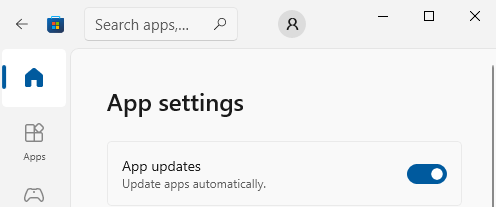
You can configure the Microsoft Store to automatically install updates as per [Wayback/Archive] Turn on automatic app updates (on my system this was the default):

Microsoft Store - Auto-Updates is turned on by default

Microsoft Store – Auto-Updates is turned on by default

  1. Select the Start ⊞ screen, then select Microsoft Store.
  2. In Microsoft Store at the upper right, select the account menu (the three dots) and then select Settings.
  3. Under App updates, set Update apps automatically to On.

As a backgrounder, here some articles on Windows Terminal, ConPTY and the Windows Console from the [Wayback/Archive] DevBlogs – Microsoft Developer Blogs:

  1. [Wayback/Archive] Windows Command-Line: Backgrounder | Windows Command Line Tools For Developers
  2. [Wayback/Archive] Windows Command-Line: The Evolution of the Windows Command-Line | Windows Command Line
  3. [Wayback/Archive] Windows Command-Line: Inside the Windows Console | Windows Command Line
  4. [Wayback/Archive] Windows Command-Line: Introducing the Windows Pseudo Console (ConPTY) | Windows Command Line
  5. [Wayback/Archive] Windows Command-Line: Unicode and UTF-8 Output Text Buffer | Windows Command Line

More on (pseudo)terminals in general containing [Wayback/Archive] “ConPTY” – Search results – Wikipedia:

More on using the Windows Terminal:

My related blog posts:

–jeroen

Posted in Chocolatey, ConPTY, Microsoft Store, Power User, Scoop, Windows, Windows Terminal, winget | Leave a Comment »