


Hopefully an example ssh config will follow.
[WayBack] Jeroen Pluimers on Twitter: “Would you mind sharing a trimmed down version of your ~/.ssh/config file? The bits from your posts are a bit fragmented now, so I’ve lost the overview (:”
–jeroen
Posted by jpluimers on 2021/08/10
Hopefully an example ssh config will follow.
[WayBack] Jeroen Pluimers on Twitter: “Would you mind sharing a trimmed down version of your ~/.ssh/config file? The bits from your posts are a bit fragmented now, so I’ve lost the overview (:”
–jeroen

Posted in *nix, Communications Development, Development, Internet protocol suite, Power User, SSH, ssh/sshd, TCP | Leave a Comment »
Posted by jpluimers on 2021/08/09
There is an autossh binary for Windows available on GitHub: [WayBack] GitHub – jazzl0ver/autossh: Windows binary for autossh v1.4c.
Combined with NSSM (which for instance you can install through [WayBack] Chocolatey Software | NSSM – the Non-Sucking Service Manager) you can not only automatically build and maintain an SSH connection, but also ensure the autossh process is up and running as a service without the need for an active logon.
This allows for SSH based tunnels from and to your Windows system.
For this usage scenario, there is no need for these tools any more:
Future research:
These are in part based on:
Download the most recent [WayBack] Releases · jazzl0ver/autossh · GitHub (see below for updates).
I used the 1.4g version: [WayBack] autossh.exe, then put on my Windows PATH.
Since it is on chocolatey ([WayBack] Chocolatey Software | NSSM – the Non-Sucking Service Manager 2.24.101.20180116), this will suffice:
choco install --yes nssm
Check the value of MaxAuthTries in /etc/ssh/sshd_config.
# grep MaxAuthTries /etc/ssh/sshd_configMaxAuthTries 1
The value needs to be at least 3 or higher for ssh-copy-id to work properly.
When changing the value, be sure to restart the sshd daemon.
Without a low value of
MaxAuthTriesin/etc/ssh/sshd_config,ssh-copy-idwill give an errorERROR: Received disconnect from myRemoteComputer port 2222:2: Too many authentication failures.See also these link via [WayBack ]“INFO: attempting to log in with the new key(s), to filter out any that are already installed” “Too many authentication failures” – Google Search:
Temporarily change the user shell to /bin/bash to allow [WayBack] ssh-copy-id to work at all.
This is explained in more detail by [WayBack] shell – ssh dissable login, but allow copy-id – Server Fault.
You need an ssh public and private key, then transfer this to your Windows client. You can for instance use these as a base:
For instance (where myLocalUser is the local user generate the key-pair for for, and myRemoteUser plus myRemoteComputer is the remote user and computer you want to autossh to):
ssh-keygen -t rsa -b 4096 -f %UserProfile%\.ssh\id_rsa_myLocalUser@%ComputerName%_autossh_myRemoteUser@myRemoteComputerssh-keygen -t ed25519 -f %UserProfile%\.ssh\id_ed25519_myLocalUser@%ComputerName%_autossh_myRemoteUser@myRemoteComputerSince git includes ssh-copy-id (which you need in the next step, it is at %Program Files%\Git\usr\bin\ssh-copy-id) and git is on chocolatey ([WayBack] Chocolatey Software | Git (Install) 2.23.0):
choco install --yes git.install --params "/GitAndUnixToolsOnPath /NoGitLfs /SChannel /NoAutoCrlf /WindowsTerminal"
Use bash with ssh-copy-id to transfer the generated public keys to a remote system (replace 2222 with the SSH port number on the remote computer; often it is just 22):
pushd %UserProfile%\.ssh
bash -c "ssh-copy-id -i %UserProfile%\.ssh\id_rsa_myLocalUser@%ComputerName%_autossh_myRemoteUser@myRemoteComputer -p 2222 myRemoteUser@myRemoteComputer"
bash -c "ssh-copy-id -i %UserProfile%\.ssh\id_ed25519_myLocalUser_%ComputerName%_autossh_myRemoteUser@myRemoteComputer -p 2222 myRemoteUser@myRemoteComputer"
popd
This sounds overly complicated, but is the only way to incorporate the environment variables.
These two ssh commands should succeed; choose the one for which you prefer the rsa or ed25519 algorithm.
ssh -i %UserProfile%\.ssh\id_rsa_myLocalUser@%ComputerName%_autossh_myRemoteUser@myRemoteComputer -p 2222 myRemoteUser@myRemoteComputerssh -i %UserProfile%\.ssh\id_ed25519_myLocalUser_%ComputerName%_autossh_myRemoteUser@myRemoteComputer -p 2222 myRemoteUser@myRemoteComputerAfter this, try with autossh:
autossh -M 0 -o "ServerAliveInterval 30" -o "ServerAliveCountMax 3" -i %UserProfile%\.ssh\id_rsa_myLocalUser@%ComputerName%_autossh_myRemoteUser@myRemoteComputer -p 2222 myRemoteUser@myRemoteComputerautossh -M 0 -o "ServerAliveInterval 30" -o "ServerAliveCountMax 3" -i %UserProfile%\.ssh\id_ed25519_myLocalUser_%ComputerName%_autossh_myRemoteUser@myRemoteComputer -p 2222 myRemoteUser@myRemoteComputerThis disables the autossh port monitoring (the -M 0 option, but uses a combination of interval/count-max from ssh itself to monitor the connection (the -o "ServerAliveInterval 30" -o "ServerAliveCountMax 3" options).
Note that there is no default monitoring port, as it can be any one: [WayBack] linux – What is the default monitoring port for autossh? – Super User
a
Depending on which algorithm you like most, use either of the below 2 (replace 2222 with the SSH port number on the remote computer; often it is just 22):
ssh -i %UserProfile%\.ssh\id_rsa_myLocalUser@%ComputerName%_autossh_myRemoteUser@myRemoteComputer -p 2222 myRemoteUser@myRemoteComputerssh -i %UserProfile%\.ssh\id_ed25519_myLocalUser_%ComputerName%_autossh_myRemoteUser@myRemoteComputer -p 2222 myRemoteUser@myRemoteComputer
C:\Users\jeroenp>ssh-keygen -t ed25519 -f %UserProfile%\.ssh\id_ed25519_myUser_%ComputerName%_autossh_revue
Generating public/private ed25519 key pair.
Enter passphrase (empty for no passphrase):
Enter same passphrase again:
Your identification has been saved in C:\Users\jeroenp\.ssh\id_ed25519_myUser_D10U003_autossh_revue.
Your public key has been saved in C:\Users\jeroenp\.ssh\id_ed25519_myUser_D10U003_autossh_revue.pub.
The key fingerprint is:
SHA256:6qjzXhQtZpTzU6aryHMYuwVs5b4a/2COKxFGFQj0Eg4 jeroenp@D10U003
The key's randomart image is:
+--[ED25519 256]--+
|E+ oo...         |
|o =  .o.  o      |
| + .  *o.+       |
|  +. = o+        |
| . .+ o So       |
|  ...+ ..        |
|   o.=B.         |
|  o *@oo         |
|  .*O*=..        |
+----[SHA256]-----+

C:\Users\jeroenp>ssh-keygen -t rsa -b 4096 -f %UserProfile%\.ssh\id_rsa_myUser_%ComputerName%_autossh_revue
Generating public/private rsa key pair.
Enter passphrase (empty for no passphrase):
Enter same passphrase again:
Your identification has been saved in C:\Users\jeroenp\.ssh\id_rsa_myUser_D10U003_autossh_revue.
Your public key has been saved in C:\Users\jeroenp\.ssh\id_rsa_myUser_D10U003_autossh_revue.pub.
The key fingerprint is:
SHA256:WaWRoAnr4OuXAnc+MekpbdnNto71SgdMykp7XqylQr8 jeroenp@D10U003
The key's randomart image is:
+---[RSA 4096]----+
|    .   .....    |
|     o o  .+     |
|  . . o . o      |
| . o . + o       |
|  . o.o S        |
|. .o*o . .       |
| o.*oO.o* .      |
| .o %ooO+o       |
|  .= oE++o.      |
+----[SHA256]-----+
NSSM is really cool to run any application as a service: [WayBack] NSSM – the Non-Sucking Service Manager
nssm is a service helper which doesn’t suck. srvany and other service helper programs suck because they don’t handle failure of the application running as a service. If you use such a program you may see a service listed as started when in fact the application has died. nssm monitors the running service and will restart it if it dies. With nssm you know that if a service says it’s running, it really is. Alternatively, if your application is well-behaved you can configure nssm to absolve all responsibility for restarting it and let Windows take care of recovery actions.
nssm logs its progress to the system Event Log so you can get some idea of why an application isn’t behaving as it should.
nssm also features a graphical service installation and removal facility. Prior to version 2.19 it did suck. Now it’s quite a bit better.
After installing, everything is command-line based (I cut away some blank lines for readability):
C:\bin\bin>nssm --help
NSSM: The non-sucking service manager
Version 2.24-101-g897c7ad 64-bit, 2017-04-26
Usage: nssm [ ...]

To show service installation GUI:

        nssm install []

To install a service without confirmation:

        nssm install   [ ...]

To show service editing GUI:

        nssm edit

To retrieve or edit service parameters directly:

        nssm dump
        nssm get   []
        nssm set   []
        nssm reset   []

To show service removal GUI:

        nssm remove []

To remove a service without confirmation:

        nssm remove  confirm

To manage a service:

        nssm start
        nssm stop
        nssm restart
        nssm status
        nssm statuscode
        nssm rotate
        nssm processes
If it is behind on [WayBack] autossh (see version history at [WayBack] autossh/CHANGES.txt), then just ask for a new version; usually it gets built and released quickly: [WayBack] Any plans for 1.4g? · Issue #3 · jazzl0ver/autossh · GitHub
[WayBack] Releases · jazzl0ver/autossh · GitHub at the time of writing:
–jeroen
Posted in *nix, *nix-tools, Communications Development, Development, Internet protocol suite, Power User, SSH, TCP | Leave a Comment »
Posted by jpluimers on 2021/08/03
There are many reasons to disable DNS over HTTPS (DoH), of which enough are discussed in the links below.
Disabling DoH always talks about setting TTR (the abbreviation Mozilla uses for it) to 5 (like [WayBack] Thread by @isotopp: “Firefox is about to break DNS by enabling DNS-over-HTTP by default […]”), but hardly ever explains the meaning of 5, or any other potential values.
After some searching, I found [WayBack] Firefox disable trr | Knowledge Base:
0: Off by default1: Firefox chooses faster2: TRR default w/DNS fallback3: TRR only mode5: DisabledI imagine the setting we’re all looking for is:
user_pref(“network.trr.mode”, 5);(emphasis mine)
It pointed me to [WayBack] Trusted Recursive Resolver – MozillaWiki:
Posted in Cloud, Cloudflare, Communications Development, Development, DNS, Firefox, Infrastructure, Internet protocol suite, Power User, TCP, Web Browsers | Leave a Comment »
Posted by jpluimers on 2021/07/21
On one of my Raspberry Pi boxes, somehow I could not access files over SFTP (SSH File Transfer Protocol) via FileZilla.
I would consistently get this error:
"Connection timed out after 20 seconds of inactivity"
Figuring the exact cause took a while.
TL;DR: SFTP uses an interactive non-login shell, then interprets the output from that shell. For that kind of shell, ensure few or none scripts run that output text.
Posted in *nix, *nix-tools, bash, bash, Communications Development, Conference Topics, Conferences, Development, Event, Internet protocol suite, Power User, Scripting, SFTP, Software Development, SSH, TCP | Leave a Comment »
Posted by jpluimers on 2021/07/20
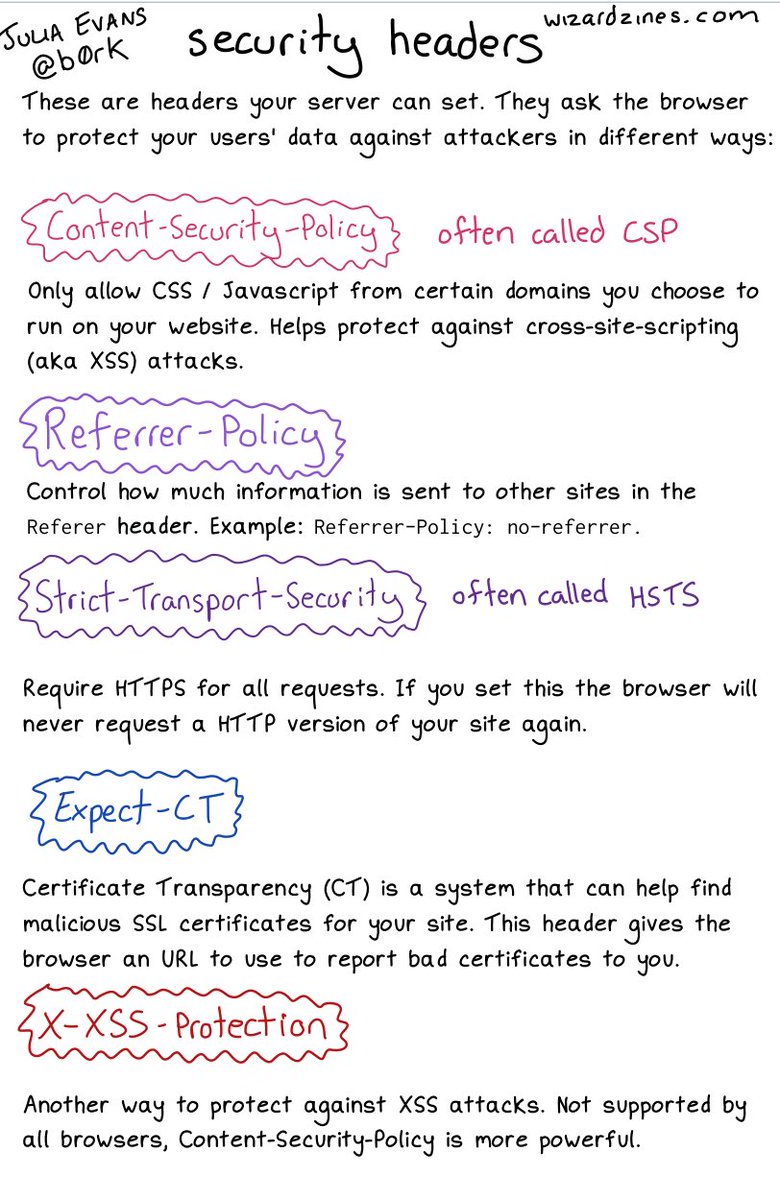
An image on CORS will follow; likely more on related topics too. [WayBack] 🔎Julia Evans🔍 on Twitter: “some security headers… “ about:
Interesting comments in the thread.
More to follow: [Archive.is] 🔎Julia Evans🔍 on Twitter: “going to talk about CORS headers on a different page because that’s a Whole Thing but i’d love to know what else I left out / got wrong here :)” including these:

Posted in Communications Development, Development, Encryption, HTTP, https, HTTPS/TLS security, Internet protocol suite, Power User, Security, TCP | Leave a Comment »
Posted by jpluimers on 2021/03/25
A great way for testing REST JSON calls is using the [WayBack] JSONPlaceholder – Fake online REST API for developers:
Fake Online REST API for Testing and Prototyping
Serving ~200M requests per month
Powered by JSON Server [WayBack] + LowDB [WayBack]
It is like [WayBack] Placeholder.com: Placeholder Images Done For You [JPG, GIF & PNG] but for JSON and supports both CORS and JSON-P for cross domain requests.
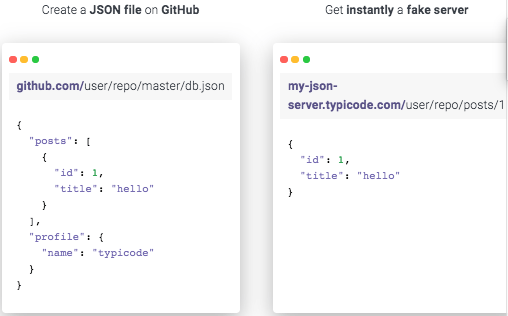
You can either use that site (which has a predefined set of REST calls) or the basic [WayBack] My JSON Server – Fake online REST server for teams that allows you to respond it to a db.json file from github:
Fake Online REST server for teams
Create a JSON file on GitHub
github.com/user/repo/master/db.json{ "posts": [ { "id": 1, "title": "hello" } ], "profile": { "name": "typicode" } }Get instantly a fake server
my-json-server.typicode.com/user/repo/posts/1{ "id": 1, "title": "hello" }
There is basic documentation at the repository [WayBack] GitHub – typicode/jsonplaceholder: A simple online fake REST API server:

Posted in Communications Development, Development, HTTP, Internet protocol suite, JavaScript/ECMAScript, JSON, REST, Scripting, Software Development, TCP | Leave a Comment »
Posted by jpluimers on 2021/01/08
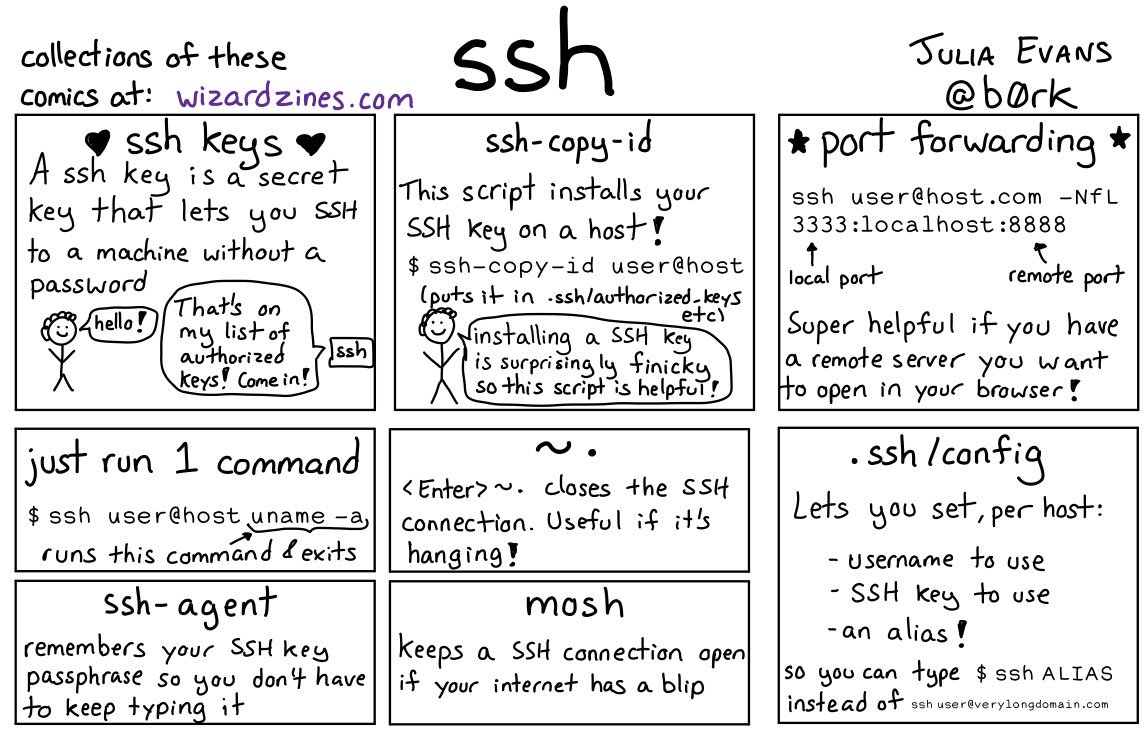
Great work by [WayBack] 🔎Julia Evans🔍 on Twitter: “ssh tips… “
Via:
Some more tips:

Posted in *nix, *nix-tools, Communications Development, Development, Internet protocol suite, Power User, SSH, ssh/sshd | Leave a Comment »
Posted by jpluimers on 2020/08/10
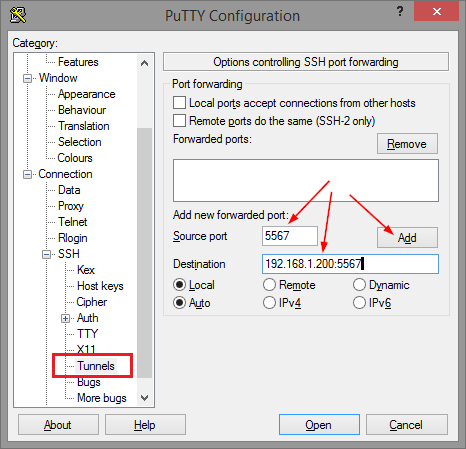
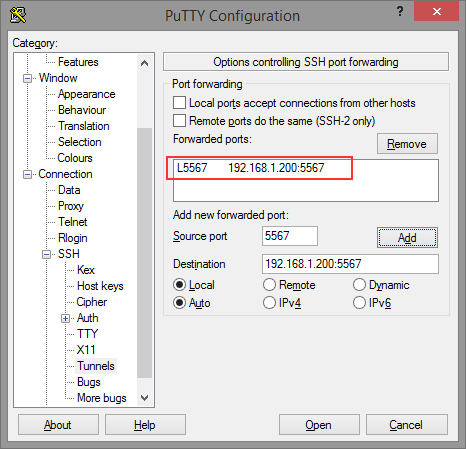
Thomas basically did all the research on the forwarding needed for ELC (formerly Belise/Elise), then showed the PuTTY equivalent to ssh user@remote -L5567:192.168.1.200:5567:
[WayBack] Remote access to the Embarcadero License Center via SSH tunnel – twm’s blog
Via: [WayBack] Once you have set up an Embarcadero License Center (ELC) for your company (with network named user or concurrent licenses) you will need network access … – Thomas Mueller (dummzeuch) – Google+
Related: [WayBack] Introducing the Embarcadero License Center – ELC
–jeroen

Posted in *nix, Communications Development, Delphi, Development, Internet protocol suite, Licensing, Power User, Software Development, SSH, ssh/sshd | Leave a Comment »
Posted by jpluimers on 2020/06/12
Often, configuration files work like this:
Not for ssh_config though, so I was right writing I should read more on it in Good read for starting to intermediate ssh users is “SSH Essentials: Working with SSH Servers, Clients, and Keys | DigitalOcean” and pointers to more advanced reading material.
So here is how ssh_config does it as per man page at [WayBack] ssh_config(5) – OpenBSD manual pages and [WayBack] ssh_config — OpenSSH SSH client configuration files at Linux.org:
     For each parameter, the first obtained value will be used.  The configuration files contain sections separated
     by “Host” specifications, and that section is only applied for hosts that match one of the patterns given in the
     specification.  The matched host name is the one given on the command line.

     Since the first obtained value for each parameter is used, more host-specific declarations should be given near
     the beginning of the file, and general defaults at the end.
This means a section Host * needs to come at the end.
I got that wrong and it took me the better half of a morning to figure out the cause of a connection problem ending in this:
debug1: Authentications that can continue: publickey,password

debug3: start over, passed a different list publickey,password

debug3: preferred publickey

debug3: authmethod_lookup publickey

debug3: remaining preferred:

debug1: No more authentication methods to try.
Somehow, the identity file was never used to try public key authentication at all because of the ssh_config order in ~/.ssh/config.
I’m not the only one confused, as during the search for the cause with “remaining preferred” “No more authentication methods to try.”:
Maybe now I should step up from manually editing the ssh_config file and use [WayBack] GitHub – moul/advanced-ssh-config: make your ssh client smarter to generate it for me.
–jeroen
Posted in *nix, *nix-tools, Communications Development, Development, Internet protocol suite, Power User, SSH, ssh/sshd, TCP | Leave a Comment »
Posted by jpluimers on 2020/05/22
Running autossh from Windows is still on my list, so here are a few links:
–jeroen
Posted in Communications Development, Development, Internet protocol suite, Power User, SSH, TCP, Windows | Leave a Comment »
 The Wiert Corner - irregular stream of stuff