Archive for the ‘Communications Development’ Category
Posted by jpluimers on 2020/03/10
In a lot of ssh-keygen related posts, you still see DSA being mentioned, though that has been deprecated and later removed from OpenSSH.
I wondered why, so I did some digging.
TL;DR: it’s complicated:
- different standards mandating eventually conflicting parameters,
- extending the parameters would require protocol extension,
- a logjam vulnerability for certain combinations of parameters and finally
- better algorithms having become available.
Some of the related topics cannot be archived in the WayBack machine or refuse being archived at Archive.is, so here is a list of partially archived relevant links:
–jeroen
Posted in Communications Development, Development, Internet protocol suite, Power User, Security, SSH, TCP | Leave a Comment »
Posted by jpluimers on 2020/02/27
 Cool tool, but be aware it does a
JavaScript:xmlhttpPost from , so your data can be logged [WayBack] Redirect Detective – A Free Tool To Trace Where Redirects End Up.
For http://www.xs4all.nl/~jp, it shows these redirects (where in bold I’ve listed the changes):
Oh and it runs this call: JavaScript:xmlhttpPost("/linkdetect.px")?word=www.xs4all.nl%2F%7Ejp from [WayBack] redirectdetective.com/ajax.js.
Note that this shows more redirects than the plain http ones, so wget from [WayBack] wget – How do I display all URLs in a redirect chain? – Unix & Linux Stack Exchange shows this:
$ wget http://www.xs4all.nl/~jp 2>&1 | grep Location:

Location: https://www.xs4all.nl/~jp [following]

Location: https://jp.home.xs4all.nl/ [following]
–jeroen
Posted in *nix, *nix-tools, Communications Development, Development, HTTP, Internet protocol suite, Power User, TCP, wget | Leave a Comment »
Posted by jpluimers on 2019/06/20
The TCP SACK vulnerabilities as found by Netflix: [WayBack] security-bulletins/2019-001.md at master · Netflix/security-bulletins · GitHub.
Easy, but slow workaround from [WayBack] linux – How to disable TCP SACK for CentOS? – Super User:
Temporary (until boot):
echo "0" > /proc/sys/net/ipv4/tcp_sack
Permanent (even after boot):
echo "net.ipv4.tcp_sack = 0" >> /etc/sysctl.conf
sysctl -p
Coverage:
–jeroen
Posted in *nix, *nix-tools, Communications Development, Development, Internet protocol suite, Power User, Security, TCP | Leave a Comment »
Posted by jpluimers on 2019/05/21
Since many HTTP stacks do not have fields for this so it’s hard to get the originating IP address:
It is about these HTTP header fields with and without X- prefix:
ForwardedX-Forwarded-ForX-Forwarded-ByX-Forwarded-Proto
Note that widely used tools like HAProxy do not always fully adhere to the “standard”…
Via:
–jeroen
Posted in Communications Development, Development, HTTP, Internet protocol suite, Software Development, TCP | Leave a Comment »
Posted by jpluimers on 2019/03/15
For me, scp is like tar; somehow I Google this every time…
- On the remote machine, find out the full path of the remote file:
~ # ssh username@192.168.71.123
...
~ # ls -alh `find /vmfs/volumes/ | grep -w W81Entx64CI | grep '\.vmdk$'`
-rw-------    1 root     root      200.0G Aug 26 22:48 /vmfs/volumes/552f5788-33e30274-8dba-001f29022aed/VM/PSO/W81Entx64CI/W81Entx64CI-flat.vmdk
-rw-------    1 root     root         500 Aug 19 16:36 /vmfs/volumes/552f5788-33e30274-8dba-001f29022aed/VM/PSO/W81Entx64CI/W81Entx64CI.vmdk
- On the local machine, go to the right directory, then copy the file from the remote machine:
~ # cd /vmfs/volumes/Samsung512NVME/PSO/VM/W81Entx64CI/
~ # time scp -v username@192.168.71.123:/vmfs/volumes/552f5788-33e30274-8dba-001f29022aed/PSO/W81Entx64CI/W81Entx64CI-flat.vmdk W81Entx64CI-flat.vmdk
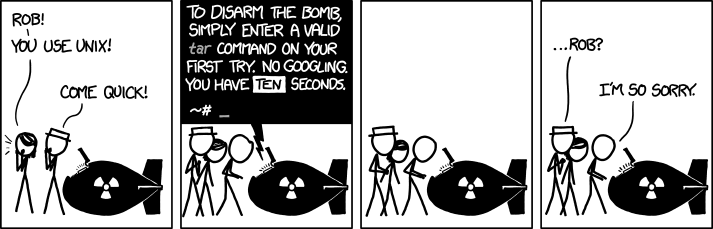
I don’t know what’s worse–the fact that after 15 years of using tar I still can’t keep the flags straight, or that after 15 years of technological advancement I’m still mucking with tar flags that were 15 years old when I started.
The last line will logon over ssh and shows the file transfer in a verbose way.
Requirements:
- both machines have ssh
- local machine has firewall entry to allow client ssh
- remote machine has sshd and firewall entry to allow sshd server connections
Via [WayBack] shell – How to scp a folder from remote to local? – Stack Overflow (thanks [WayBack] Gryphius)
Image source: [WayBack] xkcd: tar
–jeroen
Posted in Communications Development, Development, Internet protocol suite, SSH, TCP | Leave a Comment »
Posted by jpluimers on 2019/02/21
From the geek fun department: [WayBack] IP over Avian Carriers – Wikipedia.
I learned through this slightly after the fight to keep HTTP status code 418 (I’m a teapot) which is part of RFC2324 released on April 1st, 1998.
The IP over Avian Carriers is part of three RFCs, all released on April 1st in various years:
–jeroen
via: Http-statuscode ‘I’m a teapot’ is voorlopig veilig – IT Pro – .Geeks – Tweakers
Posted in Communications Development, Development, Fun, Geeky, HTTP, Internet protocol suite, Software Development, TCP | Leave a Comment »
Posted by jpluimers on 2019/02/13
Of course you don’t want this. So by the time you read this, the connection has been closed.
For testing some Internet of Shit stuff from a client that cannot do SFTP, I needed a temporary FTP accessible connection.
These links helped:
TL;DR:
- Preparing the USB stick:
- Ensure the USB disk is FAT/FAT32/NTFS
- Create a directory in the root of the USB disk for the FTP user (for now:
FtpDirectory)
- Insert the USB disk in the Fritz!Box
- Logon to the Fritz!Box web UI
- Configure a user for FTP:
- In the menu, go to
System, then FRITZ!Box Users
- Click
Add user
- Name the user (for now:
MyFtpUser)
- Ensure that user *only* has a checkmark for `Access to NAS contents`
- Click the button
Add directory
- In the popup click
Select folder
- Choose the
FtpDirectory you just made
- Click
OK
- Ensure the
read and write checkboxes are enabled
- Click
OK
- Configure the USB stick for FPT access
- In the menu, go to
Home Network, then USB Devices
- Observe if the device is visible and has the correct file system (if not: ask AVM)
- In the menu, go to
Internet, then Permit Access
- Click on the
FRITZ!Box Services
- Ensure there is a checkmark at
Internet access to your storage media via FTP/FTPS enabled
- At
TCP Port for FTP/FTPS, fill in 21 (many IoT devices cannot use a different port)
- Ensure there is *no* checkmark at
Allow only secure FTP connections (FTPS)
- Make a note of the value after
FTP address (something like ftp://example.org:21`)
- Click
Apply
- Test
–jeroen
Posted in Communications Development, Development, Fritz!, Fritz!Box, FTP, Internet protocol suite, IoT Internet of Things, Network-and-equipment, Power User, Software Development, TCP | Leave a Comment »
Posted by jpluimers on 2019/02/01
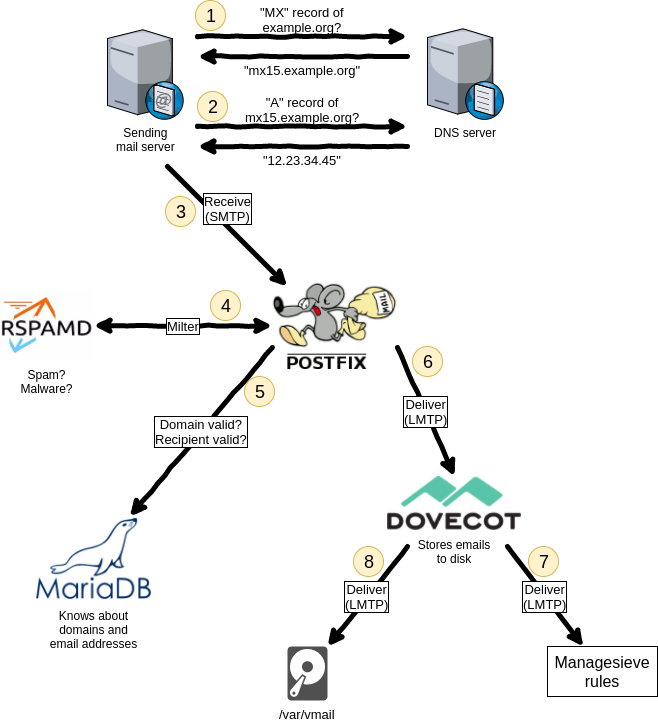
Summary from [WayBack] Dear #lazyweb, can anyone point me to a modern email server setup (just email) with letsencrypt, some spam filter, multi domain preferably on RHEL/Cent… – Jan Wildeboer – Google+
- many SMTP servers on the interwebs do not have proper TLS setups, so do not require remote SMTP servers to deliver email with a proper certificate
- delivering mail via SMTP using STARTTLS with a proper certificate yourself is a good step forward
- postfix
- dovecot
- greylisting (although in practice it does not make much of a difference any more)
- fail2ban
- dnsbl (often called rbl)
- spamassasin
- rspamd (supports SPF, DKIM and many others)
- letsencrypt automation can be tough, so here is a small wrapper: [WayBack] GitHub – DrGlitchMX/update-letsencrypt: Tiny script for updating “Let’s Encrypt!” certificates from cron
- it helps having letsencrypt and the mail server to be on one machine:
- multidomain let’s encrypt cert that has my webserver name and the mailserver in the Subject Alternative Names field. As both are on the same machine certbot can automatically update it and I just point Postfix and Dovecot to the LE files.
- Hans-Martin Mosner SMTP as-is is just not suitable for the kind of decentralized mail that you would prefer. You need some mechanism to determine which mail senders to trust and which not. Cryptography is suitable at the MUA level and should be used much more, but at the MTA level, TLS for privacy and SPF(bleh) or DKIM(meh) for sender domain authentication are basically your only weapons -much too weak. The PGP web of trust must be considered a failed experiment – who of your mail contacts uses PGP properly or at all? Ironically the only secure messaging solutions for the masses are centralized.
- A bit large but, might be an option: Zimbra. Multidomain and spam out of the box. Certs are well documented. Just disable logging which consumes way too much resources.
- Guides
Things to do:
- find a proper multi-MX fallback setup guide for postfix
–jeroen
Read the rest of this entry »
Posted in *nix, *nix-tools, Communications Development, Development, Internet protocol suite, postfix, Power User, SMTP | Leave a Comment »
Posted by jpluimers on 2019/01/22
Note: if the system you SSH from is ever compromised, then assume the passwordless targets are also compromised!
–jeroen
Posted in *nix, *nix-tools, Communications Development, Development, Internet protocol suite, Linux, openSuSE, Power User, SSH, SuSE Linux, TCP, Tumbleweed | Leave a Comment »



 The Wiert Corner - irregular stream of stuff