When connecting NeoPixels to any live power source or microcontroller, ALWAYS CONNECT GROUND (–) BEFORE ANYTHING ELSE. Conversely, disconnect ground last when separating.
Adding a 300 to 500 Ohm resistor between your microcontroller’s data pin and the data input on the first NeoPixel can help prevent voltage spikes that might otherwise damage your first pixel. Please add one between your micro and NeoPixel.
Before connecting a NeoPixel strip to ANY source of power, we very strongly recommend adding a large capacitor (1000 µF, 6.3V or higher) across the + and – terminals. This prevents the initial onrush of current from damaging the pixels.
Be extremely cautious with bench power supplies. Some — even reputable, well-regarded brands — can produce a large voltage spike when initially switched on, instantly destroying your NeoPixels!
If you use a bench supply, do not connect NeoPixels directly. Turn on the power supply first, let the voltage stabilize, then connect the pixels (GND first).
[WayBack] Yepkit – Electronics: YKUSH Yepkit USB Switchable Hub (models for USB 2 and USB 3.1 allowing to switch 3 ports at maximum)
[WayBack] Robot Electronics: Relays (both mechanical and solid state) in many communication kinds (ethernet, USB, RS485, TTL, Bluetooth, Modbus, MIDI and DMX) and sizes (from 2 to 24 ports).
[WayBack] GitHub – dschmenk/apple2pi: Apple II client/server for Raspberry Pi: hybrid computer of a Raspberry Pi inside an Apple II (either ][, or ][+, or //e) so the Apple II can be a front-end to the Raspberry Pi which then can run an Apple IIGS emulator, talk to the Apple II storage hardware and much more.
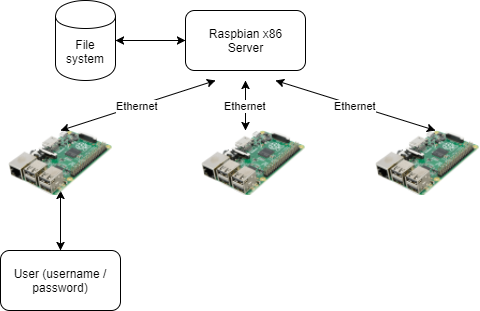
PiServer is our new piece of software that makes it easy to create a network of Pis you can centrally control — ideal for your computing classroom or club!
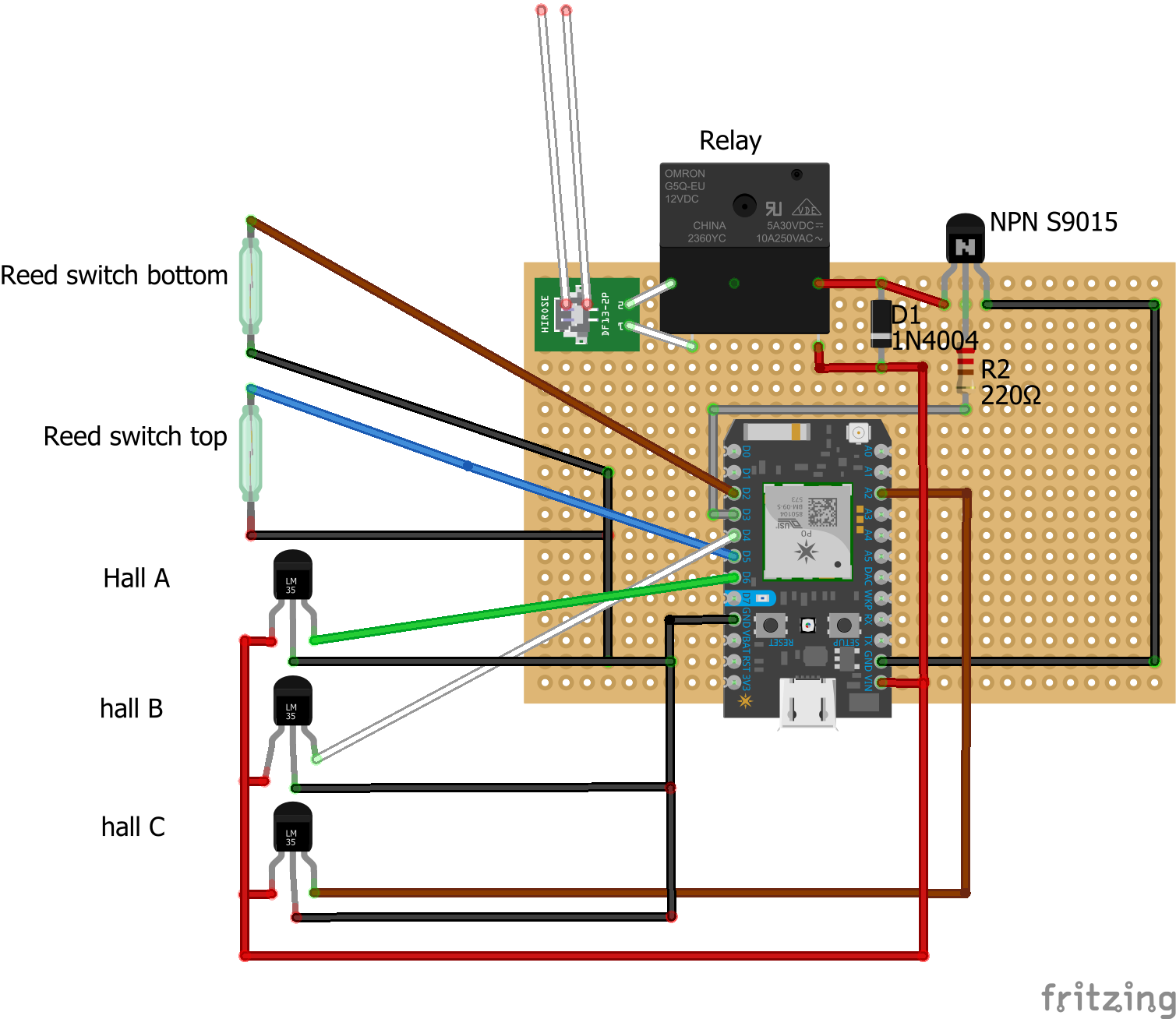
Clockwise motion occurs when the sensor triggering sequence is either A->B->C, B->C->A or C->A->B. Counter clockwise is either A->C->B, C->B->A or A->C->B. C++ code checks the sequence in which the sensors are triggered to determine if the door is moving up (clockwise) or or down (counter clockwise). Revolutions Per Minute is easily determined by counting how often one of the sensors is triggered per second and multiplying by 60.
some optocouplers to decouple GPIO pins from the Marantec switch and sensors
sensors for detecting current state: open/closed/opening/closing/obstructed
Warning on selecting GPIO pins:
When the Raspberry Pi reboots GPIO pins are reset to their default state. This can cause your garage door to open without you issuing a command. Please make sure you pick the correct pins so that you don’t accidentally have your garage door opening after a power loss.
The following pins are pulled HIGH (they output a 3.3 volt signal) on reboot:
GPIO0/2
GPIO1/3
GPIO4
GPIO7
GPIO8
GPIO14 is configured as a Serial Transmit line, so avoid choosing that pin.
All other pins are pulled LOW (they have a 0 volt signal, same as GND).
If your relay triggers when the GPIO pin goes LOW, then pick a pin that starts out HIGH on reboot. If your relay triggers with the GPIO PIN goes HIGH then pick a GPIO pin that starts out LOW on reboot.
That moment you facepalm yourself because you forgot that particular machine won’t read SD cards because they are too big for the SD card reader in it: SD goes up to 4 gigabyte, anything bigger (nowadays basically everything) requires SDXC or SDHC compatible readers.
However, older host devices do not recognize SDHC or SDXC memory cards, although some devices can do so through a firmware upgrade.[11] Older Windows operating systems released before Windows 7 require patches or service packs to support access to SDHC cards.[12][13][14]
Older host devices generally do not support newer card formats, and even when they might support the bus interface used by the card,[6]there are several factors that arise:
A newer card may offer greater capacity than the host device can handle (over 4 GB for SDHC, over 32 GB for SDXC).
A newer card may use a file system the host device cannot navigate (FAT32 for SDHC, exFAT for SDXC)
Use of an SDIO card requires the host device be designed for the input/output functions the card provides.
The hardware interface of the card was changed starting with the version 2.0 (new high-speed bus clocks, redefinition of storage capacity bits) and SDHC family (Ultra-high speed (UHS) bus)
UHS-II has physically more pins but is backwards compatible to UHS-I and non-UHS for both slot and card.[27]
Some vendors produced SDSC cards above 1GB before the SDA had standardized a method of doing so.


 Read these tips before playing with any kind of LED strips: [WayBack] Powering NeoPixels | Adafruit NeoPixel Überguide | Adafruit Learning System.








 The Wiert Corner - irregular stream of stuff