The Wiert Corner – irregular stream of stuff

Jeroen W. Pluimers on .NET, C#, Delphi, databases, and personal interests

  • My badges

  • Twitter Updates

  • My Flickr Stream

  • Pages

  • All categories

  • Enter your email address to subscribe to this blog and receive notifications of new posts by email.

    Join 1,835 other subscribers

Archive for the ‘Development’ Category

Sprints, marathons and root canals and Brady Printed Lean Labels – for lean development

Posted by jpluimers on 2019/10/15

Apart from blank and custom labels, Brady also sells [WayBack] Brady Printed Lean Labels | BradyID.com

They work great for agile projects, despite marketed as “will help you improve reliability, up-time, and efficiency”.

I found them via:


which led me to [WayBack] Sprints, marathons and root canals, which is a long but recommended read.

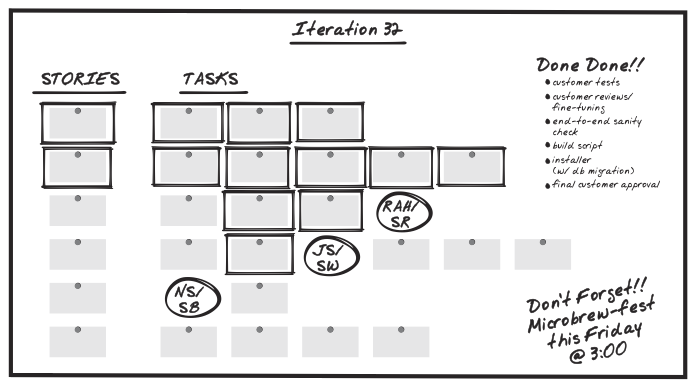
That got me to a book that is now on my reading list: [WayBack] James Shore: Agile-Book, especially this chapter:

[WayBack] James Shore: The Art of Agile Development: Iteration Planning
 

Assorted sets of stickers are (all in packs of 10 each):

[WayBack] Brady Part: 110762 | Assorted Lean Stickers

[WayBackBrady Part: 110763 | Assorted Reliability Stickers


Though you can also get them individually in 10 packs:

Read the rest of this entry »

Posted in Agile, Conference Topics, Conferences, Development, Event, Software Development | Leave a Comment »

IBM 1980 Pascal manuals

Posted by jpluimers on 2019/10/15

Just found back an old note with Pascal manuals for the IBM 370 machines: the Reference Manual and Programmers Guide.

–jeroen

Posted in Development, Pascal, Software Development | Leave a Comment »

Design Patterns aren’t the goal, especially if you can cover the pattern with a language feature

Posted by jpluimers on 2019/10/15

Interesting read: [Archive.is] Are Design Patterns Missing Language Features.

On various places, it has been claimed that use of DesignPatterns, especially complex ones like VisitorPattern, are actually indicators that the language being used isn’t powerful enough. Many DesignPatterns are by convention rather than encapsulable in a library or component, and as such contain repetition and thus violate OnceAndOnlyOnce. If it didn’t contain at least some repetition, or something that could be Refactored out, then it wouldn’t be a pattern.

When applying design pattern, always remember that back then the Gang of Four wrote their book, languages were less powerful than now.

So always check if a design pattern cannot be applied by using a feature of the language you are using.

Examples from that page:

A list of DesignPatterns and a language feature that (largely) replaces them:

 VisitorPattern  .............. GenericFunctions (MultipleDispatch)
 FactoryPattern  .............. MetaClasses, closures
 SingletonPattern ............. MetaClasses
 IteratorPattern............... AnonymousFunctions 
              (used with HigherOrderFunctions, 
               MapFunction, FilterFunction, etc.)
 InterpreterPattern............ Macros (extending the language)
               EvalFunction, MetaCircularInterpreter
               Support for parser generation (for differing syntax)
 CommandPattern ............... Closures, LexicalScope, 
               AnonymousFunctions, FirstClassFunctions
 HandleBodyPattern............. Delegation, Macros, MetaClasses
 RunAndReturnSuccessor......... TailCallOptimization
 Abstract-Factory,
 Flyweight,
 Factory-Method,
 State, Proxy,
 Chain-of-Responsibility....... FirstClass types (Norvig)
 Mediator, Observer............ Method combination (Norvig)
 BuilderPattern................ Multi Methods (Norvig)
 FacadePattern................. Modules (Norvig)
 StrategyPattern............... higher order functions (Gene Michael Stover?), ControlTable
 AssociationList................Dictionaries, maps, HashTables
                    (these go by numerous names in different languages)

Food for thought…

–jeroen

Posted in Design Patterns, Development, Software Development | Leave a Comment »

.NET Core 2.0 reaches end of life, no longer supported by Microsoft | Packt Hub

Posted by jpluimers on 2019/10/11

Just in case you were using .NET Core 2.0: it is EOL now, so you should have switched to the .NET Core 2.1 which is LTS (Long Time Stable).

[WayBack] .NET Core 2.0 reaches end of life, no longer supported by Microsoft | Packt Hub

.NET Core 2.1 was released towards the end of May 2018 and .NET Core 2.1 reached EOL on October 1. This was supposed to happen on September 1 but was pushed by a month since users experienced issues in upgrading to the newer version.

.NET Core 2.1 is a long-term support (LTS) release and should be supported till at least August 2021. It is recommended to upgrade to and use .NET Core 2.1 for your projects. There are no major changes in the newer version.

.NET Core 2.0 is no longer supported and updates won’t be provided. The installers, zips and Docker images of .NET Core 2.0 will still remain available, but they won’t be unsupported. Downloads for 2.0 will still be accessible via the Download Archives. However, .NET Core 2.0 is removed from the microsoft/dotnet repository README file. All the existing images will still be available in that repository.

via [WayBack] https://hub.packtpub.com/net-core-2-0-reaches-end-of-life-no-longer-supported-by-microsoft/ – Lars Fosdal – Google+

–jeroen

Posted in .NET, .NET Core, Development, Software Development | Leave a Comment »

Some links on SQL parsing

Posted by jpluimers on 2019/10/10

Sometimes you want the opposite of SQL generation (which most, if not all, ORMs do behind the scenes): SQL parsing.

Some links that should get me started:

–jeroen

Posted in Database Development, Development, Software Development, SQL | 2 Comments »

Great video “Why Functional Programming Matters”, by Ted Neward on getting started with Functional Programming

Posted by jpluimers on 2019/10/10

Great introduction into functional programming by a step by step: “Why Functional Programming Matters”, by Ted Neward on Devoxx Poland 2016.

It uses Java, but translates very well into C#, C++, Delphi and many other programming languages because the underlying support structures are very easy (a ~50 line Lists class, a few Function# prototypes, etc).

Two great observations here:

  • most variables don’t vary
  • collections are the gateway drug to becoming functional programmers

Summary

Coding Tech

In the latter half of the 2000s, a new kind of programming language seemed poised to take the steam out of the dominancen of object-oriented programming languages and their hold over “mainstream” development. But these new languages, collectively referred to as “functional” languages, were nothing new. In fact, they’ve been a part of the language landscape since the late 80s, and arguably even longer than that. What makes a functional language, and what makes a functional language interesting? Most importantly, why do we care now, thirty years after their introduction?

https://www.youtube.com/watch?v=oB8jN68KGcU

–jeroen

Read the rest of this entry »

Posted in Conference Topics, Conferences, Development, Event, Functional Programming, Software Development | Leave a Comment »

Teach Yourself C++ in 21 days…

Posted by jpluimers on 2019/10/10

[WayBackAbtruse Goose: Teach Yourself C++ in 21 days…

Via: [WayBack] “How to learn programming in 21 Days” – CodeProject – Google+

Read the rest of this entry »

Posted in C, C++, Development, Fun, Software Development | Leave a Comment »

Gitless: a simple version control system built on top of http://gitless.com/

Posted by jpluimers on 2019/10/09

Time to experiment with [WayBack] Gitless: a simple version control system built on top of http://gitless.com/:

Gitless is an experiment to see what happens if you put a simple veneer on an app that changes the underlying concepts. Because Gitless is implemented on top of Git (could be considered what Git pros call a “porcelain” of Git), you can always fall back on Git.

It is open source at https://github.com/sdg-mit/gitless

via: UMass Amherst CICS Distinguished Lecture: Daniel Jackson (Massachusetts Institute of Technology) “Towards a Theory of Software Design”

–jeroen

Posted in Development, DVCS - Distributed Version Control, git, Software Development, Source Code Management | Leave a Comment »

“Real Options” Underlie Agile Practices

Posted by jpluimers on 2019/10/09

On my reading list: [WayBack“Real Options” Underlie Agile Practices

Whether we realise it or not, “freedom to choose” is a principle underlying many Agile practices. By avoiding early commitments, we gain flexibility in the choices we make later. In this article, Chris Matts and Olav Maassen propose that an understanding of “Real Options” allows us to develop and refine new agile practices and take agile in directions it hasn’t gone before.

Via: [WayBack] “Real Options” Underlie Agile Practices – Marjan Venema – Google+

–jeroen

Posted in Agile, Development, Software Development | Leave a Comment »

“Use TXSxxxx classes for simple nillable types”

Posted by jpluimers on 2019/10/08

For my link archive:

The first one missed these:

Both find these:

–jeroen

Posted in Conference Topics, Conferences, Delphi, Development, Event, SOAP/WebServices, Software Development | Leave a Comment »