The Wiert Corner – irregular stream of stuff

Jeroen W. Pluimers on .NET, C#, Delphi, databases, and personal interests

  • My badges

  • Twitter Updates

  • My Flickr Stream

  • Pages

  • All categories

  • Enter your email address to subscribe to this blog and receive notifications of new posts by email.

    Join 1,860 other subscribers

Archive for the ‘Continuous Integration’ Category

Buddy (software) – Wikipedia

Posted by jpluimers on 2025/12/03

Interesting: Buddy (software) – Wikipedia

BuddyΒ (also known as Buddy.Works) is a web-based andΒ self-hostedΒ continuous integrationΒ andΒ deliveryΒ software forΒ GitΒ developers that can be used toΒ build,Β testΒ andΒ deployΒ web sites and applications with code fromΒ GitHub,Β BitbucketΒ andΒ GitLab. It employsΒ DockerΒ containers with pre-installedΒ languagesΒ andΒ frameworksΒ for builds, alongsideΒ DevOps, monitoring and notification actions.

On my list of things to try in case built-in GitGub and GitLab functionality does not suffice my needs any more.

I wonder how well it runs on ARM architecture.

–jeroen

Posted in Cloud, Containers, Continuous Integration, Development, DevOps, Docker, DVCS - Distributed Version Control, git, GitHub, GitLab, Infrastructure, Power User, Software Development | Leave a Comment »

Good Tech Things on Twitter: “Software engineering explained in 10 very serious charts.” (all by @forrestbrazeal)

Posted by jpluimers on 2025/10/07

[Wayback/Archive] Good Tech Things on Twitter: “Software engineering explained in 10 very serious charts. 1. CI/CD”, all by [Wayback/Archive] Forrest Brazeal (@forrestbrazeal), fully stored in [Wayback/Archive] Thread by @goodtechthings on Thread Reader App:
Read the rest of this entry »

Posted in Continuous Integration, Development, Power User, Software Development | Leave a Comment »

“Documented” the import order of the common msbuild extension points. Β· Issue #2767 Β· dotnet/msbuild

Posted by jpluimers on 2025/04/08

As a start a comment some 5 years ago in [Wayback/Archive] Document the import order of the common msbuild extension points. Β· Issue #2767 Β· dotnet/msbuild, though informal, made this a lot more clear.

Via: [Wayback/Archive] Nick Craver on Twitter: “Possibly the single most useful issue comment I’ve ever come across: …”

--jeroen

Posted in .NET, Continuous Integration, Development, msbuild, Software Development | Tagged: | Leave a Comment »

GitHub – KirillOsenkov/LargeAddressAware: A build tools package that adds support for making 32-bit exes LARGEADDRESSAWARE (and some words on a 64-bit Delphi product)

Posted by jpluimers on 2024/06/26

[Wayback/Archive] GitHub – KirillOsenkov/LargeAddressAware: A build tools package that adds support for making 32-bit exes LARGEADDRESSAWARE

Hopefully this can be applied to Delphi projects as well. If not then in Delphi you can manually call this in an post-build task.

Addition late 20240626

[Wayback/Archive] Kirill Osenkov: “@wiert I also found that you can…” – Mastodon

@wiert I also found that you can target AnyCPU 32-bit preferred and it will give you the same address space. So that tool is only for x86.

Via [Wayback/Archive] Meik Tranel on X: “Please for the love of all that is holy. Do not build #dotnet tools to serve a non interactive task that is supposed to be run during a build – use an #MSBuild task package. Also #JS/#NPM devs should not be allowed to write tooling. Thanks for coming to my ted talk…”.

The Delphi bit inspired a few months ago by: [Wayback/Archive] Andreas on X: “Will there ever be a 64bit Delphi IDE or at least a LargeAddressAware version. Our Projekt crashes the IDE between 14-18 compilations because it runs out of memory. Maybe I have to patch the IDE myself by moving all .NET and Compiler memory allocations above the 2 GB address.”

Read the rest of this entry »

Posted in .NET, Conference Topics, Conferences, Continuous Integration, Delphi, Development, Event, msbuild, Software Development | Leave a Comment »

Don’t fall for the golden hammer: avoid git empty commits, especially for kicking off parts of your CI/CD

Posted by jpluimers on 2022/08/16

A while back Kristian KΓΆhntopp (isotopp) wrote a blog post after quite a Twitter argument where he poses against using git empty commits. I’m with Kris: don’t use them for anything, especially not for kicking off your CI/CD.

Basically his blog post is all about avoiding to think you have a golden hammer, and avoid falling for the Law of the instrument – Wikipedia.

Originally, Abraham Maslow said in 1966:

“I suppose it is tempting, if the only tool you have is a hammer, to treat everything as if it were a nail.”

For me this has all to do with preventing technical debt: find the right tool to kick your CI/CD pipeline after part of that chain somehow malfunctioned is way better than polluting the commit history with empty commits.

His blog post: [Wayback/Archive.is] Empty commits and other wrong tools for the job | Die wunderbare Welt von Isotopp

The most important bit in it:

And since we are talking about CI/CD pipelines: Don’t YAML them. Don’t JSON them. Don’t XML them.

Programming in any of these three is wrong use of tooling, and you should not do it.

  • YAML, JSON and XML are for declarative things.
  • Python, Go and Rust are for procedural things.
  • Bash is for interactive use only.

Use the proper tooling for the job. Be an engineer.

This very much reminds me of an Entwickler Konferenz keynote a long time ago, where Neal Ford made the point that most software engineers act very much unlike what is expected from traditional engineering way of operating where the engineer is both responsible and liable for his actions.

The start of the Twitter thread: [Archive.is] Kristian KΓΆhntopp on Twitter: “A lot of people right now that git is an API and triggering CI/CD pipelines with empty commits replaces the equivalent of a Kubernetes controller for their fragile pile of bash in git triggers. This is broken and begets more brokenness. Evidence:… “

The tweet that started the subtweet: [Archive.is] Florian Haas on Twitter: “(For anyone wondering, what’s nice about this one is it works in any CI. So you don’t have to remember how to manually kick off a GitLab CI pipeline or GitHub Action or Zuul job, you just push an empty commit and off you go.)”

Other relevant tweets:

Yes, you want to avoid shell too (anything like for instance sh, ash, dash, bashΒ or zsh), but you have to know it (and understand why to avoid it) as often it is the only interactive way to access systems from the console.

And of course Kris also wrote a big document on that too, which is available as full PDF (Wayback), full HTML (Wayback) and chaptered HTML Die UNIX Shell /bin/sh.

But more importantly, Kris wrote [Wayback/Archive.is] Using Python to bash | Die wunderbare Welt von Isotopp which is about using Python to do things you might be tempted to do in the shell. It quotes

Shell is a thing you want to understand and then not use, because you learned to understand it.

which is from the German post in thread [Wayback/Archive.is] Bashprogrammierung, wo gehts am besten los which quotes Kris’ 1998 message:

From kris Tue Sep 1 11:26:12 1998
From: kris
Newsgroups: de.comp.os.unix.misc
Subject: Re: Shell-Frage, find, xargs, kopieren von vielen Dateien
References: <6seh24$q9a$2...@nz12.rz.uni-karlsruhe.de>
From: kr...@koehntopp.de (Kristian Koehntopp)
Alignment: chaotic/neutral
X-Copyright: (C) Copyright 1987-1998 Kristian Koehntopp -- All rights
reserved.
MIME-Version: 1.0
Content-Type: text/plain; charset=iso-8859-1
Content-Transfer-Encoding: 8bit

Marc.Hab...@gmx.de (Marc Haber) writes:
>mir ist das ganze Zeug mit der Shell, find, xargs und Konsorten noch
>reichlich verschlΓΌsselt.

http://www.koehntopp.de/kris/artikel/unix/shellprogrammierung/

>xargs hin oder sollte ich besser ein Perlskript schreiben?

Verwende Perl. Shell will man koennen, dann aber nicht verwenden.

Kristian

–jeroen

Posted in *nix, *nix-tools, ash/dash, ash/dash development, bash, bash, Conference Topics, Conferences, Continuous Integration, Development, DVCS - Distributed Version Control, Event, git, Power User, Scripting, sh, Sh Shell, Software Development, Source Code Management, Technical Debt | Leave a Comment »

msbuild build events can inherit, but not add in addition to inherited build events (so projects in Visual Studio, Delphi and others cannot do that either)

Posted by jpluimers on 2021/05/26

Bummer: I tried to inherit the build events from a base configuration, then add some extra steps for some of the inheriting configurations.

Those configurations just executed the extra steps, not the inherited steps.

This affects Visual Studio, Delphi and any other tool based on msbuild, as this is an ms-build thing:

–jeroen

Posted in .NET, Continuous Integration, Delphi, Development, msbuild, Software Development, Visual Studio and tools | Leave a Comment »

msbuild verbosity is not passed to the Delphi command-line compiler any more, but for found units, you can use /p:DCC_OutputDependencies and for dfm/resource files /p:DCC_OutputDependencies

Posted by jpluimers on 2021/04/06

Last week, I wrote about msbuild verbosity levels. The post was both for my own documentation, but also out of need as I wanted to have way more verbose logging for a Delphi build process involving search path configurations.

When using my Delphi build script you can both pass msbuild options and Delphi compiler options:

Run-Dependend-rsvars-From-Path.bat 5 msbuild -verbosity:detailed "/p:DCC_OutputDependencies=true" MyProject.dproj

The bold one is the msbuild parameter, the italic one the Delphi compiler parameter for unit dependencies. They are directly passed to msbuild:

...\msbuild.exe /target:build /p:DCC_BuildAllUnits=true /p:config=Debug -verbosity:detailed "/p:DCC_OutputDependencies=true" MyProject.dproj

You can multiple options too:

Run-Dependend-rsvars-From-Path.bat 5 msbuild -verbosity:detailed "/p:DCC_OutputDependencies=true" "/p:DCC_Quiet=false" MyProject.dproj

In addition to unit dependencies, you can also get an overview of .dfm and other resource file dependencies by passing /p:DCC_OutputDRCFile=true on the command-line this will generate a DRC file that not just has all the resource string constants in it, but also a comment section specifying all resource files including these file types:

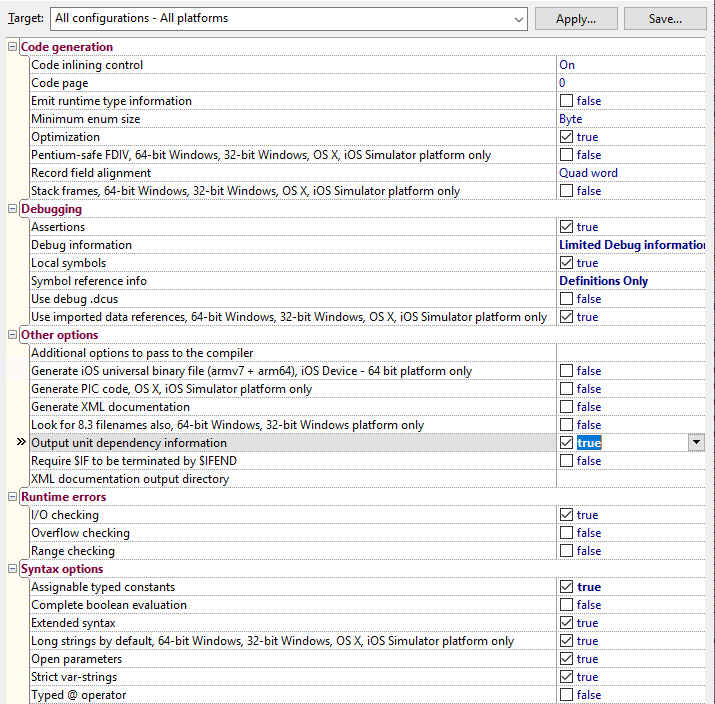
Both DCC_OutputDependencies and DCC_OutputDRCFileΒ can also be set to true in a .dproj file and are configurable under two different project option paths:

  • DCC_OutputDependencies: “Project Options” -> “Delphi Compiler” -> “Compiling” -> “Output unit dependency information”
  • DCC_OutputDRCFile: “Project Options” -> “” -> “Delphi Compiler” -> “Linking” -> “Ouput resource string .drc file”

The -verbosity:detailed however, is not passed to the various Delphi DCC compilers, as somewhere along the line, the CodeGear.Delphi.Targets got changed to Quiet="true" somewhere in-between Delphi 2007 and Delphi 2010.

Delphi 2007 had from Borland.Delphi.Targets files containing from Quiet="$(DCC_Quiet)"; the file got renamed and changes likely in Delphi 2009. See these related posts:

This means as of then on, the DCC commandline compilers will always output non-verbose logging. Even specifying "/p:DCC_AdditionalSwitches=-Q-"Β will not help: you will just get blank lines.

In the past, one of the things the verbose DCC logging would help you to see which files where accessed using the actual build. This was a tremendous help when figuring out search path problems that kick in every now and then.

For units, there is a little trick you can use here: it’s the /p:DCC_OutputDependencies=true" option you see above.

It will output an additional file with the .d extension that:

  • on the first two lines are an empty line followed by lining having the the .dpr filenamea space and a backslash
  • continues with units in reverse order of dependency:
    • optional lines having two tabs, a full .dcu filename (even if the file was actually a .pas file), a space and a backslash
    • a final line having two tabs, a full .dcu filename (even if the file was actually a .pas file) but no space or backslash

That file is relatively easy to scan or parse for path problems.

Project settings

I am not sure at which Delphi version the depends feature became a project setting, but it is. The odd thing: it does not always work, at least not in the Delphi 102. Tokyo installations I have used.

In a .dproj file, it is inside this element: <DCC_OutputDependencies>true</DCC_OutputDependencies> just like the msbuild name.

In the UI, you can find it here:
Related

–jeroen

Posted in Continuous Integration, Delphi, Development, msbuild, Software Development | Leave a Comment »

msbuild verbosity levels

Posted by jpluimers on 2021/03/31

Passing verbosity levels to msbuild on the one hand can help to quickly locate issues that go otherwise unnoticed, but also make your output so large that it is hard to search through.

Some build targets (Delphi!) do not pass the verbosity to their underlying tools, so for those cases you have to find other means to increase underlying verbosity.

You can always pass msbuild options by using the commandline (even abbreviate them as described in [WayBack] MSBuild Command-Line Reference – Visual Studio | Microsoft Docs:Β You can specify the following verbosity levels: q[uiet],Β m[inimal],Β n[ormal],Β d[etailed], andΒ diag[nostic]).

Often you also can use your IDE can also specify verbosity levels, for instance:

The currently specified verbosity values in ascending order according to [WayBack] LoggerVerbosity Enum (Microsoft.Build.Framework) | Microsoft Docs:

Quiet 0 Quiet verbosity, which displays a build summary.
Minimal 1 Minimal verbosity, which displays errors, warnings, messages withΒ MessageImportanceΒ values ofΒ High, and a build summary.
Normal 2 Normal verbosity, which displays errors, warnings, messages withΒ MessageImportanceΒ values ofΒ High, some status events, and a build summary.
Detailed 3 Detailed verbosity, which displays errors, warnings, messages withΒ MessageImportanceΒ values ofΒ HighΒ orΒ Normal, all status events, and a build summary.
Diagnostic 4 Diagnostic verbosity, which displays all errors, warnings, messages, status events, and a build summary.

Note that in the past, Detailed was called Details:

[WayBack] visual studio 2010 – What is output at the different MSBuild output verbosity levels? – Stack Overflow:

  • Quiet: only shows the result of your build.
  • Minimal: shows some configurations of your msbuild, and the CSC task.
  • Normal: This will show all the targets and its mainly steps.
  • Details: In addition to normal, this flag shows the task and it’s implementation within the each target.
  • Diagnostic: Contains all the information that a MSBuild need and produce, it’s switches, parameteres, prerequisites and etc. The input parameter of the target and task, and also contains the value of the input and output parameter, the detail steps of the task execution. The time execution for each task.

In matrix form, as perΒ [WayBack] Obtaining Build Logs with MSBuild – Visual Studio | Microsoft Docs:

The following table shows how the log verbosity (column values) affects which types of message (row values) are logged.

Quiet Minimal Normal Detailed Diagnostic
Errors βœ… βœ… βœ… βœ… βœ…
Warnings βœ… βœ… βœ… βœ… βœ…
High-importance Messages βœ… βœ… βœ… βœ…
Normal-importance Messages βœ… βœ… βœ…
Low-importance Messages βœ… βœ…
Additional MSBuild-engine information βœ…

–jeroen

Posted in Continuous Integration, Delphi, Development, msbuild, Software Development | 1 Comment »

Obtaining Build Logs with MSBuild – Visual Studio | Microsoft Docs

Posted by jpluimers on 2020/09/08

Via [WayBack] Obtaining Build Logs with MSBuild – Visual Studio | Microsoft Docs:

If you need full debug output from msbuild, then append the -verbosity diagnostic parameter.

–jeroen


Posted in Continuous Integration, Development, msbuild, Software Development | Leave a Comment »

Microsoft Visual Studio – Wikipedia

Posted by jpluimers on 2019/05/09

Like there was never an Office 13.0, there was no Visual Studio 13.0: see the below table fromΒ Microsoft Visual Studio – Wikipedia: History

This influences tooling that searches for specific versions of Visual Studio or MSBuild (which has been available since Visual Studio 8.0 and up: MSBuild – Wikipedia: History).

Product name Codename Version
number
Supported .NET
Framework versions
Supported .NET
Core versions
Release date
Visual Studio 2019 Unknown 16.0 To be announced To be announced To be announced
Visual Studio 2017 Dev15 15.0 3.5 – 4.7 1.0-1.1, 2.0 March 7, 2017
Visual Studio 2015 Dev14 14.0 2.0 – 4.6 1.0 July 20, 2015
Visual Studio 2013 Dev12 12.0 2.0 – 4.5.2 N/A October 17, 2013
Visual Studio 2012 Dev11 11.0 2.0 – 4.5.2 N/A September 12, 2012
Visual Studio 2010 Dev10,Β Rosario 10.0 2.0 – 4.0 N/A April 12, 2010
Visual Studio 2008 Orcas 9.0 2.0, 3.0, 3.5 N/A November 19, 2007
Visual Studio 2005 Whidbey 8.0 2.0, 3.0 N/A November 7, 2005
Visual Studio .NET 2003 Everett 7.1 1.1 N/A April 24, 2003
Visual Studio .NET (2002) Rainier 7.0 1.0 N/A February 13, 2002
Visual Studio 6.0 Aspen 6.0 N/A N/A June 1998
Visual Studio 97 Boston 5.0 N/A N/A February 1997

–jeroen

Posted in .NET, Continuous Integration, Development, msbuild, Software Development, Visual Studio and tools | Leave a Comment »