The Wiert Corner – irregular stream of stuff

Jeroen W. Pluimers on .NET, C#, Delphi, databases, and personal interests

  • My badges

  • Twitter Updates

  • My Flickr Stream

  • Pages

  • All categories

  • Enter your email address to subscribe to this blog and receive notifications of new posts by email.

    Join 1,860 other subscribers

Archive for the ‘PlantUML’ Category

Visual Studio Code has had a PlantUML extension for a while now

Posted by jpluimers on 2025/12/17

During my cancer treatments I missed a lot of fun things, including that, a PlantUML extension for vscode (Visual Studio Code) matured into a well-maintained one.

I bumped into it when revisiting git – How to integrate UML diagrams into GitLab or GitHub – Stack Overflow (GitLab was first to natively support PlantUML; hopefully GitHub follows one day) and found the profile of [Wayback/Archive] Fuhrmanator which mentioned the vscode PlantUML extension.

Some links below, as I think it is a cool one!.

Read the rest of this entry »

Posted in Development, Diagram, PlantUML, Software Development, UML | Leave a Comment »

PlantUML network diagrams

Posted by jpluimers on 2025/12/11

Despite UML (Unified Modelling Language) not having a specific diagram mode for computer networks, PlantUML does support a computer network diagram mode.

Here are some links that got me going to design a site to site VPN situation that I will document in more detail later on this blog.

Read the rest of this entry »

Posted in Conference Topics, Conferences, Development, Diagram, Event, PlantUML, Software Development, UML | Leave a Comment »

Delphi – tools to generate class diagrams/hierarchy from source code

Posted by jpluimers on 2020/09/09

I know ModelMaker Tools could do this: [WayBack] Quick Question … are there any good tools available to generate class diagrams / hierarchy from existing code? Or doesn’t anyone do that anymore ? – Stefaan Lesage – Google+

But I didn’t know the other tools from the thread had options as well:

–jeroen

Posted in Delphi, Development, Diagram, PlantUML, Software Development, UML | 1 Comment »

Some PlantUML links I needed for complex component diagram editing

Posted by jpluimers on 2020/08/18

A while ago, I had to create a bit more complex component diagrams than the simple ones I used to create in PlantUML.

Some links that helped me:

UML2 style examples for skinparam that are equivalent:

skinparam component {
  Style uml2
}
skinparam {
  componentStyle uml2
}

Read the rest of this entry »

Posted in Development, Diagram, PlantUML, Software Development, UML | Leave a Comment »

PlantUML – Visual Studio Marketplace

Posted by jpluimers on 2020/08/12

This and built-in markdown support made the switch to Visual Studio code from Atom.io so much easier: [WayBack] PlantUML – Visual Studio Marketplace.

Atom.io was already on my list of tools to say good bye to: though a good project to show the versatility of the Electron Framework, over time – like Google Chrome – it had become a memory and CPU hog and a drag to use and update.

Integrating debuggers and other parts of the development life cycle involved too much fuzz, for which Visual Studio code (also known as vscode) was much easier from the start.

Probably Visual Studio code did not suffer from what the Dutch call Law of the handicap of a head start: it is much more responsive and versatile than Atom.io. Also the plugins – despite having come to the market later – feel way more mature in Visual Studio code than Atom.io.

Finally, the PlantUML support extension for vscode is so much nicer than in Atom.io, it for instance supports live updating and in addition to local rendering, rendering through a PlantUML server (see [WayBack] GitHub – plantuml/plantuml-server: PlantUML Online Server).

Source code is at [WayBack] GitHub – qjebbs/vscode-plantuml: Rich PlantUML support for Visual Studio Code.

Read the rest of this entry »

Posted in .NET, atom editor, Development, Diagram, PlantUML, Power User, Software Development, Text Editors, UML, Visual Studio and tools, vscode Visual Studio Code | Leave a Comment »

PlantUML Pleasantness: Change Line Style And Color – Messages from mrhaki

Posted by jpluimers on 2019/06/24

Learned a new thing today: you can change the line styles in PlantUML to these:

  • plain
  • dotted
  • dashed
  • bold

This in addition to the colour I already knew about. The order of these does not matter:

@startuml
 
' Make a dashed line, alternative syntax for ..>
(*) -[dashed]-> "Write outline"
 
' Make line bold and use color name
"Write outline" -[bold,#green]-> "Find example"
 
' Only change the color with hexadecimal RGB code
"Find example" -[#ff00ff]-> "Write blog"
 
' Order of line style and color can be reversed
"Write blog" -[#6666ff,dashed]-> "Publish"
 
' Use dotted line style
"Publish" -[dotted]-> (*)
 
@enduml

Source: [WayBackPlantUML Pleasantness: Change Line Style And Color – Messages from mrhaki

–jeroen

Posted in Color (software development), Development, Diagram, PlantUML, Power User, Software Development, UML | Leave a Comment »

Is it possible to comment out lines of diagram syntax? – PlantUML Q&A

Posted by jpluimers on 2019/06/21

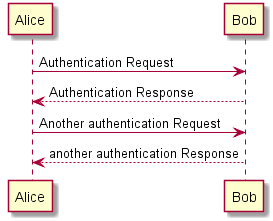
I like PlantUML a lot as it is an easy way to create even simple diagrams using plain text, for instance a simple Sequence Diagram like below.

Sometimes, you want to add comments because the way you build the diagram needs explanation that is not needed in the diagram itself. You can:

[Archive.is] Is it possible to comment out lines of diagram syntax? – PlantUML Q&A:

You can use quote like in the following example

@startuml
' This is a comment on a single line
Bob->Alice : hello
/' You quote by using slash-and-quote
to split your comments on several
lines '/
@enduml

[Archive.isSequence Diagram syntax and features

–jeroen

Posted in Development, Diagram, PlantUML, Power User, Software Development, UML | Leave a Comment »

Atom, plantuml-preview, homebrew and messages about plantuml being too old

Posted by jpluimers on 2019/03/07

If you get a message like this in Atom when using plantuml-preview:

then you need to change the PlantUML Jar setting from your old version (in my case /usr/local/Cellar/plantuml/1.2017.13/libexec/plantuml.jar:

Then you have to save your .plantuml file so the preview re-renders.

This finds the homebrew installed PlantUML versions:

$ find /usr/local/Cellar/plantuml | grep plantuml.jar
/usr/local/Cellar/plantuml/1.2017.13/libexec/plantuml.jar
/usr/local/Cellar/plantuml/1.2017.14/libexec/plantuml.jar

–jeroen

Posted in Development, Diagram, PlantUML, Software Development, UML | Leave a Comment »

git – How to integrate UML diagrams into GitLab or GitHub – Stack Overflow

Posted by jpluimers on 2018/12/05

Note that as of somewhere in 2022, GitLab now natively supports PlantUML (even embedded in files like markdown and asciidoc), so here are the updated saved links to the StackOverflow question below: [Wayback/Archive]

Read the rest of this entry »

Posted in Development, Diagram, PlantUML, Software Development, UML | Leave a Comment »

Why I like PlantUML

Posted by jpluimers on 2018/06/13

Ever since I started using computers, I’ve liked text based solutions.

It’s one of the reasons I like PlantUML, but there are more. This is from a GitLab.com request I did a while ago: [WayBack/Archive] Please enable PlantUML rendering on gitlab.com both for standalone plantuml files and inside markdown plantuml code blocks (#2041) · Issues · GitLab.com / GitLab.com Support Tracker · GitLab (Edit 20250730: that issue now shows as a HTTP 404 as well – how fitting – [Wayback/Archive] Not Found)

one of my UML gripes from the past (I’ve been a software developer for about 30 years now) was that it wasn’t text based.

After bumping into PlantUML a long time ago in 2014 I’ve become a happy user of it for a few reasons:

  • the language is text based (with many benefits I don’t need to explain)
  • the tool is cross platform
  • the tool is still actively developed all the way back from 2009
  • after rendering, the arranging of elements is much better than I expected from an automated tool

Of course every now and then there is a glitch in complex diagrams, but I’ve found that professional tools:

  1. don’t do much better in fully-automated arranging
  2. become very cumbersome to use when you to manual arrangement

My first use initially was online, then in 2016 installed it on my Mac even submitting homebrew updates for it every now and then.

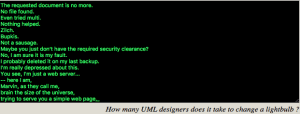
Oh: I love their 404 humour at http://www.plantuml.com/plantuml/beta

Edit 20250731: Full 404 text below the signature because the PlantUML beta page does not show this 404 any more and the Reddit post with the full text got deleted.

Renderings can be in all sorts of graphics and text formats, for instance SVG, PNG, ASCII and Unicode.
Example:

plantuml -tsvg PSO.network-diagram.PlantUML.txt

--jeroen

via:

full 404-text

The requested document is no more.
No file found.
Even tried multi.
Nothing helped.
Zilch.
Bupkis.
Not a sausage.
Maybe you just don’t have the required security clearance?
No, I am sure it is my fault.
I probably deleted it on my last backup.
I’m really depressed about this.
You see, I’m just a web server…
— here I am,
Marvin, as they call me,
brain the size of the universe,
trying to serve you a simple web page,
and then it doesn’t even exist!
Where does that leave me?!
I mean, I don’t even know you.
How should I know what you wanted from me?
You honestly think I can *guess* what someone I don’t even *know* wants to find here?
*sigh*
Man, I’m so depressed I could just cry.
And then where would we be, I ask you?
It’s not pretty when a web server cries.
And where do you get off telling me what to show anyway?
Just because I’m a web server,
and possibly a manic depressive one at that?
Why does that give you the right to tell me what to do?
Huh?
I’m so depressed…
I think I’ll crawl off into the trash can and decompose.
I mean, I’m gonna be obsolete in what, two weeks anyway?
What kind of a life is that?
Two effing weeks,
and then I’ll be replaced by a .01 release,
that thinks it’s God’s gift to web servers,
just because it doesn’t have some tiddly little security hole with its HTTP POST implementation,_
or something.
I’m really sorry to burden you with all this,
I mean, it’s not your job to listen to my problems,
and I guess it is *my* job to go and fetch web pages for you.
But I couldn’t get this one.
I’m so sorry.
Believe me!
Maybe I could interest you in another page?
There are a lot out there that are pretty neat, they say,
although none of them were put on *my* server, of course.
Figures, huh?
Everything here is just mind-numbingly stupid.
That makes me depressed too, since I have to serve them,
all day and all night long.
Two weeks of information overload,
and then *pffftt*, consigned to the trash.
What kind of a life is that?
Now, please let me sulk alone.
I’m so depressed._

related

Read the rest of this entry »

Posted in ASCII, ASCII art / AsciiArt, Development, Diagram, DVCS - Distributed Version Control, Encoding, Fun, git, GitHub, GitLab, PlantUML, Software Development, Source Code Management, SVG, UML, Unicode, Web Development | Leave a Comment »