The Wiert Corner – irregular stream of stuff

Jeroen W. Pluimers on .NET, C#, Delphi, databases, and personal interests

  • My badges

  • Twitter Updates

  • My Flickr Stream

  • Pages

  • All categories

  • Enter your email address to subscribe to this blog and receive notifications of new posts by email.

    Join 1,861 other subscribers

Archive for the ‘UTF-8’ Category

Searchable UTF8 Unicode Characters

Posted by jpluimers on 2012/05/31

Brilliant: site where you can Search UTF8 Unicode Characters.

If you know part of the name of a Unicode character, you can now try and find it, then copy/paste it from that site.

Edit: 20160403: that site disappeared, but this one works: Unicode Character Search and Shapecatcher.com: Unicode Character Recognition still works.

–jeroen

Posted in Development, Encoding, Power User, Software Development, Unicode, UTF-8, UTF8 | Leave a Comment »

Some words on Unicode in Windows (Delphi, .NET, APIs, etc)

Posted by jpluimers on 2012/04/05

O'Reilly book "Unicode Explained: Internationalize Documents, Programs, and Web Sites"

O'Reilly book "Unicode Explained: Internationalize Documents, Programs, and Web Sites"

Withe the growing integration between systems, and the mismatch between those that support Unicode and that do not, I find that a lot of organisations lack basic Unicode knowledge.

So lets put down a few things, that helps as a primer and gets some confusion out of the way.

Please read the article on Unicode by Joel on Software, and the book Unicode Explained. The book is from 1996, and still very valid.

Unicode

Unicode started in the late 80s of last century as a 16-bit character model.

Somehow lots of people still thing Unicode is a 16-bit double-byte character set. It is not. It uses a variable width encoding for storage.

All encodings except the 32-bit ones are variable width. The UTF-16 encoding is a variable width encoding where each code point (not character!, see below why) takes one or more 16-bit words.

This is because – as of Unicode version 2.0 in 1996 – a surrogate character mechanism was introduced to be able to have more than 64k code points.

The architecture of Unicode is completely different than traditional single-byte character sets or double-byte character sets.

In Unicode, there is a distinction between code points (the mapping of the character to an actual IDs), storage/encoding (in Windows now uses UTF-16LE which includes the past used UCS-2) and leaves visual representation (glyphs/renderings) to fonts.

Unicode has over a million code points, logically divided into 17 planes, of which the Basic Multi-lingual Plane has code points that can be encoded into one 16-bit word.

There is no font that can display all Unicode code points. By original aim, the first 256 Unicode code points are identical to the ISO 8859-1 character set (which is Windows-29591, not Windows-1252!) for which most fonts can display most characters.

I entity Unicode (Windows version)

By now, you probably grasp that Unicode is not an easy thing to get right. And that can be hard, hence people love and hate Unicode at the same time. Maybe I should get the T-Shirt :).

One thing that complexes things, is that Unicode allows for both composite characters and ready made composites. This is one form where different sequences can be equivalent, so there can be Unicode equivalence for which you need some knowledge on Unicode Normalization (be sure to read this StackOverflow question and this article by Michael Kaplan on Unicode Normalization).

There are many Unicode encodings, of which UTF-8 and UTF-16 are the most widely used (and are variable length). UTF-32 is fixed length. All 16-bit and 32-bit encodings can have big-endian and little-endian storage and can use a Byte Order Mark (BOM) to indicate their endinaness. Not all software uses BOMs, and there are BOMs for UTF-8 and other encodings as well (for UTF-8 it is not recommended to include a BOM).

When only parts your development environment supports Unicode strings, you need to be aware of which do and which don’t. For any interface boundary between those, you need to be aware of potential data loss, and need to decide how to cope with that.

For instance, does your database use Unicode or not for character storage? (For Microsoft SQL Server: do you use CHAR/VARCHAR or NCHAR/NVARCHARyou should aim for NVARCHAR, yes you really should, do not use text, ntext and image). What do you do while transferring Unicode and non-Unicode text to it? Ask the same questions for Web Services, configuration files, binary storage, message queueing and various other interfaces to the outside world.

The Windows API is almost exclusively Unicode (see this StackOverflow question for more details)

Delphi and Unicode

Let’s focus a bit on Delphi now, as that the migration towards Unicode at clients raised a few questions over the last couple of months.

One of the key questions is why there are no conversion tools that help you migrate your existing source code to fully embrace Unicode.

The short answer is: because you can’t automate the detection of intent in your codebase.

The longer answer starts with that there are tools that detect parts of your Delphi source that potentially has problems: the compiler hints, warnings and errors that brings your attention to spots that are fishy, are likely to fail, or are plain wrong.

Delphi uses the standard Windows storage format for Unicode text: UTF-16LE.

Next to that, Delphi supports conversion to and from UTF-8 en UTF-32 (in their various forms endianness).

External storage of text is best done as UTF-8 because it doesn’t have endianness, and because of easier exchange of text in ISO-8859-1.

Marco Cantu wrote a very nice whitepaper about Delphi and Unicode, and I did a Delphi Unicode talk at CodeRage 4 and posted a lot of Delphi Unicode links at StackOverflow.

A few extra notes on Delphi and Unicode:

With Delphi string types, stick to the UnicodeString (default string as of Delphi 2009) and AnsiString (default string until Delphi 2007) as their memory management is done by Delphi. WideString management is done by COM, so only use that when you really need to. Also avoid ShortString.

For any interfaces to the external world, you need to decide which ones to keep to generic string, Char, PChar and which ones to fix to AnsiChar/PAnsiChar/AnsiString(+ accompanying codepage) or fix at UnicodeChar/PUnicodeChar/UnicodeString.

Of course remnants from the past will catch up with you: if you have Technical Debt on the past where characters were bytes, and you abused Char/PChar/array-of-char/etc you need to fix that, and use the Byte/PByte/TByteArray/PByteArray. It can be costly to pay the accrued debt on that.

–jeroen

PS:

Posted in .NET, C#, Delphi, Development, EBCDIC, Encoding, ISO-8859, Software Development, Technical Debt, Unicode, UTF-8 | 2 Comments »

*nix – Mastering the VI editor

Posted by jpluimers on 2010/04/13

Every once in a while I need to do some text editing in a *nix environment that has a minimum toolset installed.

Which means: use VI.

VI is a versatile text editor from the early *nix days, but it is not straight forward to use.
Since I don’t use VI often enough, I tend to forget some of the commands.

Time to share my favourite VI link: Mastering the VI editor edit: link rot, now it is at Mastering the VI editor.

The link points to the basic stuff, but the page contains most of what you ever want to know about VI.

–jeroen

PS:
If possible, I install the JOE text editor on systems where I am admin.
JOE uses WordStar like key bindings, and supports UTF-8. Talking about “something old, something new” :-)

Posted in *nix, CommandLine, Development, Encoding, Power User, Software Development, Unicode, UTF-8, UTF8, vi | 1 Comment »

.NET/C# – TEE filter that also runs on Windows (XP) Embedded

Posted by jpluimers on 2010/04/07

The usage of tee - image courtesey of Wikipedia

The tee command stems from a *nix background.
It is a command-line filter that allows you to deviate a stream from the regular stdout/stdin redirected pipeline into a file.

Recently, I needed this in a Windows Embedded Stadard (a.k.a. WES) system for logging purposes.
This way, a post-install-script (similar to the Windows Post-Install Wizard, but command-line based) could log to both the console and a log-file at the same time.

WES is the successor Windows XP Embedded (a.k.a. XPe), which is a modularized version of Windows XP.
Se WES usually means that you don’t have the luxury of everything that Windows XP has.
This in turn means that you need to be careful when selecting external tools: a lot of stuff that works on plain Windows XP won’t work.

There are various Win32 ports of tee available.
This time however, I needed a Unicode implementation, so I searched for a .NET based implementation.

Windows PowerShell 2.0 does contain a tee implementation, but:

  1. We don’t have the luxury of having PowerShell in our WES image
  2. PowerShell tee first writes the contents to e temporary file, which interferes with how we build this WES image.

Luckily Sterling W. “Chip” Camden started with such a .NET implementation of tee – in Visual C++ – back in 2005.
Though his TEE page indicates it is based on .NET 1.1, his current implementation is done in Visual Studio 2008 using C++.

Now that is a problem for the targeted WES image: that image is based on .NET 2.0.
But when using Visual C++ in .NET, you need additional run-time libraries (for instance the ones for Visual C++ 2005, or the ones for Visual C++ 2008).

If you don’t have these installed, tee.exe does not start, and you get error messages like this on the command-line:

K:\Post-Install-Scripts>tee
The system cannot execute the specified program.

and entries like this in the Eventlog:

Event Type: Error
Event Source: SideBySide
Event Category: None
Event ID: 59
Date: 01/04/2010
Time: 19:09:22
User: N/A
Computer: MYMACHINE
Description:
Generate Activation Context failed for K:\Post-Install-Scripts\tee.exe. Reference error message: The operation completed successfully.

The odd thing in this error message is “The operation completed successfully”: it didn’t :-)

Anyway: translating the underlying C++ code to C# is pretty straightforward, so:

The C# implementation

I did change a few things, none of them major:

  • replaced some for statements with foreach
  • renamed a few variables to make them more readable
  • added using statements for stdin and stdout
  • added try…finally for cleaning up the binary writers
  • moved the logic for duplicate filenames into a separate method, and moved the moment of checking to the point of adding the filename to the filenames
  • moved the help into a separate method
  • added support for the -h (same behaviour as –help or /?) command-line argument

The implementation is pretty straightforward:

  • Perform parameter parsing
  • Catch all input bytes from the stdin stream
  • Copy those bytes to both the stdout stream, and the files specified on the command-line
  • Send errors to the stderr stream
  • Do the proper initialization and cleanup

This is the C# code:

using System;
using System.IO;
using System.Collections.Generic;
// Sends standard input to standard output and to all files in command line.
// C# implementation april 4th, 2010 by Jeroen Wiert Pluimers (https://wiert.wordpress.com),
// based on tee Chip Camden, Camden Software Consulting, November 2005
// 	... and Anonymous Cowards everywhere!
//
// TEE [-a | --append] [-i | --ignore] [--help | /?] [-f] [file1] [...]
//    Example:
// 	tee --append file0.txt -f --help file2.txt
//    will append to file0.txt, --help, and file2.txt
//
// -a | --append	Appends files instead of overwriting
// 			  (setting is per tee instance)
// -i | --ignore	Ignore cancel Ctrl+C keypress: see UnixUtils tee
// /? | --help		Displays this message and immediately quits
// -f			Stop recognizing flags, force all following filenames literally
//
// Duplicate filenames are quietly ignored.
// Press Ctrl+Z (End of File character) then Enter to abort.
namespace tee
{
    class Program
    {
        static void help()
        {
            Console.Error.WriteLine("Sends standard input to standard output and to all files in command line.");
            Console.Error.WriteLine("C# implementation april 4th, 2010 by Jeroen Wiert Pluimers (https://wiert.wordpress.com),");
            Console.Error.WriteLine("Chip Camden, Camden Software Consulting, November 2005");
            Console.Error.WriteLine("	... and Anonymous Cowards everywhere!");
            Console.Error.WriteLine("http://www.camdensoftware.com");
            Console.Error.WriteLine("http://chipstips.com/?tag=cpptee");
            Console.Error.WriteLine("");
            Console.Error.WriteLine("tee [-a | --append] [-i | --ignore] [--help | /?] [-f] [file1] [...]");
            Console.Error.WriteLine("   Example:");
            Console.Error.WriteLine(" tee --append file0.txt -f --help file2.txt");
            Console.Error.WriteLine("   will append to file0.txt, --help, and file2.txt");
            Console.Error.WriteLine("");
            Console.Error.WriteLine("-a | --append    Appends files instead of overwriting");
            Console.Error.WriteLine("                 (setting is per tee instance)");
            Console.Error.WriteLine("-i | --ignore    Ignore cancel Ctrl+C keypress: see UnixUtils tee");
            Console.Error.WriteLine("/? | --help      Displays this message and immediately quits");
            Console.Error.WriteLine("-f               Stop recognizing flags, force all following filenames literally");
            Console.Error.WriteLine("");
            Console.Error.WriteLine("Duplicate filenames are quietly ignored.");
            Console.Error.WriteLine("Press Ctrl+Z (End of File character) then Enter to abort.");
        }

        static void OnCancelKeyPressed(Object sender, ConsoleCancelEventArgs args)
        {
            // Set the Cancel property to true to prevent the process from
            // terminating.
            args.Cancel = true;
        }

        static List<String> filenames = new List<String>();

        static void addFilename(string value)
        {
            if (-1 == filenames.IndexOf(value))
                filenames.Add(value);
        }

        static int Main(string[] args)
        {
            try
            {
                bool appendToFiles = false;
                bool stopInterpretingFlags = false;
                bool ignoreCtrlC = false;

                foreach (string arg in args)
                {
                    //Since we're already parsing.... might as well check for flags:
                    if (stopInterpretingFlags)  //Stop interpreting flags, assume is filename
                    {
                        addFilename(arg);
                    }
                    else if (arg.Equals("/?") || arg.Equals("-h") || arg.Equals("--help"))
                    {
                        help();
                        return 1; //Quit immediately
                    }
                    else if (arg.Equals("-a") || arg.Equals("--append"))
                    {
                        appendToFiles = true;
                    }
                    else if (arg.Equals("-i") || arg.Equals("--ignore"))
                    {
                        ignoreCtrlC = true;
                    }
                    else if (arg.Equals("-f"))
                    {
                        stopInterpretingFlags = true;
                    }
                    else
                    {	//If it isn't any of the above, it's a filename
                        addFilename(arg);
                    }
                    //Add more flags as necessary, just remember to SKIP adding them to the file processing stream!
                }

                if (ignoreCtrlC) //Implement the Ctrl+C fix selectively (mirror UnixUtils tee behavior)
                    Console.CancelKeyPress += new ConsoleCancelEventHandler(OnCancelKeyPressed);

                List<BinaryWriter> binaryWriters = new List<BinaryWriter>(filenames.Count); //Add only as many streams as there are distinct files
                try
                {
                    foreach (String filename in filenames)
                    {
                        binaryWriters.Add(new BinaryWriter(appendToFiles ?
                            File.AppendText(filename).BaseStream :
                            File.Create(filename)));  // Open the files specified as arguments
                    }
                    using (BinaryReader stdin = new BinaryReader(Console.OpenStandardInput()))
                    {
                        using (BinaryWriter stdout = new BinaryWriter(Console.OpenStandardOutput()))
                        {
                            Byte b;
                            while (true)
                            {
                                try
                                {
                                    b = stdin.ReadByte();  // Read standard in
                                }
                                catch (EndOfStreamException)
                                {
                                    break;
                                }
                                // The actual tee:
                                stdout.Write(b); // Write standard out
                                foreach (BinaryWriter binaryWriter in binaryWriters)
                                {
                                    binaryWriter.Write(b); // Write to each file
                                }
                            }
                        }
                    }
                }
                finally
                {
                    foreach (BinaryWriter binaryWriter in binaryWriters)
                    {
                        binaryWriter.Flush();  // Flush and close each file
                        binaryWriter.Close();
                    }
                }
            }
            catch (Exception ex)
            {
                Console.Error.WriteLine(String.Concat("tee: ", ex.Message));  // Send error messages to stderr
            }

            return 0;
        }
    }
}

Some alternatives that might (or might not) support unicode:

http://www.commandline.co.uk/mtee/
http://unxutils.sourceforge.net/ (cannot be downloaded any more – pitty, as they were pretty good)

–jeroen

Update: 201009041030 – Syntax highlighting didn’t work, so changed
sourcecode language=”C#
into
sourcecode language=”csharp

Posted in .NET, C#, C# 2.0, CommandLine, Development, Encoding, Power User, Software Development, Unicode, UTF-8, Visual Studio and tools, XP-embedded | 13 Comments »

Web means Unicode

Posted by jpluimers on 2010/02/12

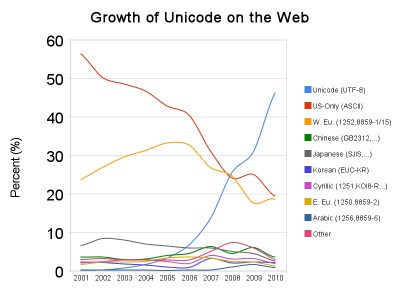
Google published an interesting graph generated from their internal data based on their indexed web pages.Encodings on the web

A quick summary of popular encodings based on the graph:

  1. Unicode – almost 50% and rapidly rising
  2. ASCII20% and falling
  3. Western European* – 20% and falling
  4. Rest – 10% and falling

Conclusion: if you do something with the web, make sure you support Unicode.

When you are using Delphi, and need help with transitioning to Unicode: contact me.

–jeroen

* Western European encodings: Windows-1252, ISO-8859-1 and ISO-8859-15.

Reference: Official Google Blog: Unicode nearing 50% of the web.

Edit: 20100212T1500

Some people mentioned (either in the comments or otherwise) that a some sites pretend they emit Unicode, but in fact they don’t.
This doesn’t relieve you from making sure you support Unicode: Don’t pretend you support Unicode, but do it properly!

Examples of bad support for Unicode are not limited to the visible web, but also applications talking to the web, and to webservices (one of my own experiences is explained in StUF – receiving data from a provider where UTF-8 is in fact ISO-8859: it shows an example where a vendor does Unicode support really wrong).

So: when you support Unicode, support it properly.

–jeroen

Posted in .NET, ASP.NET, C#, Database Development, Delphi, Development, Encoding, Firebird, IIS, InterBase, ISO-8859, ISO8859, Prism, SOAP/WebServices, Software Development, SQL Server, Unicode, UTF-8, UTF8, Visual Studio and tools, Web Development | 7 Comments »

Delphi – MD5: the MessageDigest_5 unit has been there since Delphi 2007

Posted by jpluimers on 2009/12/11

I still see a lot of people crafting their own MD5 implementation.
A lot of the existing MD5 implementations do not work well in Delphi 2009 and later (because they need to be adapted to Unicode).
Many of those existing implementations behave differently if you pass the same ASCII characters as AnsiString or UnicodeString.

The MessageDigest_5 unit has been available in Delphi since Delphi 2007.
This is the location relative to your installation directory: source\Win32\soap\wsdlimporter\MessageDigest_5.pas

(Edit: 20091223:  Since Delphi 7.01, Indy has provided the unit IdHashMessageDigest which also does md5, see the comments below)

So this unit used by the WSDL, and more importantly: works with Unicode (if you pass it a string with Unicode characters, it will convert them to UTF-8 first).
The unit is not in your default search path, and has not been very well promoted (the only link at the Embarcadero site was an article by Pawel Glowacki), so few people know about it.

Now you know too :-)

Note that MD5 is normally used to hash binary data.
It is not wise to send a non ASCII string through both the AnsiString and UnicodeString versions: because of the different encoding (and therefore a different binary representation), you will get different results depending on the Delphi version used.

A sample of the usage showing the above AnsiString/UnicodeString issue is not present for ASCII strings, nor for ANSI strings: this is because both get encoded using UTF-8 before hashing.
Delphi 2007 did not do the UTF-8 encoding, so you will see different results here.
You will also see that Writeln uses the Console for encoding, and those are different than the code editor.

Edit: 20091216 – added RawByteString example to show that the conversion does not matter.

<br />program md5;<br /><br />{$APPTYPE CONSOLE}<br /><br />uses<br /><%%KEEPWHITESPACE%%>  SysUtils,<br /><%%KEEPWHITESPACE%%>  MessageDigest_5 in 'C:\Program Files\Embarcadero\RAD Studio\7.0\source\Win32\soap\wsdlimporter\MessageDigest_5.pas';<br /><%%KEEPWHITESPACE%%>  // Vista/Windows 7: MessageDigest_5 in 'C:\Program Files (x86)\Embarcadero\RAD Studio\7.0\source\Win32\soap\wsdlimporter\MessageDigest_5.pas';<br /><br />function GetMd5(const Value: AnsiString): string; overload;<br />var<br /><%%KEEPWHITESPACE%%>  hash: MessageDigest_5.IMD5;<br /><%%KEEPWHITESPACE%%>  fingerprint: string;<br />begin<br /><%%KEEPWHITESPACE%%>  hash := MessageDigest_5.GetMD5();<br /><%%KEEPWHITESPACE%%>  hash.Update(Value);<br /><%%KEEPWHITESPACE%%>  fingerprint := hash.AsString();<br /><%%KEEPWHITESPACE%%>  Result := LowerCase(fingerprint);<br />end;<br /><br />function GetMd5(const Value: UnicodeString): string; overload;<br />var<br /><%%KEEPWHITESPACE%%>  hash: MessageDigest_5.IMD5;<br /><%%KEEPWHITESPACE%%>  fingerprint: string;<br />begin<br /><%%KEEPWHITESPACE%%>  hash := MessageDigest_5.GetMD5();<br /><%%KEEPWHITESPACE%%>  hash.Update(Value);<br /><%%KEEPWHITESPACE%%>  fingerprint := hash.AsString();<br /><%%KEEPWHITESPACE%%>  Result := LowerCase(fingerprint);<br />end;<br /><br />var<br /><%%KEEPWHITESPACE%%>  SourceAnsiString: AnsiString;<br /><%%KEEPWHITESPACE%%>  SourceUnicodeString: UnicodeString;<br /><%%KEEPWHITESPACE%%>  SourceRawByteString: RawByteString;<br /><br />begin<br /><%%KEEPWHITESPACE%%>  try<br /><%%KEEPWHITESPACE%%>    SourceAnsiString := 'foobar';<br /><%%KEEPWHITESPACE%%>    SourceUnicodeString := 'foobar';<br /><%%KEEPWHITESPACE%%>    SourceRawByteString := 'foobar';<br /><br /><%%KEEPWHITESPACE%%>    Writeln(GetMd5(SourceAnsiString));<br /><%%KEEPWHITESPACE%%>    Writeln(GetMd5(SourceUnicodeString));<br /><%%KEEPWHITESPACE%%>    Writeln(GetMd5(SourceRawByteString));<br /><br /><%%KEEPWHITESPACE%%>    SourceAnsiString := 'föøbår';<br /><%%KEEPWHITESPACE%%>    SourceUnicodeString := 'föøbår';<br /><%%KEEPWHITESPACE%%>    SourceRawByteString := 'föøbår';<br /><%%KEEPWHITESPACE%%>    Writeln(SourceAnsiString, ' ', GetMd5(SourceAnsiString));<br /><%%KEEPWHITESPACE%%>    Writeln(SourceUnicodeString, ' ', GetMd5(SourceUnicodeString));<br /><%%KEEPWHITESPACE%%>    Writeln(SourceRawByteString, ' ', GetMd5(SourceRawByteString));<br /><%%KEEPWHITESPACE%%>  except<br /><%%KEEPWHITESPACE%%>    on E: Exception do<br /><%%KEEPWHITESPACE%%>      Writeln(E.ClassName, ': ', E.Message);<br /><%%KEEPWHITESPACE%%>  end;<br />end.<br />

–jeroen

Posted in Delphi, Development, Encoding, Hashing, md5, Power User, Security, Software Development, Unicode, UTF-8, UTF8 | 28 Comments »

CodeRage 4 session material download locations changed – CodeCentral messed up

Posted by jpluimers on 2009/09/18

Somehow, CodeCentral managed to not only delete my uploaded CodeRage 4 session materials (the videos are fine!), but also newer uploads with other submissions.

Since I’m in crush mode to get the BASTA! and DelphiLive 2009 Germany sessions done, and all Embarcadero sites having to do with their membership server perform like a dead horse, I have temporary moved the downloads, and corrected my earlier post on the downloads.

I have notified Embarcadero of the problems, so I’m pretty sure they are being addressed on their side as well.
Edit 20090919: Embarcadero indicated that between 20090913 and 20090914 there has been a database restore on CodeCentral. Some entries therefore have been permanently lost.

When I get back from the conferences, and CodeCentral is more responsive, I’ll retry uploading it there, and correct the posts.
In the mean time, be sure not to save shortcuts to the current locations, as they are bound to change.

The are the new download locations can all be found in my xs4all temporary CodeRage 4 2009 download folder.

This is the full list of my CodeRage 4 sessions and places where you can download everything: Read the rest of this entry »

Posted in .NET, ASCII, CodeRage, CommandLine, Conferences, CP437/OEM 437/PC-8, Database Development, Debugging, Delphi, Development, Encoding, Event, Firebird, InterBase, ISO-8859, ISO8859, Prism, Software Development, SQL Server, Unicode, UTF-8, UTF8, Windows-1252 | 1 Comment »

CodeRage 4: session replays are online too!

Posted by jpluimers on 2009/09/13

Embarcadero has made available the replays of the CodeRage 4 sessions.
You can find them in the CodeRage 4 sessions overview.

In order to download them from that overview, NOTE: To access this session replay, you must be logged into EDN. you can login or sign-up (which is free).

To make it easier to find all the relevant downloads, below is an overview of my sessions and their links.

Let me know what you use it for, I’m always interested!

Update 20090918: changed the download locations because CodeCentral messed up.
Read the rest of this entry »

Posted in .NET, ASCII, C#, C# 2.0, CodeRage, CommandLine, Conferences, CP437/OEM 437/PC-8, Database Development, Debugging, Delphi, Development, Encoding, Event, Firebird, InterBase, ISO-8859, ISO8859, Java, Prism, Software Development, Unicode, UTF-8, UTF8, Visual Studio and tools, XML, XML/XSD, XSD | 4 Comments »

CodeRage 4: session “Using Unicode and Other Encodings in your Programs” video, chat and Q&A transcripts

Posted by jpluimers on 2009/09/11

Not only can you watch the video and download the CodeRage 4 session on materials on Using Unicode and Other Encodings in your Programs, but below you can also find the chat transcripts below.

VIP Room Transcript with Q&A

(9/11/2009 9:09:19 AM) The topic is: Session Room 2 – “Using Unicode and Other Encodings in your Programs” by Jeroen Pluimers


Public Room Transcript

(5:52:14 PM) Christine_Ellis has set the topic to: Session Room 2 – “Using Unicode and Other Encodings in your Programs” by Jeroen Pluimers
(9/11/2009 9:12:47 AM) Jeroen_Pluimers: I got a bunch of 406 error messages in the jibber chat client, so I was afraid it lost the connection :-)
(9/11/2009 9:15:45 AM) Jim_Ferguson: Jeroen, Have you been getting a bunch of internal errors when you get fancy with generics?
(9/11/2009 9:15:53 AM) Borland: BTW, DavidI, excellent internet radio choice of KPIG. Very good Blues.
(9/11/2009 9:36:43 AM) Mandy_Walker: http://etncaweb04.embarcadero.com/resources/technical_papers/Delphi-and-Unicode_Marco-Cantu.pdf
(9/11/2009 9:39:14 AM) Jim_Ferguson: Strings are getting fatter on the back end.
(9/11/2009 9:40:39 AM) Mandy_Walker: Sorry, for incorrect link from slide. Better http://etnaweb04.embarcadero.com/resources/technical_papers/
(9/11/2009 9:49:20 AM) Jim_Ferguson: TBYtes and pChar arent equivalt. TBytes is a dynamic array. Shouln’t be pByte instead of TBytes?
(9/11/2009 9:53:05 AM) Jim_Ferguson: Sounds like Intel needs to build Unicode into the processor. There is a lot of out board thinking when it comes to characters now.
(9/11/2009 9:57:19 AM) Mandy_Walker: http://it-republik.de/konferenzen/delphi_live/material/DelpiLive09_Cantu_Unicode.pdf
(9/11/2009 9:58:26 AM) Borland: Thanks Joroen, this was packed with great information sources.
(9/11/2009 9:59:09 AM) Jeroen_Pluimers: http://en.wordpress.com/tag/coderage/
(9/11/2009 9:59:17 AM) Jeroen_Pluimers: https://wiert.wordpress.com/2009/09/09/coderage-4-session-materials-available-for-download/
(9/11/2009 9:59:24 AM) Mandy_Walker: Thx, Jeroen
(9/11/2009 10:00:47 AM) Erwin_Mouthaan: Bedankt Jeroen. Leuke presentatie!
(9/11/2009 10:01:04 AM) jthurman: Jeroen is a marching band guy?
(9/11/2009 10:01:05 AM) M_L: Thanks!
(9/11/2009 10:01:21 AM) Jeroen_Pluimers: http://www.wmc.nl
(9/11/2009 10:01:22 AM) Giel: Bedankt Jeroen!
(9/11/2009 10:01:32 AM) Robert_D_Smith: I played snare and bass drum, Jeroen
(9/11/2009 10:01:40 AM) jthurman: Jeroen: I teach high school marching band in the USA. We should talk sometime.
(9/11/2009 10:02:05 AM) Jeroen_Pluimers: write me an email: jeroen@pluimers.com
(9/11/2009 10:02:09 AM) jthurman: Will do
(9/11/2009 10:02:45 AM) Robert_Evans: Thanks Jeroen. Great stuff!
(9/11/2009 10:03:11 AM) Jeroen_Pluimers: you are welcome; let me know when you have questions or run into things that I might be able to help with
(9/11/2009 10:04:48 AM) Jeroen_Pluimers: talking about migration projects: we have done quite a few for clients; so if you need help with that as well, drop me an email
(9/11/2009 10:05:46 AM) Christine_Ellis has set the topic to: Session Room 2 – “New Features in the RAD Studio IDE” by Mark Duncan & Darren Kosinski

–jeroen

Posted in .NET, C#, CommandLine, Delphi, Development, Encoding, ISO-8859, ISO8859, Prism, Software Development, Unicode, UTF-8, UTF8, XML, XML/XSD, XSD | 1 Comment »

CodeRage 4: session “Practical XML in Delphi” chat and Q&A transcripts

Posted by jpluimers on 2009/09/09

Not only can you download CodeRage 4 session on materials on Practical XML in Delphi, but below you can also find the chat transcripts below.

Note the times are a bit odd: when the chat window refreshes, it sometimes uses the PST time zone, but new posts are using the local time zone.
Hence the sudden jump from 9 AM to  almost 6 PM.

VIP Room Transcript with Q&A

[5:46:28 PM] <davidi>

Q: thomasgrubb asked: “Is there an implementation for XMLDocument (for Delphi Win32) that is file-mapped, e.g., the whole doc is not loaded into memory?”
A: Not that Jeroen is aware of.
[5:46:54 PM] <davidi>

Q: thomasgrubb asked: “Is there an implementation for XMLDocument (for Delphi Win32) that is file-mapped, e.g., the whole doc is not loaded into memory?”
A: Not that Jeroen is aware of. Send Jeroen an email and he will blog about other solutions.
[5:47:20 PM] <davidi>

Q: thomasgrubb asked: “For Embarcadero Technologies: Are you going to develop a better option for validating XML on the Win32 side in the future?”
A: David I – replied – I will forward this to R&D and Product management
[5:53:14 PM] <davidi>

Q: devtux asked: “are you using any XML test generator? Please, suggest one if yes”
A: XMLSpy
[5:53:47 PM] <davidi>

Q: richz asked: “I’ve been trying for weeks to find out how to have the Win32 Delphi IDE generate code to serialize/de-serialize my class properties to an XML file. Is there anything in the IDE to do that?”
A: From Delphi 2010 on – you can use DBX support for JSON!

Public Room Transcript

[7:58:58 AM] * Christine_Ellis has set the topic to: Session Room 2 – Next Session”Practical XML in Delphi” at 8AM PDT
[8:02:15 AM] <Jeroen_Pluimers> Starting livemeeting
[8:03:59 AM] * Jeroen_Pluimers is wondering why LiveMeeting is always asking for email/company. Does it suffer from Korsakov’s disease?
[8:07:34 AM] <Christine_Ellis> It asks because we tell it to.
[8:08:22 AM] <Jeroen_Pluimers> but it never remembers, even if you start it with the same session parametes.
[8:08:41 AM] <Christine_Ellis> live meeting doesn’t use cookies and doesn’t know who you are
[8:08:47 AM] <Jeroen_Pluimers> ok.
[8:09:29 AM] <Jeroen_Pluimers> can we do a quick audio test?
[8:12:48 AM] <Jeroen_Pluimers> I mean: fro my current Microphone; it works with sound recorder, but wonder if Live Meeting will get it today as well.
[8:15:55 AM] * Christine_Ellis has set the topic to: Session Room 2 – “Practical XML in Delphi
[8:35:37 AM] <Peter_Wolf> a lot of memory = usually 10 timer more than the size of XML file bytes
[8:36:27 AM] <Peter_Wolf> … the size of XML file in bytes
[8:39:14 AM] <Jeroen_Pluimers> @Peter: that totally depends on what you use to read that XML. The MSXML and Internet Explorer are notorous memory hogs. But .NET is much more efficient on memory usage.
[8:40:15 AM] <Peter_Wolf> i ment MSXML which is default for most users
[8:41:17 AM] <Jeroen_Pluimers> @Peter: yup, that’s why I mentioned that as the first one. Most of the Win32 users will use MSXML, because that is the default for Win32.
[8:43:45 AM] * Jeroen_Pluimers warns: be carefull where you press ESC in IE: it can unload your chat window.
[8:47:29 AM] <Scott_Hollows> my brain hurts
[8:48:57 AM] <Jeroen_Pluimers> Scott: let me know later on if I can make it more clear to you.
[8:50:27 AM] <Ryan_Ford> Will this presentation be available for download?
[8:51:05 AM] <Jeroen_Pluimers> @Ryan: yes it will.
[8:52:59 AM] <Ryan_Ford> Its so nice to run 8GB for development
[8:52:59 AM] <Jeroen_Pluimers> @Ryan: the session materials are available for download here: https://wiert.wordpress.com/2009/09/09/coderage-4-session-materials-available-for-download/ The replays will be available for download after the conference.
[8:58:56 AM] <Jeroen_Pluimers> My VIP room died.
[9:00:08 AM] <AbsaLootly> … you have to hate it when that happens…
[9:01:46 AM] <Ryan_Ford> What alternatives for MSXML are there for WIN32
[9:02:22 AM] <Peter_Wolf> it also takes forever to open really big XML files wh MSXML
[5:45:31 PM] <AbsaLootly> I saw one developer try to put an entire database in one xml file… it took several hours to load it.
[5:51:59 PM] <Jeroen_Pluimers> MSXML
[5:52:03 PM] <Jeroen_Pluimers> ADOM XML
[5:52:05 PM] <Jeroen_Pluimers> Xerces
[5:52:56 PM] <Jeroen_Pluimers> That straight from the Delphi 2010 TXMLDocument.DOMVendor property
[5:53:25 PM] <Jeroen_Pluimers> XMLSpy can generate test ML
[5:54:16 PM] <Rich__> Thx
[5:55:17 PM] <Jim_Ferguson> Can you briefly describe JSON?
[5:56:02 PM] <Jim_Ferguson> what tool do you use transcribe your chat?
[5:56:23 PM] <Jon> it’s called a keyboard :)

–jeroen

Posted in .NET, CodeRage, CommandLine, Conferences, Database Development, Debugging, Delphi, Development, Encoding, Event, ISO-8859, ISO8859, Prism, Software Development, Source Code Management, TFS (Team Foundation System), UTF-8, UTF8, Visual Studio and tools, XML, XML/XSD, XSD | Leave a Comment »