


I wasn’t aware that Java has some some catch-up and now supports user definable inline types: [Wayback/Archive] Inline Thinking | Patricia Aas – Programmer
Inline Thinking
97 Things Every Java Programmer Should Know
Patricia Aas, 16 January 2020Computers changed. They changed in many ways, but for the purpose of this text they changed in one significant way: The relative cost of reading from RAM became extremely high.…These “cache friendly” behaviors are already present in Java when using so called “primitive types”, like ints and chars. “Primitive types” are “inline types” and come with all of their advantages. So even though inline types may seem foreign in the beginning, you have worked with them before, you just might not have thought of them as objects. So when “inline classes” seem confusing, you could try to think: “What would an int do?”







 The Wiert Corner - irregular stream of stuff
Yep, I can see this problem as well. I believe the problem (bug) has indeed always existed.

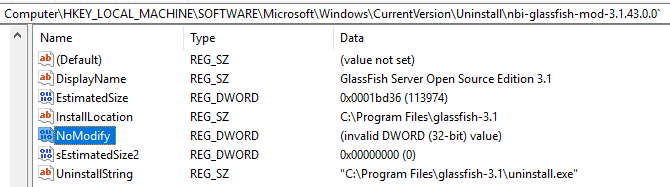
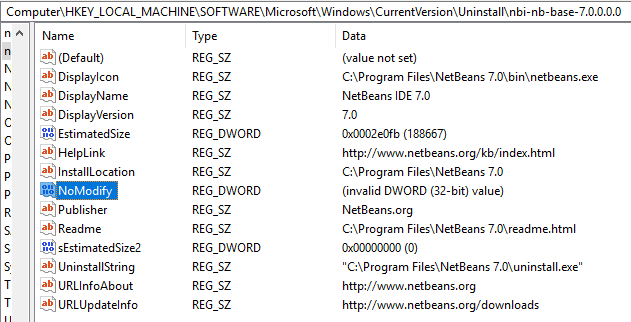
What happens is that someone (in this case NetBeans Installer) has put an 8-byte value into a Registry field that should only contain a 4-byte value. DWORDs are 4-byte.

If you use Registry Editor you can clearly see the problem if you look at something NBI has installed. You must look under either
HKEY_LOCAL_MACHINE\SOFTWARE\Microsoft\Windows\CurrentVersion\Uninstall (64-bit installers) or HKEY_LOCAL_MACHINE\SOFTWARE\Wow6432Node\Microsoft\Windows\CurrentVersion\Uninstall (32-bit installers). For some reason I don't see the problem for those NBI applications installed with a 32-bit installer, meaning the stuff in HKEY_LOCAL_MACHINE\SOFTWARE\Wow6432Node\Microsoft\Windows\CurrentVersion\Uninstall. This can probably be explained when you read the next bit.

NBI actually sets a number of Registry key values but all of them are strings, with the exception of NoModify value. As far as I know this value already defaults to true (=1) if not present so the fact that Windows cannot interpret what NBI has put into the Registry does not have much effect .... until all other kinds of tools will start to explain as you've encountered.

So, what's the problem?  As far as I can see this is really just a very simple bug. In the NBI project (NetBeans Platform source) you have a file called jni_WindowsRegistry.c which defines various JNI methods that can then be used from within Java. One of these is called 'set32BitValue0(....)'.

It looks like this:

JNIEXPORT void JNICALL Java_org_netbeans_installer_utils_system_windows_WindowsRegistry_set32BitValue0(JNIEnv *jEnv, jobject jObject, jint jMode, jint jSection, jstring jKey, jstring jName, jint jValue) {
    unsigned short*  key       = getWideChars(jEnv, jKey);
    unsigned short*  name      = getWideChars(jEnv, jName);
    DWORD  dword     = (DWORD) jValue;
    LPBYTE byteValue = (LPBYTE) &dword;

    if (!setValue(getMode(jMode),getHKEY(jSection), key, name, REG_DWORD, byteValue, sizeof(name), 0)) {
        throwException(jEnv, "Cannot set value");
    }

    FREE(key);
    FREE(name);
}

One of the parameters passed to the setValue() function is the size (bytes) of the value. Unfortunately whoever made this has made a blunder by using 'sizeof(name)' for that parameter. It should have been the size of the value, not the size of the name, meaning sizeof(dword) or just a hard-coded value of 4.  Just imagine what sizeof(name) will give you if name happens to be 'NoModify'. Yep, that's right: It will be 8.

As I said, I believe this blunder has been in the code from the very beginning. It just hasn't had much effect until now.