


Last year in OWASP top rated security “feature” A01:2021 – Broken Access Control, I promised to write more about how learn about OWASP documented and rated security vulnerabilities.
Today is the day you should start learning from [Wayback/Archive.is] Github: OWASP WebGoat:
Deliberately insecure JavaEE application to teach application security
It is a Java backend with a JavaScript/HTML frontend, but the vulnerabilities just as easily apply to other back-end stacks.
Repositories:
- [Wayback/Archive.is] WebGoat/WebGoat: WebGoat is a deliberately insecure application
WebGoat is a deliberately insecure web application maintained by OWASP designed to teach web application security lessons.
This program is a demonstration of common server-side application flaws. The exercises are intended to be used by people to learn about application security and penetration testing techniques.
WARNING 1: While running this program your machine will be extremely vulnerable to attack. You should disconnect from the Internet while using this program. WebGoat’s default configuration binds to localhost to minimize the exposure.
WARNING 2: This program is for educational purposes only. If you attempt these techniques without authorization, you are very likely to get caught. If you are caught engaging in unauthorized hacking, most companies will fire you. Claiming that you were doing security research will not work as that is the first thing that all hackers claim.
- [Wayback/Archive.is] WebGoat/WebGoat-Lessons: 7.x – The WebGoat STABLE lessons supplied by the WebGoat team.
This repository contains all the lessons for the WebGoat container. Every lesson is packaged as a separate jar file which can be placed into a running WebGoat server.
- [Wayback/Archive.is] WebGoat/WebWolf (Can’t have a goat without a wolf, but I wonder where the cabbage is)
- [Wayback/Archive.is] WebGoat/WebGoat-Legacy: Legacy WebGoat 6.0 – Deliberately insecure JavaEE application
This is the WebGoat Legacy version which is essentially the WebGoat 5 with a new UI.This program is a demonstration of common server-side application flaws. The exercises are intended to be used by people to learn about application penetration testing techniques. - [Wayback/Archive.is] WebGoat/WebGoat-Archived-Releases: WebGoat 5.4 releases and older
WebGoat 5.4 releases and older
- [Wayback/Archive.is] WebGoat/groovygoat: POC for dynamic groovy/thymeleaf based lesson system
POC to demonstrate dynamic lessons with groovy controller/thymeleaf templates
They are by OWASP:
The Open Web Application Security Project (OWASP) is an online community that produces freely-available articles, methodologies, documentation, tools, and technologies in the field of web application security.[4][5]The Open Web Application Security Project (OWASP) provides free and open resources. It is led by a non-profit called The OWASP Foundation. The OWASP Top 10 – 2021 is the published result of recent research based on comprehensive data compiled from over 40 partner organizations.
Very important is the [Wayback/Archive.is] OWASP Top Ten Web Application Security Risks | OWASP:
The OWASP Top 10 is a standard awareness document for developers and web application security. It represents a broad consensus about the most critical security risks to web applications.Globally recognized by developers as the first step towards more secure coding.
Companies should adopt this document and start the process of ensuring that their web applications minimize these risks. Using the OWASP Top 10 is perhaps the most effective first step towards changing the software development culture within your organization into one that produces more secure code.

More OWASP repositories (including the [Wayback/Archive.is] OWASP/Top10: Official OWASP Top 10 Document Repository and [Wayback/Archive.is] OWASP/www-project-top-ten: OWASP Foundation Web Respository which seem to be at a 4-year update interval got updated in 2021) are at [Wayback/Archive.is] Github: OWASP.
Related: [Archive.is] Jeroen Wiert Pluimers on Twitter: “This so much sounds like German government IT-projects: …”
Via:
–jeroen







 The Wiert Corner - irregular stream of stuff
Yep, I can see this problem as well. I believe the problem (bug) has indeed always existed.

What happens is that someone (in this case NetBeans Installer) has put an 8-byte value into a Registry field that should only contain a 4-byte value. DWORDs are 4-byte.

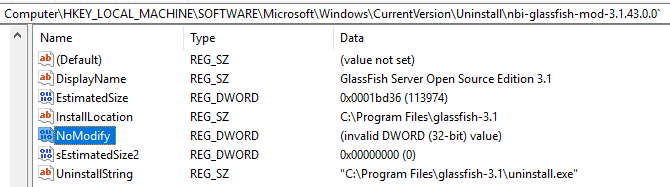
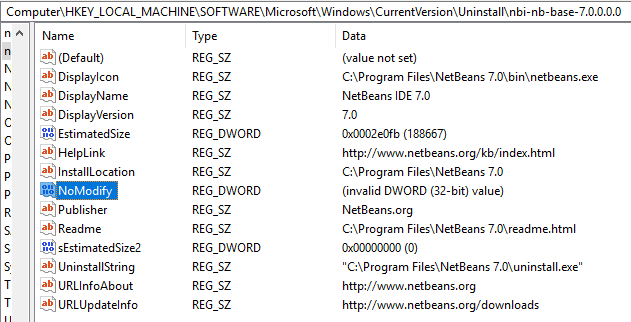
If you use Registry Editor you can clearly see the problem if you look at something NBI has installed. You must look under either
HKEY_LOCAL_MACHINE\SOFTWARE\Microsoft\Windows\CurrentVersion\Uninstall (64-bit installers) or HKEY_LOCAL_MACHINE\SOFTWARE\Wow6432Node\Microsoft\Windows\CurrentVersion\Uninstall (32-bit installers). For some reason I don't see the problem for those NBI applications installed with a 32-bit installer, meaning the stuff in HKEY_LOCAL_MACHINE\SOFTWARE\Wow6432Node\Microsoft\Windows\CurrentVersion\Uninstall. This can probably be explained when you read the next bit.

NBI actually sets a number of Registry key values but all of them are strings, with the exception of NoModify value. As far as I know this value already defaults to true (=1) if not present so the fact that Windows cannot interpret what NBI has put into the Registry does not have much effect .... until all other kinds of tools will start to explain as you've encountered.

So, what's the problem?  As far as I can see this is really just a very simple bug. In the NBI project (NetBeans Platform source) you have a file called jni_WindowsRegistry.c which defines various JNI methods that can then be used from within Java. One of these is called 'set32BitValue0(....)'.

It looks like this:

JNIEXPORT void JNICALL Java_org_netbeans_installer_utils_system_windows_WindowsRegistry_set32BitValue0(JNIEnv *jEnv, jobject jObject, jint jMode, jint jSection, jstring jKey, jstring jName, jint jValue) {
    unsigned short*  key       = getWideChars(jEnv, jKey);
    unsigned short*  name      = getWideChars(jEnv, jName);
    DWORD  dword     = (DWORD) jValue;
    LPBYTE byteValue = (LPBYTE) &dword;

    if (!setValue(getMode(jMode),getHKEY(jSection), key, name, REG_DWORD, byteValue, sizeof(name), 0)) {
        throwException(jEnv, "Cannot set value");
    }

    FREE(key);
    FREE(name);
}

One of the parameters passed to the setValue() function is the size (bytes) of the value. Unfortunately whoever made this has made a blunder by using 'sizeof(name)' for that parameter. It should have been the size of the value, not the size of the name, meaning sizeof(dword) or just a hard-coded value of 4.  Just imagine what sizeof(name) will give you if name happens to be 'NoModify'. Yep, that's right: It will be 8.

As I said, I believe this blunder has been in the code from the very beginning. It just hasn't had much effect until now.