The Wiert Corner – irregular stream of stuff

Jeroen W. Pluimers on .NET, C#, Delphi, databases, and personal interests

  • My badges

  • Twitter Updates

  • My Flickr Stream

  • Pages

  • All categories

  • Enter your email address to subscribe to this blog and receive notifications of new posts by email.

    Join 1,862 other subscribers

Archive for the ‘Lightweight markup language’ Category

Online markup conversion from markdown to mediawiki: pandoc

Posted by jpluimers on 2018/07/06

Since Mediawiki needs an extension to display Markdown, and many MediaWiki installations do not have that extension, I was looking for an online conversion from markdown to MediaWiki markup.

Luckily the Pandoc try has this conversion: [WayBack] Try pandoc! Markdown(pandoc) -> MediaWiki

These links helped me get there:

–jeroen

Posted in *nix, *nix-tools, Development, Lightweight markup language, MarkDown, MediaWiki, pandoc document converter, Power User, Software Development | Leave a Comment »

Two reasons I love Visual Studio Code over Atom.io: built-in markdown support and vscode-markdown; just watch the CHANGELOG.md at master · neilsustc/vscode-markdown · GitHub

Posted by jpluimers on 2018/07/03

Boy, I love this so much: [WayBack] vscode-markdown/CHANGELOG.md at master · neilsustc/vscode-markdown · GitHub

Just a few of the screen videos:

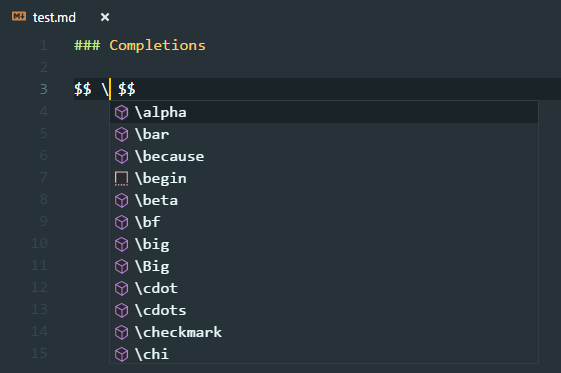
  • Formula support
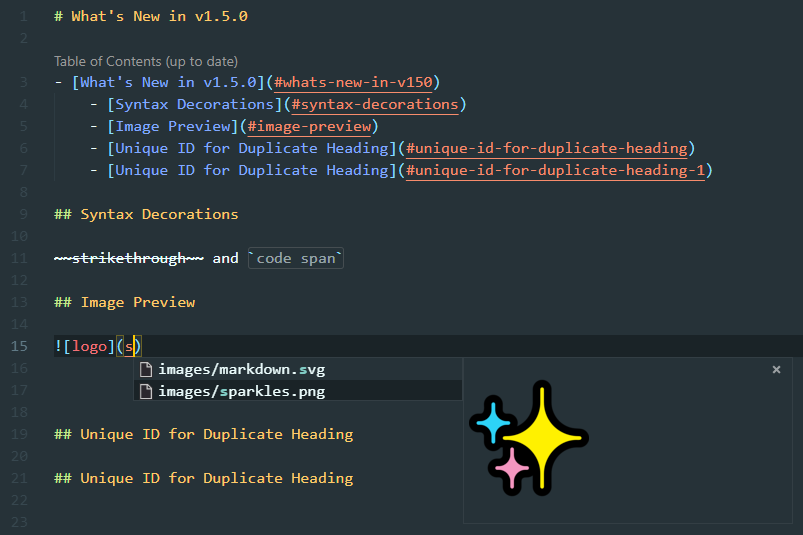
  • Table of Contents (ToC) support including leaving out individual headings:
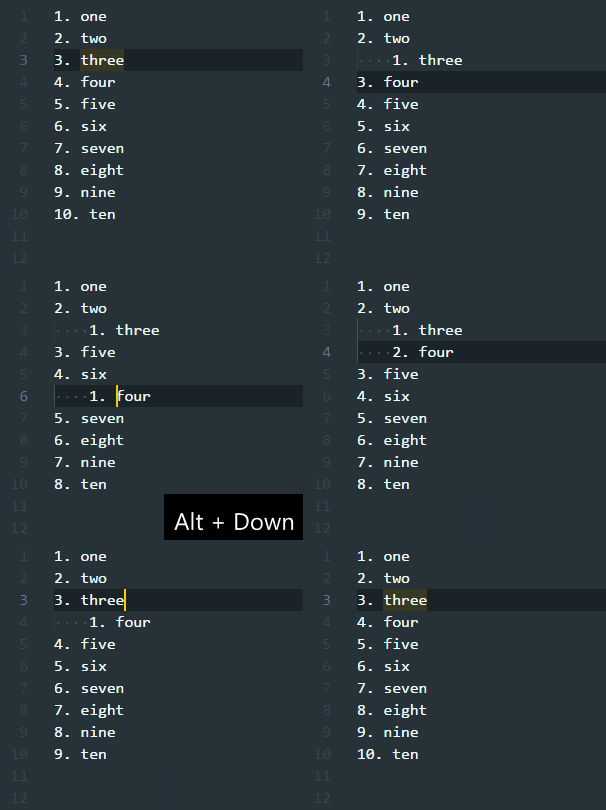
  • On the fly list renumbering:
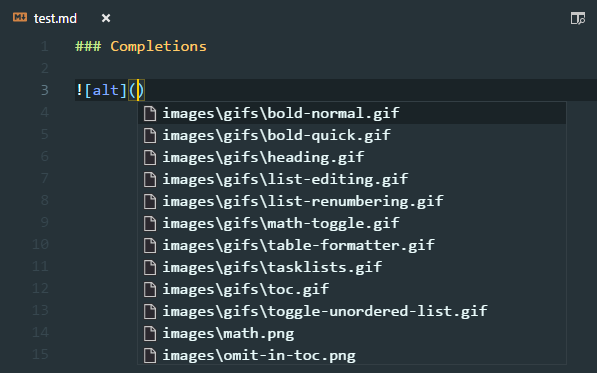
  • Image reference completion including image preview:

–jeroen

Posted in Development, Lightweight markup language, MarkDown, Software Development | Leave a Comment »

Finding out why Github doesn’t render your reStructuredText as expected

Posted by jpluimers on 2018/04/13

One of the cool Github features is that it renders reStructuredText (and other markup documents like markdown).

Often however, your .rst file on GitHub looks very differently on GitHub as your local render. Heck: sometimes Github will not even render it at all.


–jeroen

Posted in Development, Lightweight markup language, MarkDown, Power User, reStructuredText, Software Development | Leave a Comment »

YouTube videos in Markdown – via Markdown Cheatsheet · adam-p

Posted by jpluimers on 2018/02/28

Clever, as I didn’t know you could directly refer to the YouTube preview image using the “/0.jpg” trick:

Youtube videos

They can’t be added directly but you can add an image with a link to the video like this:

<a href="http://www.youtube.com/watch?feature=player_embedded&v=YOUTUBE_VIDEO_ID_HERE
" target="_blank"><img src="http://img.youtube.com/vi/YOUTUBE_VIDEO_ID_HERE/0.jpg" 
alt="IMAGE ALT TEXT HERE" width="240" height="180" border="10" /></a>

Or, in pure Markdown, but losing the image sizing and border:

[![IMAGE ALT TEXT HERE](http://img.youtube.com/vi/YOUTUBE_VIDEO_ID_HERE/0.jpg)](http://www.youtube.com/watch?v=YOUTUBE_VIDEO_ID_HERE)

Source: [WayBackMarkdown Cheatsheet · adam-p/markdown-here Wiki · GitHub

Gif using gifs.com

If you allow using resources outside of YouTube, then you can use gifs.com to render the video into a gif image and use that image in the above construct.

I tried that with a few seconds from http://www.youtube.com/watch?v=iHOpw55TI-U which resulted in https://gifs.com/gif/liquid-prompt-Lg1kPp and the gif file https://j.gifs.com/Lg1kPp.gif

via: [WayBackflash – How to embed a video into GitHub README.md? – Stack Overflow (thanks [WayBackaloisdg for answering)

–jeroen

Read the rest of this entry »

Posted in Development, Lightweight markup language, MarkDown, Power User, SocialMedia, Software Development, YouTube | Leave a Comment »

Comparison of Common markup for Markdown and reStructuredText · GitHub

Posted by jpluimers on 2017/10/09

This is a very good comparison of how to use reStructuredText and Markdown well for rendering at GitHub: [WayBackCommon markup for Markdown and reStructuredText · GitHub.

It is being updated by Alex Dupuy over time at https://gist.github.com/dupuy/1855764 and has two sections:

And it refers to http://pandoc.org/try/ which I had missed when starting with reStructuredText a long time ago.

Examples in there are actually more useful to me than these reStructuredText ones:

–jeroen

Posted in Development, Lightweight markup language, MarkDown, Power User, reStructuredText, Software Development | 2 Comments »

reStructuredText Interpreted Text Roles

Posted by jpluimers on 2017/10/04

There is so much great stuff in reStructuredText, take for instance [WayBackreStructuredText Interpreted Text Roles where basically can create your own role (for instance :csharp: or :delphi: roles based on :code: for syntax-highlighted code blocks given the right syntax highlighters).

I got there via this great piece by[WayBackChris who answered [WayBackInline code highlighting in reStructuredText – Stack Overflow:

Having looked into this some more I stumbled upon the document reStructuredText Interpreted Text Roles. From this document:

Interpreted text uses backquotes (`) around the text. An explicit role marker may optionally appear before or after the text, delimited with colons. For example:

This is `interpreted text` using the default role.

This is :title:`interpreted text` using an explicit role.

It seems that there is a code role, so you can simply type

:code:`a = b + c`

to render an inline code block. To get syntax highlighting you can define a custom role. For example

.. role:: bash(code)
   :language: bash

which you can then use like so:

Here is some awesome bash code :bash:`a = b + c`.

Note, the document I link to makes no mention of the version of docutils to which it refers. The code role is not available in docutils 0.8.1 (which is the only version I have to test against).

–jeroen

Posted in .NET, C#, Delphi, Development, Lightweight markup language, reStructuredText, Software Development | Leave a Comment »

Inline code highlighting in reStructuredText – Stack Overflow

Posted by jpluimers on 2017/08/15

To inline code inside reStructuredText embed it with back-ticks and pre-pend the first back-tick with :code:

This is how some text with :code:`a = b + c` embedded will look like.

This is how some text with a = b + c embedded will look like.

Source: Inline code highlighting in reStructuredText – Stack Overflow [WayBack]

The above is in addition to the a = b + c that renders to default code as described for instance by reST – reStructuredText — Sphinx/Rest Memo v1.0-14-ga2798e1 documentation [WayBack]

–jeroen

Posted in Development, Lightweight markup language, reStructuredText, Software Development | Leave a Comment »

If only there was a plugin to convert a Google Suite Document into Markdown S…

Posted by jpluimers on 2017/06/29

via If only there was a plugin to convert a Google Suite Document into Markdown Syntax… – Kristian Köhntopp – Google+ [WayBack]

GitHub – mangini/gdocs2md: Convert a Google Drive Document to the Markdown format, suitable for publishing. [WayBack]

In the gapps language: Apps Script  |  Google Developers

Maybe one day – when I use Google Docs more often – I make a reStructuredText version

–jeroen

Posted in Development, gapps Google Apps Script, Google, Google Apps, Lightweight markup language, MarkDown, Power User, reStructuredText, Scripting, Software Development | Leave a Comment »

Github reStructuredText parser got less strict so it now does display parts it cannot fully render

Posted by jpluimers on 2017/05/25

As the pull request had been in the pipeline for almost 2 years, I missed it went through:

Before that, Github would not render parts of reStructuredText files at all it could not fully render them. Now it renders them as raw reStructuredText so at least you can see the content.

Examples:

.. function:: code_to_ast(codeobj)

–jeroen

Posted in Development, Lightweight markup language, reStructuredText, Software Development | Leave a Comment »

reStructuredText Markup Specification – sections (that translate to HTML headings)

Posted by jpluimers on 2017/05/05

So I won’t forget; source: reStructuredText Markup Specification – Sections

[2]

The following are all valid section title adornment characters:

! " # $ % & ' ( ) * + , - . / : ; < = > ? @ [ \ ] ^ _ ` { | } ~

Some characters are more suitable than others. The following are recommended:

= - ` : . ' " ~ ^ _ * + #

Rather than imposing a fixed number and order of section title adornment styles, the order enforced will be the order as encountered. The first style encountered will be an outermost title (like HTML H1), the second style will be a subtitle, the third will be a subsubtitle, and so on.

Below are examples of section title styles:

===============
 Section Title
===============

---------------
 Section Title
---------------

Section Title
=============

Section Title
-------------

Section Title
`````````````

Section Title
'''''''''''''

Section Title
.............

Section Title
~~~~~~~~~~~~~

Section Title
*************

Section Title
+++++++++++++

Section Title
^^^^^^^^^^^^^

When a title has both an underline and an overline, the title text may be inset, as in the first two examples above. This is merely aesthetic and not significant. Underline-only title text may not be inset.

A blank line after a title is optional. All text blocks up to the next title of the same or higher level are included in a section (or subsection, etc.).

All section title styles need not be used, nor need any specific section title style be used. However, a document must be consistent in its use of section titles: once a hierarchy of title styles is established, sections must use that hierarchy.

Each section title automatically generates a hyperlink target pointing to the section. The text of the hyperlink target (the “reference name”) is the same as that of the section title.

I prefer this order because of decreasing “greyness”:

# * = + ^ ~ - : . _ ` ' "

–jeroen

Posted in Development, Lightweight markup language, Power User, reStructuredText, Software Development | Leave a Comment »