


Two years later, it is a reminder to look at my statement again: [WayBack] Jeroen Pluimers on Twitter: “Hi dpi is a mess, not just on Windows. It will take considerable time to overcome the decades long Pixel mess we’ve been coming from (:”
–jeroen
Posted by jpluimers on 2020/05/26
Two years later, it is a reminder to look at my statement again: [WayBack] Jeroen Pluimers on Twitter: “Hi dpi is a mess, not just on Windows. It will take considerable time to overcome the decades long Pixel mess we’ve been coming from (:”
–jeroen

Posted in Apple, Development, Mac OS X / OS X / MacOS, Power User, Software Development, Windows | Leave a Comment »
Posted by jpluimers on 2020/05/25
Sometimes an NTFS shrink still fails, even though you use the built in Windows defragmentation tools, of SysInternals contig tool.
The best you can do is to follow the steps in:
diskmgmt.msc to try shrinking the disk, then often it is already in the error message: “You can’t shrink a volume beyond the point where any unremoveable files are located see the defrag event in application log for detailed information about the operation when it has completed.”eventvwr.exe and look at the Windows Logs for the most recent Application entries that has Source set to defragThose defrag entries usually tell about the last file that could not be moved.
You can use
wevtutillto query events on the commandline.Note that contrary to [WayBack] WEVTUTIL – Windows CMD – SS64.com documentation, the option
/rdcannot be expanded to/reversedirection, as you will get an error “invalid option reversedirection” – Google Search.For querying the above
defragevent, use this command line (replace/format:XMLwith/format:textfor more readable but also more verbose output):
wevtutil query-events Application /count:2 /format:XML /rd:true /query:"*[System[(EventID=259)]]"
On Windows 10, this is often caused by “System Protection” which locks files under C:\Recovery, but I have also seen $BITMAP, $MFT and $DATA entries.
To view which drives are currently used for system protection (this opens the “System Properties” dialog focussed on the “System Protection” tab):
SystemPropertiesProtection.exe
To disable it for one drive:
Disable-ComputerRestore -Drive "C:"
To enable it for one drive:
Enable-ComputerRestore -Drive "C:"
There seems to be no easy one-command PowerShell way to view the drives have ComputerRestore enabled, as this does not show drive letters:
PowerShell Get-ComputerRestorePoint ^| Format-List
The above gives more detailed output than a plain PowerShell Get-ComputerRestorePoint
PowerShell does not have a built-in option to delete restore points, but vssadmin has, but calls them “shadows”.
First list them:
vssadmin list shadows
Then delete them (but be aware this will not prompt for confirmation because of the /quiet):
vssadmin delete shadows /for=C: /quiet
You can also delete them for all drives (this will not prompt for confirmation either):
vssadmin delete shadows /all /quiet
Stopping the volume shadow copy service:
net stop vss
Hibernation:
powercfg.exe /hibernate off
powercfg.exe /hibernate on
Page file:
wmic pagefile list /format:list

AllocatedBaseSize=2944
CurrentUsage=0
Description=C:\pagefile.sys
InstallDate=20181018215808.683376+120
Name=C:\pagefile.sys
PeakUsage=0
Status=
TempPageFile=FALSE
wmic computersystem where name="%computername%" get AutomaticManagedPagefile
AutomaticManagedPagefile
TRUE
wmic computersystem where name="%computername%" set AutomaticManagedPagefile=False
Updating property(s) of '\\MYCOMPUTER\ROOT\CIMV2:Win32_ComputerSystem.Name="LAPTOPUW08"'
Property(s) update successful.
wmic computersystem where name="%computername%" get AutomaticManagedPagefile
AutomaticManagedPagefile
FALSE
wmic.exe pagefileset where name="C:\\pagefile.sys" delete
Deleting instance \\MYCOMPUTER\ROOT\CIMV2:Win32_PageFileSetting.Name="C:\\pagefile.sys"
Instance deletion successful.Sometimes the deletion does not work (see below for workaround):
wmic pagefile list /format:list
AllocatedBaseSize=2944
CurrentUsage=0
Description=C:\pagefile.sys
InstallDate=20181018215808.683376+120
Name=C:\pagefile.sys
PeakUsage=0
Status=
TempPageFile=FALSE
Do not do this:
wmic pagefile delete
Deleting instance \\MYCOMPUTER\ROOT\CIMV2:Win32_PageFileUsage.Name="C:\\pagefile.sys"
ERROR:
Description = Provider is not capable of the attempted operation
wmic pagefileset set name="c:\\pagefile.sys",InitialSize=0,MaximumSize=0
No Instance(s) Available.
Sometimes it still fails, so then you have to use the UI:
SystemPropertiesAdvanced.exePerformance, click on SettingsAdvanced tabVirtual memory, click the Change buttonAutomatically manage page file size for all drives is disabledNo paging file is selectedSet buttonOK buttons to fully leave the Advanced System Properties dialog.After resizing the disk, reverse the steps:
SystemPropertiesAdvanced.exePerformance, click on SettingsAdvanced tabVirtual memory, click the Change buttonAutomatically manage page file size for all drives is enabledOK buttons to fully leave the Advanced System Properties dialog.Sometimes the file blocking the resize is the NTFS "\$BitMap::$DATA", which few defragmentation tools can move as it is the MFT Bitmap.
–jeroen
Posted in CommandLine, Console (command prompt window), Development, Power User, PowerShell, PowerShell, Scripting, Software Development, Windows | Leave a Comment »
Posted by jpluimers on 2020/05/21
Interesting course: [WayBack] Go: The Complete Developer’s Guide (Golang) | Udemy Master the fundamentals and advanced features of the Go Programming Language (Golang)
It covers:
–jeroen
Posted in Development, Go (golang), Software Development | Leave a Comment »
Posted by jpluimers on 2020/05/21
Almost 20 years old, but still a very nice read [Archive.is] David Korn Tells All – Slashdot.
Another funny story involving David Korn during the not-so open source times of Microsoft late last century: [WayBack] Korn Shell Story
–jeroen
Posted in *nix, *nix-tools, bash, bash, Development, History, Power User, Scripting, Software Development | Leave a Comment »
Posted by jpluimers on 2020/05/21
From [WayBack] Why would the compiler generate a "E2018 Record, object or class type required" helper when I use a ToUpperInvariant (or any TStringsHelper call) on t… – Jeroen Wiert Pluimers – Google+:
Why would the compiler generate a
"E2018 Record, object or class type required"when I use a ToUpperInvariant (or any TStringsHelper call) on theTextproperty of aTEdit?Full failing code is at [WayBack] https://gist.github.com/jpluimers/b5e3684f725216622bdcb80bf5f10698
Failing line is this:
Edit1.Text := Edit1.Text.ToUpperInvariant;
// the above line generates this error:
// [dcc32 Error] MainFormUnit.pas(29): E2018 Record, object or class type required
This fails as well:
Edit1.Text := TStringHelper.ToUpperInvariant(Edit1.Text);Why would the compiler (in this case XE8) throw this error?
Note the workaround is simple:
var
  lText: string;
begin
  lText := Edit1.Text;
  Edit1.Text := lText.ToUpperInvariant;
My suspicion is that the
Editproperty is of typeTCaptionwhich istype string.Could it be that simple?
To which David Heffernan responded:
Yup, the issue is
TCaptionhas no helper. Pretty distressing.
Typed types are indeed different types. They have been there for a long time (to facilitate generating different type information so you can for instance hook up different property editors to TCaption (a typed string) or TColor (a typed integer).
It is explained at [WayBack] Declaring Types. but has existed since Delphi 1 or Delphi 2.
More on the implications is at [WayBack] pascal – Delphi Type equivalence and Type equality syntax – Stack Overflow.
–jeroen
Posted in Conference Topics, Conferences, Delphi, Development, Event, Software Development | Leave a Comment »
Posted by jpluimers on 2020/05/20
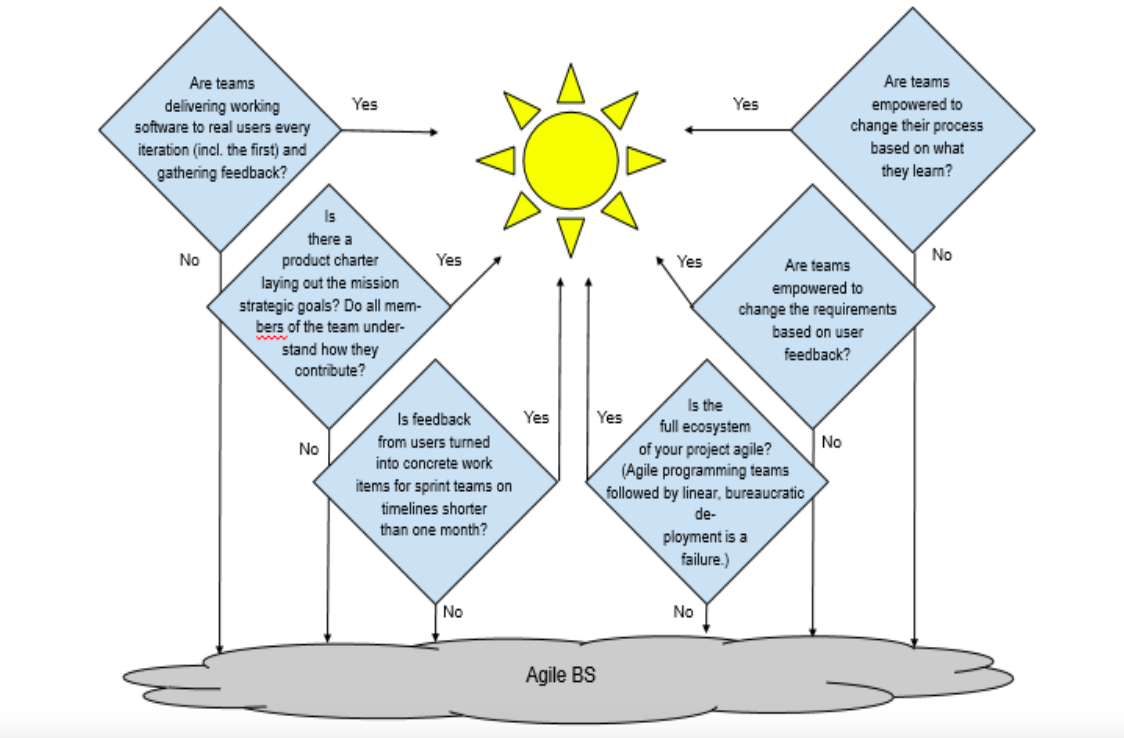
From a while back, but still one of the easiest flow charts to see if your organisation really works in an agile way: “graphical flow chart for separating agile from agile BS”
It is part of [WayBack] DIB_DETECTING_AGILE_BS_2018.10.05.pdf (hey, it is military so there are dates and abbreviations).
Source: [WayBack] The Defense Innovation Board wants to help the military recognize ‘agile BS’ – Fedscoop
Via manu links, including:
–jeroen

Posted in Agile, Development, Software Development | Leave a Comment »
Posted by jpluimers on 2020/05/20
Reminder to self to eventually try to merge this into GExperts: [WayBack] GitHub – NickRing/Delphi-Shortcut-Finder: Shows/find keyboard short-cuts have be assigned, that may be conflicting.
And a reminder to ensure if I ever bump into XE7 again, I need to ensure it is at least update 1: Source: QualityCentral Report # 127616: registry key has incorrect value, 20 should be 21.
–jeroen
via: [WayBack] I need some help from anyone who knows RTTI better than me. I’m writing an OTA tool to list all the actions or keybindings that are associated with a s… – David Hoyle – Google+
Posted in Delphi, Development, Software Development | Leave a Comment »
Posted by jpluimers on 2020/05/19
The below is based on [WayBack] delphi – Is there any way to catch the error if loading a dll cannot find a dependency? – Stack Overflow which I got via:
The problem is that the [WayBack] SysUtils.SafeLoadLibrary Function (present since at least Delphi 2007, and a wrapper around the [WayBack] LoadLibrary function (Windows)) does many good things – maybe even too many – so you need to take all of them into account:
function SafeLoadLibrary(const FileName: string; ErrorMode: UINT = SEM_NOOPENFILEERRORBOX): HMODULE;
SafeLoadLibrary loads a Windows DLL or Linux shared object file, as specified by Filename.SafeLoadLibrary preserves the current FPU control word, preventing library initialization code from permanently overwriting precision and exception masks.SafeLoadLibrary temporarily sets the system error mode to ErrorMode. The default, SEM_NOOPENFILEERRORBOX, suppresses error dialogs. The previous error mode is restored before SafeLoadLibrary exits. For a list of error modes, refer to [Wayback1/Wayback2] SetErrorMode in the Microsoft documentation.Dummy argument is ignored.Do not ever pass 0 (the number zero) as ErrorMode; I’ve seen lots of applications just passing zero for parameters they are not sure about, but in this case it is the worst solution as it will show all errors as a popup.
Do not forget a parameter either: the default value SEM_NOOPENFILEERRORBOX will only suppress a message box when it fails to find a file. But it will fail to enable SEM_FAILCRITICALERRORS which is what you really want.
LoadLibrary and SafeLoadLibrary load the DLL from a file. But what if you want to load it from a resource?
Then this post from Thomas Mueller applies: he adopted the SafeLoadLibrary logic to load from a resource:
The way Delphi sets the FPU control word is not thread safe: QualityCentral Report # 106943: Set8087CW/SetMXCSR are not thread-safe (you could work around in your implementation by using thread safe versions like mentioned in [WayBack] FastMM / Discussion / Open Discussion:Call to GetStackTrace changes 8087CW).
Calling SetErrorMode sets a global application wide setting (by default including all threads) of error code, so it is better to either:
Because the error mode is set for the entire process, you must ensure that multi-threaded applications do not set different error-mode flags. Doing so can lead to inconsistent error handling.
Second, SEM_FAILCRITICALERRORS prevents an error to pop up when dependencies of the loaded file are not available. You might want to combine (bitwise or) it with other values like SEM_NOGPFAULTERRORBOX.
There are many more modes you can pass to the [WayBack] SetErrorMode function (Windows):
| Value | Meaning |
|---|---|
|
Use the system default, which is to display all error dialog boxes. |
|
The system does not display the critical-error-handler message box. Instead, the system sends the error to the calling process.
Best practice is that all applications call the process-wide SetErrorMode function with a parameter of SEM_FAILCRITICALERRORS at startup. This is to prevent error mode dialogs from hanging the application. |
|
The system automatically fixes memory alignment faults and makes them invisible to the application. It does this for the calling process and any descendant processes. This feature is only supported by certain processor architectures. For more information, see the Remarks section.
After this value is set for a process, subsequent attempts to clear the value are ignored. |
|
The system does not display the Windows Error Reporting dialog. |
|
The OpenFile function does not display a message box when it fails to find a file. Instead, the error is returned to the caller. This error mode overrides the OF_PROMPT flag. |
–jeroen
all via:
Related:
Posted in Delphi, Development, Software Development | Leave a Comment »
Posted by jpluimers on 2020/05/18
On my research list: read more about hexagonal architecture – Google Search.
Like:
Related: [WayBack] Learned today: In the praxis most domains are way more than sufficiently complex… – Jeroen Wiert Pluimers – Google+
I think I like a round diagrams better than hexagonal ones, because it gives more clarity to me.
Also on my list:
–jeroen
Posted in Development, Software Development, Systems Architecture | Leave a Comment »
Posted by jpluimers on 2020/05/14
Back in the days, framing stuff from other sites would just work. Nowadays, often they don’t because of a variety of reasons, often the site not wanting to be embedded, which is OK with me.
But it pays knowing what they do and how they do it, to ensure it is not an accidental setting of the address bar URL to the wrong value like in
  if(top != window) {
    top.location = window.location
  }
So here are some links for me to dig deeper when I encounter framing issues again:
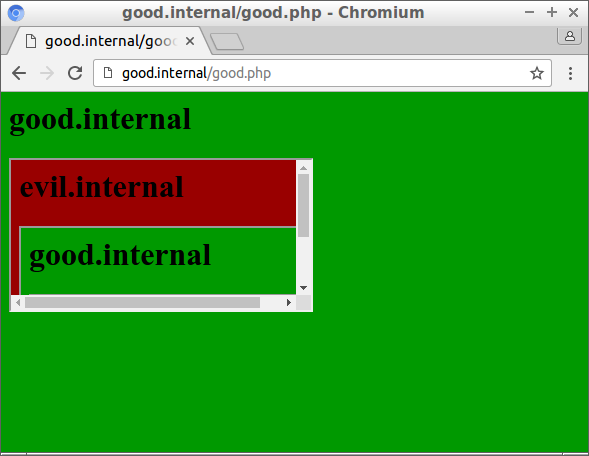 [WayBack] Headers to block iframe loading
My basic idea for a workaround is to go through a proxy.
It looks like others had this idea too, so some links future reading via cors proxy – Google Search:
–jeroen

Posted in Development, JavaScript/ECMAScript, JSFiddle, Scripting, Software Development, Web Development | Leave a Comment »
 The Wiert Corner - irregular stream of stuff