Archive for the ‘Scripting’ Category
Posted by jpluimers on 2023/05/10
Sometimes, you want to restart the Windows explorer. This is already an exception case which you want to do when explorer hangs (for instance when taskbar icons do not respond any more), or has files locked which need to be modified. I described the latter in Inno Setup: Program Folder not showing up In Start > All Programs , with this very simple restart script:
taskkill /F /IM explorer.exe
start explorer
Even more exception is wanting to run explorer with a UAC elevated administrative token. I sometimes do this when moving around stuff from other users on the same computer without having them logged on (as that would lock the files or directories to be moved around).
The risk of running explorer under UAC elevation, is that any program you start will also start UAC elevated, so beware what you ask for…
This is how you start explorer under UAC elevation:
pwsh.exe -nol -noni -nop -w hidden -c "taskkill /f /im explorer.exe; start explorer -v runas -a /nouaccheck"
or if you run an older Windows version of PowerShell:
PowerShell.exe -nol -noni -nop -w hidden -c "taskkill /f /im explorer.exe; start explorer -v runas -a /nouaccheck"
These command-line options and verbs are used:
Time to explain a few:
Read the rest of this entry »
Posted in Batch-Files, CommandLine, Development, Power User, PowerShell, PowerShell, Scripting, Software Development, Windows, Windows 10, Windows 11, Windows 7, Windows 8.1 | 1 Comment »
Posted by jpluimers on 2023/05/04
As a continuation of the various bookmarklet posts, here is one with information on bookmarklets that operate on the current page, for instance when you already got text selected.
All via [Wayback/Archive] bookmarklet that works on link of current selection – Google Search
–jeroen
Posted in Bookmarklet, Development, JavaScript/ECMAScript, Power User, Scripting, Software Development, Web Browsers, Web Development | Leave a Comment »
Posted by jpluimers on 2023/05/03
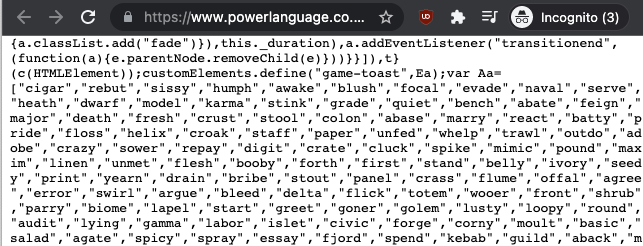
Oh well: [Archive] Kris on Twitter: “L> add AI there and you’ve got a paper R> I just had a look, and that thing is pretty much completely offline. the JS contains the entire dictionary C> well would you look at that, might want to use the actual dictionary then “

Actually, it was dead easy to copy the sources to a gist and host the gist:
And of course someone distilled the wordle word solutions list into some statistics:
More was done at [Wayback/Archive] Reverse Engineering Wordle | Robert Reichel.
Which got updated to the statistics of the union of solution and accepted words list
Another tool that helps solving is [Wayback/Archive] willthames/wordle-guesses which I found via [Archive] Will Thames on Twitter: “I spent some of my New Year’s Day writing a program to generate the best first two guesses for Wordle. Time well spent, I think: …”.
Jilles then posted a video on how to view the source [Archive] Jilles🏳️🌈 on Twitter: “How to cheat on #wordle …”.
To make Wordle even harder, there is Absurdle, an adversorial version of Wordle that decides the word upon your input until it runs out of decisions:
A Dutch and German version were added as Woordle and Wordle (which missed being called WorDeL and Wortle):
Shortly followed by another German version (always the Austrians setting themselves apart), and a French one (which messed Le Word as perfect name):
There is also a four-letter word edition, actually two of them:
There is a Prime version too:
Felienne posted a cool analysis bot that watches Wordle tweets and uses them to estimate the correct Wordle solution:
Oh, there is a single Letterle, which on average takes you some 13 tries when disregarding letter frequencies (which likely should not matter):
When you think Absurdle was going far, look at what happened Wordlinator:
Two search tools that are very useful:
If you are desperate, these solvers can help; the second one is more flexible, the first one faster, and the last one is pure cheating:
- [Wayback/Archive] Ruining the fun: a Wordle auto-solver – by Tom
- [Wayback/Archive] Wordle Helper – Suggestion and Solver Tool – Gamer Journalist
- [Wayback/Archive] Wordle Answers (February 2022) – Today’s Solution
I tried referencing all posts in the somewhat broken thread at:
Some links that did not make it into that thread (yet):
Having good start words and an on-line dictionary help:
And there is always a really fast way: [Wayback/Archive] Wordle Solver | Not Fun at Parties (explained in [Wayback/Archive] Ruining the fun: a Wordle auto-solver – by Tom)
–jeroen
Read the rest of this entry »
Posted in Development, JavaScript/ECMAScript, LifeHacker, Natural Languages, Power User, Scripting, Software Development | Leave a Comment »
Posted by jpluimers on 2023/04/27
I want to check out how to do POST requests using bookmarklets in order to save URLs to the Wayback machine.
The reason is that every few months or so, saving a page the normal way through a something like https://web.archive.org/save/URL fails for one reason or the other, but going to https://web.archive.org/save, then entering URL, and pressing “SAVE PAGE” button works fine:
The the failing way above is using a GET request, the succeeding workaround will open https://web.archive.org/save/URL using the below POST request (where I omitted some HTTP cookies and HTTP header fields for brevity).
- POST request using
PowerShell:
$session = New-Object Microsoft.PowerShell.Commands.WebRequestSession
$session.UserAgent = "Mozilla/5.0 (Windows NT 10.0; Win64; x64) AppleWebKit/537.36 (KHTML, like Gecko) Chrome/96.0.4664.110 Safari/537.36"
Invoke-WebRequest -UseBasicParsing -Uri "https://web.archive.org/save/URL" `
-Method "POST" `
-WebSession $session `
-Headers @{
"method"="POST"
"origin"="https://web.archive.org"
"referer"="https://web.archive.org/save"
} `
-ContentType "application/x-www-form-urlencoded" `
-Body "url=URL&capture_outlinks=on&capture_all=on&capture_screenshot=on"
- POST request using cURL on
bash:
curl 'https://web.archive.org/save/URL' \
-H 'origin: https://web.archive.org' \
-H 'content-type: application/x-www-form-urlencoded' \
-H 'referer: https://web.archive.org/save' \
--data-raw 'url=URL&capture_outlinks=on&capture_all=on&capture_screenshot=on' \
--compressed
- POST request using the fetch API in JavaScript:
fetch("https://web.archive.org/save/URL", {
"headers": {
"content-type": "application/x-www-form-urlencoded",
},
"referrer": "https://web.archive.org/save",
"body": "url=URL&capture_outlinks=on&capture_all=on&capture_screenshot=on",
"method": "POST",
"mode": "cors"
});
BTW: Yes, I know that URL is not a valid URL, so it will return a page with “http://url/ URL syntax is not valid.“.
All links below via [Wayback/Archive] bookmarklet post request – Google Search:
I tried to put createFormSubmittingBookmarklets/createFormSubmitBookmarklets.js in a bookmarklet using both userjs.up.seesaa.net/js/bookmarklet.html and skalman.github.io/UglifyJS-online. That failed: somehow this code does not want to run as bookmarklet.
Running it from the console is fine though, and gave me this basic bookmarklet template:
javascript:function sf(ur,ty,fd){function me(tg,pr){var el=document.createElement(tg);for(const[nm,vl]of Object.entries(pr)){el.setAttribute(nm,vl);}return el}const fm=me("form",{action:ur,method:ty,style:"display:hidden;"});for(const[nm,vl]of Object.entries(fd)){fm.appendChild(me("input",{name:nm, value:vl}))}document.body.appendChild(fm);fm.submit()}sf("https://web.archive.org/save","post",{"url":"URL","capture_outlinks":"on","capture_all":"on","capture_screenshot":"on","wm-save-mywebarchive":"on","email_result":"on","":"SAVE PAGE"});
There bold URL there is the URL to be saved. I need to test this, then rework it to become parameterised.
–jeroen
Posted in Bookmarklet, Development, JavaScript/ECMAScript, Power User, Scripting, Software Development, Web Browsers, Web Development | Leave a Comment »
Posted by jpluimers on 2023/04/18
Cool one-liner program via [Archive] Jilles🏳️🌈 (@jilles_com) / Twitter:
for s in 0123456789ABCDEF 172.16.0.254 Passwd:admin;do echo -en "Big Endian: $s\nMiddle Endian: ";echo -n $s|xxd -e -g 4 | xxd -r;echo -en "\nLittle Endian: ";echo -n $s|xxd -e -g 2 | xxd -r;echo -en "\nReversed : ";echo -n $s|xxd -p -c1 | tac | xxd -p -r;echo -e "\n";done
Note that the hex are bytes, not nibbles, so the endianness is OK:

Big Endian: 0123456789ABCDEF
Middle Endian: 32107654BA98FEDC
Little Endian: 1032547698BADCFE
Reversed : FEDCBA9876543210
Big Endian: 172.16.0.254
Middle Endian: .2710.61452.
Little Endian: 71.2610.2.45
Reversed : 452.0.61.271
Big Endian: Passwd:admin
Middle Endian: ssaPa:dwnimd
Little Endian: aPssdwa:mdni
Reversed : nimda:dwssaP
That nibble/byte thing confused me at first (as I associate hexadecimal output with hex dumps, where each hexadecimal character represents a nibble)) so here are some interesting messages from the thread that Jilles_com started:
Some related man pages:
–jeroen
Posted in *nix, *nix-tools, bash, Development, Power User, Scripting, Software Development, xxd | Leave a Comment »
Posted by jpluimers on 2023/04/13
MikroTik switches and routers are very flexible to configure, as everything is done through [Wayback/Archive] RouterOS settings.
This means that given enough ports, you can split a physical switch into logical switches. This can be very convenient when you run multiple networks without VLAN.
Earlier this week, I already wrote about Torching a specific port on a MikroTik switch or router running RouterOS which involved turning off hardware acceleration off for specific ports in order to have the flow through the underlying switch chip prohibiting torch and filter features.
For splitting noticing which ports are connected to which switch chip is also important: splitting works best if you can configure each logical switch to exclusively use network ports on one switch chip.
This post was to both research how to configure this, and if my MikroTik devices would allow for hardware acelleration.
Here are some links that should help me with configuring (via [Wayback/Archive] mikrotik split switch in two – Google Search):
–jeroen
Read the rest of this entry »
Posted in Development, Hardware, MikroTik, Network-and-equipment, Power User, RouterOS, routers, Scripting, Software Development | Leave a Comment »
Posted by jpluimers on 2023/04/11
On most recent [Wayback/Archive] RouterOS configurations of MikroTik Routers and Switches, running [Wayback/Archive] Torch a port will show zero traffic when they are part of a bridge configuration. The same holds for the Packet Sniffer.
The reason is that these bridges have hardware acceleration turned on, which makes all traffic go through the switch chip instead of the device CPU. Torch works on the CPU level, so won’t show hardly any traffic except for some configuration stuff (depending on the combination of switch chip and CPU type).
This is not documented in the Torch documentation, but it is documented in the Packet Sniffer documentation.
Further reading:
- [Wayback/Archive] Manual:Troubleshooting tools – Torch – MikroTik Wiki
- [Wayback/Archive] Manual:Tools/Packet Sniffer – MikroTik Wiki
Note: Unicast traffic between Wireless clients with client-to-client forwarding enabled will not be visible to sniffer tool. Packets that are processed with hardware offloading enabled bridge will also not be visible (unknown unicast, broadcast and some multicast traffic will be visible to sniffer tool).
- [Wayback/Archive] mikrotik nonhardware bridge – Google Search (yes that was a typo, but Google still got good results)
- [Wayback/Archive] Can not see trafic in TORCH – MikroTik
As the ethernet ports are marked as S(laves) in the tables, I would assume that they are member ports of bridges and “hardware acceleration” is enabled (the value of hw in the respective rows of /interface bridge port is set to yes). So any frames which pass through these ports to other ports of the same switch chip are counted by the switch chip counters, but as they never get to the CPU, the torch cannot see them.
- [Wayback/Archive] mikrotik torch ip ports of bridge – Google Search
- [Wayback/Archive] Manual:Layer2 misconfiguration; Packet flow with hardware offloading and MAC learning – MikroTik Wiki
Consider the following scenario, you setup a bridge and have enabled hardware offloading in order to maximize the throughput for your device, as a result your device is working as a switch, but you want to use Sniffer or Torch tools for debugging purposes, or maybe you want to implement packet logging.
- [Wayback/Archive] Manual:Layer2 misconfiguration; Packet flow with hardware offloading and MAC learning; Configuration – MikroTik Wiki
/interface bridge
add name=bridge1
/interface bridge port
add bridge=bridge1 hw=yes interface=ether1 learn=yes
add bridge=bridge1 hw=yes interface=ether2 learn=yes
- [Wayback/Archive] Manual:Layer2 misconfiguration; Packet flow with hardware offloading and MAC learning; Problem – MikroTik Wiki
When running
Sniffer or
Torch tool to capture packets you might notice that barely any packets are visible, only some unicast packets, but mostly broadcast/multicast packets are captured, while the interfaces report that much larger traffic is flowing through certain interfaces than the traffic that was captured.
Since RouterOS v6.41 if you add two or more Ethernet interfaces to a bridge and enable Hardware Offloading, then the switch chip will be used to forward packets between ports. To understand why only some packets are captured, we must first examine how the switch chip is interconnected with the CPU, in this example we can use a block diagram from a generic 5-Port Ethernet router:

For this device each Ethernet port is connected to the switch chip and the switch chip is connected to the CPU using the CPU port (sometimes called the
switch-cpu port).
For packets to be visible in Sniffer tools, the packet must be sent from an Ethernet port to the CPU port, this means that the packet must be destined to the CPU port (destination MAC address of the packet matches the bridge’s MAC address) or the packet’s MAC address has not be learnt (packet is flooded to all ports), this behavior is because of
MAC learning·
The switch chip keeps a list of MAC addresses and ports called the
Hosts table· Whenever a packet needs to be forwarded, the switch chip checks the packet’s destination MAC address against the hosts table to find which port should it use to forward the packet.
If the switch chip cannot find the destination MAC address, then the packet is flooded to all ports (including the CPU port). In situations where packet is supposed to be forwarded from, for example, ether1 to ether2 and the MAC address for the device behind ether2 is in the hosts table, then the packet is never sent to the CPU and therefore will not be visible to
Sniffer or
Torch tool..
- [Wayback/Archive] Manual:Layer2 misconfiguration; Packet flow with hardware offloading and MAC learning – MikroTik Wiki
Packets with a destination MAC address that has been learned will not be sent to the CPU since the packets are not not being flooded to all ports. If you do need to send certain packets to the CPU for packet analyser or for Firewall, then it is possible to copy or redirect the packet to the CPU by using ACL rules. Below is an example how to send a copy of packets that are meant for 4C:5E:0C:4D:12:4B:
/interface ethernet switch ruleadd copy-to-cpu=yes dst-mac-address=4C:5E:0C:4D:12:4B/FF:FF:FF:FF:FF:FF ports=ether1 switch=switch1
Note: If the packet is sent to the CPU, then the packet must be processed by the CPU, this increases the CPU load.
- [Wayback/Archive] mikrotik torch mac address – Google Search
–jeroen
Posted in Development, Hardware, MikroTik, Power User, RouterOS, routers, Scripting, Software Development | 1 Comment »
Posted by jpluimers on 2023/03/16
PolyShell is a script that’s simultaneously valid in Bash, Windows Batch, and PowerShell (i.e. a polyglot).
[Wayback/Archive] llamasoft/polyshell: A Bash/Batch/PowerShell polyglot!
Need to check this out, as often I have scripts that have to go from one language to the other or vice versa.
Maybe it enables one language to bootstrap functionality in the other?
The quest
The above polyglot started with a quest to see if I can could include some PowerShell statements in a batch file with two goals:
- if the batch file started from the PowerShell command prompt, then execute the PowerShell code
- if the batch file started from the
cmd.exe command prompt, then have it start PowerShell with the same command-line arguments
The reasoning is simple:
- PowerShell scripts will start from the PATH only when PowerShell is already running
- Batch files start from the path when either
cmd.exe or PowerShell are running
Lots of users still live in the cmd.exe world, but PowerShell scripts are way more powerful, and since PowerShell is integrated in Windows since version 7, so having a batch file bootstrap PowerShell still makes sense.
Since my guess was about quoting parameters the right way, my initial search for the link below was [Wayback/Archive] powershell execute statement from batch file quoting – Google Search.
I have dug not yet into this, so there are still…
Many links to read
These should give me a good idea how to implement a polyglot batch file/PowerShell script.
–jeroen
Posted in *nix, *nix-tools, bash, bash, Batch-Files, Development, JavaScript/ECMAScript, Perl, Polyglot, Power User, PowerShell, Scripting, Software Development | Leave a Comment »
Posted by jpluimers on 2023/03/15
Yup, web browser bookmarklets, though hardly published about any more, I still like them (and wrote about them before). With a little bit, usually unreadable, JavaScript, they can add magical functionality to your browser.
So here are some links on Twitter related bookmarklets:
- [Wayback/Archive] Send to Twitter Bookmarklet (uses document.title and URL as content) with this URI:
javascript:location.href='http://twitter.com/share?url='+encodeURIComponent(window.location.href)+'&text='+encodeURIComponent(document.title)
which I reworked into:
javascript:window.open('http://twitter.com/share?url='+encodeURIComponent(window.location.href)+'&text='+encodeURIComponent(document.title))
- These are all from the same author:
All code from the above links seemed to give corrupted tweets, which I thought was because of quote beautification, but was just me doing the whitespace removal wrong.
This is the right one:
javascript:(function(){n=getSelection().anchorNode;if(!n){t=document.title;}else{t=n.nodeType===3?n.data:n.innerText;}t='“'+t.trim()+'”\n\n';window.open(`https://twitter.com/intent/tweet?text=${encodeURIComponent(t)}${document.location.href}`)})();
which I reworked using «» quotes into:
javascript:(function(){n=getSelection().anchorNode;if(!n){t=document.title;}else{t=n.nodeType===3?n.data:n.innerText;}t='«'+t.trim()+'»\n\n';window.open(`https://twitter.com/intent/tweet?url=${document.location.href}&text=${encodeURIComponent(t)}`)})();
All via [Wayback/Archive] twitter bookmarklet – Google Search.
–jeroen
Posted in Bookmarklet, Development, JavaScript/ECMAScript, Power User, Scripting, Software Development, Web Browsers, Web Development | Leave a Comment »