The Wiert Corner – irregular stream of stuff

Jeroen W. Pluimers on .NET, C#, Delphi, databases, and personal interests

  • My badges

  • Twitter Updates

  • My Flickr Stream

  • Pages

  • All categories

  • Enter your email address to subscribe to this blog and receive notifications of new posts by email.

    Join 1,839 other subscribers

Archive for the ‘Scripting’ Category

Using a main check __main__ to call a main function in Python

Posted by jpluimers on 2020/01/01

[WayBack] __main__ — Top-level script environment — Python 3 documentation recommends code like this:

if __name__ == "__main__":
    # execute only if run as a script
    main()

This has many cool possibilities, including these that I like most as a beginning Python developer:

  • having your def main(): function in a separate source file
  • allowing to return prematurely from your main function (you cannot do this from the main block)
  • allowing a file to distinguish if it is being loaded as a module, or as a main program

Related:

–jeroen

Posted in Conference Topics, Conferences, Development, Event, Python, Scripting, Software Development | Leave a Comment »

How to make a self extracting archive runs your setup.exe, 7zip -sfx

Posted by jpluimers on 2020/01/01

For my link archive step by step instruction on the command-line which can be automated:

Via:

–jeroen

Posted in 7zip, Batch-Files, Compression, Development, Power User, Scripting, Software Development | Leave a Comment »

Delphi, decoding files to strings and finding line endings: some links, some history on Windows NT and UTF/UCS encodings

Posted by jpluimers on 2019/12/31

A while back there were a few G+ threads sprouted by David Heffernan on decoding big files into line-ending splitted strings:

Code comparison:

Python:

with open(filename, 'r', encoding='utf-16-le') as f:
  for line in f:
    pass

Delphi:

for Line in TLineReader.FromFile(filename, TEncoding.Unicode) do
  ;

This spurred some nice observations and unfounded statements on which encodings should be used, so I posted a bit of history that is included below.

Some tips and observations from the links:

  • Good old text files are not “good” with Unicode support, neither are TextFile Device Drivers; nobody has written a driver supporting a wide range of encodings as of yet.
  • Good old text files are slow as well, even with a changed SetTextBuffer
  • When using the TStreamReader, the decoding takes much more time than the actual reading, which means that [WayBack] Faster FileStream with TBufferedFileStream • DelphiABall does not help much
  • TStringList.LoadFromFile, though fast, is a memory allocation dork and has limits on string size
  • Delphi RTL code is not what it used to be: pre-Delphi Unicode RTL code is of far better quality than Delphi 2009 and up RTL code
  • Supporting various encodings is important
  • EBCDIC days: three kinds of spaces, two kinds of hyphens, multiple codepages
  • Strings are just that: strings. It’s about the encoding from/to the file that needs to be optimal.
  • When processing large files, caching only makes sense when the file fits in memory. Otherwise caching just adds overhead.
  • On Windows, if you read a big text file into memory, open the file in “sequential read” mode, to disable caching. Use the FILE_FLAG_SEQUENTIAL_SCAN flag under Windows, as stated at [WayBack] How do FILE_FLAG_SEQUENTIAL_SCAN and FILE_FLAG_RANDOM_ACCESS affect how the operating system treats my file? – The Old New Thing
  • Python string reading depends on the way you read files (ASCII or Unicode); see [WayBack] unicode – Python codecs line ending – Stack Overflow

Though TLineReader is not part of the RTL, I think it is from [WayBack] For-in Enumeration – ADUG.

Encodings in use

It doesn’t help that on the Windows Console, various encodings are used:

Good reading here is [WayBack] c++ – What unicode encoding (UTF-8, UTF-16, other) does Windows use for its Unicode data types? – Stack Overflow

Encoding history

+A. Bouchez I’m with +David Heffernan here:

At its release in 1993, Windows NT was very early in supporting Unicode. Development of Windows NT started in 1990 where they opted for UCS-2 having 2 bytes per character and had a non-required annex on UTF-1.

UTF-1 – that later evolved into UTF-8 – did not even exist at that time. Even UCS-2 was still young: it got designed in 1989. UTF-8 was outlined late 1992 and became a standard in 1993

Some references:

–jeroen

Read the rest of this entry »

Posted in Delphi, Development, Encoding, PowerShell, PowerShell, Python, Scripting, Software Development, The Old New Thing, Unicode, UTF-16, UTF-8, Windows Development | Leave a Comment »

Pythonic

Posted by jpluimers on 2019/12/24

When learning Python, one of the terms to get used to is Pythonic, basically shorthand for a loosely defined idiomatic Python way of writing code.

Some links to help you get a feel for this:

Sometime, I am going to dig into learning how to write Pythonic code for merging and joining dictionaries (preferably those of namedtuple entities). Hopefully these links will help me with that:

–jeroen

Posted in Development, Python, Software Development | Leave a Comment »

Visual Studio Code: enable Python debugging and selecting the Python version used

Posted by jpluimers on 2019/12/18

A few links and screenshots for my archive (assuming development on MacOS):

Enable Python Debugging

  1. Start the debugger: key combination Shift-Command-D, or click the debug icon 
  2. Click on the wheel with the red dot in the debugger pane: , which will generate and open a launch.json file in the current workspace, remote the red dot and fill the drop down with debug configurations
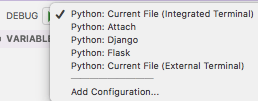

Via:

Selecting the Python version

  1. Key combination Ctrl-Shift-P
  2. Type Select Interpreter
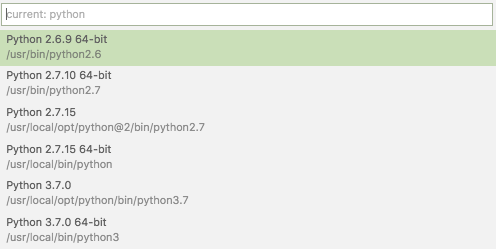
  3. Select the Python version you want; on my system they were at the time of writing:

Via:

Setting command-line arguments

Commandline arguments are set in the same .vscode/launch.json file:

"args": [
    "--quiet", "--norepeat"
],

Though [WayBack] Python debugging configurations in Visual Studio Code: args could have been more clear that you should put that under the Python configuration section you are debugging with, for instance:

{
    // Use IntelliSense to learn about possible attributes.
    // Hover to view descriptions of existing attributes.
    // For more information, visit: https://go.microsoft.com/fwlink/?linkid=830387
    "version": "0.2.0",
    "configurations": [
        {
            "name": "Python: Current File (Integrated Terminal)",
            "type": "python",
            "request": "launch",
            "program": "${file}",
            "console": "integratedTerminal",
            "args": [
                "--quiet", "--norepeat"
            ]
        },

Setting the startup python program

The page above also has a section on [WayBack] Python debugging configurations in Visual Studio Code: _troubleshooting that you can use to start the same script each time you debug, for instance your integration tests:

{
    // Use IntelliSense to learn about possible attributes.
    // Hover to view descriptions of existing attributes.
    // For more information, visit: https://go.microsoft.com/fwlink/?linkid=830387
    "version": "0.2.0",
    "configurations": [
        {
            "name": "Python: Current File (Integrated Terminal)",
            "type": "python",
            "request": "launch",
            // "program": "${file}",
            "program": "${workspaceFolder}/snapperListDeleteFailures.FileTests.py",

Fazit

I should have read [WayBack] Get Started Tutorial for Python in Visual Studio Code first.

–jeroen

Posted in Development, Python, Scripting, Software Development | Leave a Comment »

shell – Should I put #! (shebang) in Python scripts, and what form should it take? – Stack Overflow

Posted by jpluimers on 2019/12/17

It is very important to get the shebang correct. In case of Python, you both need env and the correct Python main version.

Answer

Correct usage for Python 3 scripts is:

#!/usr/bin/env python3

This defaults to version 3.latest. For Python 2.7.latest use python2 in place of python3.

Comment

env will always be found in /usr/bin/, and its job is to locate bins (like python) using PATH. No matter how python is installed, its path will be added to this variable, and env will find it (if not, python is not installed). That’s the job of env, that’s the whole reasonwhy it exists. It’s the thing that alerts the environment (set up env variables, including the install paths, and include paths).

Source: [WayBack] shell – Should I put #! (shebang) in Python scripts, and what form should it take? – Stack Overflow

Thanks GlassGhost and especially flornquake for the answer and Elias Van Ootegem for the comment!

The answer is based on [WayBack] PEP 394 — The “python” Command on Unix-Like Systems | Python.org.

The env is always in the same place, see env – Wikipedia and Shebang (Unix) – Wikipedia.

–jeroen

Posted in Development, Python, Scripting, Software Development | Leave a Comment »

Automated clicking on HTML elements – Chee Wee’s blog

Posted by jpluimers on 2019/12/03

Magic from the JavaScript console: [WayBackAutomated clicking on HTML elements – Chee Wee’s blog: IT solutions for Singapore and companies worldwide.

This is the code he uses because [WayBackgetElementsByClassName returns an array ([WayBack] getElementById returns one reference or null, but many sites still develop without assigning an ID to their elements):

function clickRefresh() {
  ImStillHere = document.getElementsByClassName("Button Success");
  if (ImStillHere.length > 0)
    ImStillHere[0].click();
  document.getElementsByClassName("refresh-widget")[0].click();
}
setInterval(clickRefresh, 1000);

via: [WayBack] function clickRefresh(){ … – CHUA Chee Wee – Google+

I like the approach. Now I need to find a way to automate this in some kind of plug-in.

–jeroen

Posted in Development, JavaScript/ECMAScript, Scripting, Software Development | Leave a Comment »

bash: converting numbers to human readable SI or IEC units

Posted by jpluimers on 2019/12/03

Many unix tools that report sizes in bytes can convert them to either IEC or SI readable formats.

For github.com/jpluimers/btrfs-du/blob/master/btrfs-du I wrote about last week, I also wanted that kind of behaviour. So I did some research and came up with the code and test cases below.

Note that depending on the bitness of your system, bash integer numeric values are limited in size; see [WayBack] What is the maximum value of a numeric bash shell variable? – Super User.

So I wrote a small bash script for that too, which needed also gave me the opportunity to show how a  perpetual while loop as explained by [WayBack] bash – “while :” vs. “while true” – Stack Overflow.

Two things that always bite me with these short scripts are expressions (done through [WayBack]Arithmetic Expansion) and comparisons (through[WayBack] Other Comparison Operators).

The IEC suffixes contain one extra i to indicate binary and – next to the ISO notation that were already ISO defined – made it into the ISO 80000 standard since 2008. Here is a comparison list from [WayBackBinary prefix – Wikipedia:

Prefixes for multiples of
bits (bit) or bytes (B)
Decimal
Value SI
1000 k kilo
10002 M mega
10003 G giga
10004 T tera
10005 P peta
10006 E exa
10007 Z zetta
10008 Y yotta
Binary
Value IEC JEDEC
1024 Ki kibi K kilo
10242 Mi mebi M mega
10243 Gi gibi G giga
10244 Ti tebi
10245 Pi pebi
10246 Ei exbi
10247 Zi zebi
10248 Yi yobi

Most tools nowadays default to binary IEC suffixes for byte sizes, though disk manufacturers still use SI suffixes because, well then they appear bigger but aren’t. Just for comparison, look at the numbers from [WayBack] File size – Wikipedia and [WayBack] IEC and SI Size Notations – AN!Wiki where I got the test cases from:

Read the rest of this entry »

Posted in *nix, *nix-tools, bash, bash, Development, Power User, Scripting, Software Development | Leave a Comment »

How to Send Emails with Gmail using Python

Posted by jpluimers on 2019/11/27

The cool thing about [WayBack] How to Send Emails with Gmail using Python is that it covers a broad range of email sending topics:

  • regular connections
  • secure connections
  • authenticating
  • rate limits
  • Google disallowing SMTP by default

Well wordt reading it, and the references:

–jeroen

Posted in Development, Python, Scripting, Software Development | Leave a Comment »

some links on bash and optional parameters

Posted by jpluimers on 2019/11/26

Hopefully I’ve been able to integrate some of the ideas in the links below in github.com/jpluimers/btrfs-du/blob/master/btrfs-du

One of the features I wanted there was to be able to add optional switches like --raw, --iec or --si to it similar to what as the btrfs qgroup show subcommand has.

It seems possible with bash, but it is not trivial, at least not for me as a non-frequent bash user, so here are some links to get me started:

In retrospect, other languages than bash might have been a better choice for a script like that (:

–jeroen

PS, some btrfs references:

Posted in *nix, *nix-tools, bash, bash, Development, Power User, Scripting, Software Development | Leave a Comment »