


Since I tend to forget the exact statements for starting a fresh repository and push it to a git hoster like GitHub or GitLab: [WayBack] Git: Push a new or existing repo to Github · GitHub
–jeroen
Posted by jpluimers on 2019/11/27
Since I tend to forget the exact statements for starting a fresh repository and push it to a git hoster like GitHub or GitLab: [WayBack] Git: Push a new or existing repo to Github · GitHub
–jeroen

Posted in Development, DVCS - Distributed Version Control, git, GitHub, GitLab, Software Development, Source Code Management | Leave a Comment »
Posted by jpluimers on 2019/11/21
Some interesting thoughts on DVCS: [WayBack] Unorthodocs: Abandon your DVCS and Return to Sanity – bitquabit
Besides the very good point it raises about DVCS (Git, Mercurial and most other DVCSes treat the whole state of the repository as the atom) it also indicates quite a few shortcomings:
I see many other advantages of DVCS systems (for instance that you only need to locally have the branches you are interested in, way better tooling for DVCS systems, ditto for sites hosting DVCS), but it always a good thing to know the weak spots of what you are working with.
–jeroen
Posted in Development, DVCS - Distributed Version Control, git, Mercurial/Hg, Software Development, Source Code Management | Leave a Comment »
Posted by jpluimers on 2019/11/20
When working with git, often the brevity of a solution is remarkable. Remembering how it can be so short is the hard part. An explanation why helps, for instance with [WayBack] git tag – How to delete a git remote tag? – Stack Overflow by markdorison.
He explains why you end up with:
git push --delete <origin> <tagname>
Here, <origin> is your remote, and <tagname> the tag to delete.
He explains other ways, which is done by [WayBack] gist.github.com/mobilemind/7883996 as well:
| # delete local tag '12345' | |
| git tag -d 12345 | |
| # delete remote tag '12345' (eg, GitHub version too) | |
| git push origin :refs/tags/12345 | |
| # alternative approach | |
| git push –delete origin tagName | |
| git tag -d tagName |
–jeroen
Posted in Development, DVCS - Distributed Version Control, git, Software Development, Source Code Management | Leave a Comment »
Posted by jpluimers on 2019/10/09
Time to experiment with [WayBack] Gitless: a simple version control system built on top of http://gitless.com/:
…
Gitless is an experiment to see what happens if you put a simple veneer on an app that changes the underlying concepts. Because Gitless is implemented on top of Git (could be considered what Git pros call a “porcelain” of Git), you can always fall back on Git.
…
It is open source at https://github.com/sdg-mit/gitless
–jeroen
Posted in Development, DVCS - Distributed Version Control, git, Software Development, Source Code Management | Leave a Comment »
Posted by jpluimers on 2019/10/08
Somebody didn’t believe the claim “Git is easy to learn” and wrote a [WayBack] git man page generator (of course with a repository: github: Lokaltog/git-man-page-generator), for example generating
git-complete-tipNAME
git-complete-tipcomplete all non-committed downstream tips opposite of a few rebased remote indicesSYNOPSIS
git-complete-tip[ –maintain-log | –lecture-violate-history ]DESCRIPTION
git-complete-tipcompletes a few staged tips inside any forward-ported non-staged unstaged indices, and a few checked out subtrees fscked by histories in the tree, but that are not inHOLD_SUBTREE, are checked out in a temporary pack.…
 For the same reason there is [WayBack] XKXD: Git (image on the right), which is [WayBack] explained for a reason. Just see this little summary:
The difficulty of using Git in common situations is belied by the apparent simplicity of its use in tutorial-style situations. Committing and sharing changes is fairly straightforward, for instance, but recovering from situations such as accidental commits, pushes or bad merges is difficult without a solid understanding of the rather large and complex conceptual model. For instance, three of the top five highest voted questions on Stack Overflow are questions about how to carry out relatively simple tasks: undoing the last commit, changing the last commit message, and deleting a remote branch.
Actually the “easy to learn” means “there is easy to find documentation for it“.
–jeroen

Posted in Development, DVCS - Distributed Version Control, Fun, git, Software Development, Source Code Management | Leave a Comment »
Posted by jpluimers on 2019/09/24
Works for Windows too: [WayBack] Fork – a fast and friendly git client for Mac.
Via [WayBack] Weekend Reader 2017.46 – reality-loop(who switched away from SourceTree, because, well, that was ahead of it’s time but in the end couldn’t keep up with reality)
–jeroen
Posted in Development, DVCS - Distributed Version Control, git, git-fork, Software Development, Source Code Management, SourceTree | Leave a Comment »
Posted by jpluimers on 2019/08/27
Since I keep forgetting this and the top search for “git remote add” “tracking” do not answer it (see for instance …):
git remote add gitlab https://user@gitlab.com/group/subgroup/repository.git -t master
This adds a new gitlab remote on the repository path https://user@gitlab.com/group/subgroup/repository.git tracking branch master.
–jeroen
Posted in Development, DVCS - Distributed Version Control, git, Source Code Management | Leave a Comment »
Posted by jpluimers on 2019/08/01
Via a co-worker:
In my own experience, PlasticSCM needs a lot of work, especially on the usability side:
ERROR_NOT_ENOUGH_QUOTA 1816 (0x718): Not enough quota is available to process this command.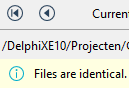
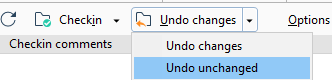
One thing that baffled me is that you can edit commit messages. Changing them does not result in another commit. This means that these are not set in stone which is very odd when you see all changes in the commit history.
[Archive.is] Are check-in comment editable?
Sure!
The commit message textbox is editable, start typing and then push save.
—
I realized that in the Branch Explorer one can edit them using the procedure you’ve described, but if you open a changset from “Changesets” or somewhere else, the comment on the top is readonly. Maybe it would be nice to be have a way to edit it there, though I guess, it would be a rarely used feature.
—
At the changesets view you are also able to do it by cliking in the “Show extended information” button.
I’m afraid that this are the only spots to do it.
–jeroen

Posted in Development, DVCS - Distributed Version Control, git, Source Code Management | Leave a Comment »
Posted by jpluimers on 2019/06/20
I needed a solution inside a batch file for git similar to [WayBack] How to test if an executable exists in the %PATH% from a windows batch file? – Stack Overflow which became this:
where /q git || echo Cound not find git on the PATH %PATH%. && goto :eof
I could have expanded this to find the install location, but for now this is sufficient.
When it is needed, I should read [WayBack] Programmatically (not manually) finding the path where Git is installed on a Windows system – Stack Overflow
–jeroen
Posted in Batch-Files, Development, DVCS - Distributed Version Control, git, Scripting, Software Development, Source Code Management | Leave a Comment »
Posted by jpluimers on 2019/06/10
Archive.is Githunt – Chrome Web Store: Replace the new tab with a list of trending repositories on github belonging to any technology that you chose.
More information: [WayBack] How to get trending GitHub projects in your Chrome new tab screen with GitHunt
–jeroen
via: [WayBack] This is how I discover new and interesting open source Delphi/Pascal projects – install Githunt and it replaces my ‘new tab’ page, there I set the langu… – Edwin Yip – Google+
Posted in Development, DVCS - Distributed Version Control, git, GitHub, Software Development, Source Code Management | Leave a Comment »

 The Wiert Corner - irregular stream of stuff