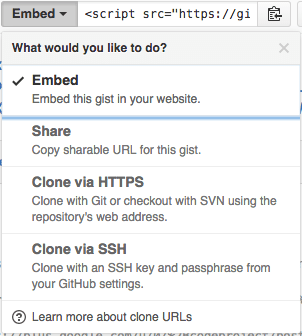
The “embed” dropdown allows to get URLs for sharing and git cloning.
Recently I did my very first JavaScript in HTML development. Since it was a one page experiment, I didn’t want to put it in an official repository of it’s own.
I will explain about the content in a future post, but first about getting it on-line as a HTML file that can run JavaScript.
This is the hosted page: Work around G+ “403. That’s an error.” errors.
Gists are the base
Gists are pretty amazing. They have history, syntax highlighting (which you can embed on your own page, see Using Github as a Syntax Highlighter for Your Blog or Website), can show an overview of files or even raw content. This holds for public and secret gists.
The history of all the files comes from a repository: in fact all gists are in fact git repositories of which you can get the URL (be it https or ssh) is under the “Embed” dropdown: see the screenshot on the right.
So the gist itself is available under these URLs:
- gist
- syntax highlight script
- git https
- git ssh
The individual files can either be viewed as syntax highlighted (when they’re small enough, not binary and github knows how to highlight them), or as raw files:
Read the rest of this entry »


 The Wiert Corner - irregular stream of stuff