The Wiert Corner – irregular stream of stuff

Jeroen W. Pluimers on .NET, C#, Delphi, databases, and personal interests

  • My badges

  • Twitter Updates

  • My Flickr Stream

  • Pages

  • All categories

  • Enter your email address to subscribe to this blog and receive notifications of new posts by email.

    Join 1,854 other subscribers

Archive for the ‘Source Code Management’ Category

Gitless: a simple version control system built on top of http://gitless.com/

Posted by jpluimers on 2019/10/09

Time to experiment with [WayBack] Gitless: a simple version control system built on top of http://gitless.com/:

Gitless is an experiment to see what happens if you put a simple veneer on an app that changes the underlying concepts. Because Gitless is implemented on top of Git (could be considered what Git pros call a “porcelain” of Git), you can always fall back on Git.

It is open source at https://github.com/sdg-mit/gitless

via: UMass Amherst CICS Distinguished Lecture: Daniel Jackson (Massachusetts Institute of Technology) “Towards a Theory of Software Design”

–jeroen

Posted in Development, DVCS - Distributed Version Control, git, Software Development, Source Code Management | Leave a Comment »

Git man-page generator (“Git is easy to learn”)

Posted by jpluimers on 2019/10/08

Somebody didn’t believe the claim “Git is easy to learn” and wrote a [WayBackgit man page generator  (of course with a repository: github: Lokaltog/git-man-page-generator), for example generating

git-complete-tip

NAME

git-complete-tipcomplete all non-committed downstream tips opposite of a few rebased remote indices

SYNOPSIS

git-complete-tip [ –maintain-log | –lecture-violate-history ]

DESCRIPTION

git-complete-tip completes a few staged tips inside any forward-ported non-staged unstaged indices, and a few checked out subtrees fscked by histories in the tree, but that are not in HOLD_SUBTREE, are checked out in a temporary pack.

 …

For the same reason there is [WayBack] XKXD: Git (image on the right), which is [WayBack] explained for a reason. Just see this little summary:

The difficulty of using Git in common situations is belied by the apparent simplicity of its use in tutorial-style situations. Committing and sharing changes is fairly straightforward, for instance, but recovering from situations such as accidental commits, pushes or bad merges is difficult without a solid understanding of the rather large and complex conceptual model. For instance, three of the top five highest voted questions on Stack Overflow are questions about how to carry out relatively simple tasks: undoing the last commit, changing the last commit message, and deleting a remote branch.

Actually the “easy to learn” means “there is easy to find documentation for it“.

–jeroen

via: UMass Amherst CICS Distinguished Lecture: Daniel Jackson (Massachusetts Institute of Technology) “Towards a Theory of Software Design”

Read the rest of this entry »

Posted in Development, DVCS - Distributed Version Control, Fun, git, Software Development, Source Code Management | Leave a Comment »

Fork – a fast and friendly git client for Mac

Posted by jpluimers on 2019/09/24

Works for Windows too: [WayBack] Fork – a fast and friendly git client for Mac.

Via [WayBack] Weekend Reader 2017.46 – reality-loop(who switched away from SourceTree, because, well, that was ahead of it’s time but in the end couldn’t keep up with reality)

–jeroen

Posted in Development, DVCS - Distributed Version Control, git, git-fork, Software Development, Source Code Management, SourceTree | Leave a Comment »

git add remote with tracking

Posted by jpluimers on 2019/08/27

Since I keep forgetting this and the top search for “git remote add” “tracking” do not answer it (see for instance …):

git remote add gitlab https://user@gitlab.com/group/subgroup/repository.git -t master

This adds a new gitlab remote on the repository path https://user@gitlab.com/group/subgroup/repository.git tracking branch master.

–jeroen

Posted in Development, DVCS - Distributed Version Control, git, Source Code Management | Leave a Comment »

PlasticSCM console

Posted by jpluimers on 2019/08/09

The cm.exe by default is not on the path, even though it is a useful tool.

Some links on it:

Slow

One drawback: the cm.exe is slow in startup, likely because it is a .NET executable needing quite a few assemblies to load:

"C:\Program Files (x86)\Microsoft SDKs\Windows\v10.0A\bin\NETFX 4.7.1 Tools\CorFlags.exe" "C:\Program Files\PlasticSCM5\client\cm.exe"
Microsoft (R) .NET Framework CorFlags Conversion Tool. Version 4.7.2558.0
Copyright (c) Microsoft Corporation. All rights reserved.

Version : v4.0.30319
CLR Header: 2.5
PE : PE32
CorFlags : 0x1
ILONLY : 1
32BITREQ : 0
32BITPREF : 0
Signed : 0

Finding stuff

I get a feeling that there is quite a bit of cm functionality either undocumented, or hardly documented.

For instance, copying a title from the PlasticSCM GUI does not mean it will work as a cm command.

Despite the documentation indicating

When you run queries using comparison operators (>, <, >=, <=) from the command line, remember that the shell considers these operators as IO redirections, so you will need to enclose the queries with quotation marks:
cm find "branches where owner='pablo' and changesets >= '2013/03/01'"

you have to be really careful where to put the starting double quote: it has to be after the find command:

  1. Example 1
    • Title
      User query: find changeset where branch='/main/test/My Branch Name' on repository 'Projects@ssl://plastic.example.org:8088' (22 Items - 0 selected)
    • Failure
      "C:\Program Files\PlasticSCM5\client\cm.exe" "find changeset where branch='/main/test/My Branch Name' on repository 'Projects@ssl://plastic.example.org:8088'"
      Command 'find changeset where branch='/main/test/My Branch Name' on repository 'Projects@ssl://plastic.example.org:8088'' not found. Type cm showcommands to get a command list.
    • Success
      "C:\Program Files\PlasticSCM5\client\cm.exe" find "changeset where branch='/main/test/My Branch Name' on repository 'Projects@ssl://plastic.example.org:8088'"
  2. Example 2
    • Title
      Changesets /main/test/My Branch Name@Projects@ssl://plastic.example.org:8088 (4 Items - 1 selected)
    • Failure
      "C:\Program Files\PlasticSCM5\client\cm.exe" find "Changesets /main/test/My Branch Name@Projects@ssl://plastic.example.org:8088"
      Error: unexpected char: '@'
    • Success
      "C:\Program Files\PlasticSCM5\client\cm.exe" find "Changesets where branch='/main/test/My Branch Name' on repository 'Projects@ssl://plastic.example.org:8088'"

This means that changeset can be Changesets: it is case insensitive and has multiple aliases. It looks similar to commands I used in my days of using Rational ClearCase – Wikipedia

I need to find out how to translate a non-query title into a query one. That will make it a lot easier to go from PlasticSCM GUI to the cm.

No XML documentation

The cm find command has a cool parameter --xml, which dumps the output in an XML tree.

My original goal was to see if I could turn the XML into something like Markdown or RST, using an XSLT transform like these:

For those transforms, you have to know how the input XML is structured. However, this information is undocumented.

When asked, PlasticSCM indicated there is no XSD for it claiming it was “super simple export to XML”:

[WayBack] Plastic SCM on Twitter: “No XSD, I’m afraid. Just super simple export to XML.… “

https://twitter.com/plasticscm/status/1039842761304940544

I hoped the elements were just uppercase versions of the output below, but they are not. Bummer.

–jeroen

Read the rest of this entry »

Posted in Development, PlasticSCM, Power User, Source Code Management | Leave a Comment »

Some git versus PlasticSCM comparisons

Posted by jpluimers on 2019/08/01

Via a co-worker:

In my own experience, PlasticSCM needs a lot of work, especially on the usability side:

  1. PlasticSCM call themselves a DVCS, but in order to have a local full repository like all other DVCS systems, you have to run a local server (and a license for it, I still need to sort out if that is free or paid). For the DVCS definition, see Distributed version control – Wikipedia. This means you run a client, a local PlasticSCM server and a remote PlasticSCM server.
  2. Despite there being a CLI version (more on that in a future post), the GUI does not show the exact CLI syntax for commands (unlike most git tools that do). This means you need to think thrice when translating them from GUI to CLI, made even harder by most UI access paths having different ways to copy their information to the clipboard.
  3. When you run the Plastic SCM GUI client long enough, even on a small repository, you will get errors about not enough quota being available (the dreaded 0x718): [WayBack] System Error Codes (1700-3999) | Microsoft Docs ERROR_NOT_ENOUGH_QUOTA 1816 (0x718): Not enough quota is available to process this command.
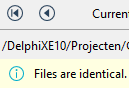
  4. Often after scanning for changes, you see a lot of changed files. If you click each file, you see  “Files are identical”

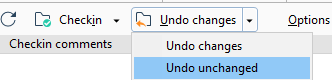
    • As a result you have to perform “Undo Unchanged”:
    • I never have this when using git.
  5. Online PlasticSCM hosting parties, especially integrated with bug tracking, are far and few between: besides [WayBackPlasticSCM cloud, I have not found any. Take the git world, or even the Mercurial world and there are far more choices (yes I know about the manual labour involved setting it up described at [WayBack] Plastic SCM version control · Task and issue tracking systems guide and [Archive.is] Plastic SCM blog: Integrating Plastic SCM with Trac Issue Tracking).

One thing that baffled me is that you can edit commit messages. Changing them does not result in another commit. This means that these are not set in stone which is very odd when you see all changes in the commit history.

[Archive.is] Are check-in comment editable?

Sure!

The commit message textbox is editable, start typing and then push save. :)

I realized that in the Branch Explorer one can edit them using the procedure you’ve described, but if you open a changset from “Changesets” or somewhere else, the comment on the top is readonly. Maybe it would be nice to be have a way to edit it there, though I guess, it would be a rarely used feature.

At the changesets view you are also able to do it by cliking in the “Show extended information” button.

I’m afraid that this are the only spots to do it.

–jeroen

Posted in Development, DVCS - Distributed Version Control, git, Source Code Management | Leave a Comment »

How to test if an executable exists in the %PATH% from a windows batch file? – Stack Overflow

Posted by jpluimers on 2019/06/20

I needed a solution inside a batch file for git similar to [WayBack] How to test if an executable exists in the %PATH% from a windows batch file? – Stack Overflow which became this:

where /q git || echo Cound not find git on the PATH %PATH%. && goto :eof

I could have expanded this to find the install location, but for now this is sufficient.

When it is needed, I should read [WayBack] Programmatically (not manually) finding the path where Git is installed on a Windows system – Stack Overflow

–jeroen

Posted in Batch-Files, Development, DVCS - Distributed Version Control, git, Scripting, Software Development, Source Code Management | Leave a Comment »

Githunt – Chrome Web Store – discover new github projects in your technology area of interest

Posted by jpluimers on 2019/06/10

Archive.is Githunt – Chrome Web Store: Replace the new tab with a list of trending repositories on github belonging to any technology that you chose.

More information: [WayBack] How to get trending GitHub projects in your Chrome new tab screen with GitHunt

–jeroen

via: [WayBack] This is how I discover new and interesting open source Delphi/Pascal projects – install Githunt and it replaces my ‘new tab’ page, there I set the langu… – Edwin Yip – Google+

Posted in Development, DVCS - Distributed Version Control, git, GitHub, Software Development, Source Code Management | Leave a Comment »

Many flow strategies at GitLab Flow | GitLab

Posted by jpluimers on 2019/06/04

Many flow strategies: GitLab Flow | GitLab

After me doing some research on [WayBack] What your approach to branching tells me about the state of your agile transformation. | LinkedIn – Marjan Venema – Google+

–jeroen

Posted in Development, DVCS - Distributed Version Control, git, Software Development, Source Code Management | Leave a Comment »

svnrdump for dumping and loading remote svn repositories – twm’s blog

Posted by jpluimers on 2019/05/31

One day I will likely need svnrdump:

Since I keep forgetting what the tool is called and how to use it: svnrdump is a tool that can dump a remote svn repostory to a text file and also load that text file into a different remote svn repository…

Via: [WayBack] Since I keep forgetting what the tool is called and how to use it: svnrdump i…

–jeroen

Posted in *nix, Development, DVCS - Distributed Version Control, Power User, Subversion/SVN, Windows | Leave a Comment »