---------------------------

Wait a moment, please...

---------------------------

In progress...

Shelving pending changes

---------------------------

OK

---------------------------
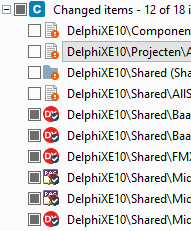
I cannot show all changes, but the third one is an xlink:
The error did not return any meaningful results when I searched for it, but the developers on the team indicated “Errors like these happen every now and then; there is no information in Google. Sit down, cry a little, then restart with a fresh repository”.
Workaround
The workaround for this undocumented behaviour is tedious, but works:
The easiest way to uninstall the CollabNet SVN Client is running this small script:
This file contains hidden or bidirectional Unicode text that may be interpreted or compiled differently than what appears below. To review, open the file in an editor that reveals hidden Unicode characters. Learn more about bidirectional Unicode characters
I have long since stopped using the CollabNet-branded version because it’s behind a registration wall. I found Slik SVN as a good alternative. It’s exactly the same command-line client you get from CollabNet, sans the hassle in downloading it.
I hope someone at Embarcadero enters this in QC^w QualityPortal as I’m awaiting Embarcadero response about a security issue there.
Fixes Null Reference exceptions when parameters or contentType are not populated
To install the Git Credential Manager, download and double-click the GCMW-1.18.1.exe installer. It is that easy, it will even install Git for Windows 2.17.0 and the Microsoft .Net Framework for you if necessary.
moderately soon, hopefully, there will be a minor version release of Git for Windows that will include the updated GCM v1.18.1. [just need more volunteer time for the PR and tests ;-)
That should eliminate the `Fatal: NullReferenceException” but appears not to fix the #1874https://github.com/git-for-windows/git/issues/1874 delays. (still to hear from the OP if the issue is definitely the AV, or something elese)
---------------------------
Mergetool usage
---------------------------
Usage: mergetool [ | ]

    diffOptions:  []

    mergeOptions:   [] [[] [] ] [] []

        baseFile:            {-b | --base}=
        baseSymbolicName:    {-bn | --basesymbolicname}=
        automatic:           -a | --automatic
        silent:              --silent
        resultFile:          {-r | --result}=
        mergeType:           {-m | --mergeresolutiontype}={onlyone | onlysrc | onlydst | try | forced}

    generalFiles:  []  []

        sourceFile:          {-s | --source}=
        srcSymbolicName:     {-sn | --srcsymbolicname}=
        destinationFile:     {-d | --destination}=
        dstSymbolicName:     {-dn | --dstsymbolicname}=

    generalOptions: [] [] [] []

        defaultEncoding:     {-e | --encoding}={none |ascii | unicode | bigendian | utf7 | utf8}
        comparisonMethod:    {-i | --ignore}={none | eol | whitespaces | eol&whitespaces}
        fileType:            {-t | --filestype}={text/csharp | text/XML | text}
        resultEncoding:      {-re | --resultencoding}={none |ascii | unicode | bigendian | utf7 | utf8}
        progress:            {--progress}=progress string indicating the current progress, for example: Merging file 1/8
        extraInfoFile:       {--extrainfofile}=path to a file that contains extra info about the merge

    Remarks:

        -a | --automatic:    Tries to resolve the merge automatically.
                             If the merge can't be resolved automatically (requires user interaction), the merge tool is shown.
        --silent:            This option must be used combined with the --automatic option.
                             When a merge can't be resolved automatically, this option causes the tool to return immediately
                             with a non-zero exit code (no merge tool is shown).
                             If the tool was able to resolve the merge automatically, the program returns exit code 0.

    Examples:

        mergetool
        mergetool -s=file1.txt -d=file2.txt
        mergetool -s=file1.txt -b=file0.txt --destination=file2.txt
        mergetool --base=file0.txt -d=file2.txt --source=file1.txt --automatic --result=result.txt
        mergetool -b=file0.txt -s=file1.txt -d=file2.txt -a -r=result.txt -e=utf7 -i=eol -t=text/csharp -m=onlyone
---------------------------
OK
---------------------------
The merge extraInfoFile.tmp has a syntax like this:
Source (cs:-#)
    relative-sourceFile from cs:-# created by userName on timeStamp
    Comments: Source changeset description

Base (cs:#)
    relative-baseFile from cs:#@/baseBranch by userName on timeStamp
    Comments: BO's + CRUDS

Destination (cs:#)
    relative-destinationFile from cs@/destinationBranch created by userName on timeStamp
    Comments: Destination changeset description
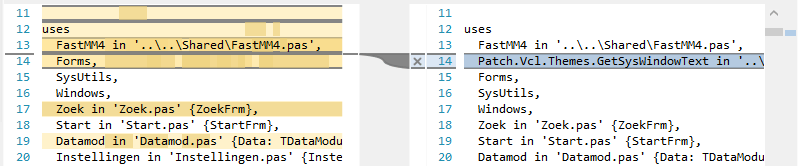
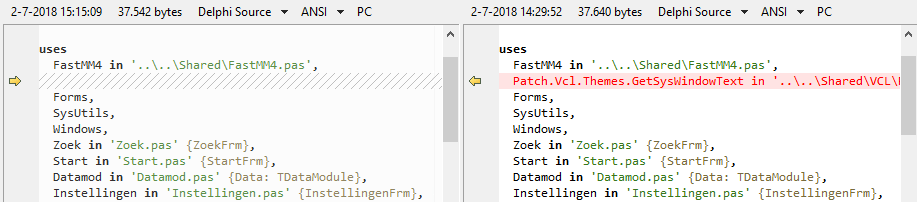
The diff engine in PlasticSCM is nice in appearance, but it lacks a lot of features for file types that Beyond Compare handles out of the box.
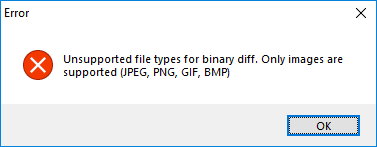
For instance, .RES files cannot be diffed:
---------------------------
Error
---------------------------
Unsupported file types for binary diff. Only images are supported (JPEG, PNG, GIF, BMP)
---------------------------
OK
---------------------------
There is another file with a similar, but deceptively different name and behaviour: hidden_changes.conf. There ignore.conf ignores changes, hidden_changes.conf completely hides them. I am still not sure what subtleties are involved in the difference between “ignore” and “hide”, as the documentation is confusing and hidden_changes.conf can also appear in the root of a repository:
hidden_changes.conf
Contains the paths of the controlled files to hide from the Pending changes view. The hidden changes are controlled items that can be changed but the user doesn’t want them to appear by default on the Pending changes view.
This config file is located in the plastic4 directory (under $HOME/.plastic4 on Linux/Mac systems or C:\Users\user\AppData\Local\plastic4 on Windows), in the root directory of the workspace, or in the plastic-global-config repository so that all clients have the same settings by default.
Contains the paths of the private files to be ignored in the Pending changes view. The ignored files are files that you have no intention of placing under source control.
This config file is placed at the root directory of the workspace, or in the plastic-global-config repository so that all clients have the same settings by default.
serveralias.conf – This file can only be placed in the /allrepos directory (no other location is supported for this configuration file). The Plastic SCM GUI will load the aliases during the startup.


---------------------------
---------------------------



 For instance, .RES files cannot be diffed:
 The Wiert Corner - irregular stream of stuff