


Don’t post screen shots as low quality JPEG.
Use PNG, which results in smaller files and better looking images.
Not like ING did: no screen reader can help visually impaired, and it gives a very bad user experience to the rest of the world.

–jeroen
Posted by jpluimers on 2012/04/16
Don’t post screen shots as low quality JPEG.
Use PNG, which results in smaller files and better looking images.
Not like ING did: no screen reader can help visually impaired, and it gives a very bad user experience to the rest of the world.
–jeroen

Posted in LifeHacker, Power User, Usability, User Experience (ux) | 1 Comment »
Posted by jpluimers on 2012/04/14
I’m experimenting with the Posting categories overview page as a prequel to a proper tag cloud (and a series of posts on how to get there).
Please let me know in the comments which of the below ones you like most:
(For comparison, you need a big screen; the most popular choice will survive on the Posting categories page).
–jeroen
via: Posting categories « The Wiert Corner – irregular stream of Wiert stuff. Read the rest of this entry »

Posted in CSS, Development, HTML, Power User, SocialMedia, Software Development, Usability, User Experience (ux), Web Development, WordPress, WordPress | Leave a Comment »
Posted by jpluimers on 2011/09/02
Kort geleden schreef ik over de #yellowbrick en #anwb #fail: Als de website nu ook nog nice was… (deal: ANWB – Ledenvoordeel – Yellowbrick – gratis registratie).
Inmiddels is er lichte voortgang:
Kortom: Read the rest of this entry »
Posted in Opinions, Power User, User Experience (ux) | Leave a Comment »
Posted by jpluimers on 2011/03/16
When you want to enable (or disable) a toolbar in Visual Studio 2010, there are three options to go, of which the last two are equivalent:
The first one is the easiest; you can see the resulting Context Menu in the left picture (click on it to enlarge).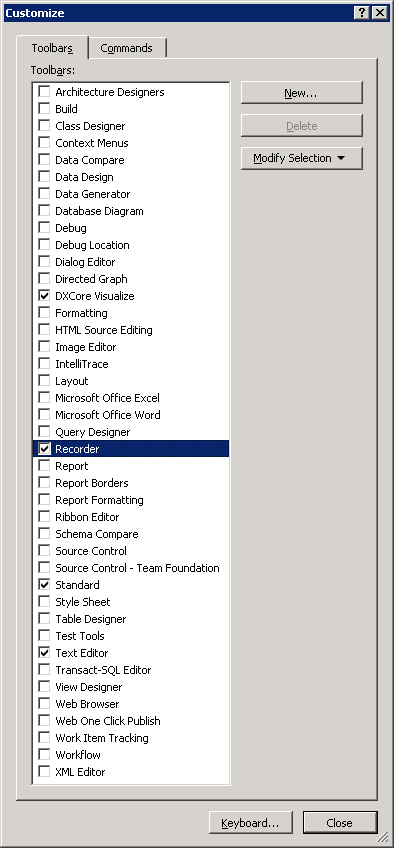
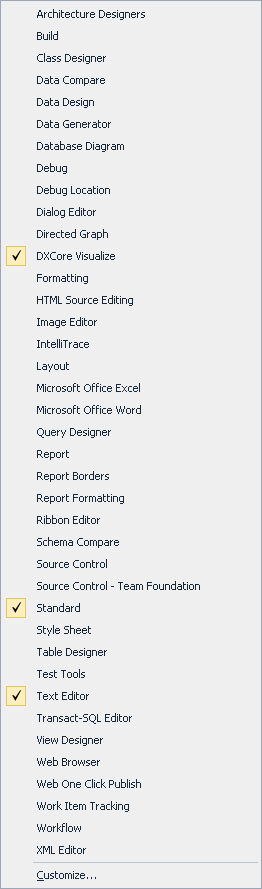
The last two require an extra step; you can see the resulting dialog in the right most picture (click on it to enlarge).
Given the size of those lists, you’d think all toolbars are in both.
Wrong!
These are missing from the Context Menu:
I consider this a serious Ux problem; if the Context Menu was much shorter (like 10 entries or so), it would be pretty obvious they are not.
It took me more than 10 minutes to find the Recorder toolbar which would have been vastly shorter if both lists were the same.
(Another Ux failure that caused my search to be this long is that I was looking for ‘Macro Recorder’ since all entries in the menu contain the word ‘Macro’; Recorder could as well point to a Toolbar for screen, video or audio recording).
–jeroen

Posted in .NET, Development, Software Development, Usability, User Experience (ux), Visual Studio 2010, Visual Studio and tools | Leave a Comment »
Posted by jpluimers on 2010/09/01
Most pages don’t do a page submit when you press the Enter key in a combobox.
KLM does in their online check-in.
Which means that a keyboard groupie like me basically is forced to use the mouse to select country a zillion times (Netherlands for all of the group members for Nationality, Passport, etc).
Other sites do it right and accept this:
KLM online check-in does a page submit on each time you get to step 3, refreshes the page, and moves the focus to some non-input fied.
Big #fail.
–jeroen
Posted in Opinions, User Experience (ux) | Leave a Comment »
Posted by jpluimers on 2010/07/26
There is an address that I have been traveling from lately quite a bit: “Weena 505, Rotterdam, NL”.
So: routes.tomtom.com has put it in my history.
So why is it then that every time I select that address from my history, and I start planning my route, I get an additional choice of addresses to choose from this selection:
From:
Weena 505, Rotterdam, NL
Weena, Rotterdam, NL
Weena, Rotterdam, NL
The Westin Rotterdam, Rotterdam, NL
Or review your input:
- Weena 505, Rotterdam, NL
They do this for all kinds of addresses.
It drives me nuts for two reasons:
Are interaction designers and UI builders ever going to learn?
–jeroen

Posted in Usability, User Experience (ux) | 1 Comment »
Posted by jpluimers on 2009/12/31
One of the things in usability is to enable old skoop people that have been using.
Windows 7 went even further than Windows Vista into changing start menu functionality and explorer functionality that had been there since Windows 95.
So things that have been working for over a decade, suddenly stopped to work, or worse: work differently.
Would you imagine what happened when someone reordered the pedals in a car (from left to right are clutch, brake and throttle) or reassign their functionality?
So some people gathered and wrote Classic Shell.
Now someone please restrore the “backspace” keyboard behaviour back to “go one level up in the folder tree” as it had been for more than a decade…
–jeroen
Posted in Keyboards and Keyboard Shortcuts, Power User, Usability, User Experience (ux) | 4 Comments »
 The Wiert Corner - irregular stream of stuff