The Wiert Corner – irregular stream of stuff

Jeroen W. Pluimers on .NET, C#, Delphi, databases, and personal interests

  • My badges

  • Twitter Updates

  • My Flickr Stream

  • Pages

  • All categories

  • Enter your email address to subscribe to this blog and receive notifications of new posts by email.

    Join 1,861 other subscribers

Archive for the ‘Event’ Category

How I use Wireshark – Julia Evans

Posted by jpluimers on 2018/08/03

Cool set of steps on [WayBackHow I use Wireshark – Julia Evans who uses the combination of tcpdump to dump traffic in pcap files and Wireshark to analyse the pcap files after copying them using scp. On many platforms, Wireshark can also capture the ptrace files for you.

Via: [WayBack] 🔎Julia Evans🔍 on Twitter: “how I use Wireshark https://t.co/j699JXrjaH” which has some nice comments including:

  • adding ptrace to your tool-kit
  • not needing scp for copying, as you can do [WayBack] dumpcap over an existing ssh connection:
    • You might like this snippet, saves you the need to do the scp dance: wireshark -k -i <(ssh <IP> "sudo dumpcap -P -w - -f 'not tcp port 22'")

–jeroen

Posted in *nix, *nix-tools, Conference Topics, Conferences, Event, Power User, Wireshark | Leave a Comment »

From the bragging “Did you know the IDE starts almost twice as fast in 10.2.2 as it did in 10.1?”

Posted by jpluimers on 2018/07/17

An interesting discussion sprouted from the bragging [WayBack] Did you know the IDE starts almost twice as fast in 10.2.2 as it did in 10.1? https://community.embarcadero.com/blogs/entry/new-in-10-2-2-welcome-page-… – David Millington – Google+.

I do not care very much about IDE start times (Visual Studio starts faster, others like Android Studio start slower than Delphi), more about productivity.

Which means loading projects, opening files and forms, switching projects, etcetera need to be fast and stable.

For me this is when on Delphi projects, I start about half a dozen copies of Delphi about 10 seconds apart (otherwise you get exceptions in any Galileo version), make some tea, then come back.

Each time an IDE crashes, I kill it, start a new one, switch to an existing one, load the projects I need and continue. On a full day working with Delphi, this happens about a dozen times a day.

After that I want to be productive.

Here is where I was so surprised by the great tip from Yusuf Zorlu

+Asbjørn Heid you should try to disable all “livebinding” packages + rename dclbindcomp250.bpl . If i opened a form before i had to wait 20 to 40 seconds … now it is superfast and opens forms under 5 seconds. I don’t need LiveBindings …

and the response by Asbjørn Heid

+Yusuf Zorlu Thank you! Holy cow that’s a difference! As you say, even our most complex forms are down to 4 seconds now.

I never use LiveBindings as they are way to convoluted, unstable and result in logic being in designers as opposed to tool-manageable code.

In addition, LiveBindings have never been really optimised since their inception in Delphi XE2.

This saves a lot of time!

So one day, I need to update Source: Delphi packages I have disabled by prefixing their description with an underscore (and why) and create a batch file with the various [WayBack] reg add commands modifying the package loads.

Related:

–jeroen

Posted in Conference Topics, Conferences, Delphi, Development, Event, Software Development | 2 Comments »

Delphi: formatting uses lists to each unit is on a separate line

Posted by jpluimers on 2018/06/29

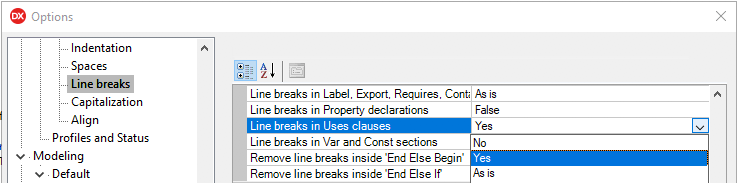
Delphi formatter setting, so I can manually arrange uses lists:

–jeroen

Uwe Raabe commented on G+:

Also available in MMX Code Explorer in the settings dialog: Pascal -Sorting – Format unit uses clauses – “Each unit on a new line”.
If you prefer the standard setting and spare the other for special purpose, there is “Format Uses – Alternate” in the context menu. Perhaps give it a decent shortcut for quick access.

Bernd Ott in the same thread:

Important because scm. Less merge trouble. Only the last semicolon in last row is always stupid.

https://plus.google.com/+JeroenPluimers/posts/RfrCkDAd95G

Posted in Conference Topics, Conferences, Delphi, Development, Event, Software Development | 4 Comments »

Two cool features of the TestInsight treeview – navigate and copy

Posted by jpluimers on 2018/06/20

TestInsight is a great tool for automatically running your unit tests and seeing the results to make you more productive.

Two of the results treeview features you might not know make you even more productive:

  • After selecting a node, pressing Ctrl-C will copy the content as text to the clipboard
  • Double clicking will bring you to the unit test in your source code

You can get TestInsight at sglienke / TestInsight — Bitbucket

–jeroen

Posted in Conference Topics, Conferences, Delphi, Development, Event, Software Development | 1 Comment »

Fixing the WSDLImp command-line Delphi WSDL importer to parse WSDL files including XSD files using xsd:group at the top level

Posted by jpluimers on 2018/05/24

I finally found out the cause of the Delphi WSDL Importer generating wrong .pas files when the WSDL file includes an XSD file that uses an xsd:group (see below) at the top-level.

The resulting access violation was caused by forgetting a nil check for a Context (at the top-level it is nil because there is no encompassing type yet; xsd:group can be at the top-level).

There might also be other WSDL/XSD constructs leading to the same code path: a good set of WSDL/XSD combination would be needed for proper integration testing on this. Hopefully, Embarcadero has such a set.

Patches

All patches are at https://gist.github.com/jpluimers/2824c03ae816229a53ffa4830b2d6208. If you need a binary build that includes the patches, drop a comment below.

Before fixing, I had to get it building which required modifying the search path and output path (both see Delphi WSDL importer compiler defines). This is the first patch below (which results includes a huge .dproj change as that’s what the IDE does to a project when you change just a few simple things).

The second patch below is the fix.

The fix is to replace if (TypeDef.IsAnonymous) then by if (TypeDef.IsAnonymous) and Assigned(Context) then in side the function TWSDLTypeImporter.AddComplexType of WSDLImpWriter.pas.

After careful checking of the group handling (around etElementGroup, cmGroupRef,  xtiElemGroupIXMLElementGroup, IXMLElementGroups), no other fixes are needed as the rest of the xsd:group handling functions correctly at least for the WSDL/XSD combinations I had to import.

During fixing, I found some compiler defines would produce much more output. That output tremendously helped finding out if xsd:group handling was indeed correct.

In the third patch, I have added another modification that introduces a new -logall command-line parameter that enables all these in one go.

I have handed over the patches through internal channels in order to circumvent a long and tedious QC/QualityPortal process. Hopefully they will make it in the next major Delphi version.

Related

Patches generated by following the steps in [WayBack] Generate a git patch for a specific commit – Stack Overflow:

git format-patch -1 <<commit-SHA>>

Command-line parameters

The WSDLImp has many command-line parameters, some of which are not accessible from the IDE expert. More information on these at:

xsd:group

An xsd:group contains a group of definitions. It is similar to a list of fields in a record/class/interface in Delphi that you can use in multiple record/class/interface definitions. The group only has a name at the XSD level, but not at the Delphi generated code level: there the group is expanded in each place it is used.

More information: [WayBack] xsd – How to use the xml schema group element – Stack Overflow

–jeroen

Read the rest of this entry »

Posted in Conference Topics, Conferences, Delphi, Development, Event, Software Development | 12 Comments »

Delphi WSDL importer compiler defines

Posted by jpluimers on 2018/05/22

As a follow-up on Delphi WSDL default importer settings, you can use these compiler defines to increase output.

Output that the built-in Wizard will never show you (that is also the reason you will not see any errors like access violations in the IDE).

TL;DR

Always use the command-line WSDL importer WSDLImp as it has the same default options as the IDE.

The command-line WSDL importer called WSDLImp does show error messages, but in case of an error still continues writing the wrong .pas file.

Syntax:

"C:\Program Files (x86)\Embarcadero\Studio\19.0\bin\WSDLImp.exe" -DD:\Playground\iECK_ImportWSDL "D:\Playground\iECK DT2.0 services v2.1.1\wsdl\ECK-DT2-CatalogService-v2.1.1.wsdl"

When debugging the code, I found out there are many conditional defines you can enable so it shows more output. Output that greatly helps to pin-point issues while importing more complex WSDL, especially when the WSDL has include or import elements.

These are the defines:

  • TRACK_MEMORY this requires the FastMM4 unit in the path
  • SHOW_XML_INFO
  • LOG_TYPES_DUMP
  • LOG_TYPES_LOOKUP
  • LOG_TYPES_READING
  • LOG_TYPES_SORTING
  • LOG_TYPES_UNWIND
  • LOG_TYPES_WRITING

The really odd thing is that there is a hidden command-line option -debug which does not automatically enable these, but does use SHOW_XML_INFO which seems enabled by default and writes an output file with extension .xml in addition to .pas, where the XML has an overview of the parsed data types.

I am going to fiddle around to see if I can enable all of the LOG_ entries from the command-line in a simple way.

When you debug the WSDLImp tool, ensure these two directories are on the unit search path:

  • $(BDS)\source\soap
  • $(BDS)\source\xml

The first is needed so the compiler can find CompVer.inc, the second so you can step through the XML handling code.

Also make sure you change the output path from $(BDS)\bin (which only works under UAC and overwrites the stock output) with something like .\$(Platform)\$(Config) (which  puts it along the .DCU files).

–jeroen

Posted in Conference Topics, Conferences, Delphi, Development, Event, Software Development | 1 Comment »

Delphi: a pattern for a generic factory, this one for components, but can be uses for anything having a base class like a TThread descendant.

Posted by jpluimers on 2018/05/16

Generics and constraints in Delphi is still a bit of pain.

A while ago, I needed a factory for threads. It was more convoluted than I meant it to be, so I had a short chat with Stefan Glienke.

He came up with an example similar to the one below. I tore it apart so you can on each line see what the compiler dislikes.

This fails, but was kind of how I wanted it to be:

type
   TFactory = record
     class function Manufacture<T: TBaseClass, constructor>(parameter definitions): T;
   end;

class function Manufacture<T: TBaseClass, constructor>(parameter definitions): T;
begin
  Result := T.Create(parameter values);
end;

Which means I need to update Delphi Constraints in Generics – RAD Studio XE documentation wiki

The factory:

type
  TComponentFactory = class
    class function CreateComponent<T: TComponent>(AOwner: TComponent): T; static;
  end;

class function TComponentFactory.CreateComponent<T>(AOwner: TComponent): T;
var
  ComponentClass: TComponentClass;
  Component: TComponent;
begin
  ComponentClass := T;
  Component := ComponentClass.Create(AOwner); // you can't do `T.Create(AOwner)`
  Result := T(Component); // you can't do `Result := ComponentClass.Create(AOwner);`
end;

The usage:

var
  Component: TButton;
  Owner: TComponent;
begin
  Owner := Application.MainForm;
  Component := TComponentFactory<TButton>.CreateComponent(Owner);
  Component.Parent := Owner;
end;

Full source example is at: After a discussion with Stefan Glienke: a pattern for a factory, this one for components, but can be uses for anything having a base class like a TThread descendant.

In the mean time, Spring4D has added the [Archive.is] Spring4D: TActivator record with many CreateInstance methods that allow you to create instances of classes for which you just have type information.

–jeroen

This fails:

type
   TFactory = record
     class function Manufacture<T: TBaseClass, constructor>(parameter definitions): T;
   end;

class function Manufacture<T: TBaseClass, constructor>(parameter definitions): T;
begin
  Result := T.Create(parameter values);
end;

view raw

readme.md

hosted with ❤ by GitHub


type
TComponentFactory = class
class function CreateComponent<T: TComponent>(AOwner: TComponent): T; static;
end;
class function TComponentFactory.CreateComponent<T>(AOwner: TComponent): T;
var
ComponentClass: TComponentClass;
Component: TComponent;
begin
ComponentClass := T;
Component := ComponentClass.Create(AOwner); // you can't do `T.Create(AOwner)`
Result := T(Component); // you can't do `Result := ComponentClass.Create(AOwner);`
end;


var
Component: TButton;
Owner: TComponent;
begin
Owner := Application.MainForm;
Component := TComponentFactory<TButton>.CreateComponent(Owner);
Component.Parent := Owner;
end;

Posted in Conference Topics, Conferences, Delphi, Development, Event, Software Development | Leave a Comment »

Delphi WSDL default importer settings

Posted by jpluimers on 2018/05/15

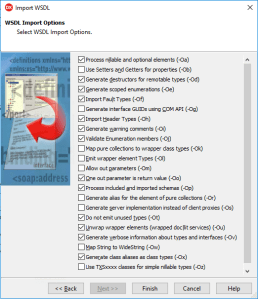
Note to self (as the WSDL importer has trouble with WSDL files that include XSD files having xsd:group definitions), the default settings of the importer in the UI:

-Oa -Od -Oe -Of -Oh -Oi -Oj -Oo -Op -Ot -Ou -Ov -Ox

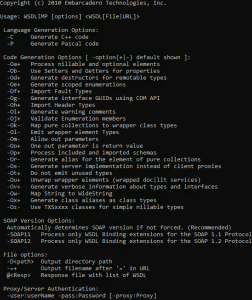
This matches the output from the WSDLImp.exe default settings as well (larger screenshots below):

I suspect the reason is that the command-line importer does, but the wizard does not, show an exception during processing:

*Error*: D:\Playground\iECK DT2.0 services v2.1.1\xsd\ECK-DT2-CatalogServiceSchema-v2.1.1.xsd
> Access violation at address 0059DBA4 in module 'WSDLImp.exe'. Read of address 00000000
Done : D:\Playground\iECK DT2.0 services v2.1.1\wsdl\ECK-DT2-CatalogService-v2.1.1.wsdl>0
Writing: D:\Playground\iECK_ImportWSDL\ECK_DT2_CatalogService_v2.pas

Hopefully more on that later.

Both the IDE expert and console based WSDLimp will write the output .pas file and the output file of both tools has the same content.

–jeroen

Read the rest of this entry »

Posted in Conference Topics, Conferences, Delphi, Development, Event, Software Development | Leave a Comment »

Procedural Programming: It’s Back? It Never Went Away – Kevlin Henney [ACCU 2018] – YouTube

Posted by jpluimers on 2018/05/09

If you haven’t been in the software development arena for the last 50 years, then watch this and learn all “modern” stuff has been around for ages:

Most if it comes from the era of Algol, make, AWK and the famous Structured Programming book (which is not about procedures, but about control flow).

So watch Procedural Programming: It’s Back? It Never Went Away – Kevlin Henney [ACCU 2018] – YouTube

Slide deck: Sideshare: Procedural Programming: It’s Back? It Never Went Away – Kevlin Henney [ACCU 2018]

Then read [WayBack] ISBN 9780122005503 – Structured Programming (A.P.I.C. studies in data processing, no. 8)

Via: [WayBack] Kevlin Henney – Google+

–jeroen

Read the rest of this entry »

Posted in Agile, Conference Topics, Conferences, Development, Event, Paradigms, Software Development | Leave a Comment »

Delphi .dproj file changed or not changed? Normalize it! | The Art of Delphi Programming

Posted by jpluimers on 2018/05/02

Cool tool that integrates into the Delphi IDE: [WayBackDproj changed or not changed? Normalize it! | The Art of Delphi Programming

Via: [WayBack] Introducing DprojNormalizer: http://www.uweraabe.de/Blog/2017/01/18/dproj-changed-or-not-changed/ – Uwe Raabe – Google+

Note there is also RadCLI that requires Python and does it via the command-line:[WayBackjoshkel/RadCli: Command-line utilities for RAD Studio / Delphi / C++Builder

DprojNormalizer supports Delphi XE7 and up.

Updates at [WayBack] Downloads | The Art of Delphi Programming: DprojNormalizer

Note that it requires an elevation to Administrator for installing. If you run Delphi as a normal user, then afterwards you need to register the package yourself, for instance with a batch file like this:

reg add "HKEY_CURRENT_USER\Software\Embarcadero\BDS\18.0\Known Packages" /v "C:\Program Files (x86)\DprojNormalizer\DprojNormalizer240.bpl" /t REG_SZ /d "Dproj Normalizer" /f
reg add "HKEY_CURRENT_USER\Software\Embarcadero\BDS\19.0\Known Packages" /v "C:\Program Files (x86)\DprojNormalizer\DprojNormalizer250.bpl" /t REG_SZ /d "Dproj Normalizer" /f

Adjust your BDS and DllSuffix in the BPL file names using the table at Delphi version info table: C# Builder, Delphi 8 through 10.2 Tokyo and Appbuilder.

If you want to temporarily disable it:

reg add "HKEY_CURRENT_USER\Software\Embarcadero\BDS\18.0\Disabled Packages" /v "C:\Program Files (x86)\DprojNormalizer\DprojNormalizer240.bpl" /t REG_SZ /d "Dproj Normalizer" /f
reg add "HKEY_CURRENT_USER\Software\Embarcadero\BDS\19.0\Disabled Packages" /v "C:\Program Files (x86)\DprojNormalizer\DprojNormalizer250.bpl" /t REG_SZ /d "Dproj Normalizer" /f

If you want to re-enable it: remove the values under Disabled Packages.

–jeroen


Posted in Conference Topics, Conferences, Delphi, Development, Event, Software Development | 1 Comment »