==> Caveats
==> nss
nss is keg-only, which means it was not symlinked into /usr/local,
because Firefox can pick this up instead of the built-in library, resulting in
random crashes without meaningful explanation.
Please see https://bugzilla.mozilla.org/show_bug.cgi?id=1142646 for details.
If you need to have nss first in your PATH run:
echo ‘export PATH=”/usr/local/opt/nss/bin:$PATH”‘ >> ~/.bash_profile
For compilers to find nss you may need to set:
export LDFLAGS=”-L/usr/local/opt/nss/lib”
export CPPFLAGS=”-I/usr/local/opt/nss/include”
For pkg-config to find nss you may need to set:
export PKG_CONFIG_PATH=”/usr/local/opt/nss/lib/pkgconfig”
==> sphinx-doc
sphinx-doc is keg-only, which means it was not symlinked into /usr/local,
because this formula is mainly used internally by other formulae.
Users are advised to use `pip` to install sphinx-doc.
If you need to have sphinx-doc first in your PATH run:
echo ‘export PATH=”/usr/local/opt/sphinx-doc/bin:$PATH”‘ >> ~/.bash_profile
==> sqlite
sqlite is keg-only, which means it was not symlinked into /usr/local,
because macOS provides an older sqlite3.
If you need to have sqlite first in your PATH run:
echo ‘export PATH=”/usr/local/opt/sqlite/bin:$PATH”‘ >> ~/.bash_profile
For compilers to find sqlite you may need to set:
export LDFLAGS=”-L/usr/local/opt/sqlite/lib”
export CPPFLAGS=”-I/usr/local/opt/sqlite/include”
For pkg-config to find sqlite you may need to set:
export PKG_CONFIG_PATH=”/usr/local/opt/sqlite/lib/pkgconfig”
==> openssl
A CA file has been bootstrapped using certificates from the SystemRoots
keychain. To add additional certificates (e.g. the certificates added in
the System keychain), place .pem files in
/usr/local/etc/openssl/certs
and run
/usr/local/opt/openssl/bin/c_rehash
openssl is keg-only, which means it was not symlinked into /usr/local,
because Apple has deprecated use of OpenSSL in favor of its own TLS and crypto libraries.
If you need to have openssl first in your PATH run:
echo ‘export PATH=”/usr/local/opt/openssl/bin:$PATH”‘ >> ~/.bash_profile
For compilers to find openssl you may need to set:
export LDFLAGS=”-L/usr/local/opt/openssl/lib”
export CPPFLAGS=”-I/usr/local/opt/openssl/include”
For pkg-config to find openssl you may need to set:
export PKG_CONFIG_PATH=”/usr/local/opt/openssl/lib/pkgconfig”
==> openssl@1.1
A CA file has been bootstrapped using certificates from the system
keychain. To add additional certificates, place .pem files in
/usr/local/etc/openssl@1.1/certs
and run
/usr/local/opt/openssl@1.1/bin/c_rehash
openssl@1.1 is keg-only, which means it was not symlinked into /usr/local,
because openssl/libressl is provided by macOS so don’t link an incompatible version.
If you need to have openssl@1.1 first in your PATH run:
echo ‘export PATH=”/usr/local/opt/openssl@1.1/bin:$PATH”‘ >> ~/.bash_profile
For compilers to find openssl@1.1 you may need to set:
export LDFLAGS=”-L/usr/local/opt/openssl@1.1/lib”
export CPPFLAGS=”-I/usr/local/opt/openssl@1.1/include”
For pkg-config to find openssl@1.1 you may need to set:
export PKG_CONFIG_PATH=”/usr/local/opt/openssl@1.1/lib/pkgconfig”
==> icu4c
icu4c is keg-only, which means it was not symlinked into /usr/local,
because macOS provides libicucore.dylib (but nothing else).
If you need to have icu4c first in your PATH run:
echo ‘export PATH=”/usr/local/opt/icu4c/bin:$PATH”‘ >> ~/.bash_profile
echo ‘export PATH=”/usr/local/opt/icu4c/sbin:$PATH”‘ >> ~/.bash_profile
For compilers to find icu4c you may need to set:
export LDFLAGS=”-L/usr/local/opt/icu4c/lib”
export CPPFLAGS=”-I/usr/local/opt/icu4c/include”
For pkg-config to find icu4c you may need to set:
export PKG_CONFIG_PATH=”/usr/local/opt/icu4c/lib/pkgconfig”
==> ruby
By default, binaries installed by gem will be placed into:
/usr/local/lib/ruby/gems/2.6.0/bin
You may want to add this to your PATH.
ruby is keg-only, which means it was not symlinked into /usr/local,
because macOS already provides this software and installing another version in
parallel can cause all kinds of trouble.
If you need to have ruby first in your PATH run:
echo ‘export PATH=”/usr/local/opt/ruby/bin:$PATH”‘ >> ~/.bash_profile
For compilers to find ruby you may need to set:
export LDFLAGS=”-L/usr/local/opt/ruby/lib”
export CPPFLAGS=”-I/usr/local/opt/ruby/include”
For pkg-config to find ruby you may need to set:
export PKG_CONFIG_PATH=”/usr/local/opt/ruby/lib/pkgconfig”
==> qt
We agreed to the Qt open source license for you.
If this is unacceptable you should uninstall.
qt is keg-only, which means it was not symlinked into /usr/local,
because Qt 5 has CMake issues when linked.
If you need to have qt first in your PATH run:
echo ‘export PATH=”/usr/local/opt/qt/bin:$PATH”‘ >> ~/.bash_profile
For compilers to find qt you may need to set:
export LDFLAGS=”-L/usr/local/opt/qt/lib”
export CPPFLAGS=”-I/usr/local/opt/qt/include”
For pkg-config to find qt you may need to set:
export PKG_CONFIG_PATH=”/usr/local/opt/qt/lib/pkgconfig”
==> python
Python has been installed as
/usr/local/bin/python3
Unversioned symlinks `python`, `python-config`, `pip` etc. pointing to
`python3`, `python3-config`, `pip3` etc., respectively, have been installed into
/usr/local/opt/python/libexec/bin
If you need Homebrew’s Python 2.7 run
brew install python@2
You can install Python packages with
pip3 install <package>
They will install into the site-package directory
/usr/local/lib/python3.7/site-packages
See: https://docs.brew.sh/Homebrew-and-Python
==> youtube-dl
Bash completion has been installed to:
/usr/local/etc/bash_completion.d
zsh completions have been installed to:
/usr/local/share/zsh/site-functions
==> cabal-install
Bash completion has been installed to:
/usr/local/etc/bash_completion.d
==> node
Bash completion has been installed to:
/usr/local/etc/bash_completion.d
==> hub
Bash completion has been installed to:
/usr/local/etc/bash_completion.d
zsh completions have been installed to:
/usr/local/share/zsh/site-functions
==> gnupg
Once you run this version of gpg you may find it difficult to return to using
a prior 1.4.x or 2.0.x. Most notably the prior versions will not automatically
know about new secret keys created or imported by this version. We recommend
creating a backup of your `~/.gnupg` prior to first use.
For full details on each change and how it could impact you please see
https://www.gnupg.org/faq/whats-new-in-2.1.html
==> mas
Bash completion has been installed to:
/usr/local/etc/bash_completion.d
==> pandoc
Bash completion has been installed to:
/usr/local/etc/bash_completion.d
==> go
A valid GOPATH is required to use the `go get` command.
If $GOPATH is not specified, $HOME/go will be used by default:
https://golang.org/doc/code.html#GOPATH
You may wish to add the GOROOT-based install location to your PATH:
export PATH=$PATH:/usr/local/opt/go/libexec/bin


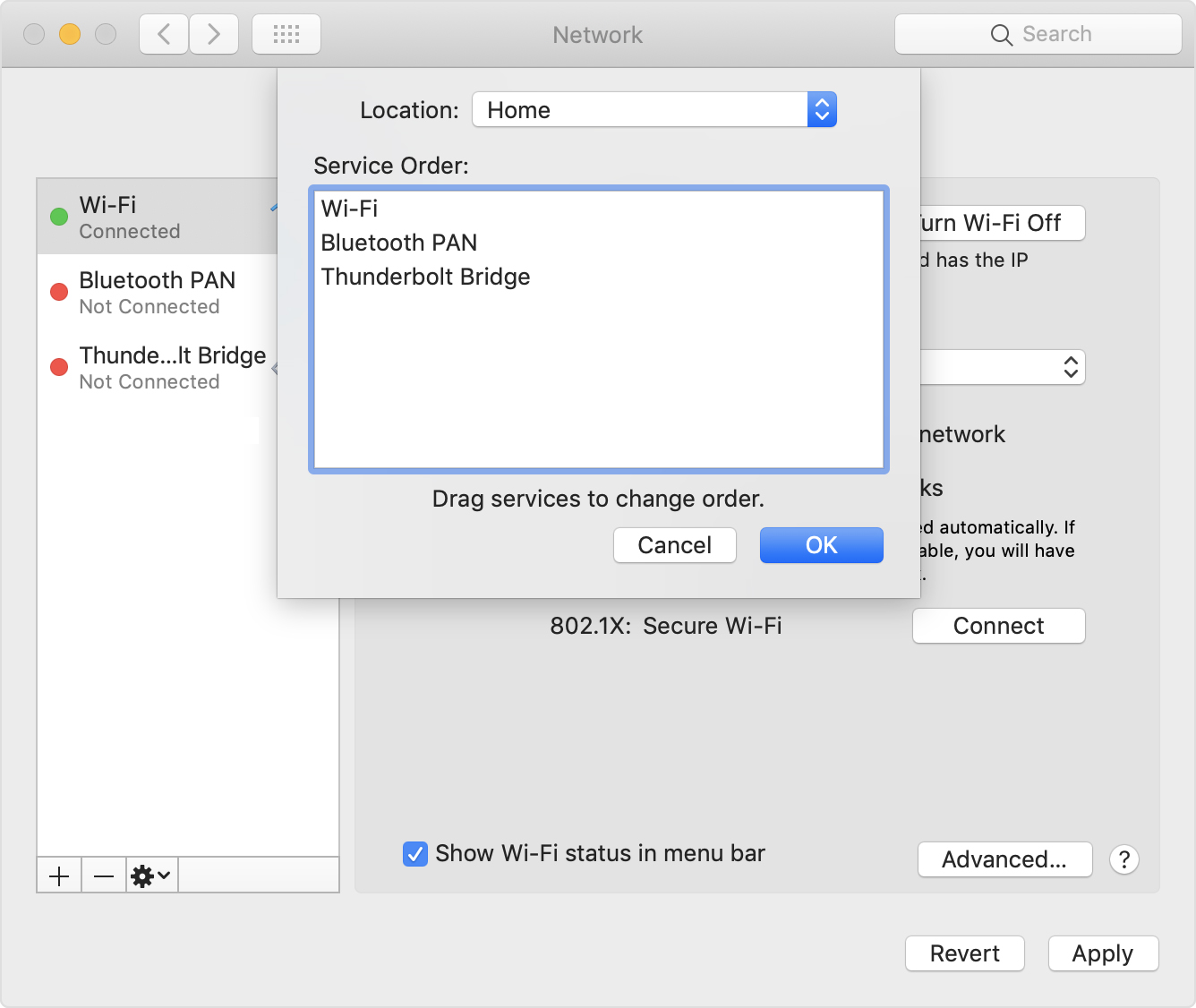
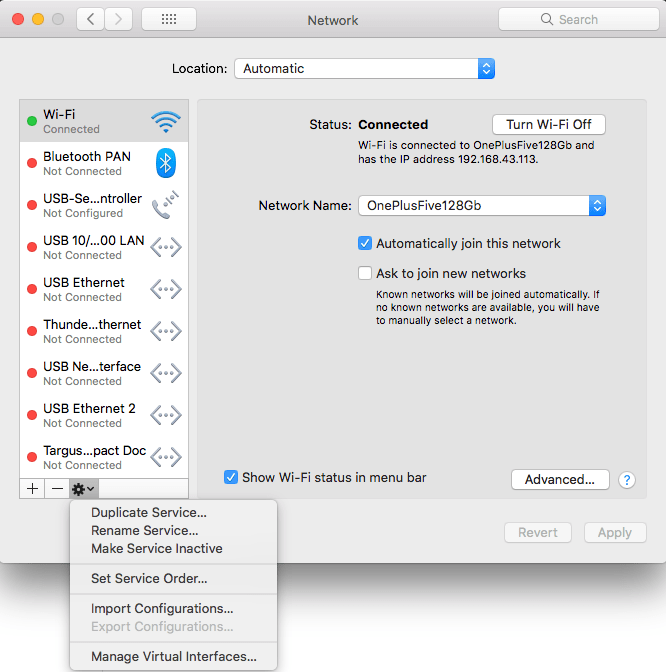 Very useful when you want to give your WiFi less priority than an USB or Thunderbolt network adapter: [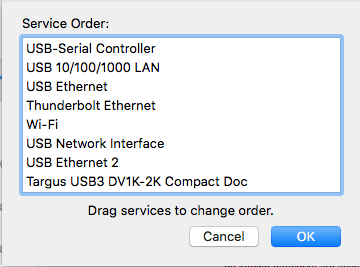

 The Wiert Corner - irregular stream of stuff