The Wiert Corner – irregular stream of stuff

Jeroen W. Pluimers on .NET, C#, Delphi, databases, and personal interests

  • My badges

  • Twitter Updates

  • My Flickr Stream

  • Pages

  • All categories

  • Enter your email address to subscribe to this blog and receive notifications of new posts by email.

    Join 1,860 other subscribers

Archive for the ‘GoogleDrive’ Category

Google Drive is not telling it secretly moves files to the trash

Posted by jpluimers on 2021/04/12

A while ago, Google Drive told me it was out of storage.
I tried re-syncing, and then it suddenly told me a “Drive storage is full” message indicating “You have 3GB in your trash at drive.google.com. Empty your trash or upgrade your storage”.

You can view your trash at drive.google.com/drive/trash

Emptying is more tricky than you’d think:

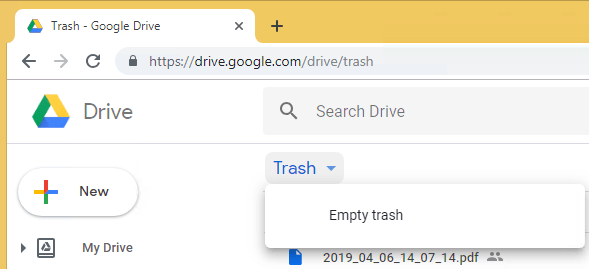
  1. Click on the “Trash word” (not the trash icon!)
  2. Click om “Empty trash”
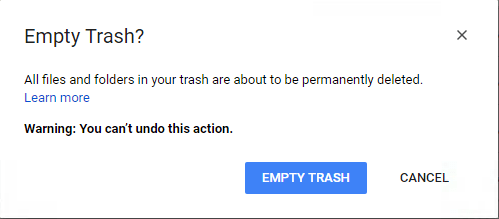
  3. Conform the action


  4. wait a few seconds, as often the trash will fill itself up again
  5. if it refilled: repeat from step 2.
  6. refresh your browser screen, as often then the trash will refill
  7. if it refilled: repeat from step 2.

The trash contained thousands of temporary PDF files: 3.2 GB, even more than Google Drive indicated.

These are not something I want to keep in the trash. Too bad Google Drive never warned me they were kept there.

On a different account that had way more file changes this saved more than 27 GB.

Maybe time to setup [WayBack] Google Drive Sensor | PRTG Network Monitor User Manual

Might be really interesting, as since 2015, [WayBack] PRTG 100 is Now Available For Free.

–jeroen

Posted in Google, GoogleDrive, Power User | Leave a Comment »

There’s recently been a question about moving G+ Photos to Google Photos. [Th…

Posted by jpluimers on 2019/03/01

[WayBack] There’s recently been a question about moving G+ Photos to Google Photos. [That is, Photos posted to Google+] Just been playing with this. Here’s one… – Julian Bond – Google+

Before I forget:

Here’s one route.

  1. Go to Google Photos settings and set Google Drive –
    Sync photos & videos from Google Drive.
  2. Google Takeout. G+Streams.Photos.
  3. Unzip locally.
  4. Copy the contents of ‘Takeout\Google+ Stream\Photos\Photos from posts‘ to a directory in Google Drive\My Pictures
  5. Fire up “Backup and Sync from Google” to upload
  6. Check the photos are now present in Photos.

And https://get.google.com/albumarchive/

Via: [WayBack] There’s recently been a question about moving G+ Photos to Google Photos. Just been playing with this. Here’s one route. 1. Go to Google Photos setti… – Alan Cox – Google+

–jeroen

Posted in G+: GooglePlus, Google, Google Photos, GoogleDrive, Power User | Leave a Comment »

Mac: when “Save time with right-click sharing from your Google Drive folder” fails…

Posted by jpluimers on 2018/07/09

A few years ago, Google Drive introduced this:

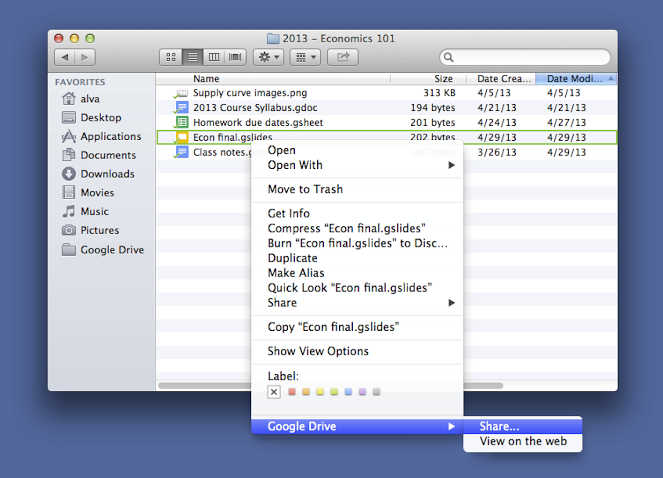
For those looking to share files more quickly, listen up. You can now share with others directly from the Google Drive folder on your Mac or PC. To share a file while inside your Google Drive folder, simply right click the file, select “Google Drive” and then click “Share.” This new feature is rolling out over the next few days.

Source: [WayBackSave time with right-click sharing from your Google Drive folder…

However, sometimes it fails. And the menu has changed as well.

By now the menu looks like this:

  • “View with Google Drive”
  • “Share using Google Drive”

If those do not appear, then:

Try to stop, then start Google Drive.

If that fails:

Read the rest of this entry »

Posted in Google, GoogleDrive, LifeHacker, Power User | Leave a Comment »

Google verlaagt prijzen opslagdienst Drive en komt met familieabonnement – Computer – Nieuws – Tweakers

Posted by jpluimers on 2018/05/28

Google heeft de prijzen voor veel abonnementen op de betaalde opslagdienst Drive verlaagd. Ook komt er een optie om verschillende betaalde abonnementen onder te brengen op een rekening. De gratis optie om 15GB op te slaan blijft bestaan.

[WayBack] Google verlaagt prijzen opslagdienst Drive en komt met familieabonnement – Computer – Nieuws – Tweakers

Quotes:

Daarboven komt nog de onzekerheid dat als je “per ongeluk” de voorwaarden van google schendt in één van hun diensten, ze je gehele account kunnen blokkeren zonder wederwoord. Je zou niet de eerste zijn die zich in de haren krabt en zich afvraagt waarom je in godsnaam van de ene op de andere dag geblokkeerd bent zonder dat je iemand kan contacteren om te vragen waarom.
Om deze reden doe ik regelmatig een sync met een andere clouddienst. Je betaalt dan wel wat meer maar dan heb je tenminste de zekerheid beschermt te zijn tegen zulke willekeur


Niemand hier die G Suite van Google gebruikt? Ik heb daar het business abonnement en betaal iets van 8 euro in de maand voor onbeperkte opslag. Er zit dan wel een 1TB limiet aan als je minder dan 5 accounts op je domeinnaam hebt staan, maar dat hanteren ze niet en ik denk na deze verandering bij Drive al helemaal niet.

Ik zet werkelijk alles op dat G Suite account, gewoon omdat het kan. Echter ben ik wel huiverig over het feit dat Google zomaar je account zou kunnen aflsuiten als je een bestand op je Drive hebt staan met copyright en macht met een hash die bij hun bekend is. Ik sla hele belangrijke bestanden dan ook altijd nog op, op mijn lokale NAS, thuis.


Ik gebruik hetzelfde al sinds oktober 2017 en heb er ondertussen 20TB op staan. Kan ook bevestigen dat ze de 5 gebruiker regel niet toepassen in de praktijk.

Persoonlijk raad ik wel aan om alles lokaal te encrypten/decrypten en dan naar drive uploaden. Dit kan makkelijk met de crypt module van rclone https://rclone.org/crypt/

Heb al screenshots van mensen gezien die er 200TB hebben op staan.

Zeker als hoge upload snelheid (zelf heb ik 1gbit) hebt is dit een goede oplossing voor offsite replicatie / cold storage voor je lokale backups.

Overigens is er wel een 10TB download en 750GB upload limiet per dag. Ben zelf al een paar keer tegen het upload limiet aangelopen maar denk dat dit voor de meeste gebruikers geen probleem is.

Als backup tool gebruik ik op dit moment https://duplicacy.com/


Zoiets heb ik inderdaad ook al eens gehoord, tevens heb ik een meerdere chats van Google vernomen dat er niets mee aan de hand is als je dat doet, de medewerker zelf had ook meerdere bestanden met copyright op zijn Drive staan.

De key lijkt dus dat je het gewoon niet deelt, want dan is het natuurlijk mogelijk dat de link op internet verschijnt en je in feite materiaal met copyright verspreid en dan wordt het natuurlijk een ander verhaal.

Heb ook nog met de woordvoerder op Twitter een chat gehad (Rachid Finge) en die heeft aangegeven ook G Suite te gebruiken voor persoonlijk gebruik. Screenshot

Ik denk dat we dus redelijk veilig zitten met het gebruik van G Suite voor persoonlijk gebruik, ik kan het dus iedereen aanraden, zeker als je meer dan 2TB denk te gaan gebruiken!


Posted in Google, GoogleDrive, LifeHacker, Power User | Leave a Comment »

Backup & Sync: The ridiculous steps you need to move the Google Drive from the C: drive to the D: drive

Posted by jpluimers on 2018/04/27

Unlike for instance DropBox, Google Backup & Sync does not allow you do move the Google Drive location in a one-step way. You have to go through below ridiculous steps to move it around yourself.

A comment on G+ indicated I should try Insync. Not free, but way more stable and more features.

[WayBack] Insync: A Mini Desktop File Manager For Your Google Drive

Insync adds Google Drive functionality to your Windows, Linux and mac OS desktop. Sync, backup, edit and share files easily with one or multiple accounts. Team Drives syncing for G Suite accounts now available! Try Insync free, no credit card needed.

[WayBack] Unlike for instance DropBox, Google Backup & Sync does not allow you do move … – Jeroen Wiert Pluimers – G+

I got them via [Archive.is] Change default location of Backup and Sync Folder on disk. – Google Product Forums, rephrased and added screenshots:

Read the rest of this entry »

Posted in Fujitsu ScanSnap, Google, GoogleBackupAndSync, GoogleDrive, Hardware, ix500, Power User, Scanners | Leave a Comment »

Just in case you are wondering what these %TEMP%\_MEI* folders are about: Google Drive does not cope well with Windows logoff/shutdown…

Posted by jpluimers on 2018/03/19

From a while back, but still not fixed: [WayBack] Just in case you are wondering what these %TEMP%_MEI* folders are about: Google Drive apparently doesn’t clean up correctly when it exits because you l… – Daniela Osterhagen – Google+

Just in case you are wondering what these %TEMP%\_MEI* folders are about: Google Drive apparently doesn’t clean up correctly when it exits because you log off or shut down Windows.

This is ridiculous. It’s not as if there weren’t any options to let Windows do that cleanup if the program fails.

It is still not fixed:

[WayBack] Just in case you are wondering what these %TEMP%_MEI* folders are about: Google Drive apparently doesn’t clean up correctly when it exits because you l… – Jeroen Wiert Pluimers – Google+

Adrian Meacham:

Still doing it all these years later – only the size of the garbage left behind has changed (Size: 58.4 MB (61,303,879 bytes) Size on disk: 67.7 MB (71,061,504 bytes) 1/3 of which is icons) – why this isn’t committed to Chrome instead of held open in %TEMP% is beyond reasoning +Google Drive

Original forum source: [Archive.is] _MEI folder created at windows start – Google Product Forums

by Martin Friedl 3/17/13

Hi,
I just found out that on windows the google drive tool creates a ‘_MEIxxxxx’ folder on every startup of windows. The xxxxx is a number that differs at every startup. On my PC (with windows 7) this folder is created on ‘C:\’ and has a size of about 35MB. SO with every start of windows google drive occopies 35 additional MB. It looks as the content of the folder is mainly Pyhton-files.

Is there a way to prevent google drive from creating an additional folder with every start of windows?

Best regards
Martin

10/21/13
Klint said:
If you exit Google Drive by right-clicking the Google Drive icon in your Windows 7 notification area, and selecting Exit, then Google Drive shuts down properly and correctly deletes the _MEIxxx folder. Unfortunately, it leaves the folder behind if you leave Google Drive running when you log out or shut down. So, yes, it is a bug in Google Drive. It ought to terminate properly when the user logs out.

–jeroen

Read the rest of this entry »

Posted in Google, GoogleDrive, Power User, Windows | Leave a Comment »

Reminder to self: Sort out empty (zero size) Icon? files in Google Drive folder on OS X and Windows

Posted by jpluimers on 2018/01/12

It looks like when syncing folders between Mac OS X (MacOS X?) and Windows, many directories get empty Icon? files have a size of 0 bytes.

None of these directories had custom icons, so I’m inclined to remove them all from the Google Drive folder:

find . -name 'Icon*' -size 0 -print0 | xargs -0 rm

as [WayBackDidier Trosset answered at [WayBackHow to delete many 0 byte files in linux? – Stack Overflow

Before I do that, I need to read these in more detail:

–jeroen

Posted in Apple, Google, GoogleDrive, iMac, Mac, Mac OS X / OS X / MacOS, MacBook, MacBook Retina, MacBook-Air, MacBook-Pro, MacMini, OS X 10.10 Yosemite, OS X 10.11 El Capitan, OS X 10.9 Mavericks, Power User | Leave a Comment »

Google Drive stuck forever on “One Moment Please” during initial login on Windows Server based systems.

Posted by jpluimers on 2017/05/29

Basically the Google Drive sign-in user interface is a wrapper around Internet Explorer.

If you have tight Internet Option settings, then your sign-in can fail without telling you why:

There is a older list of exceptions to add to the Internet Options Application Development: sign in to google drive … stuck in one moment please, but since Google has moved quite a few domains around (they now for instance use 1e100.net for part of the traffic).

The easiest way is to get the URLs right is to play back what Google Drive sign-in does from within Internet Explorer. These are the steps:

Read the rest of this entry »

Posted in Google, GoogleDrive, Power User | Leave a Comment »

Mac OS X: restarting Google Drive when it shows a spinning wheel

Posted by jpluimers on 2017/03/29

Every now and then, Google Drive on Mac OS X gets confused and starts showing the spinning wheel when hovering over the menu bar icon similar to for instance DropBox does every once in a while.

This is how to terminate and restart Google Drive from the terminal (no need for su):

killall -v -SIGKILL Google\ Drive
open -a Google\ Drive

Alternatively you can start Google Drive using this:

/Applications/Google\ Drive.app/Contents/MacOS/Google\ Drive &

I found this executable through osx – Find all executable files within a folder in terminal – Ask Different

Note that this won’t kill Google Drive as it sends the TERM signal (SIGTERM):

killall -v Google\ Drive

–jeroen

Posted in Apple, bash, Development, Google, GoogleDrive, iMac, Mac, Mac OS X / OS X / MacOS, MacBook, MacBook Retina, MacBook-Air, MacBook-Pro, MacMini, OS X 10.10 Yosemite, OS X 10.11 El Capitan, OS X 10.8 Mountain Lion, OS X 10.9 Mavericks, Power User, Scripting, Software Development | 1 Comment »

The size and distribution of the data over your Google Drive storage

Posted by jpluimers on 2015/12/10

Drive storage is at https://www.google.com/settings/storage

–jeroen

Posted in G+: GooglePlus, GMail, Google, GoogleDrive, Power User, SocialMedia | Leave a Comment »