The Wiert Corner – irregular stream of stuff

Jeroen W. Pluimers on .NET, C#, Delphi, databases, and personal interests

  • My badges

  • Twitter Updates

  • My Flickr Stream

  • Pages

  • All categories

  • Enter your email address to subscribe to this blog and receive notifications of new posts by email.

    Join 1,860 other subscribers

Archive for the ‘GoogleSearch’ Category

Parameter you should add to most of your Google queries: “before:2023” (thanks Grant Gulovsen on Mastodon)

Posted by jpluimers on 2024/04/29

[Wayback/Archive] Grant Gulovsen: “Someone recently posted a hot tip about adding “before:2023” to Google web searches and I forget who it was but wow what a huge difference it makes. So thank you to whoever that was. It gets rid of so much AI-generated SEO crap.” – Mastodon

The actual source seemed to be either of these:

Read the rest of this entry »

Posted in Chrome, Chrome, Firefox, Google, GoogleSearch, Power User, Web Browsers | Leave a Comment »

I missed that this has become way easier: Searching code – GitHub Docs

Posted by jpluimers on 2023/08/02

For my link archive, the table of contents of [Wayback/Archive/Archive] Searching code – GitHub Docs:

Limitations apply:

Due to the complexity of searching code, there are some restrictions on how searches are performed:

  • You must be signed into a user account on GitHub to search for code across all public repositories.
  • Code in forks is only searchable if the fork has more stars than the parent repository. Forks with fewer stars than the parent repository are not indexed for code search. To include forks with more stars than their parent in the search results, you will need to add fork:true or fork:only to your query. For more information, see “Searching in forks.”
  • Only the default branch is indexed for code search.
  • Only files smaller than 384 KB are searchable.
  • Only repositories with fewer than 500,000 files are searchable.
  • Only repositories that have had activity or have been returned in search results in the last year are searchable.
  • Except with filename searches, you must always include at least one search term when searching source code. For example, searching for language:javascript is not valid, while amazing language:javascript is.
  • At most, search results can show two fragments from the same file, but there may be more results within the file.
  • You can’t use the following wildcard characters as part of your search query: . , : ; / \ ` ' " = * ! ? # $ & + ^ | ~ < > ( ) { } [ ] @. The search will simply ignore these symbols.

There is a truckload of languages supported, though the yaml format of the list is not really human readable: [Wayback/Archive] linguist/languages.yml at master · github/linguist

I’ll try this and see if it works better than Google Search.

Via:

–jeroen

Posted in Development, DVCS - Distributed Version Control, GitHub, Google, GoogleSearch, Power User, Software Development, Source Code Management | Leave a Comment »

css color picker – Google Search

Posted by jpluimers on 2021/08/12

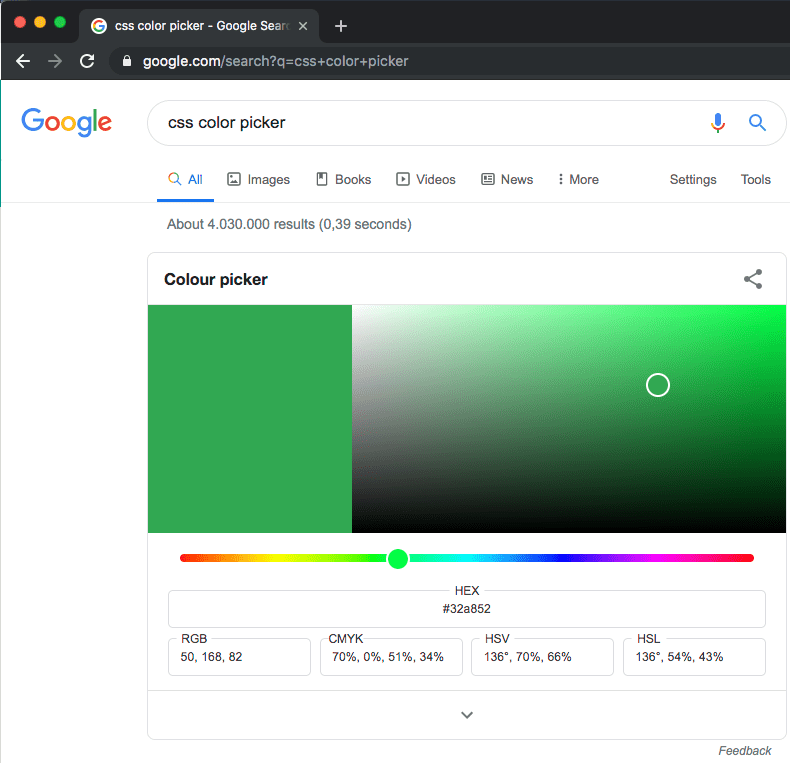
Probably old, but there is an embedded [WayBack] css color picker – Google Search that on each refresh switches colours:

–jeroen

Posted in Color (software development), CSS, Development, Google, GoogleSearch, HTML, Power User, Software Development, Web Development | Leave a Comment »

Limiting Google Research to multiple web-sites using the OR and site: operators

Posted by jpluimers on 2021/01/22

I knew Google Search had a site: operator and I thought you could or them together using something like this:

reboot site:superuser.com or site:android.stackexchange.com

To my surprise that returned zero results as in empty result list.

Indeed: the OR needs to be in uppercase to work:

you can use the OR operator to add another site to your query:

reboot site:superuser.com OR site:android.stackexchange.com

–jeroen

Source: How to limit Google search result to a set of websites? – Web Applications Stack Exchange [WayBack]

Posted in Google, GoogleSearch, Power User | Leave a Comment »

Guidelines for representing your business on Google – Google My Business Help

Posted by jpluimers on 2020/08/17

For my link archive: [WayBack] Guidelines for representing your business on Google – Google My Business Help

–jeroen

Posted in Google, GoogleMaps, GoogleSearch, LifeHacker, Local Guides, Power User | Leave a Comment »

“View Image” button in Google Image Search

Posted by jpluimers on 2020/07/10

Hopefully by now the extensions below still work, as Google removed the “View Image” button in Google Image Search a few years back.

When not: these might help finding an updated method (:

Via:

–jeroen

Posted in Google, GoogleImageSearch, GoogleSearch, Power User | Leave a Comment »

Google Dataset Search

Posted by jpluimers on 2019/08/22

Reminder to self: check if [WayBack] Dataset Search still exists.

Via: [WayBack] Looking for a #dataset to use to train your system or test it? #Google has just released a search engine specifically for datasets. Very useful! #Machi… – Jason Mayes – Google+

–jeroen

Posted in Google, GoogleSearch, Power User | Leave a Comment »

Google old content posted before a specific date

Posted by jpluimers on 2019/05/15

Steps:

  1. Start with something like https://www.google.com/search?q=”did+you+hear+about+the+man”+”he%27s+0K+now”
  2. Clicking Tools followed by Any Time, then Custom range often does not show a dialog.
  3. Appending &tbs=qdr:y to the URL magically enables that popup:
    https://www.google.com/search?q=”did+you+hear+about+the+man”+”he%27s+0K+now”&tbs=qdr:y
  4. After filling it in, you get a very different URL like https://www.google.com/search?q=”did+you+hear+about+the+man”+”he%27s+0K+now”&tbs=cdr:1,cd_min:,cd_max:01-01-2007

This is how I found the post in Did you hear about the man who got cooled to absolute zero? He’s 0K now.

I think cdr stands for custom date range and qdr for a built in date range as after searching for the abbreviations, I found [WayBack] Google Search URL Request Parameters | DETECTED that discusses tbm and tbo in addition to tbs.

The trick above is the successor of [WayBack] Filter Google Results by Date with a URL Trick which appended &as_qdr=d.

–jeroen

Posted in Google, GoogleSearch, Power User | Leave a Comment »

Preventing sites to add themselves to the Google Chrome search engine list

Posted by jpluimers on 2019/01/11

For a long time, sites have been able to add themselves to the search engine list in Google Chrome.
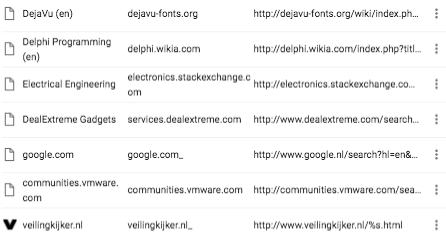
 

The last one is my own, but hundreds of them are not.

I never noticed this until I needed to add some custom search engine strings to the list and found the UI is obnoxiously slow when there are hundreds of entries in that list.

It’s like the cookies editor: the editing speed decreases exponentially with the number of entries in that list.

The feature is called Tab to Search, apparently is intentional, based on the OpenSearch standard and well documented:

Many people dislike it though:

There are various ways around it documented in the last link.

This is the one I liked best: [WayBackDon’t add custom search engines – Chrome Web Store.

Via: [WayBack] Google Chrome: Remove all ‘Other Search Engines’ – Super User who also pointed me to the script below the signature ([WayBack] Remove chrome “other search engines” · GitHub), which likely needs this change:

penguin020 commented on Dec 22, 2017  

Just in case you are trying to use this with the (keep) mechanism, I think that the engine.modelIndex can get muddled if you do not refresh between runs of this script, possibly deleting engines you wish to keep.

UPDATE: if you reverse sort by modelIndex, this problem is obviated.

Add

val.others.sort(function (a, b) { return b.modelIndex - a.modelIndex; });

just after the .then.

–jeroen

Read the rest of this entry »

Posted in Chrome, Google, GoogleSearch, Power User | Leave a Comment »

How to Force Google Chrome to Use Google.com Instead of Country Specific Version

Posted by jpluimers on 2018/12/21

Steps:

  1. visit this URL once: https://google.com/ncr (to fix google.com as search engine)
  2. define a Google.com search shortcut in chrome://settings/searchEngines

You can use example search shortcuts from Forcing Chrome to use google.com as search engine.

If you forget the first step, then often your search still will go a localised place (except when you are in the USA).

–jeroen

Posted in Google, GoogleSearch, Power User | Leave a Comment »