Archive for the ‘Keyboards and Keyboard Shortcuts’ Category
Posted by jpluimers on 2020/07/21
Good to remember both these:
[WayBack] Operant Conditioning by Software Bugs – Embedded in Academia which means when using a system, you subconsciously start behaving around it’s issues. This also happens when you the software you wrote the software for such a system: you hardly test the things that you broke.
The magic SysReq key on Linux systems running on PC-hardware allows you to sync/mount read-only/shutdown a system by keyboard (and many more options – see the Wikipedia list below). Do not forget to enable this as it is disabled by default. And remember that many laptops forego the SysReq key (as do Mac systems).
The order while holding Alt-SysReq down is S,U,B…
Both via [WayBack] Kristian Köhntopp – Google+
–jeroen
Read the rest of this entry »
Posted in *nix, *nix-tools, Development, Keyboards and Keyboard Shortcuts, Power User, Software Development, ThinkPad | Leave a Comment »
Posted by jpluimers on 2020/07/10
 I am still a bit ambivalent on remapping keys on a keyboard, mainly because of two reasons:
- Without remapping, tools used for virtualisation, remote access and shells already get it wrong every now and then. Finding causes is already tough, so adding more degrees of freedom complicates this more.
- Switching systems or assisting people without the tools can be cumbersome. I vividly remember the really hard times when I had switched from Windows Explorer to Windows Commander (now Total Commander) and could not use it on a sequence of contracting jobs.
Just in case I am going to use it:
–jeroen
Via:
Posted in Keyboards and Keyboard Shortcuts, Power User | Leave a Comment »
Posted by jpluimers on 2019/12/20
Cool: Magic SysRq key – Wikipedia
The magic SysRq key is a key combination understood by the Linux kernel, which allows the user to perform various low-level commands regardless of the system’s state. It is often used to recover from freezes, or to reboot a computer without corrupting the filesystem.[1] Its effect is similar to the computer’s hardware reset button (or power switch) but with many more options and much more control.
Sometimes reading fluffy fluff posts teaches you new things, so be sure to read this one:
[WayBack] I just got trolled by my cat, hard. Last night i left my linux laptop open and running while watching TV in the other room. I came back to find Marley … – Stephen Shirley – Google+
…
I started looking through the kernel logs from last night, to see if there was any indication of the issue starting. And then i saw it. One innocent line that said:
Dec 18 21:26:52 x240 kernel: [373001.156356] sysrq: SysRq : Emergency Remount R/O
The fluffy dumbass had somehow hit the Sysrq [0] key combo to mount all filesystems read-only. This is an old, low-level when-all-else-fails facility for dealing with an linux unresponsive system, and fluff-for-brains Marley had somehow hit alt+fn+s+u.
Sigh.
[0] https://en.wikipedia.org/wiki/Magic_SysRq_key
Via: [Archive.is] I just got trolled by my cat, hard. Last night i left my linux laptop open and running while watching TV in the other room. I came back to find Marley … – Kristian Köhntopp – Google+
–jeroen
Posted in *nix, *nix-tools, Keyboards and Keyboard Shortcuts, Linux, Power User | Leave a Comment »
Posted by jpluimers on 2019/03/11
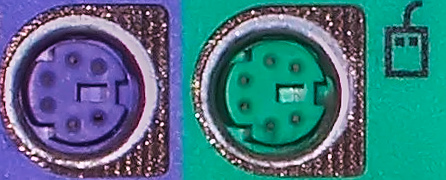
 I always forget which colours the [WayBack] PS/2 port for keyboard and mouse have.
Some of my old (some call it classic or vintage) mice and keyboards don’t even have a coloured plug.
Luckily, Wikipedia has the answer File:Ps-2-ports.jpg – Wikipedia :
| Color |
Description |
| Purple |
Keyboard |
| Green |
Mouse |
–jeroen
Posted in History, Keyboards and Keyboard Shortcuts, Power User | Leave a Comment »
Posted by jpluimers on 2018/05/14
Edit 20260814: added archived link; removed comment link to G+ as that died a long time ago.
Since:
- many people use the left-alt key as it as it is more accessible
- development tools uses a lot of Alt-Shift based keyboard shortcuts
- Windows by default has the Left Alt+Shift shortcut enabled to switch language+keyboard layout combinations
- In most countries, Windows by default has more than one language+keyboard combination installed
- Windows remembers per application instance which language+keyboard combination is used
every now and then you will get strange characters in only your development tools.
You can change this Windows setting, but be aware that every now and then, various Windows versions will re-enable the Left Alt+Shift even if you have previously disabled it. As of Windows 7 this occurs far less often, but still seems to occur.
Source: [Wayback/Archive] Question: Does anyone else have instances in the IDE (Berlin but has happened…
--jeroen
Posted in internatiolanization (i18n) and localization (l10), Keyboards and Keyboard Shortcuts, Power User, Windows | Leave a Comment »
Posted by jpluimers on 2017/10/27
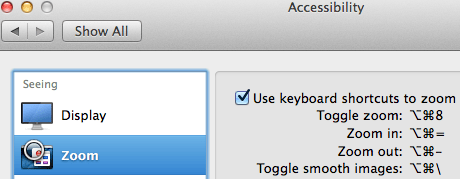
Accessibiity -> Zoom -> enable checkbox” class=”size-medium” /> Preferences -> Accessibiity -> Zoom -> enable checkbox
I didn’t know this was built-in since Mountain Lion and up, but it is, is startable from the keyboard and it’s tremendously convenient when presenting: [WayBack]: OS X Mountain Lion: Zoom content on the screen.
TL;DR:
- System Prefrecences
- Accesibility
- Zoom
- Checkbox
–jeroen
Posted in Apple, iMac, Keyboards and Keyboard Shortcuts, Mac, Mac OS X / OS X / MacOS, MacBook, MacBook Retina, MacBook-Air, MacBook-Pro, MacMini, macOS 10.12 Sierra, OS X 10.10 Yosemite, OS X 10.11 El Capitan, OS X 10.8 Mountain Lion, OS X 10.9 Mavericks, Power User | Leave a Comment »
Posted by jpluimers on 2017/07/17
 If it had function keys, I might have ordered it, but in case anyone is still interested: order before the end of July as they will likely not do a re-run of this unique project: [Archive.is] Brand New Model F Keyboards – The Model M Predecessor: Mechanical Capacitive Buckling Spring Keyboards with NKRO.
Model F quality is much better than Model M, which is way better than anything manufactured after that. Just compare the spring mechanisms below.
via: [WayBack] Keyboardfanaat gaat getrouwe reproducties IBM Model F leveren – Computer – .Geeks – Tweakers
What is the Difference between IBM Model M and Model F Key-Switches?
[WayBack] What is the Difference between IBM Model M and Model F Key-Switches?


–jeroen
Read the rest of this entry »
Posted in Keyboards and Keyboard Shortcuts, Power User | Leave a Comment »
Posted by jpluimers on 2017/05/24
Cool: someone made a CheatSheet for Readline keyboard shortcuts for bash, bc, ftp, gnuplot, gpg, ksh, mysql, psql, python, smbclient, xmllint and zsh [WayBack] of the GNU Readline library [WayBack].
–jeroen
Posted in *nix, *nix-tools, Keyboards and Keyboard Shortcuts, Power User | Leave a Comment »




 The Wiert Corner - irregular stream of stuff
