The Wiert Corner – irregular stream of stuff

Jeroen W. Pluimers on .NET, C#, Delphi, databases, and personal interests

  • My badges

  • Twitter Updates

  • My Flickr Stream

  • Pages

  • All categories

  • Enter your email address to subscribe to this blog and receive notifications of new posts by email.

    Join 1,860 other subscribers

Archive for the ‘Mainboards’ Category

LGA 2011 – remove and insert a CPU

Posted by jpluimers on 2021/05/21

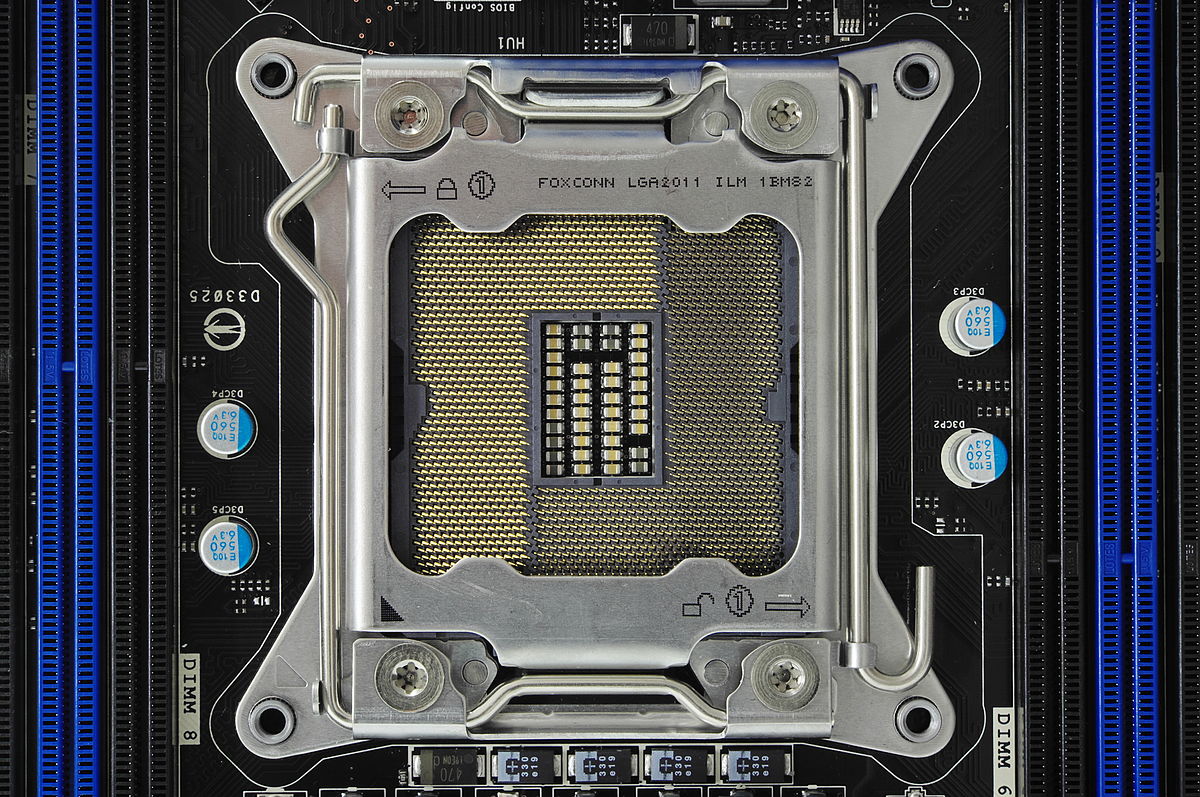
I while ago I needed to upgrade a processor in a LGA 2011  socket

If you know what the icons mean they are simple.

  • The (1) lock on the top left means that lever (with the triangle bend in it) needs to be done first when locking
  • The (1) unlock on the bottom right means that lever (with the rounded end) needs to be done first when unlocking

More details at:

–jeroen

Read the rest of this entry »

Posted in Hardware, Mainboards, Power User | Leave a Comment »

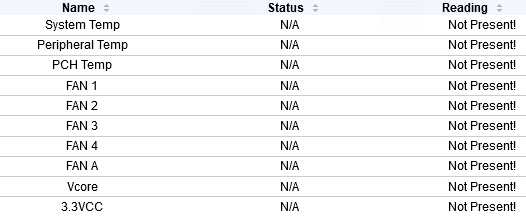
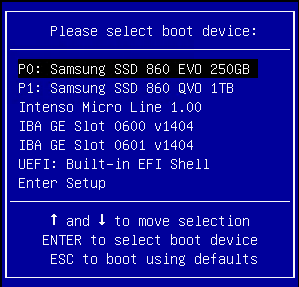
When all your SuperMicro X9/X10/X11 IPMI sensors show N/A: the system is in a BIOS or boot selection screen

Posted by jpluimers on 2021/05/17

I have seen this happen on various Supermicro X9/X10/X11 systems including X9SRi-F/X9SRi-3F/X10SRH-CF/X11SPM-F boards:


I found this via:

  • [WayBack] IPMI no sensor readings and already reset | iXsystems Community
  • [WayBack] Supermicro X10 and X11 motherboard FAQ | iXsystems Community

    All the sensors read N/A 

    First of all, make sure you’re not in the BIOS setup menu. IPMI monitoring of sensors isn’t available there.

    If that is not the case, the procedures listed under “The CPU/PCH temperatures read N/A” may help.

    The CPU/PCH temperatures read N/A

    While the exact cause is unknown, the BMC may enter a faulty state, requiring a reset.

    The following options were recommended to me by Supermicro:

    • Start by power cycling the IPMI. This can be done from the web interface.
    • If that doesn’t work, reset it to factory defaults via the web interface and power cycle it (it will not work until it is properly power cycled).

–jeroen

Posted in Hardware, IPMI, Power User, SuperMicro | Leave a Comment »

SC732D4-500B | Mid-tower | Chassis | Products | Super Micro Computer, Inc.

Posted by jpluimers on 2021/05/10

The [WayBack] SC732D4-500B | Mid-tower | Chassis | Products | Super Micro Computer, Inc. is a nice tower case, but remember that it has 2 USB 3.0 ports on the outside.

If you have a motherboard without onboard USB 3.0 pin headers, or one with incompatible pin headers, then you cannot use these ports with this standard cable that comes with the case:

Cable(S) CBL-0453L 1 USB 3.0,INT,19 PIN/F TO 19PIN/F,60CM,CONNECT TO CBL-0454L

Most of the X9 motherboards have no compatible pin headers.

These boards are an exception:

Too bad my boards are X9SRI-F and X9SRI-3F (do NOT get the bare X9SRI: it has no iPMI) with C6xx Dual processor Sandy Bridge-based Xeon chipsets (List of Intel Xeon chipsets) – Wikipedia:

This cable might fix this, though there is very little documentation on either of these cables:

Adapter Cable CBL-0454L USB3.0 to 2.0 adapter cable – 30cm(19pin male to 9pin female)

I could find no site with a picture of the first cable, and only newegg had pictures of the last one.

[WayBack] Supermicro CBL-0454L Supermicro CBL-0454L USB 3.0 to USB 2.0 Adapter Cable – Newegg.com

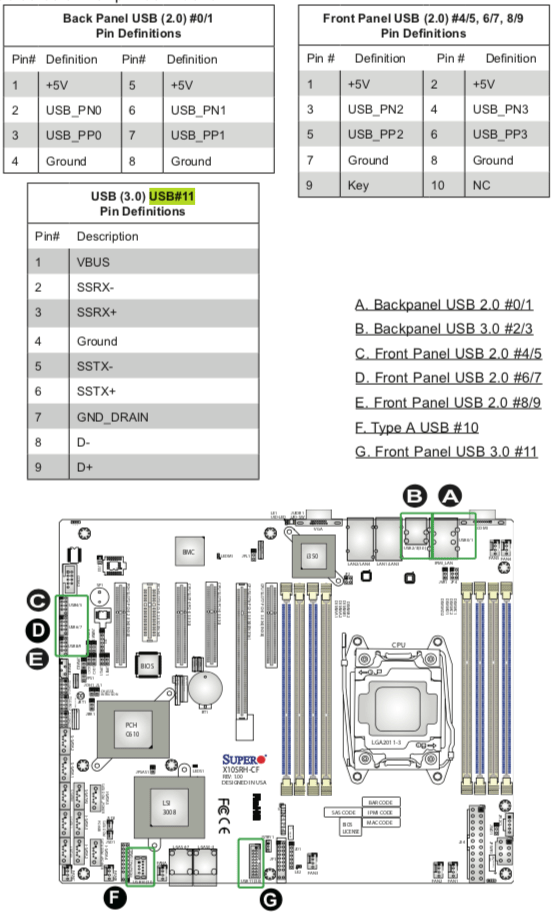
Luckily I had an X10 manual at hand, so here you can see the various pin-outs.

One end of the CBL-0454L has the same pin out as “USB (3.0) USB#11 Pin Definitions” (actually you need to double the rows) so CBL-0453L fits into it.

The other end of CBL-0454L fits into “Front Panel USB (2.0) /5, 6/7, 8/9” headers.

Fitting 2.5 inch drives in it

Another interesting aspect is part:

2.5″ HDD Bracket MCP-220-73201-0N HDD Cage (4x Internal 2.5″ fixed HDD bays)

Again hard to find pictures. There is only one at the whole supermicro site:

[WayBack] Supermicro | Products | SuperWorkstation | Mid-Tower | 5039C-T with Part List

[WayBack] 5039C-T_side.jpg

The part is [WayBack] Supermicro MCP-220-73201-0N Accessories with 0091016_2-5in-hdd-cage-4x-internal-2-5in-hdd.jpg (500×500)

–jeroen

Posted in Hardware, Mainboards, Power User, SuperMicro, X9SRi-3F, X9SRi-F | Leave a Comment »

Supermicro X9SRi-F Mainboard with SCU – Motherboards and CPUs – Unraid

Posted by jpluimers on 2021/05/10

Passthrough should work with these: [WayBack] Supermicro X9SRi-F Mainboard with SCU – Motherboards and CPUs – Unraid

Both unRaid and eESXi success in that thread.

–jeroen

Posted in Hardware, Mainboards, Power User, SuperMicro, X9SRi-F | Leave a Comment »

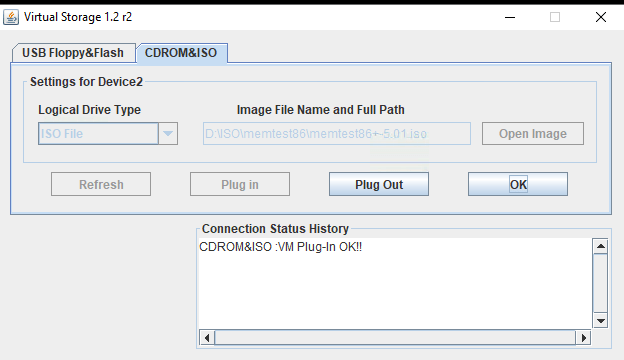
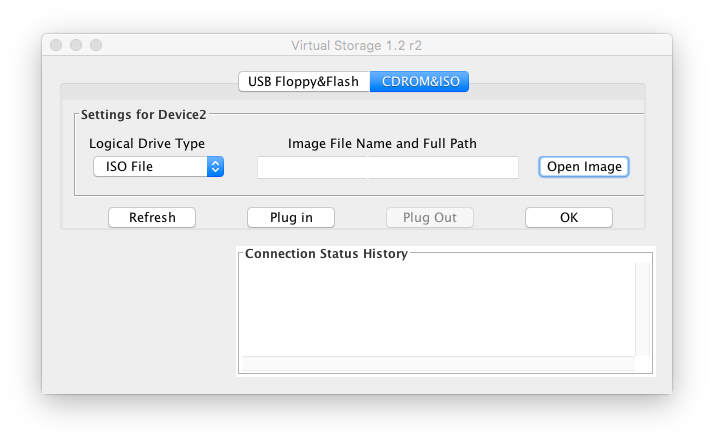
MacOS IPMIView and Supermicro X9SRi-F web interface cannot mount ISOs; on Windows, the web started Java iKVM console can

Posted by jpluimers on 2021/05/07

Screenshots so I do not forget.

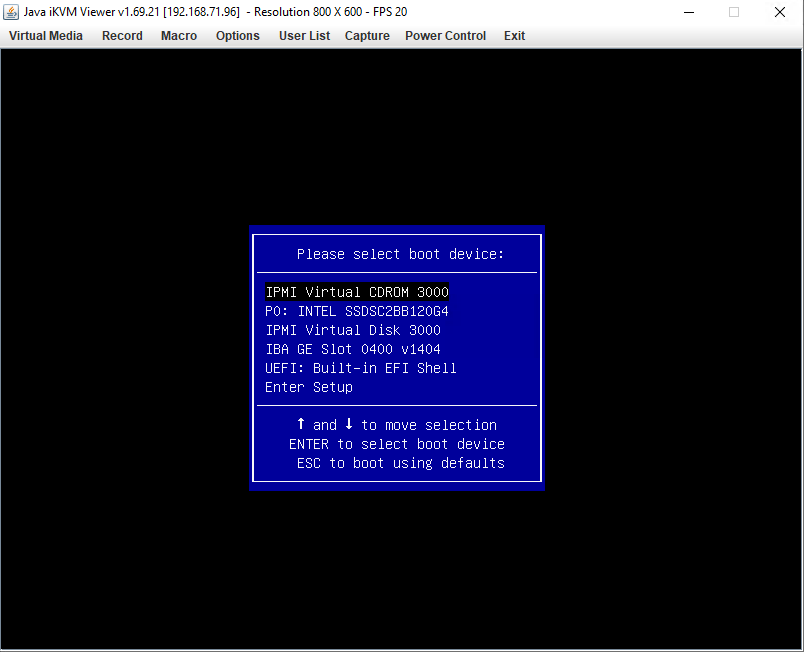
Works from Windows Java iKVM Viewer v1.69.21 started via the web interface:

C:\Users\jeroenp>java -version
java version "1.8.0_211"
Java(TM) SE Runtime Environment (build 1.8.0_211-b12)
Java HotSpot(TM) 64-Bit Server VM (build 25.211-b12, mixed mode)

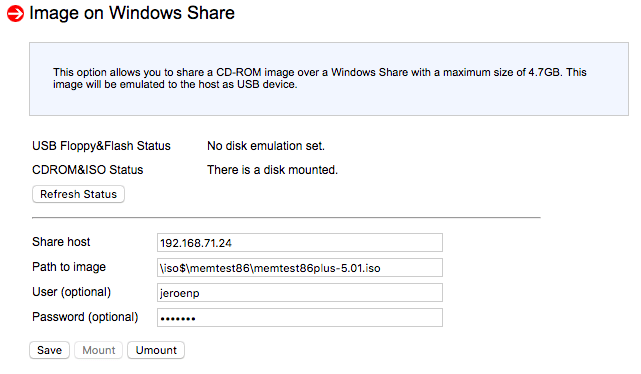
Fails from web interface:

It does not matter if the share is iso$ or iso: both fail in the same way.

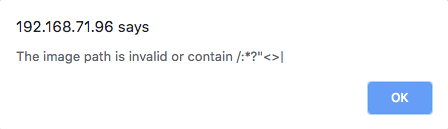
Note this was after working around this very confusion error message from the web interface:

The image path is invalid or contain /:*?"<>|

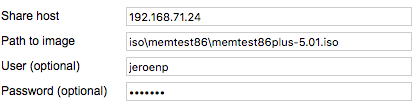
The error message is just telling that the path should start with a back-slash:

[WayBack] Supermicro IPMI and Windows Share – Server Fault

With HTML5 iKVM this seems to work fine, but that requires more recent motherboards:

[WayBack] How to map a network share to boot from ISO, moving Supermicro Java iKVM to browser-only HTML5 iKVM | TinkerTry IT @ Home

Fails on MacOs with Java iKVM Viewer v1.69 r14.

# java -version
java version "1.8.0_74"
Java(TM) SE Runtime Environment (build 1.8.0_74-b02)
Java HotSpot(TM) 64-Bit Server VM (build 25.74-b02, mixed mode)

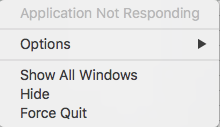
Gets you the rainbow circle of death and an “application not responding”

The success and failure are the same no matter the firmware; the same results were obtained both before and after upgrading the IPMI firmware:

–jeroen


PS: from Twitter


Posted in Hardware, IPMI, Mainboards, Power User, SuperMicro, X9SRi-F | Leave a Comment »

Need to research alternative IPMI tooling

Posted by jpluimers on 2021/05/07

Since IPMIView cannot mount ISOs and some tasks are not that convenient in GUI tools, I want to look more deeply in console based IPMI tooling.

Though my machine to remotely manage stuff is a MacOS based machine, most of my sites have Raspberry Pi devices, so some compatibility there would be nice. imputil seems to work there given IPMI firmware is recent:

Here are some names for future research:

  • impmiutil
    • [WayBack] ipmiutil – IPMI Management Utilities

      IPMI Management Utilities Project provides a series of common utilities for IPMI server management locally or via LAN. The utilities provide source and scriptable command binaries for automating server management functions.

      IPMIUTIL performs a series of common IPMI server management functions to allow administrators to perform management functions without a learning curve. It can gather FRU inventory data, SEL firmware log, sensors, watchdog, power control, health, monitoring, and has an SOL console. It can write sensor thresholds, FRU asset tags, and supports a full IPMI configuration save/restore. Ease-of-use examples with IPMIUTIL:

      • Native builds on many OSs: Linux, Windows, BSD, Solaris, MacOSX, HPUX
      • The only IPMI project natively supporting Windows drivers
      • IPMIUTIL supports any IPMI-compliant vendor firmware
      • IPMIUTIL detects and handles OEM-specific IPMI firmware variants
      • IPMIUTIL interprets various vendor OEM-specific sensor values automatically.
      • Any IPMI values not yet recognized at least return the values, rather than just ‘na’ or Unknown.
      • Shared library for custom applications, sample source included
      • IPMIUTIL BSD license is compatible with open-source or commercial use
      • Linux driverless support is ideal for boot media or embedded
      • Configuring the IPMI LAN requires just a single command
      • The decoding of IPMI SEL events includes a severity.
      • A soft-reboot can be easily performed instead of a hard reboot by using ipmiutil_asy, even if the platform does not support ACPI.
      • IPMI SEL management is automated via checksel.
      • Watchdog management is automated via ipmiutil_wdt.
    • [WayBack] homebrew-core/ipmiutil.rb at master · Homebrew/homebrew-core · GitHub
    • [WayBack] ipmiutil — Homebrew Formulae
    • [WayBack] Install ipmiutil on Mac with Brew | BrewInstall
  • ipmitool
  • freeipmi
    • [WayBack] FreeIPMI – Home

      FreeIPMI provides in-band and out-of-band IPMI software based on the IPMI v1.5/2.0 specification. The IPMI specification defines a set of interfaces for platform management and is implemented by a number vendors for system management. The features of IPMI that most users will be interested in are sensor monitoring, system event monitoring, power control, and serial-over-LAN (SOL). The FreeIPMI tools and libraries listed below should provide users with the ability to access and utilize these and many other features. A number of useful features for large HPC or cluster environments have also been implemented into FreeIPMI. See the README or FAQ for more info.


    • [WayBack] homebrew-core/freeipmi.rb at master · Homebrew/homebrew-core · GitHub
    • [WayBack] freeipmi — Homebrew Formulae

Things I am interested in:

  • discovering IPMI capable devices in a network
  • reading sensors
  • setting power state
  • mounting/unmounting ISO images

–jeroen

Posted in Hardware, IPMI, Mainboards, Power User, SuperMicro | 3 Comments »

Supermicro: 5 BIOS beeps might just mean internal VGA is disabled

Posted by jpluimers on 2021/05/03

A while ago, I got a second hand Supermicro workstation and wondered why the IPMI KVM would not show anything.

The video card in it worked fine, so I used it as a desktop machine setup for a while, happily running VMS.

I finally decided to move into a closet, so I removed the video card, and rebooted.

Then it beeped 5 times, which was odd: I expected it to switch from the video card to the internal video. It didn’t.

Older BIOS codes: [WayBack] AMI BIOS Beep Codes – Thomas-Krenn-Wiki

From PDF [WayBack] BIOS POST Codes for C7/X9/X10/X11/B9/B10/B1/A1 Motherboards

PEI Beep Codes

# of Beeps Description
1 Memory not Installed
1 Memory was installed twice (InstallPeiMemory routine in PEI Core called twice)
2 Recovery started
3 DXEIPL was not found
3 DXE Core Firmware Volume was not found
4 Recovery failed
4 S3 Resume failed
7 Reset PPI is not available

DXE Beep Codes

# of Beeps Description
1 Invalid password
4 Some of the Architectural Protocols are not available
5 No Console Output Devices are found
5 No Console Input Devices are found
6 Flash update is failed
7 Reset protocol is not available
8 Platform PCI resource requirements cannot be met

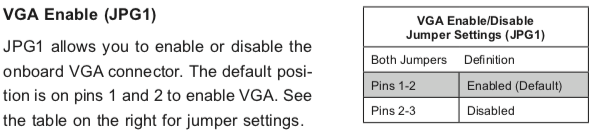
So I did a bit of reading in the manual, then found about a jumper which had happily been living out of view, under the video card:

VGA Enable (JPG1)

JPG1 allows you to enable or disable the onboard VGA connector. The default position is on pins 1 and 2 to enable VGA.

Setting the jumper to pins 1&2 made internal VGA available again, it happily booted and showed in the IPMI KVM.

Later I understood why the jumper was set to VGA disabled: when having two video cards, by default Windows will extend your desktop to an invisible monitor.

The easiest workaround for that is just to disable VGA. However, you can also change Windows

Older versus newer boards

It appears that most older SuperMicro systems have a hardware switch, but for newer chipsets supporting Intel Quick Sync Video a there is a BIOS setting: [WayBack] Enable internal graphics in SUPERMICRO servers | Any IT here? Help Me!

Windows 10 fixing video cards and ACPI_BIOS_ERROR

The reboot did not work fine: Windows 10 would not initialise properly, but hung when detecting video cards.

Read the rest of this entry »

Posted in Hardware, IPMI, Mainboards, Power User, SuperMicro, X10SRH-CF, X9SRi-3F, X9SRi-F | Leave a Comment »

Need to do some reading on local domains on the internal network

Posted by jpluimers on 2021/04/09

A long time I wondered why I saw ESXi systems on my local network have two entries in their /etc/hosts file:

[root@ESXi-X10SRH-CF:~] cat /etc/hosts
# Do not remove the following line, or various programs
# that require network functionality will fail.
127.0.0.1   localhost.localdomain localhost
::1     localhost.localdomain localhost
192.168.71.91   ESXi-X10SRH-CF ESXi-X10SRH-CF

Then I bumped into someone who had a different setup:

[root@ESXi-X10SRH-CF:~] cat /etc/hosts
# Do not remove the following line, or various programs
# that require network functionality will fail.
127.0.0.1   localhost.localdomain localhost
::1     localhost.localdomain localhost
192.168.0.23    esxi.dynamic.ziggo.nl esxi

So now I knew that the first entry can have a domain resolving it (it still makes be wonder why ziggo is using a top-level domain to resolve local stuff; but searching for  dynamic.ziggo.nl did not get me further on that).

So I installed a quick ESXi machine on that local network, and got the same.

When back home the machine still thought it was esxi.dynamic.ziggo.nl, though clearly I was outside a Ziggo network

I wanted to get rid of it, but that was hard.

Since I forgot to take screenshots beforehand, I can only provide the ones without a search domain bellow.

Reminder to self: visit someone within the Ziggo network, then retry.

Normally you can edit things like these in the default TCP/IP stack. There are two places to change this:

Neither of these allowed me to change it to a situation like this, but luckily the console did.

In the below files, I had to remove the bold parts, then restart the management network (I did keep a text dump, lucky me):

[root@esxi:/etc] grep -inr ziggo .
./vmware/esx.conf:116:/adv/Misc/HostName = "esxi.dynamic.ziggo.nl"
./resolv.conf:2:search dynamic.ziggo.nl 
./hosts:5:192.168.71.194    esxi.dynamic.ziggo.nl esxi
[root@esxi:/etc] cat /etc/resolv.conf 
nameserver 192.168.71.3
search dynamic.ziggo.nl 
[root@esxi:/etc] cat /etc/hosts
# Do not remove the following line, or various programs
# that require network functionality will fail.
127.0.0.1   localhost.localdomain localhost
::1     localhost.localdomain localhost
192.168.71.194  esxi.dynamic.ziggo.nl esxi

Future steps

  1. Read more on local domains, search domains and related topics
  2. Configure a local domain on my local network, so DHCP hands it out, and DHCP handed out host names are put in the local DNS
  3. Test if all services on all machines still work properly

Reading list

Read the rest of this entry »

Posted in DNS, ESXi6.5, ESXi6.7, Hardware, Internet, Mainboards, Network-and-equipment, Power User, SuperMicro, Virtualization, VMware, VMware ESXi, X10SRH-CF, X9SRi-3F | Leave a Comment »

Supermicro Single CPU Board for ESXi Home lab – Upgrading LSI 3008 HBA on the X10SRH-CLN4F | ESX Virtualization

Posted by jpluimers on 2021/04/09

This LSI 3008 HBA update to TI firmware is still on my wish list, but I could not find it when I bought the board in 2018.

[WayBack] Supermicro Single CPU Board for ESXi Home lab – Upgrading LSI 3008 HBA on the X10SRH-CLN4F | ESX Virtualization:

As you know my lab got an addition this year with Supermicro’s Single CPU board, the X10SRH-CLN4F. In this post we will be upgrading LSI 3008 HBA on the X10SRH-CLN4F.

I have learned a new way to patch via UEFI. In fact, it’s same (or easier) than through DOS-based bootable USB. The IT firmware can be reverted back to IR firmware as in the ZIP package there are both versions there. So in case you need a server with hardware RAID, you can use the IR version. I was actually wondering what it means the IT and IR and here is what I have found at LSI (Avago) website:

“IT” firmware maximizes the connectivity and performance aspects of the HBA. “IR” firmware offers RAID functionality via RAID 0, 1, and 10 capabilities.

Via:

SR-IOV?

The step afterwards is to enable SR-IOV for this LSI 3008 HBA.

These links should help with that:


–jeroen

Posted in ESXi6.5, ESXi6.7, Hardware, Mainboards, Power User, SuperMicro, Virtualization, VMware, VMware ESXi, X10SRH-CF | Leave a Comment »

The tale of [SSH into ESXi 6.7 box resulting in “debug1: expecting SSH2_MSG_KEXDH_REPLY”, delay and after entering password “Permission denied, please try again.”]

Posted by jpluimers on 2021/04/02

A similar ESXi 6.5 box worked well to ssh into, but on ESXi 6.7 it failed:

SSH into ESXi 6.7 box resulting in “debug1: expecting SSH2_MSG_KEXDH_REPLY“, delay and after entering password “Permission denied, please try again.

I had a hard time figuring out why: Login with the same user+password on the web user interface, DCUI and console shell work fine (see [WayBack] Enable SSH on VMware ESXi 6.x – VirtuBytes).

Searches that led me to EBCAK:

Read the rest of this entry »
Posted in ESXi6.5, ESXi6.7, Hardware, IPMI, Mainboards, Power User, PowerCLI, SuperMicro, Virtualization, VMware, VMware ESXi | Leave a Comment »