The Wiert Corner – irregular stream of stuff

Jeroen W. Pluimers on .NET, C#, Delphi, databases, and personal interests

  • My badges

  • Twitter Updates

  • My Flickr Stream

  • Pages

  • All categories

  • Enter your email address to subscribe to this blog and receive notifications of new posts by email.

    Join 1,861 other subscribers

Archive for the ‘routers’ Category

Download pfSense Community Edition: pfSense-CE-2.5.1-RELEASE-amd64.iso.gz

Posted by jpluimers on 2022/03/08

Since this is what I use to VPN home:

pfSense is a free and open source firewall and router that also features unified threat management, load balancing, multi WAN, and more

[Wayback] Download pfSense Community Edition: [Wayback] pfSense-CE-2.5.1-RELEASE-amd64.iso.gz

–jeren

Posted in Internet, pfSense, Power User, routers | Leave a Comment »

Some links on Chrome not prompting to save passwords (when Firefox and Safari do)

Posted by jpluimers on 2022/01/20

For quite some time now, Chrome (think years) refuses to prompt for saving passwords whereas Firefox and Safari do prompt and save them, even for site types that it used to save passwords for in the past.

It has been annoying enough for too long now that I tried to do better than the Google searches I used back when I saw this happen first.

Below are some links based on new searches (starting with [Wayback] adding a password in chrome settings – Google Search); hopefully I can try them after I made a list of sites that Chrome does not show the password save prompt for.

Solutions I tried that failed (but maybe useful for others):

Solutions still to try:

Read the rest of this entry »

Posted in Chrome, Chrome, Communications Development, Development, Encryption, ESXi6, ESXi6.5, ESXi6.7, Firefox, Fritz!, Fritz!Box, Fritz!WLAN, Google, https, HTTPS/TLS security, Internet, Internet protocol suite, Let's Encrypt (letsencrypt/certbot), Power User, routers, Safari, Security, TCP, TLS, Virtualization, VMware, VMware ESXi, Web Browsers, Web Development | Leave a Comment »

Winbox configuration files

Posted by jpluimers on 2021/12/31

A few notes:

  • WinBox configuration files are under %APPDATA%\Mikrotik\Winbox
    • The subdirectory sessions contains binary *.viw files that seem to represent “view” configurations (the positions, dimensions and other properties of the open Windows in a Winbox session) where the * of the name seems to be an IPv4 address of a machine.
    • Directories named like 6.40.3-2932358209 and 6.43.13-695307561 contain configuration files that seem to determine what WinBox features a certain RouterOS version should reveal; files in those directories seem to always be these:
      • advtool.crc / advtool.jg
      • dhcp.crc / dhcp.jg
      • hotspot.crc / hotspot.jg
      • icons.crc / icons.png
      • mpls.crc / mpls.jg
      • ppp.crc / ppp.jg
      • roteros.crc / roteros.jg
      • roting4.crc / roting4.jg
      • secure.crc / secure.jg
      • wlan6.crc / wlan6.jg
    • There are binary files Addresses.cdb and settings.cfg.viw
    • A text file named sessionpath contains the expanded path %APPDATA%\Mikrotik\Winbox\sessions

The *.crc files contain a CRC code, presumably on the contents of the correspoding *.jg file. The *.jg files seem to contain some kind of JSON.

Some links I found:

–jeroen

Posted in Development, Internet, MikroTik, Power User, RouterOS, routers, Scripting, Software Development | Leave a Comment »

Reset MikroTik through LCD TouchScreen when reset button procedure fails

Posted by jpluimers on 2021/12/13

I wanted access to a supposedly reset a MikroTik [WayBack] MikroTik CRS109-8G-1S-2HnD-IN, but the default credentials did not work. Somehow, keeping the reset button pushed for almost 20 seconds also did not reset+reboot it.

Luckily, the default PIN code was still 1234 ([WayBack] Manual:LCD TouchScreen: PIN code – MikroTik Wiki) so I could reset it ([WayBack] Manual:LCD TouchScreen: Reboot and Reset Configuration – MikroTik Wiki).

After this, I changed credentials and PIN, documented configuration and credentials, and ensured there is a back-up of that documentation available.

Note: fiddling with power and reset button might have worked, though it is odd the CRS109 documentation does not mention this. PIN code worked faster, so that’s what solved my issue first.

Related:

–jeroen

Posted in Hardware, Internet, MikroTik, Network-and-equipment, Power User, routers | Leave a Comment »

In case I ever need to jail-break a Mikrotik device

Posted by jpluimers on 2021/11/02

Some links in case I ever need to jail-break a Mikrotik device:

–jeroen

Posted in Development, Internet, MikroTik, Power User, routers, Software Development | Leave a Comment »

MikroTik PoE: automatically power cycle and reboot device when it becomes unresponsive.

Posted by jpluimers on 2021/09/24

In the past I had these manual scripts to power-cycle a hung RaaspberryPi device:

/interface ethernet poe set ether5 poe-out=off
/interface ethernet poe set ether5 poe-out=forced-on

or on one line:

/interface ethernet poe set ether5 poe-out=off; /interface ethernet poe set ether5 poe-out=forced-on

I am going to try this script for the port having a Raspberry Pi on it (note: this requires a 48V power brick for the Mikrotik!) on RouterOS version 6.48.3 (stable):

/interface ethernet
set [ find default-name=ether5 ] comment="RaspberryPi" poe-out=\
    forced-on power-cycle-ping-address=192.168.124.38 power-cycle-ping-enabled=\
    yes power-cycle-ping-timeout=2m

The above has not worked for a long time as per [Wayback] No POE Power Cycle @ hEX POE – MikroTik:

But it might be fixed as of [Wayback] RouterOS version v6.47.3[stable] as per [Wayback] MikroTik Routers and Wireless – Software: 6.47.3 (2020-Sep-01 05:24):

*) poe – fixed “power-cycle” functionality on RB960GSP;

Similar issues exist on RB760iGS/Hex S, and there the fix requires new hardware in addition to firmware as per [Wayback] POE OUT issue on ether5 rb760igs (no power) – MikroTik

Note that I did disassemble both of these routers for inspection and there are obvious changes to the hardware to correct the PoE problems – most notably a completely different relay, capacitor and some minor circuit design changes.

If it still fails, I might try

[Wayback] No POE Power Cycle @ hEX POE – MikroTik: workaround script

:local ipPing ("x.x.x.x")
:local pingip
#
# pingip below RUNS and sets the variable
# to number of successful pings ie 3 means 3 of 45 success
# can also use ($pingip > 1) or ($pingip >= 1) both TESTED
# ($pingip >= 1) means if only 1 or 0 pings do the IF, not the ELSE
#
:log info ("ping CHECK script IS RUNNING NOW")
# first delay 90 b4 ping test incase this is running at POWER UP
:delay 90
:set pingip [/ping $ipPing count=45]
:if ($pingip <= 3) do={ :log warning (">95% lost ping LOSS to isp GW IP x.x.x.x via ether5 so DO POE powerCYCLE")
  /interface ethernet poe set ether5 poe-out=off
  :delay 12
  /interface ethernet poe set ether5 poe-out=auto-on
  :delay 10
  :log warning ("ether5 POE HAS BEEN TURNED BACK ON")
  :delay 90
  /system script run emailPOEresult
} else={
  :log warning ("PoeCyclePINGcheck ELSE ran so no ping loss detected by script")
}

Based on:

Read the rest of this entry »

Posted in Development, Hardware Development, Internet, MikroTik, Power User, Raspberry Pi, routers | Leave a Comment »

Mikrotik RouterOS “/ip ssh” setting not available from WinBox and defaulting to insecure?

Posted by jpluimers on 2021/09/20

Still need to research this further:

Somewhere around 6.44, when upgrading an existing RouterOS device, this snippet became part of the configuration:

/ip ssh
set allow-none-crypto=yes forwarding-enabled=remote

A few remarks:

  • I could not find anything in WinBox that is equivalent.
  • This sounds very insecure, so I have run this script:
    /ip ssh
    set allow-none-crypto=no forwarding-enabled=no

    which makes the snippet to disappear (because they are default settings according to [WayBack] Manual:IP/SSH – MikroTik Wiki).

    Like usual, the on-line documentation is dense and insufficiently clear, hence my measure.

In the future, I need to decipher these posts (via [WayBack] winbox ssh allow none crypto – Google Search and [WayBack] winbox ssh forwarding enabled remote – Google Search):

–jeroen

Posted in Internet, MikroTik, Power User, routers | Leave a Comment »

MikroTik RB960PGS hEX PoE powering PoE devices: ensure you get a 48V power supply

Posted by jpluimers on 2021/08/24

By default, the [WayBack] MikroTik RB960PGS hEX PoE comes with a 24V power supply.

Most PoE capable devices cannot be powered by 24V but need 48V. I wrote about this before in the midst of the long post Linus Torvalds – Google+: Working gadgets: Ubiquiti UniFi collection (and a whole bunch of Unifi/Ubiquiti/Ubtn links)

So now I re-mention it in a much smaller post so it easier to find back, and a few links to Power over Ethernet – Wikipedia, where especially these bits are relevant:

  • The PoE Standard implementation for 802.3af (802.3at Type 1) “PoE” requires DC 44.0–57.0 V.
  • Of the PoE Non-standard_implementations, some common Passive specifications include:
    • 24VDC 0.5A 100 Mbit/s or 1 Gbit/s
    • 24VDC 1.0A 100 Mbit/s or 1 Gbit/s
    • 48VDC 1.0A 100 Mbit/s or 1 Gbit/s
    • 56VDC 1.0A and 2.0A 1 Gbit/s (used for 45W+ load point to point microwave and millimeter band radios

The 24V is what MikroTik sticks to with their default power supply.

Read the rest of this entry »

Posted in Internet, MikroTik, Network-and-equipment, Power User, routers, Unifi-Ubiquiti | Leave a Comment »

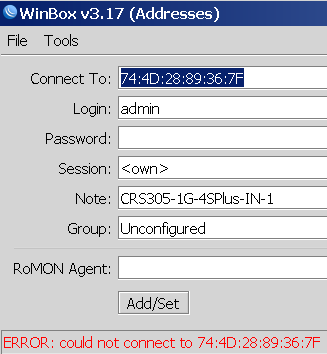
Winbox 3.19 can connect via MAC whereas Winbox 3.17 cannot

Posted by jpluimers on 2021/08/17

Not sure why, but Winbox 3.17 could not connect to out of the box blank MikroTik equipment at all.

Winbox 3.19 complains every now and than, but usually connects fine.

This was while configuring a bunch of [WayBack] MikroTik Routers and Wireless – Products: CRS305-1G-4S+IN.

Read the rest of this entry »

Posted in Development, Internet, MikroTik, Power User, RouterOS, routers, Scripting, Software Development | Leave a Comment »

Mikrotik CCR devices based on NAND memory will eventually die

Posted by jpluimers on 2021/08/16

If you own a Mikrotik CCR device based on NAND memory, then be prepared that it will die.

I had this on a (now discontinued [WayBack] MikroTik Routers and Wireless – Products: CCR1009-8G-1S-1S+PC, superseded by the less functional [WayBack] MikroTik Routers and Wireless – Products: CCR1009-7G-1C-1S+PC, which is also NAND based).

Many more people had this or very similar problems:

It also happens due to bad capacitors on the (also discontinued) [WayBack] MikroTik Routers and Wireless – Products: RB1200:

There have been quite a few NAND related changes to the firmware over the years that have to do with handling corruption:

If you are really lucky (I was not), then it is a bad power supply: [WayBack] bootloop on CCR1036-12g-4s (almost 5 years old) [SOLVED] – MikroTik.

Sometimes you can partially recover using the Console port or NetInstall, but eventually you will trip another part of the faulty NAND storage and it will die again, until it has spent all its lives.

Unlike a cat, those are usually far less than 9 lives.

If you do need to recover, the links might help you:

–jeroen

Posted in Internet, MikroTik, Power User, routers | Leave a Comment »